Design with AI
Generate a new design based on this screen using your own content.
# Design from Reference: Ruul Select Client Country
Create an original, high-fidelity visual design inspired by the reference. Prioritize composition, typography, colors, spacing, and component styling over technical implementation.
## Reference
- **Product:** Ruul
- **Category:** Add & Edit
- **Screenshot:** https://cdn.prod.website-files.com/5e9dc792e1210c5325f7ebbc/6acb6c0f5391d62536b67155_6acb6ab1672175f31f248db0_cms-6787cf3693707a64896f0745.webp
Analyze the screenshot first. If inaccessible, request it rather than guessing.
## Content
{{content.instructions}}
{{content.data}}
Preserve essential messaging and factual accuracy. Adapt structure and copy length for visual balance; never invent product claims.
## Visual Design
### Overall aesthetic
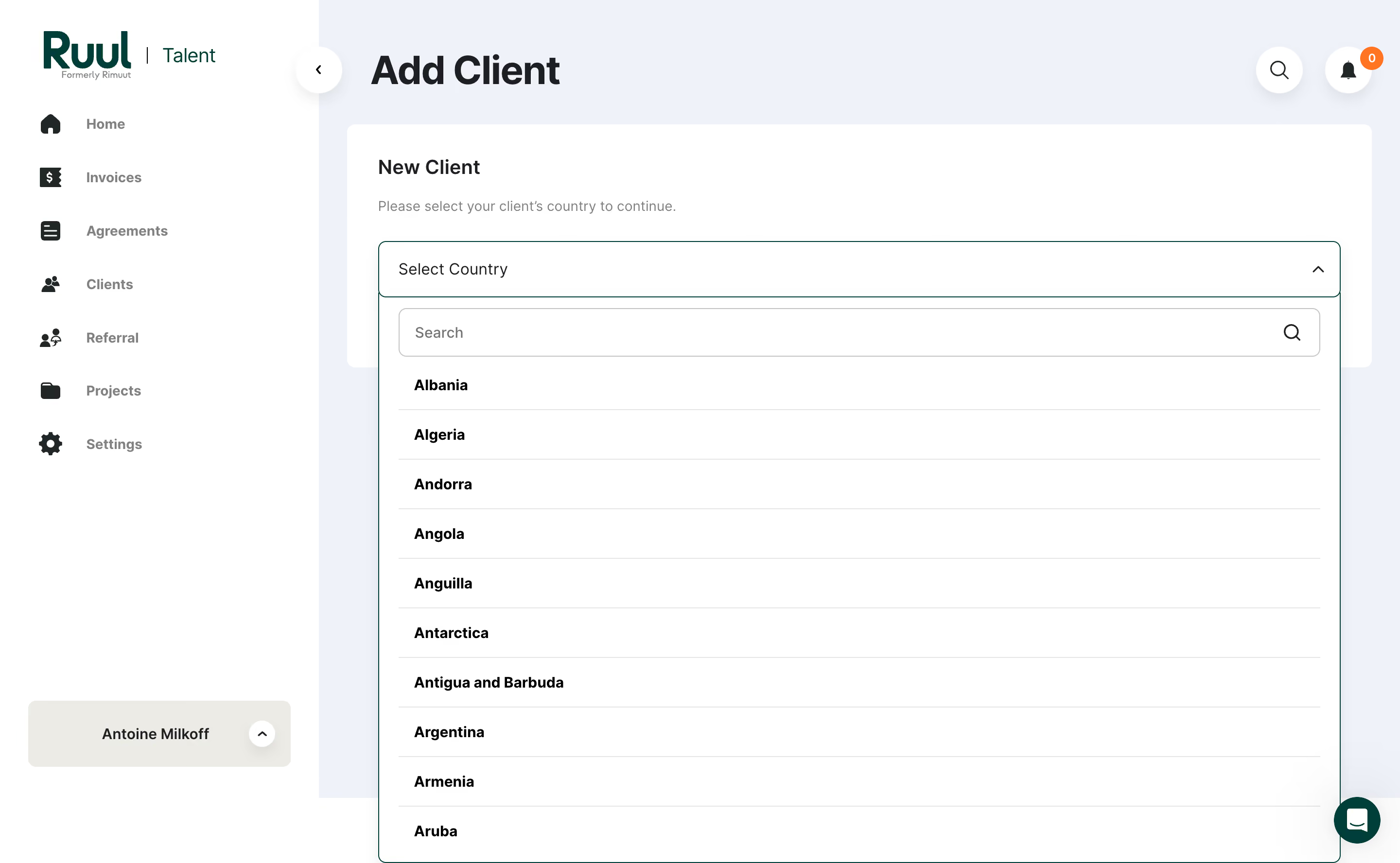
- **Character:** A client-setup interface uses a pale blue-gray canvas, white panels, dark teal branding and a large open country dropdown.
- **Evidence:** The image measures 2880 × 1776 pixels. CSS sizes assume an unverified 2× capture density.
### Page composition
- **Sidebar:** A roughly 328-pixel white rail contains brand, seven navigation entries and an account control near the bottom.
- **Main:** Add Client titles the page above a white New Client panel with a short instruction.
- **Dropdown:** An expanded country selector extends well below the panel, containing search and ten visible alphabetic options.
- **Utilities:** Circular back/search/notification controls and a lower-right chat launcher frame the task.
### Information hierarchy
- **Task:** Add Client is the largest text; New Client and the instruction establish the immediate step.
- **Country selection:** The open selector dominates the central area; bold country rows provide a direct scan list.
- **Navigation:** Sidebar labels are muted, keeping the setup panel primary.
### Typography
- **Page title:** Approximately 40 pixels bold; panel title about 22 pixels semibold.
- **Controls/options:** Around 16 pixels, with country names bold and placeholder text regular.
- **Sidebar/helper:** Roughly 14 pixels; the neutral sans-serif identity is unverified.
### Colors & surfaces
- **Measured base:** ICC-to-sRGB sampling identifies #FFFFFF as panels/sidebar, #EFF3F9 as canvas and #ECECE5 as the account-control surface.
- **Measured support:** #E5E5E5 appears in outlines/dividers, with #FEFEFE/#FDFDFD light variations.
- **Accents:** Dark teal outlines the active dropdown and colors branding/chat; orange marks the notification count.
- **Depth:** Circular utilities have soft shadows; the dropdown uses a thin teal boundary and pale internal rules.
### Components
- **Country field:** A broad roughly 990 × 58-pixel outlined control has a right upward chevron.
- **Search:** A large inset rounded search input includes a right magnifier.
- **Options:** Approximately 50-pixel rows have left-aligned bold labels and thin gray separators.
- **Main panel:** A white rounded card has roughly 32-pixel padding.
- **Sidebar controls:** Large icons sit beside labels; the bottom account strip includes an expand chevron.
### Visual rhythm
- **Alignment:** Panel title, instruction and selector share a common left inset.
- **Option cadence:** Consistent row heights and rules support alphabetic scanning.
- **Whitespace:** The sidebar is sparse, while the open menu creates the page's main vertical density.
### Responsive
- **Observed scope:** One desktop open-dropdown state is shown; selected-country and later client fields are not visible.
- **Recommended layout:** Collapse navigation and constrain the option list height with accessible scrolling.
- **Recommended control:** Keep search and selected value visible, support keyboard type-ahead and prevent the menu from extending outside the usable viewport.
### Adaptation guidance
- **Setup pattern:** Ask for jurisdiction before exposing dependent client details.
- **Selection clarity:** Use searchable options with a clear selected state and semantic combobox/listbox behavior.
- **Implementation:** Verify fonts/density and country data; preserve readable option spacing and visible focus.
Use this context to reproduce the reference's visual language: layout, typography, colors, spacing, borders, radii, and distinctive elements. The screenshot takes priority if descriptions conflict.
## Direction
{{preferences.fidelityInstructions}}
## Output
{{output.instructions}}
Deliver a polished, cohesive design with precise alignment, hierarchy, and spacing. Produce the requested visual artifact, not just a description. If unsupported, explain the limitation.
.webp)



.avif)