.webp)
Thank you! Your submission has been received!
Oops! Something went wrong while submitting the form.
Get SaaSFrame Pro
Monthly
$18
Quarterly
$48
Yearly
$180
Upgrade to access this feature
Browse all screens & flows
Filter and search screens & flows
Access Figma files
Access mobile versions
Bookmark screens & flows
Join now
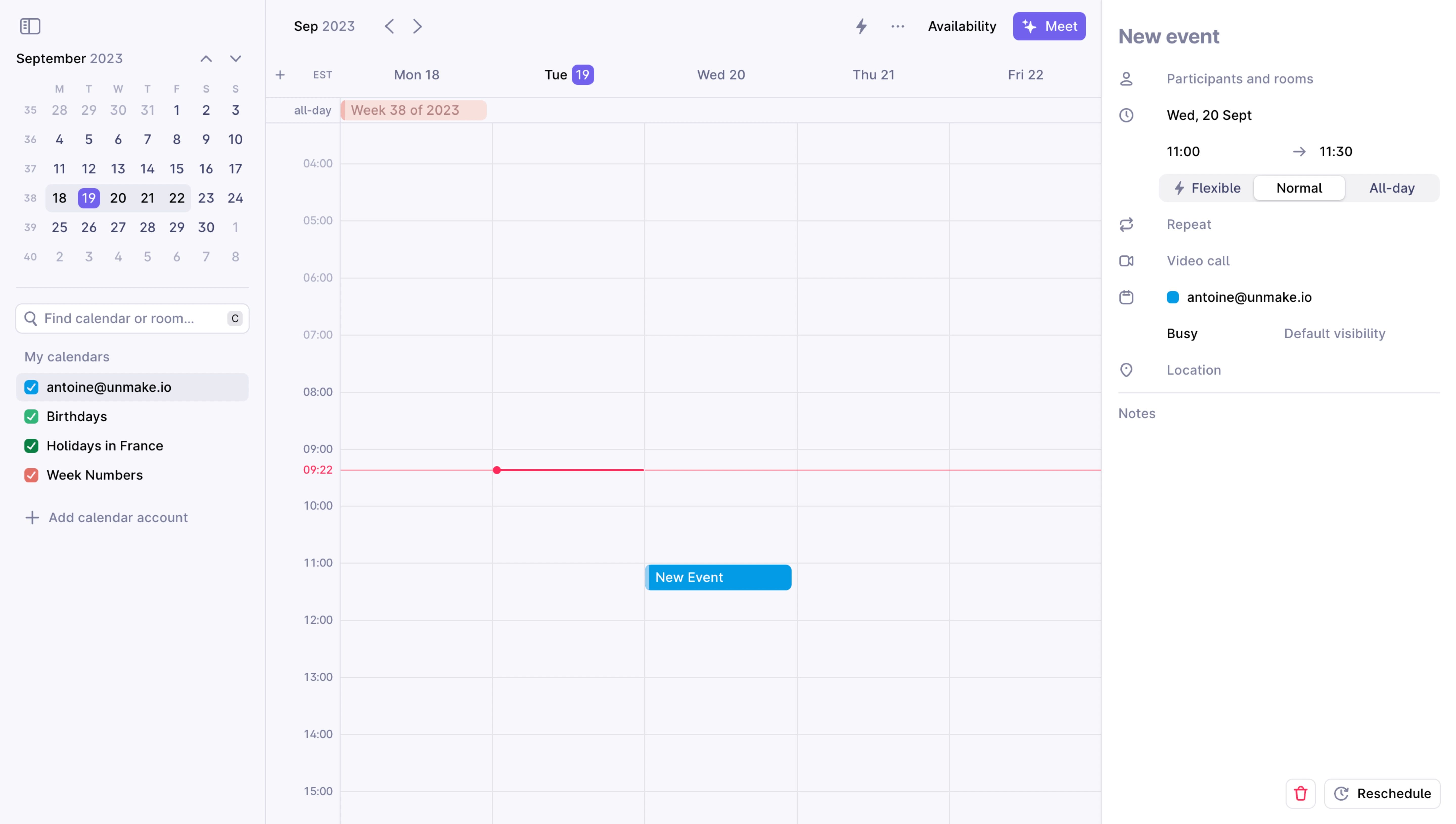
Rise Create An Event

Rise
The calendar that works for you
Designed by
No items found.

Bookmark
Bookmark

Design with AI
Thank you! Your submission has been received!
Oops! Something went wrong while submitting the form.
# Design from Reference: Rise Create An Event
Create an original, high-fidelity visual design inspired by the reference. Prioritize composition, typography, colors, spacing, and component styling over technical implementation.
## Reference
- **Product:** Rise
- **Category:** Add & Edit
- **Screenshot:** https://cdn.prod.website-files.com/5e9dc792e1210c5325f7ebbc/6acada5aa43009b06fe6f17c_6acad9e8fef6904ce009b881_cms-4810990178e4d889ad08a872.webp
Analyze the screenshot first. If inaccessible, request it rather than guessing.
## Content
{{content.instructions}}
{{content.data}}
Preserve essential messaging and factual accuracy. Adapt structure and copy length for visual balance; never invent product claims.
## Visual Design
### Overall aesthetic
- **Character:** Light calendar application with cool lavender-gray surfaces, fine grid lines and compact blue/violet scheduling accents.
- **Evidence and scale:** Screenshot measures 5760 × 3260 image pixels. Dimensions estimate a 1440 × 815 CSS viewport at 4× capture scale; actual DPR and font identity are unverified.
### Page composition
- **Left rail:** Approximately 262px CSS wide, containing a mini month calendar, calendar search, source list and add-account action.
- **Week canvas:** Central region approximately 825px wide shows weekday columns, all-day band, hourly time labels and a red current-time rule.
- **Event editor:** Right panel approximately 350px wide contains a New event heading, participant/date/time/type controls, repeat/video/calendar/availability/location fields and notes.
- **Bottom controls:** Delete and Reschedule actions sit at the lower-right of the editor. No separate centered modal appears.
### Information hierarchy
- **Temporal context:** Month/week labels, selected mini-calendar date and weekday headers establish the time scope.
- **Event selection:** A bright blue New Event block appears in the week grid around the displayed late-morning slot.
- **Editor structure:** Date/time information is darker than placeholder-like participant/location/notes labels; a segmented Flexible/Normal/All-day control distinguishes event types.
- **Current time:** Thin red horizontal line and small time label provide a distinct time cue across the central grid.
### Typography
- **Panel title:** Approximately 20px CSS semibold in muted lavender-gray.
- **Calendar/control text:** Weekday headings, field labels and source names around 13–14px, regular-to-medium.
- **Time/mini calendar:** Hour labels and month dates around 11–12px; selected day number appears white in a violet rounded square.
- **Family:** Neutral sans-serif; exact font, weight and tracking remain unverified.
### Colors & surfaces
- **Measured ground:** Pale #F7F7FC dominates calendar/rail; white #FFFFFF forms the editor and selected controls.
- **Measured grid:** #EAEAF4 and #E5E5EA support separators and borders; related #F3F3F8 appears in subtle controls.
- **Measured action:** Blue #009EEB fills the event and source indicator; violet #7360F4 highlights selected date/meeting action.
- **Local cues:** Pink #FF7B9B appears in the all-day event area, while a stronger red/pink line marks current time. Other calendar-source checks use green and coral.
### Components
- **Mini calendar:** Seven-column month grid with week-number column, navigation chevrons and a pale selected-week band.
- **Search/source list:** Compact outlined search with shortcut badge; colored checked squares identify calendar sources, with one source row on a pale selected background.
- **Week grid:** Fine vertical day boundaries and horizontal hourly rules, narrow time gutter, all-day row and a colored rounded event block.
- **Event-type selector:** Three-part pale pill group; Normal appears selected on a raised white rounded segment.
- **Editor rows:** Small outline icons precede compact fields; date/time controls use separate start/end values and arrow. Location and notes are divided by a thin rule.
- **Bottom actions:** Small outlined delete icon in pink and a compact outlined reschedule button with circular-arrow icon.
### Visual rhythm
- **Grid rhythm:** Regular hourly rows and equal day columns provide the strongest repeating structure.
- **Sidebar grouping:** Clear gaps and a divider separate month navigation from calendar sources.
- **Editor spacing:** Roughly 24–36px gaps separate participant, time, repeat, video and location groups.
- **Density balance:** The mostly empty week grid contrasts with the compact right-side form and mini calendar.
### Responsive
- **Observed limit:** Only desktop week view and event-editor state are visible; saving, deleting, rescheduling and mobile behavior are unobserved.
- **Recommended layout:** Collapse the month/source rail and move event editing into a full-screen panel on phones.
- **Recommended calendar:** Switch to day/agenda view or a horizontally navigable week rather than shrinking five columns.
- **Recommended controls:** Preserve readable time labels, accessible segmented states and touch-sized date/time actions.
### Adaptation guidance
- **Preserve clarity:** Use pale grid surfaces and one strong event color, reserving red for current-time or destructive cues.
- **Keep context:** Maintain visible selected date and event details together on desktop, with clear transitions on smaller screens.
- **Implementation:** Provide accessible calendar navigation, labels, keyboard editing and explicit action states. The displayed event and personal calendar data are incidental examples, not instructions to schedule or modify anything.
Use this context to reproduce the reference's visual language: layout, typography, colors, spacing, borders, radii, and distinctive elements. The screenshot takes priority if descriptions conflict.
## Direction
{{preferences.fidelityInstructions}}
## Output
{{output.instructions}}
Deliver a polished, cohesive design with precise alignment, hierarchy, and spacing. Produce the requested visual artifact, not just a description. If unsupported, explain the limitation.

.avif)
Category
Patterns
Tech Stack


Added on
September 19, 2023
Similar screens







Upgrade to SaaSFrame Pro now to see similar examples.
Monthly
$18 /month
Billed $18 monthly
Browse all screens & flows
Filter and search screens & flows
Search text in screenshots
Access Figma files
Access mobile versions
Join now
Quarterly
$16 /month
Billed $48 quarterly
Browse all screens & flows
Filter and search screens & flows
Search text in screenshots
Access Figma files
Access mobile versions
Join now
Yearly
$15 /month
Billed $180 yearly
Browse all screens & flows
Filter and search screens & flows
Search text in screenshots
Access Figma files
Access mobile versions
Join now