.webp)
Thank you! Your submission has been received!
Oops! Something went wrong while submitting the form.
Get SaaSFrame Pro
Monthly
$18
Quarterly
$48
Yearly
$180
Upgrade to access this feature
Browse all screens & flows
Filter and search screens & flows
Access Figma files
Access mobile versions
Bookmark screens & flows
Join now
Reply Academy

Reply
Supercharge your sales team
Designed by
No items found.

Bookmark
Bookmark

Design with AI
Thank you! Your submission has been received!
Oops! Something went wrong while submitting the form.
# Design from Reference: Reply Academy
Create an original, high-fidelity visual design inspired by the reference. Prioritize composition, typography, colors, spacing, and component styling over technical implementation.
## Reference
- **Product:** Reply
- **Category:** Academy
- **Screenshot:** https://cdn.prod.website-files.com/5e9dc792e1210c5325f7ebbc/6acbbff1d6be908889c5d7d5_6acbbf2e8fac5a61406fb435_cms-3e754ad7367b6ab852bb41bf.webp
Analyze the screenshot first. If inaccessible, request it rather than guessing.
## Content
{{content.instructions}}
{{content.data}}
Preserve essential messaging and factual accuracy. Adapt structure and copy length for visual balance; never invent product claims.
## Visual Design
### Overall aesthetic
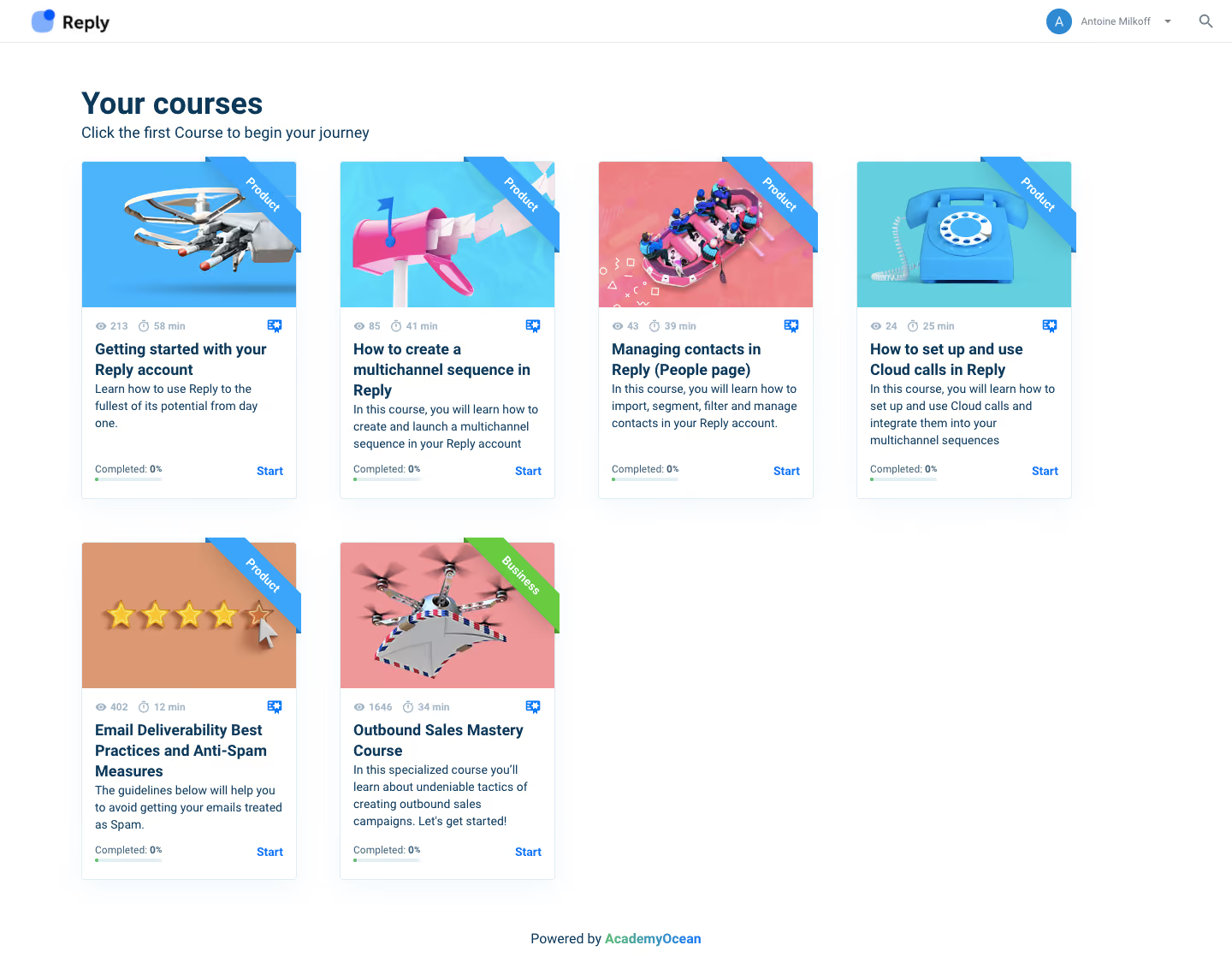
- **Character:** A bright course-library dashboard uses a clean white canvas, dark blue text and colorful three-dimensional course thumbnails.
- **Capture evidence:** The screenshot measures 1440 × 1118 image pixels. Approximate dimensions refer to image pixels; a near-1× CSS scale is plausible but unverified.
- **Tone:** Playful imagery and diagonal category ribbons contrast with a conventional learning-card interface.
### Page composition
- **Header:** A thin white top bar contains the Reply brand at left and avatar, account menu and search at right, separated from content by a light rule.
- **Main content:** A roughly 1160px-wide left-aligned grid begins around 96px from the viewport edge beneath a title and one-line instruction.
- **Grid:** Four course cards fill the first row; two fill the second row, leaving open white space to the right.
- **Footer:** A small centered platform attribution appears at the bottom.
### Information hierarchy
- **Page heading:** Your courses is the strongest text, with a smaller instructional sentence immediately beneath.
- **Course identity:** Each card starts with a colorful thumbnail, category ribbon and compact metadata strip.
- **Learning details:** Bold multiline titles sit above short descriptions; completion information and a Start action align near the bottom.
- **Visible state:** All six cards show zero completion, with a tiny green starting mark on pale progress tracks.
### Typography
- **Family:** A compact sans-serif is visible throughout; exact identity is unverified.
- **Page heading:** Approximately 36px bold with around 43px line-height.
- **Instruction:** Approximately 18px regular, dark blue.
- **Course title:** Approximately 18px bold with 24px line-height; descriptions are around 14px with 20px line-height.
- **Metadata and status:** Approximately 11–12px, muted blue-gray; Start links are around 14px bold.
- **Ribbons:** White category labels use compact bold text rotated with the ribbon.
### Colors & surfaces
- **Canvas:** Sampled #FFFFFF supplies the main surface and card bodies.
- **Thumbnail colors:** Sampled #DA9972 warm tan, #EF9899 pink, #63CFDF cyan and #4BB4FB blue appear prominently in course artwork.
- **Text:** Dark navy-blue carries titles and descriptions, with pale blue-gray metadata.
- **Actions and categories:** Bright blue emphasizes Start links, small certificate icons and most ribbons; one business ribbon is green.
- **Boundaries:** Very pale blue borders and soft diffuse shadows distinguish cards without heavy contrast.
### Components
- **Course cards:** Approximately 250px wide and 394px tall, with thin pale borders, small corner radii and subtle shadows.
- **Thumbnails:** Roughly 250 × 170px images depict distinct objects such as a drone, mailbox, amusement ride, telephone and rating stars.
- **Category ribbons:** Diagonal bands overlap the upper-right image corner and extend slightly beyond the card edge.
- **Metadata row:** Small eye and timer icons accompany view and duration values; a small certificate-style icon sits at right.
- **Progress footer:** A small completion label sits above a short pale track, with Start right aligned.
- **Header controls:** A circular blue avatar precedes an account-name dropdown and magnifying-glass icon.
### Visual rhythm
- **Grid spacing:** Approximately 50px gutters separate card columns and rows.
- **Card padding:** Around 16px inset aligns text, metadata and completion status.
- **Internal balance:** Short descriptions leave flexible blank space so card footers align across the row.
- **Page margins:** Broad white margins surround the grid; the sparse second row maintains the same column alignment.
### Responsive
- **Evidence limit:** Only the desktop course grid is observed; hover, course-player and mobile states are unverified.
- **Grid recommendation:** Reduce four columns to two and then one, preserving card readability and thumbnail proportions.
- **Height recommendation:** Allow titles and descriptions to expand without colliding with the progress footer.
- **Header recommendation:** Collapse long account text while keeping avatar, menu and search reachable.
### Adaptation guidance
- **Card system:** Use one consistent component for image, category, metadata, description and progress/action regions.
- **Content handling:** Use representative course data and retain distinct image subjects for easy recognition.
- **Progress clarity:** Provide accessible text for completion and duration rather than relying on the short track or icons.
- **Interaction:** Make course links and Start actions keyboard accessible with visible focus and clear destinations.
Use this context to reproduce the reference's visual language: layout, typography, colors, spacing, borders, radii, and distinctive elements. The screenshot takes priority if descriptions conflict.
## Direction
{{preferences.fidelityInstructions}}
## Output
{{output.instructions}}
Deliver a polished, cohesive design with precise alignment, hierarchy, and spacing. Produce the requested visual artifact, not just a description. If unsupported, explain the limitation.

.avif)
Category
Patterns
No items found.
Tech Stack

Added on
February 4, 2023
Similar screens







Upgrade to SaaSFrame Pro now to see similar examples.
Monthly
$18 /month
Billed $18 monthly
Browse all screens & flows
Filter and search screens & flows
Search text in screenshots
Access Figma files
Access mobile versions
Join now
Quarterly
$16 /month
Billed $48 quarterly
Browse all screens & flows
Filter and search screens & flows
Search text in screenshots
Access Figma files
Access mobile versions
Join now
Yearly
$15 /month
Billed $180 yearly
Browse all screens & flows
Filter and search screens & flows
Search text in screenshots
Access Figma files
Access mobile versions
Join now