Generate a new design based on this screen using your own content.
Thank you! Your submission has been received!
Oops! Something went wrong while submitting the form.
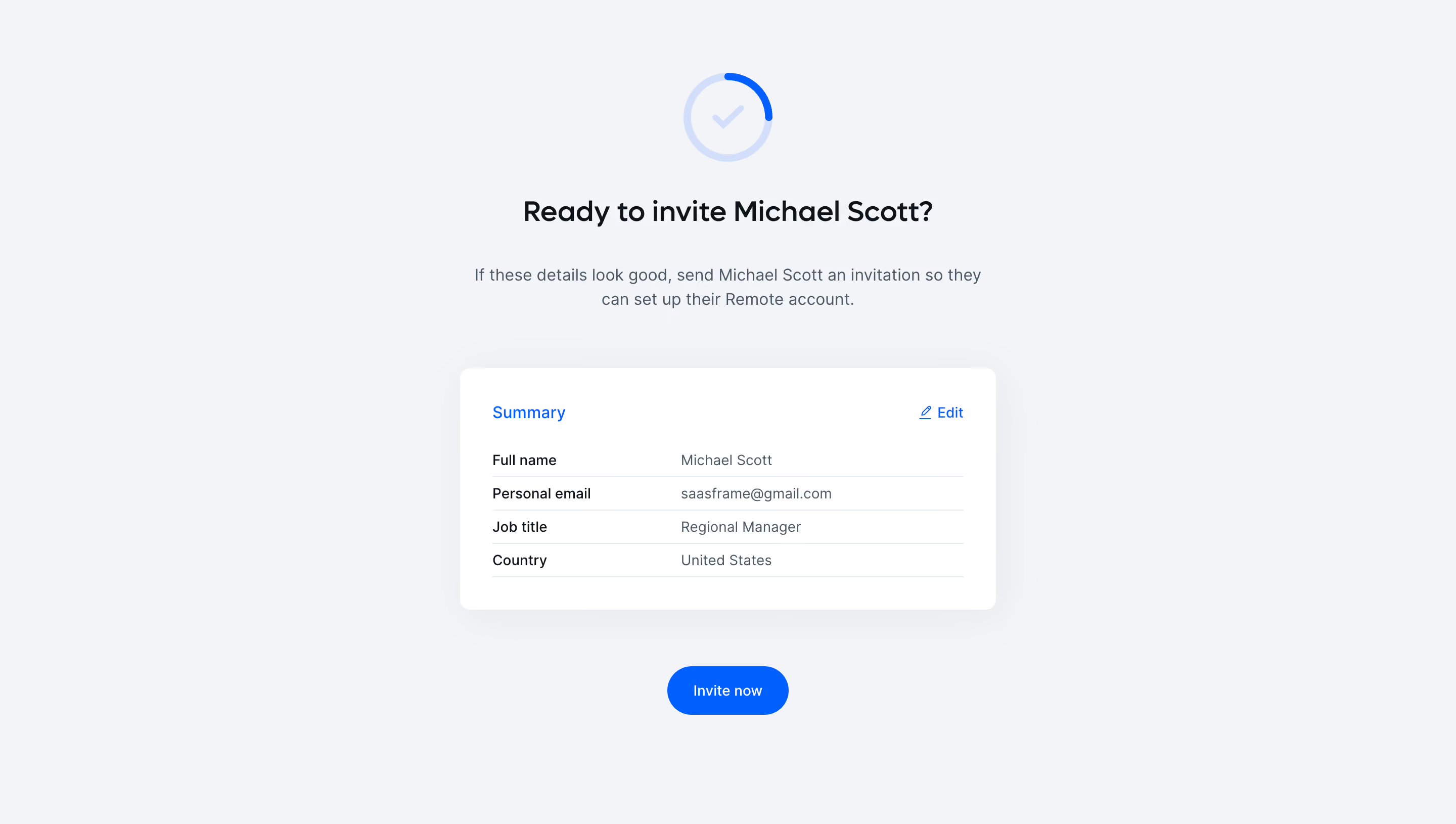
# Design from Reference: Remote Send Employee Invite
Create an original, high-fidelity visual design inspired by the reference. Prioritize composition, typography, colors, spacing, and component styling over technical implementation.
## Reference
- **Product:** Remote
- **Category:** Confirmation
- **Screenshot:** https://cdn.prod.website-files.com/5e9dc792e1210c5325f7ebbc/6acad7a0fbf1299940aab63f_6acad64f782887bd3974836b_cms-c044fa2631f787fa64ed736d.webp
Analyze the screenshot first. If inaccessible, request it rather than guessing.
## Content
{{content.instructions}}
{{content.data}}
Preserve essential messaging and factual accuracy. Adapt structure and copy length for visual balance; never invent product claims.
## Visual Design
Use this context to reproduce the reference's visual language: layout, typography, colors, spacing, borders, radii, and distinctive elements. The screenshot takes priority if descriptions conflict.
## Direction
{{preferences.fidelityInstructions}}
## Output
{{output.instructions}}
Deliver a polished, cohesive design with precise alignment, hierarchy, and spacing. Produce the requested visual artifact, not just a description. If unsupported, explain the limitation.
This page exemplifies a modern, minimalist SaaS design, exuding professionalism without feeling sterile. Generous white space gives the interface an open, uncluttered feel, allowing each element to breathe and preventing cognitive overload. The design fosters a sense of clarity and trust, aligning with the platform’s promise of reliability and simplicity in employee management.
Layout and Structure
The structure is highly focused, with a single, interactive form at its core, streamlining the onboarding of a new team member. A sticky sidebar guides users through the step-by-step process, visually marking progress and encouraging completion. There are no distracting hero banners or extraneous content—just an intuitive flow that keeps users engaged with their primary task.
Visual Elements
Subtle micro-interactions—such as input field highlights and gentle icon animations—enhance the overall polish. Icons serve not just as decoration, but as functional cues for information and action, supporting wayfinding and comprehension. Occasional soft illustrations humanize the process and reinforce the brand’s approachable tone.
Color Palette and Typography
The palette balances a crisp white background with deep navy accents and vibrant call-to-action highlights, lending an energetic yet authoritative feel. Typography is clean and highly legible, with a clear hierarchy: bold headings guide attention, while neutral body copy supports scan-ability. Button and form label contrasts ensure effortless interaction.
User Experience Patterns & Notable Design Choices
Navigation is frictionless, with persistent progress indicators and contextual tooltips that make the process feel guided and supportive. The decision to keep ancillary navigation discreet strengthens the task-centered user journey. Overall, the tone is both efficient and empathetic—projecting confidence while subtly reassuring the user at every step.
.webp)




.avif)