Design with AI
Generate a new design based on this screen using your own content.
# Design from Reference: Remote Employee Product Onboarding
Create an original, high-fidelity visual design inspired by the reference. Prioritize composition, typography, colors, spacing, and component styling over technical implementation.
## Reference
- **Product:** Remote
- **Category:** User Onboarding
- **Screenshot:** https://cdn.prod.website-files.com/5e9dc792e1210c5325f7ebbc/6acad79bfbf1299940aab5dc_6acad64a1da4492d8d254dd2_cms-d8bc388e9fd95690ed986c6f.webp
Analyze the screenshot first. If inaccessible, request it rather than guessing.
## Content
{{content.instructions}}
{{content.data}}
Preserve essential messaging and factual accuracy. Adapt structure and copy length for visual balance; never invent product claims.
## Visual Design
### Overall aesthetic
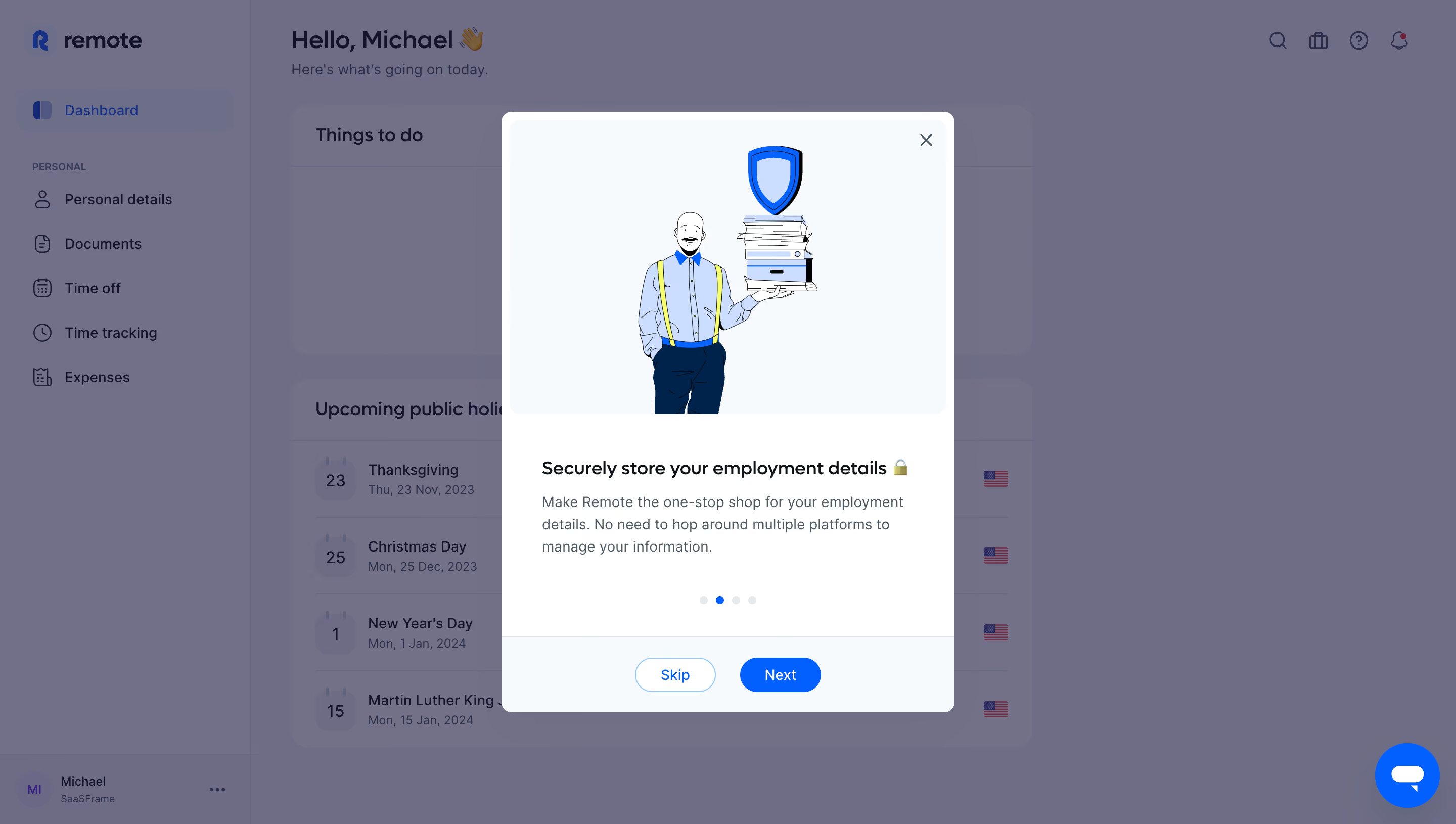
- **Character:** A friendly employee onboarding modal combines a clean white card, blue progression controls, and a hand-drawn employment/security illustration over a dimmed dashboard.
- **Evidence:** The source is 2880 × 1630 px, inspected at 1400 px width. Dimensions below estimate a 1440 px CSS layout at 2× capture; that ratio is unverified.
- **State:** The modal is foregrounded by a muted purple-gray veil. Underlying dashboard colors are altered by the overlay.
### Page composition
- **Background:** A left navigation rail and main employee dashboard remain visible behind the modal, including greeting, task region, and public-holiday list.
- **Modal:** A centered card approximately 448 × 594 CSS px contains a large illustration region, text block, four progress dots, and a separated footer.
- **Illustration:** A person holding documents sits below a blue shield on a very pale blue surface.
- **Footer:** Outlined Skip and filled Next pills are centered as a pair. A close icon occupies the upper-right corner.
- **Support:** A bright blue circular chat launcher remains visible at lower right.
### Information hierarchy
- **Visual lead:** The large illustration establishes the employment-details theme.
- **Message:** A dark bold heading and three-line muted explanation describe secure record storage.
- **Progress:** Four dots show the second dot active in blue.
- **Actions:** Next is stronger than Skip; close is a small icon-only alternative.
### Typography
- **Family:** A rounded interface sans serif is used; exact identity is unverified.
- **Modal heading:** Approximately 18 px semibold with 24 px line-height.
- **Body:** About 14–15 px with 22 px leading, muted slate.
- **Actions:** Around 14 px medium weight. Background title is approximately 24 px but dimmed.
### Colors & surfaces
- **Measured pixels:** Source samples include overlay tones #6E6D87, #71708A, #73718A, #727089, pale modal surface #F6FAFC, and white #FFFFFF.
- **Semantic accents:** Saturated blue marks shield, active progress, Next, and chat. Exact blue hex is not independently sampled.
- **Illustration:** Navy, pale blue, small yellow details, and black linework distinguish the person and documents.
- **Separation:** White card edges and a pale footer contrast with the purple-gray background veil.
### Components
- **Modal shell:** Approximately 448 px wide with 12 px radii and a narrow white inset around the illustration.
- **Artwork panel:** Nearly full-width pale rectangle, about 290 px tall, with rounded upper corners.
- **Progress dots:** Four small circles around 8 px diameter with even gaps.
- **Buttons:** Approximately 80 × 34 px pill controls; Skip is white/blue outlined and Next is blue/white filled.
- **Footer divider:** A thin cool-gray line separates content from actions.
- **Close:** Small dark cross near the artwork's upper-right edge.
### Visual rhythm
- **Padding:** Text is inset roughly 40 px from card edges; artwork has a much smaller inset.
- **Grouping:** Heading and explanation are tightly grouped, followed by a larger pause before progress.
- **Centering:** Artwork, dots, and actions share a central axis; text remains left-aligned.
- **Overlay:** Large dimmed margins concentrate attention on the compact modal.
### Responsive
- **Observed limit:** Only desktop is visible; mobile layout and subsequent steps are unverified.
- **Recommended fit:** Constrain the modal to viewport width and height, using internal scrolling when necessary.
- **Recommended artwork:** Scale illustration proportionally and keep heading/actions visible on short screens.
- **Recommended access:** Manage focus, keyboard dismissal, and accessible progress labels; avoid chat overlapping actions.
### Adaptation guidance
- **Preserve:** Keep the large friendly illustration, concise explanatory message, visible step position, and primary/secondary navigation.
- **Implement:** Use an accessible dialog with named close control and clear focus treatment.
- **State discipline:** Do not reuse overlay-muted background colors as the normal dashboard palette.
- **Validate:** Confirm fonts, CSS scale, short-screen scrolling, and step transitions. Only the displayed second step is evidenced.
Use this context to reproduce the reference's visual language: layout, typography, colors, spacing, borders, radii, and distinctive elements. The screenshot takes priority if descriptions conflict.
## Direction
{{preferences.fidelityInstructions}}
## Output
{{output.instructions}}
Deliver a polished, cohesive design with precise alignment, hierarchy, and spacing. Produce the requested visual artifact, not just a description. If unsupported, explain the limitation.
.webp)



.avif)