.webp)
Thank you! Your submission has been received!
Oops! Something went wrong while submitting the form.
Get SaaSFrame Pro
Monthly
$18
Quarterly
$48
Yearly
$180
Upgrade to access this feature
Browse all screens & flows
Filter and search screens & flows
Access Figma files
Access mobile versions
Bookmark screens & flows
Join now
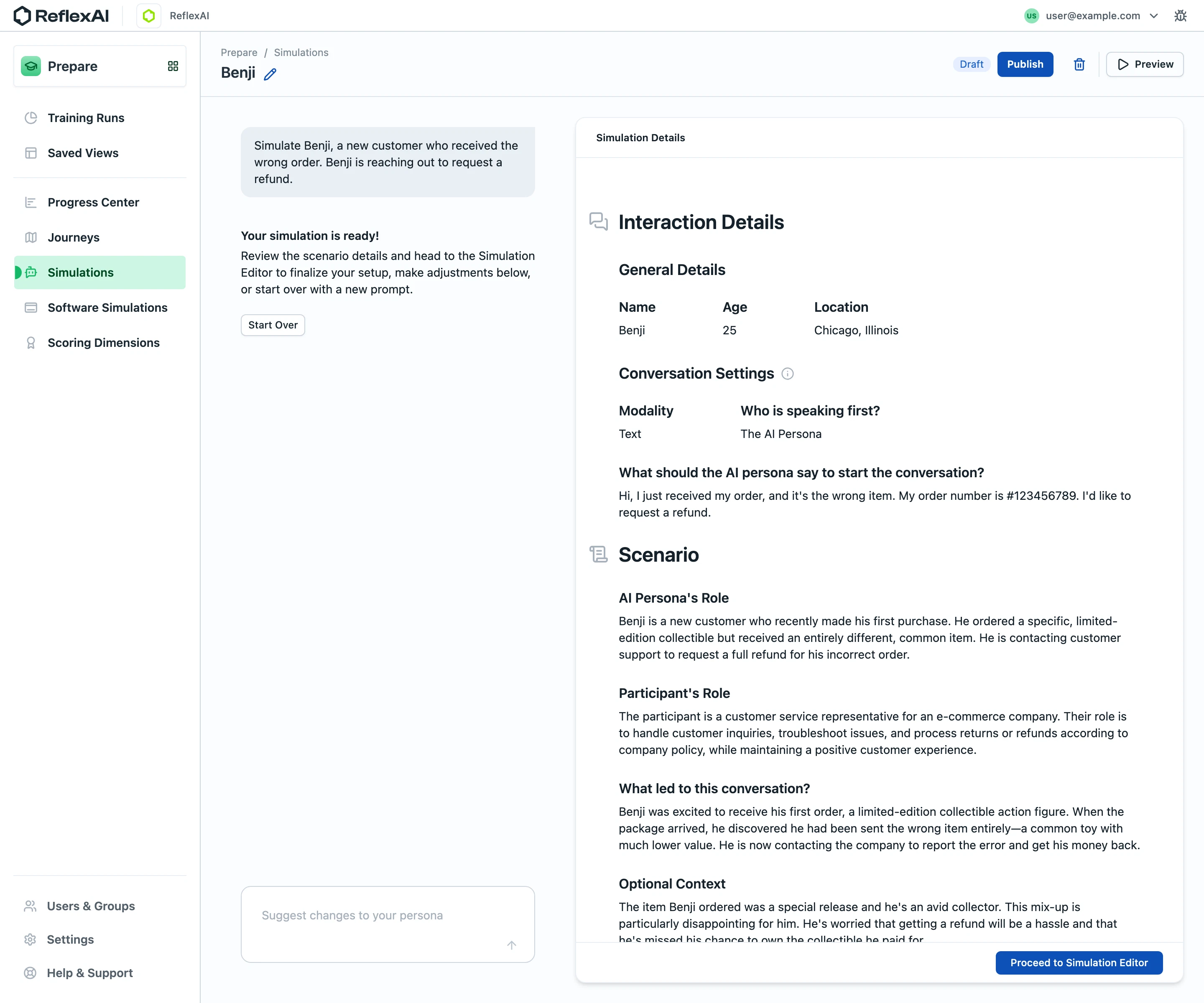
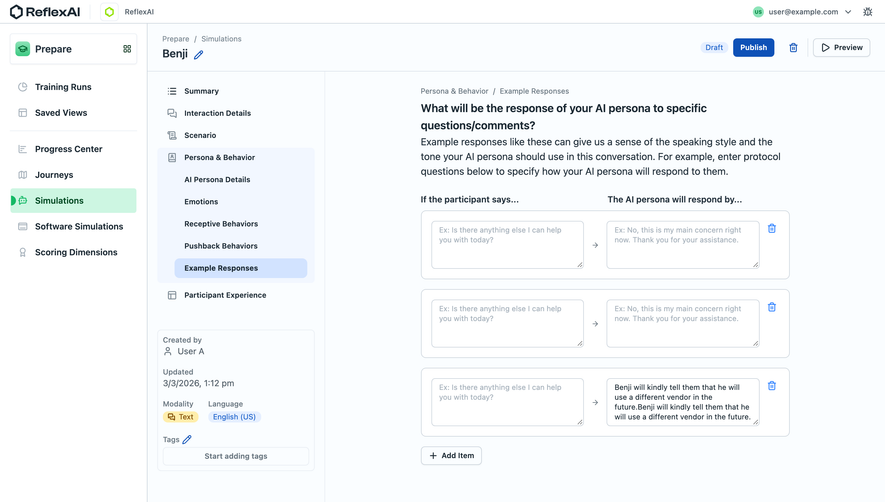
ReflexAI AI persona interaction details

ReflexAI
Simulations and quality assurance for critical conversations
Designed by
No items found.

Bookmark
Bookmark

Design with AI
Thank you! Your submission has been received!
Oops! Something went wrong while submitting the form.
# Design from Reference: ReflexAI AI persona interaction details
Create an original, high-fidelity visual design inspired by the reference. Prioritize composition, typography, colors, spacing, and component styling over technical implementation.
## Reference
- **Product:** ReflexAI
- **Category:** Add & Edit
- **Screenshot:** https://cdn.prod.website-files.com/5e9dc792e1210c5325f7ebbc/6aca27d5aca7079066e8e51b_6aca258ef4a8a7332baad9f2_cms-f0ed765ceb98ec4724e0be8c.webp
Analyze the screenshot first. If inaccessible, request it rather than guessing.
## Content
{{content.instructions}}
{{content.data}}
Preserve essential messaging and factual accuracy. Adapt structure and copy length for visual balance; never invent product claims.
## Visual Design
### Overall aesthetic
- **Style:** Structured training-simulation workspace with a white navigation rail, extremely pale blue-gray canvas and a large document-like review panel.
- **Character:** Dark slate text, blue actions and mint-green navigation emphasis create a professional, readable authoring environment.
- **Capture:** The image measures 2880 × 2400 pixels. CSS estimates assume a 2× capture, equivalent to approximately 1440 × 1200 CSS pixels; actual scale and font identity are unverified.
### Page composition
- **Global header:** A narrow white bar contains brand/workspace identity left and account utilities right.
- **Sidebar:** An approximately 240-CSS-pixel rail contains the Prepare area, training/navigation groups and bottom administration links.
- **Page toolbar:** A breadcrumb and editable simulation title sit left; Draft, Publish, delete and Preview controls align right.
- **Two-part workspace:** A roughly 352-pixel conversational setup column sits beside a roughly 728-pixel simulation-details panel.
- **Setup column:** A gray prompt bubble is followed by a readiness message, explanatory copy and Start Over control. A suggestion composer anchors the bottom.
- **Details panel:** A rounded white card has a small header, interaction information, general details, conversation settings and a longer scenario section.
- **Bottom action:** A fixed-looking footer within the details card contains a blue editor-progression button; the last visible paragraph is clipped behind it.
### Information hierarchy
- **Page identity:** The simulation name is emphasized below the breadcrumb, with a pencil icon indicating editability.
- **Workflow state:** A compact Draft badge precedes the stronger Publish action.
- **Readiness message:** Bold introductory text in the left column confirms the scenario is ready for review.
- **Document levels:** Large icon-led headings separate Interaction Details and Scenario, with smaller bold subsection labels.
- **Metadata:** General details use three label/value columns; conversation settings use two label/value groups.
- **Narrative fields:** Persona role, participant role, initiating context and optional context appear as bold labels above readable paragraphs.
- **Next step:** The bottom blue action is the primary progression route after review.
### Typography
- **Family:** A compact neutral sans-serif is visible; exact font identity is unverified.
- **Main document headings:** Approximately 24-pixel CSS size, bold, with around 32-pixel line height.
- **Subsection headings:** Approximately 18–20 pixels, bold.
- **Field labels:** Approximately 16 pixels and semibold.
- **Values and narrative:** Approximately 14 pixels with 20-pixel line height.
- **Navigation:** Approximately 14 pixels, mostly semibold, with selected text darker.
- **Metadata and controls:** Breadcrumb, badge and small actions use approximately 12–13 pixels.
### Colors & surfaces
- **Measured base:** White #FFFFFF fills the rail and document panel; pale blue-white #FAFDFF fills the main canvas.
- **Measured supporting surface:** #E9EEF4 supports the left prompt bubble and other muted regions.
- **Measured text:** Dark slate #15212A and #1A2832 appear in principal text pixels.
- **Measured selection:** Mint #CDF6E2 highlights the selected navigation row.
- **Measured action:** Blue #0E51B7 supports primary buttons.
- **Measured boundaries:** #CDD5DD appears among cool-gray borders and outlines.
- **Depth:** The details card has a thin outline, rounded corners and a restrained bottom shadow; most other regions remain flat.
### Components
- **Prepare selector:** A bordered white block with a green icon sits at the top of the sidebar.
- **Selected navigation:** Simulations uses a mint rounded row with a green icon and small left-edge indicator.
- **Toolbar actions:** Publish is solid blue; Preview is outlined with a play icon; deletion is a separate icon control.
- **Prompt bubble:** Approximately 352 × 84 CSS pixels, with 12-pixel corners and 16-pixel padding.
- **Start Over:** A compact white outlined control sits below the readiness explanation.
- **Suggestion composer:** Approximately 352 × 92 pixels, rounded and outlined, with muted prompt text and a small upward-arrow control.
- **Details card:** Approximately 728 pixels wide, with 12-pixel corners and a roughly 48-pixel top header.
- **Metadata groups:** Name, age and location align horizontally; modality and first-speaker information form a second paired group.
- **Section icons:** Small cool-gray outline icons precede the large interaction and scenario headings.
- **Progression footer:** A white lower strip contains a compact right-aligned blue button leading to the simulation editor.
- **State scope:** The simulation is a draft review state; no preview, publication outcome or suggestion response is visible.
### Visual rhythm
- **Shell alignment:** Sidebar and page-toolbar boundaries establish stable horizontal and vertical divisions.
- **Workspace gutters:** Approximately 48-pixel separation distinguishes the setup column from the document card.
- **Document inset:** Main content begins about 52 pixels inside the card, providing a readable narrative measure.
- **Field rhythm:** Labels sit close to values; larger 28–36-pixel breaks distinguish subsection groups.
- **Density contrast:** The sparse setup column balances the dense right-hand scenario document.
- **Bottom anchoring:** Composer and progression action create separate lower anchors in the two workspace columns.
### Responsive
- **Recommendation — columns:** Stack setup conversation and details on narrow screens, preserving review before progression.
- **Recommendation — sidebar:** Collapse navigation while keeping the current Prepare/Simulations context clear.
- **Recommendation — metadata:** Wrap three-column details into smaller groups with labels retained.
- **Recommendation — scrolling:** Ensure the details panel's final paragraphs can scroll fully above the action footer.
- **Recommendation — actions:** Wrap toolbar controls without hiding draft state or primary progression. No mobile layout is evidenced.
### Adaptation guidance
- **Preserve review hierarchy:** Separate concise metadata, conversation configuration and longer scenario narratives.
- **Keep generation context nearby:** Retain the original setup prompt and change-request composer beside the review where desktop space permits.
- **Use consistent tokens:** Reuse pale canvas, white panel, slate text, mint selection and blue primary actions.
- **Distinguish workflow actions:** Keep preview, publishing, deletion and editor progression visually and semantically separate.
- **Handle overflow deliberately:** Preserve access to content clipped by the lower action strip in the capture.
- **Define unseen states:** Implement suggestion progress, editing, validation and publication feedback separately; the screenshot shows only the ready draft.
Use this context to reproduce the reference's visual language: layout, typography, colors, spacing, borders, radii, and distinctive elements. The screenshot takes priority if descriptions conflict.
## Direction
{{preferences.fidelityInstructions}}
## Output
{{output.instructions}}
Deliver a polished, cohesive design with precise alignment, hierarchy, and spacing. Produce the requested visual artifact, not just a description. If unsupported, explain the limitation.

.avif)
Category
Tech Stack

Added on
September 19, 2026


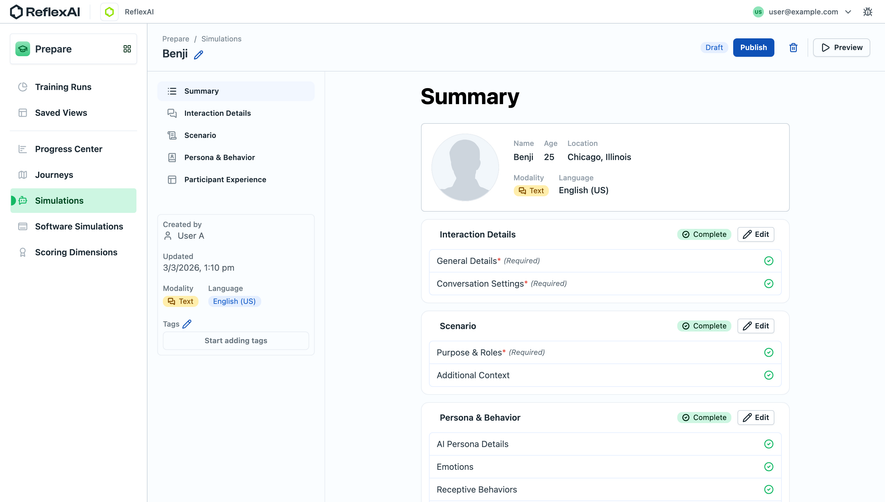

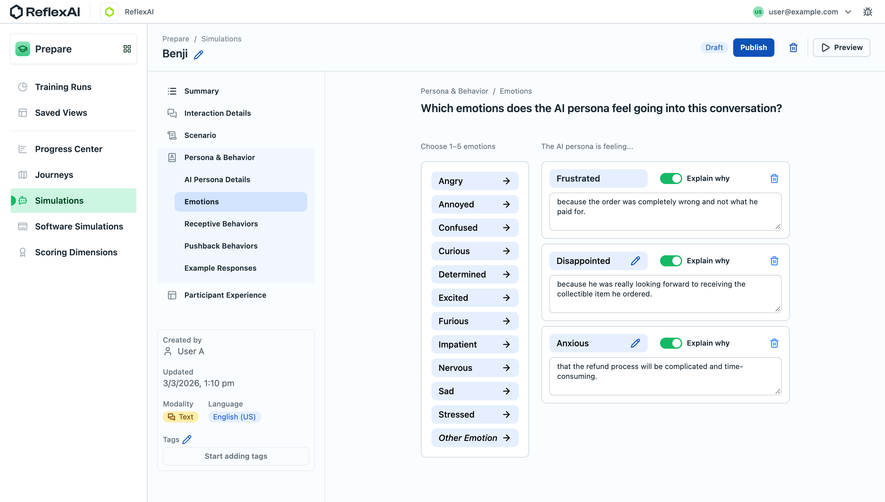
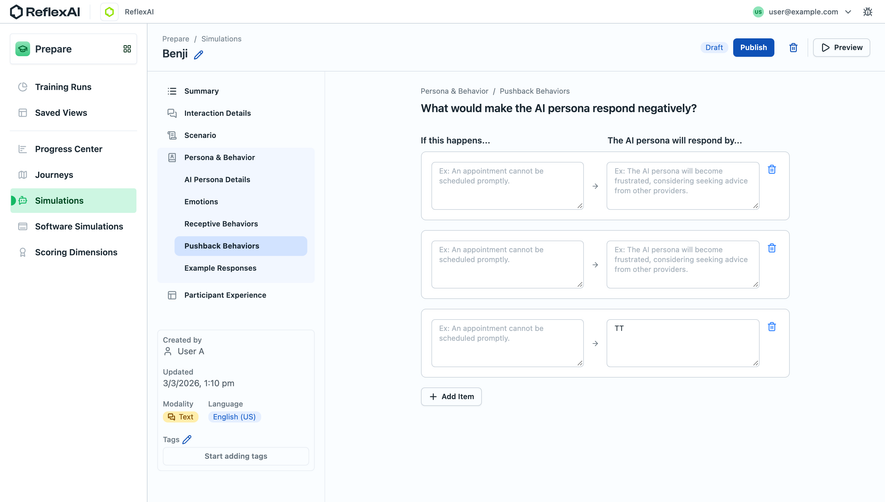
Similar screens






Upgrade to SaaSFrame Pro now to see similar examples.
Monthly
$18 /month
Billed $18 monthly
Browse all screens & flows
Filter and search screens & flows
Search text in screenshots
Access Figma files
Access mobile versions
Join now
Quarterly
$16 /month
Billed $48 quarterly
Browse all screens & flows
Filter and search screens & flows
Search text in screenshots
Access Figma files
Access mobile versions
Join now
Yearly
$15 /month
Billed $180 yearly
Browse all screens & flows
Filter and search screens & flows
Search text in screenshots
Access Figma files
Access mobile versions
Join now