Generate a new design based on this screen using your own content.
Thank you! Your submission has been received!
Oops! Something went wrong while submitting the form.
# Design from Reference: Prelude Messages Configuration
Create an original, high-fidelity visual design inspired by the reference. Prioritize composition, typography, colors, spacing, and component styling over technical implementation.
## Reference
- **Product:** Prelude
- **Category:** Settings
- **Screenshot:** https://cdn.prod.website-files.com/5e9dc792e1210c5325f7ebbc/697b764f83a3c28b4dc03ab4_gdGFZTgY55V8mQeOfeBivn_lwnM2Ctz6CzegZ93sGDU.avif
Analyze the screenshot first. If inaccessible, request it rather than guessing.
## Content
{{content.instructions}}
{{content.data}}
Preserve essential messaging and factual accuracy. Adapt structure and copy length for visual balance; never invent product claims.
## Visual Design
Use this context to reproduce the reference's visual language: layout, typography, colors, spacing, borders, radii, and distinctive elements. The screenshot takes priority if descriptions conflict.
## Direction
{{preferences.fidelityInstructions}}
## Output
{{output.instructions}}
Deliver a polished, cohesive design with precise alignment, hierarchy, and spacing. Produce the requested visual artifact, not just a description. If unsupported, explain the limitation.
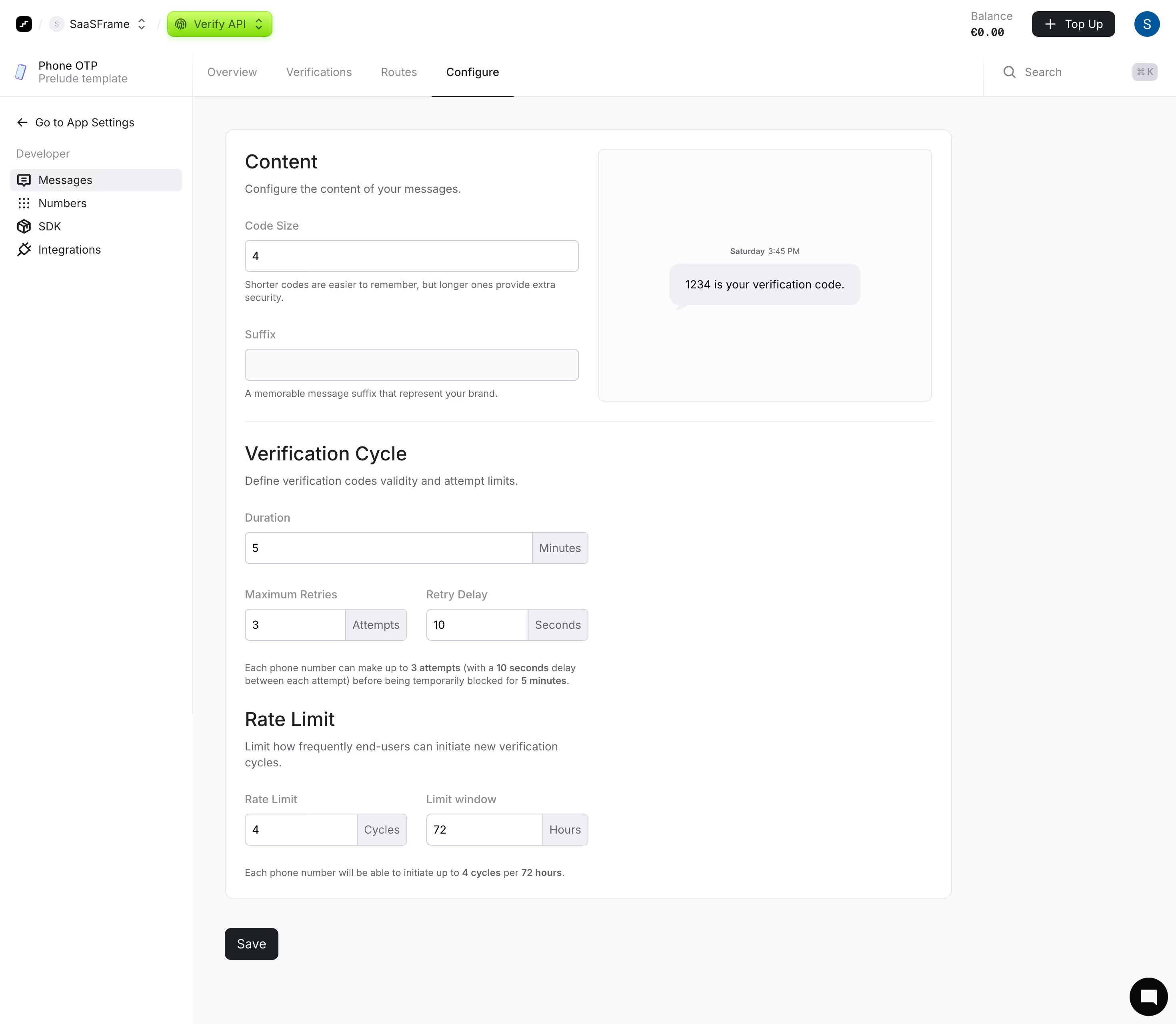
This is Prelude's Verify API configuration page, and it's a masterclass in making dense settings feel approachable. The left sidebar keeps navigation tight with just five items under "Developer." No bloat. The content area splits into clear sections: Content, Verification Cycle, and Rate Limit, each with its own heading and a short explanation underneath.
The Preview Sells It
What grabs you first is that phone mockup on the right showing "1234 is your verification code." It updates contextually with the Code Size input, giving you instant visual feedback. That's a smart move that turns a boring form into something interactive. The green pill badge for "Verify API" in the top nav is a subtle but effective way to signal which product context you're in.
Typography and Restraint
Everything breathes. Generous whitespace between sections, muted helper text below each field, and bold inline highlights like "3 attempts" and "10 seconds" in the summary sentences. The monochrome palette with just that green accent keeps things focused. Input fields with their unit labels (Minutes, Cycles, Hours) attached directly reduce cognitive load. Functional and honest design.
.webp)



.avif)