Generate a new design based on this screen using your own content.
Thank you! Your submission has been received!
Oops! Something went wrong while submitting the form.
# Design from Reference: Prelude Integrations Settings
Create an original, high-fidelity visual design inspired by the reference. Prioritize composition, typography, colors, spacing, and component styling over technical implementation.
## Reference
- **Product:** Prelude
- **Category:** Integrations
- **Screenshot:** https://cdn.prod.website-files.com/5e9dc792e1210c5325f7ebbc/697b765344680a5df0d3ca77_KiBNHexCEllHYyE2pQ-P1YMGKAz2DLJVyEggs9wAtpk.avif
Analyze the screenshot first. If inaccessible, request it rather than guessing.
## Content
{{content.instructions}}
{{content.data}}
Preserve essential messaging and factual accuracy. Adapt structure and copy length for visual balance; never invent product claims.
## Visual Design
Use this context to reproduce the reference's visual language: layout, typography, colors, spacing, borders, radii, and distinctive elements. The screenshot takes priority if descriptions conflict.
## Direction
{{preferences.fidelityInstructions}}
## Output
{{output.instructions}}
Deliver a polished, cohesive design with precise alignment, hierarchy, and spacing. Produce the requested visual artifact, not just a description. If unsupported, explain the limitation.
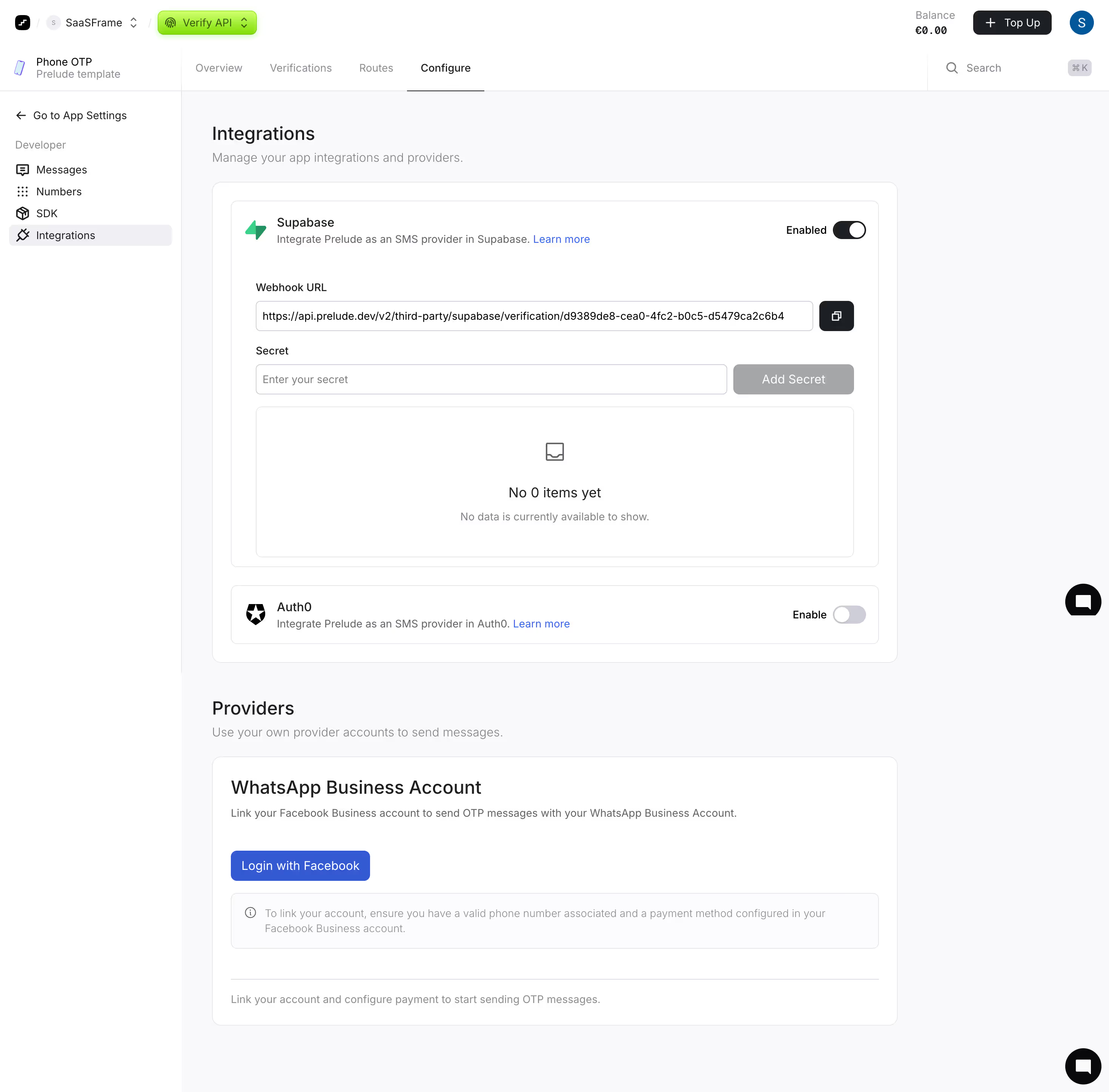
First thing you notice is how calm this page feels. Prelude's integration settings page doesn't try to do too much. The left sidebar keeps navigation tight with just five items under Developer. Smart restraint there.
Layout That Breathes
Each integration gets its own card with a consistent pattern: icon, name, description, toggle, and expandable config. The Supabase card is expanded showing the webhook URL and secret fields, while Auth0 sits collapsed below. This progressive disclosure keeps things from feeling overwhelming. The green "Enabled" toggle instantly communicates state without making you think.
Typography and Color Choices
The type hierarchy is solid. Bold section headers like "Integrations" and "Providers" anchor each block. Body text stays light gray, pulling back where it should. That green Verify API badge in the top nav is the only real color pop, and it works as a subtle product identifier.
The WhatsApp Section Stands Out
The "Login with Facebook" button in bright blue breaks the neutral palette intentionally. The info callout box below it with the circle-i icon is a thoughtful touch for reducing support tickets before they happen.
.webp)



.avif)