Generate a new design based on this screen using your own content.
Thank you! Your submission has been received!
Oops! Something went wrong while submitting the form.
# Design from Reference: Prelude Dashboard
Create an original, high-fidelity visual design inspired by the reference. Prioritize composition, typography, colors, spacing, and component styling over technical implementation.
## Reference
- **Product:** Prelude
- **Category:** Dashboard
- **Screenshot:** https://cdn.prod.website-files.com/5e9dc792e1210c5325f7ebbc/697b763f56f96503e8310a50_LnK7d7V2-jEGX46WswhYuppZaHuN3C94Mev_6rqj3eY.avif
Analyze the screenshot first. If inaccessible, request it rather than guessing.
## Content
{{content.instructions}}
{{content.data}}
Preserve essential messaging and factual accuracy. Adapt structure and copy length for visual balance; never invent product claims.
## Visual Design
Use this context to reproduce the reference's visual language: layout, typography, colors, spacing, borders, radii, and distinctive elements. The screenshot takes priority if descriptions conflict.
## Direction
{{preferences.fidelityInstructions}}
## Output
{{output.instructions}}
Deliver a polished, cohesive design with precise alignment, hierarchy, and spacing. Produce the requested visual artifact, not just a description. If unsupported, explain the limitation.
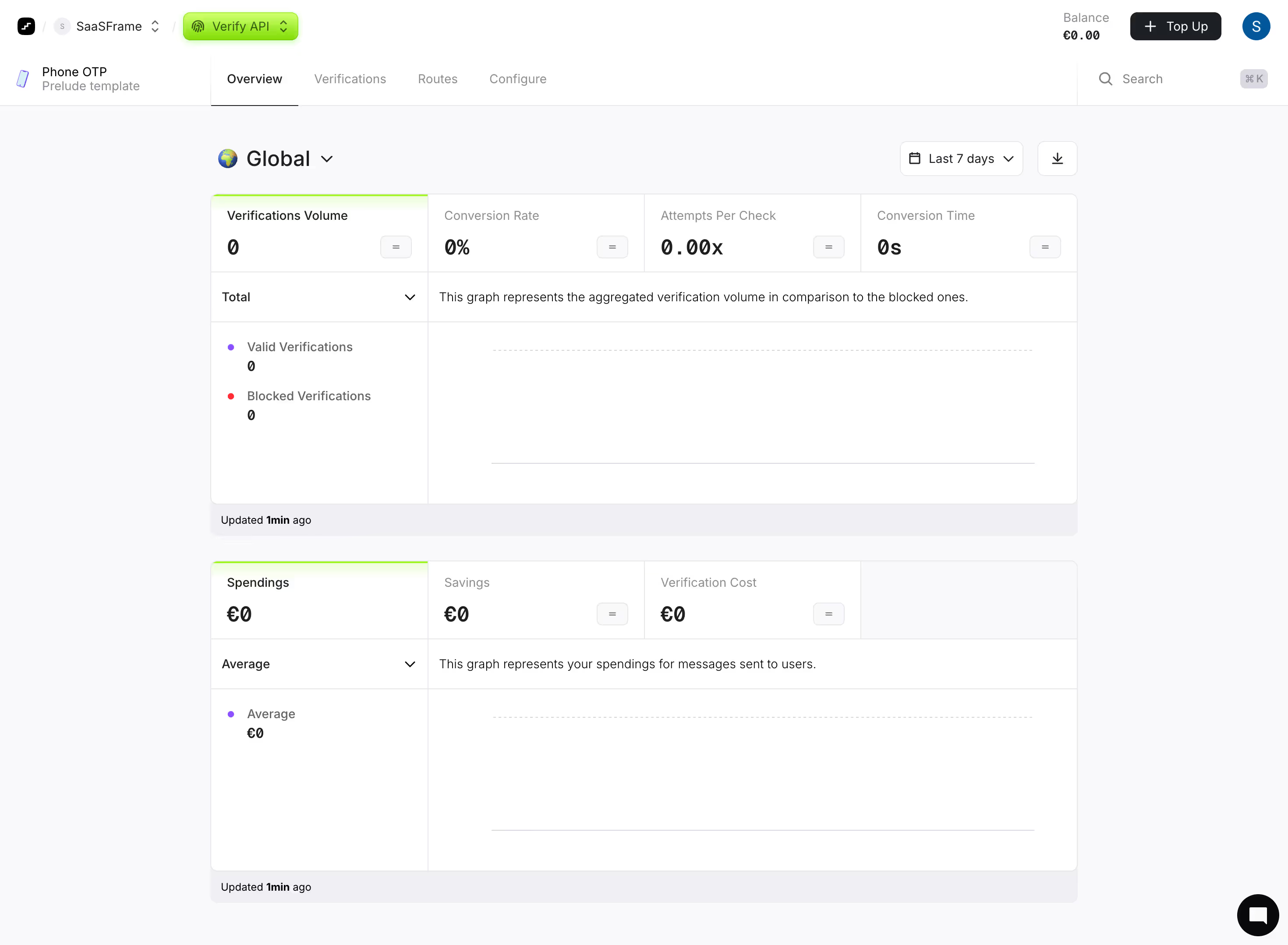
First thing you notice is how quiet this page is. Prelude's Verify API overview screen uses whitespace aggressively and it works. The metrics row up top (Verifications Volume, Conversion Rate, Attempts Per Check, Conversion Time) is dead simple. All zeros here, but the structure is immediately scannable.
Color Restraint Done Right
The palette is almost monochrome with tiny pops of color doing all the heavy lifting. That lime green accent on the "Verify API" pill and the thin progress bars above Spendings sections adds just enough energy. Blue and red dots for Valid vs Blocked verifications. Purple for Average. Every color means something. Nothing decorative.
Typography and Hierarchy That Just Works
Big bold numbers. Smaller muted labels above them. The section descriptions in gray feel like helpful whispers rather than clutter. The "Global" heading with its globe icon and dropdown feels confident without being loud.
What Stands Out
The equal sign buttons next to each metric are a subtle but smart touch for comparisons. Tab navigation across Overview, Verifications, Routes, Configure keeps things flat and accessible. This is a dashboard that respects your attention.
.webp)



.avif)