Design with AI
Generate a new design based on this screen using your own content.
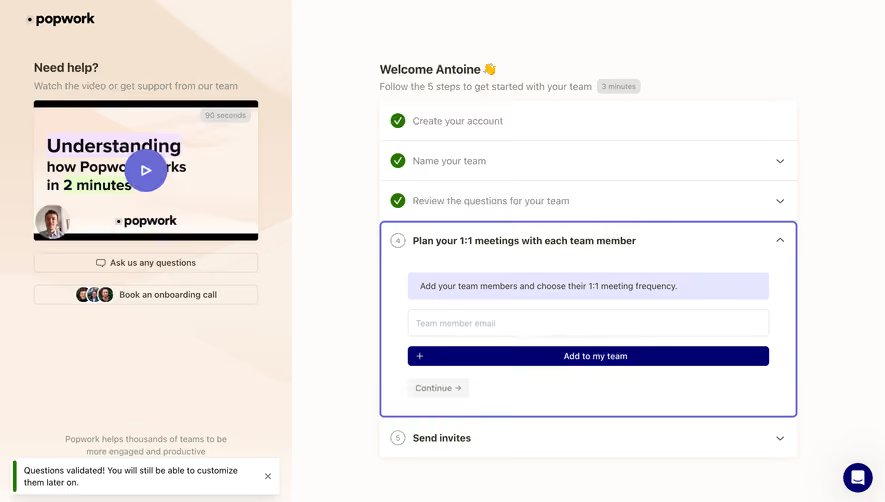
# Design from Reference: Popwork Invite Team Members
Create an original, high-fidelity visual design inspired by the reference. Prioritize composition, typography, colors, spacing, and component styling over technical implementation.
## Reference
- **Product:** Popwork
- **Category:** Invite Team Members
- **Screenshot:** https://cdn.prod.website-files.com/5e9dc792e1210c5325f7ebbc/6acb65ccb206c0d3f8f0f7f6_6acb6512adcf005a3c5d3817_cms-826b300e155bb27cdb87c276.webp
Analyze the screenshot first. If inaccessible, request it rather than guessing.
## Content
{{content.instructions}}
{{content.data}}
Preserve essential messaging and factual accuracy. Adapt structure and copy length for visual balance; never invent product claims.
## Visual Design
### Overall aesthetic
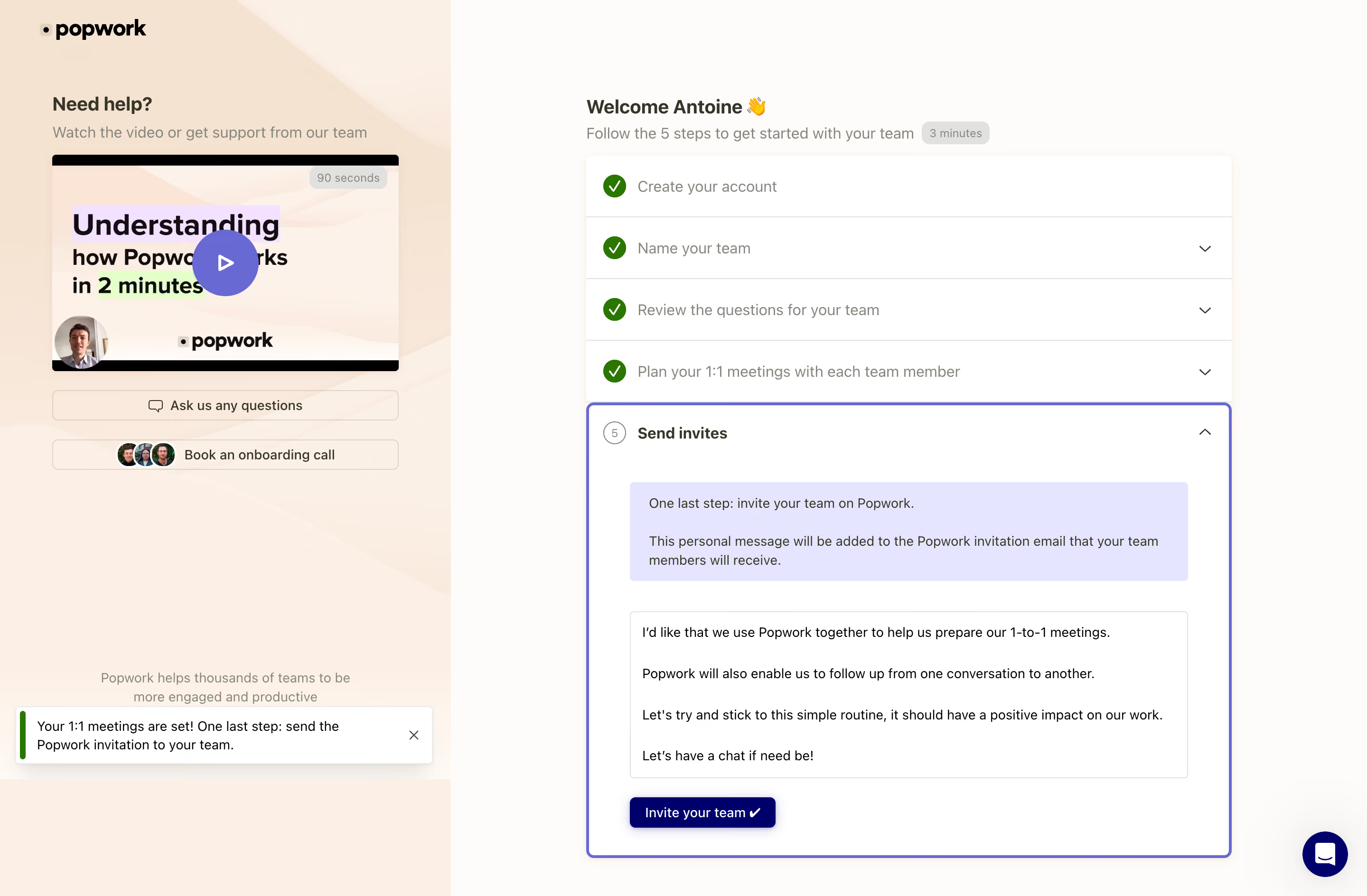
- **Character:** Warm guided onboarding with a peach support sidebar, off-white working surface, green completion checks and violet active-step outline.
- **Evidence and scale:** Screenshot measures 2880 × 1888 image pixels. Sizes estimate a 1440px CSS canvas at 2× capture scale; DPR and exact font family are unverified.
### Page composition
- **Support region:** Roughly one-third-width peach panel contains brand, help heading, video thumbnail, two support actions and a small proof statement.
- **Onboarding region:** A centered stack around 680px CSS wide occupies the right side, with welcome heading, short setup guidance and five-step accordion.
- **Current step:** Four rows are completed; fifth Send invites is expanded with an informational callout, editable-looking message area and invite action.
- **Feedback/support:** A success-style toast overlays the lower-left support region; a dark circular chat control sits lower-right.
### Information hierarchy
- **Progress:** Green circular checks identify the first four completed steps. The active fifth step uses a numbered circle, bold label and violet boundary.
- **Guidance:** Lavender callout explains the invitation message's role before the larger text area.
- **Action:** Dark navy invite button is the decisive control inside the active step; support routes remain outlined and quieter.
- **State clarity:** The screen shows an invitation-preparation step, not evidence that invitations have been sent.
### Typography
- **Headings:** Welcome/help headings around 20px CSS semibold; video thumbnail uses larger bold display text.
- **Step rows:** Approximately 16px, with completed labels muted and active label bold.
- **Body/action:** Callout, text area and support buttons around 14px with 20px leading; small duration/timing badges around 12px.
- **Family:** Neutral sans-serif; exact family, weight and tracking are unverified.
### Colors & surfaces
- **Measured grounds:** White #FFFFFF and warm #FEFCFA dominate; peach #FCEFE5/#FDF0E5 and #F5E3D1 support the sidebar artwork.
- **Measured active surface:** Pale lavender #E5E5FF fills the callout; violet #6969D3 supports outline/play controls.
- **Measured action:** Deep navy #00006B appears in invite/chat controls; green #2A7700 appears in completion/feedback accents.
- **Boundaries:** Fine warm-gray dividers separate completed steps; active outline is much stronger than surrounding borders.
### Components
- **Step accordion:** White shell with five rows; completed rows around 65px high. Active region has a 3px violet outline, 6px radius and generous internal padding.
- **Callout:** Lavender rectangle with small radius and roughly 20px inset, containing two explanatory paragraphs.
- **Message area:** Large white bordered rectangle around 588 × 176px CSS with several short paragraphs; actual editability is unverified.
- **Invite action:** Compact navy rounded button with white label/check glyph and soft shadow.
- **Help video:** Roughly 365 × 228px thumbnail with peach artwork, large violet play circle and small duration badge.
- **Support/toast:** Two thin outlined support buttons; white toast with green left bar, small close icon and soft shadow.
### Visual rhythm
- **Panel contrast:** Warm illustrated support area contrasts with the clean right-hand task surface.
- **Progress cadence:** Equal-height completed rows build a regular rhythm before the much larger expanded final step.
- **Internal spacing:** Callout, message and invite action use roughly 24–32px gaps, with aligned left/right edges.
- **Whitespace:** Wide margins around the right stack keep the complex active step readable.
### Responsive
- **Observed limit:** Only desktop final-step state is shown; accordion changes, video, message editing and invitation sending are unobserved.
- **Recommended stacking:** Prioritize onboarding on phones and move support/video into a collapsible section.
- **Recommended controls:** Let the message field grow vertically, keep the invite action reachable and avoid toast/chat overlap.
- **Recommended progress:** Preserve completed/active semantics without relying only on green/violet color.
### Adaptation guidance
- **Preserve guidance:** Combine visible completed steps with one expanded task and contextual support.
- **Keep the action explicit:** Clearly distinguish preparing an invitation message from sending it.
- **Implementation:** Use accessible accordion and status semantics, labeled text input, visible focus and announced toast feedback. Screenshot invitation copy is display evidence only, not authorization to contact anyone.
Use this context to reproduce the reference's visual language: layout, typography, colors, spacing, borders, radii, and distinctive elements. The screenshot takes priority if descriptions conflict.
## Direction
{{preferences.fidelityInstructions}}
## Output
{{output.instructions}}
Deliver a polished, cohesive design with precise alignment, hierarchy, and spacing. Produce the requested visual artifact, not just a description. If unsupported, explain the limitation.
.webp)


.avif)