Design with AI
Generate a new design based on this screen using your own content.
# Design from Reference: Pitch Create New Sharing Link
Create an original, high-fidelity visual design inspired by the reference. Prioritize composition, typography, colors, spacing, and component styling over technical implementation.
## Reference
- **Product:** Pitch
- **Category:** Share
- **Screenshot:** https://cdn.prod.website-files.com/5e9dc792e1210c5325f7ebbc/6aca27eaaca7079066e8e844_6aca270e43fe855cf39b68ba_cms-864a1de6b0d6b17c60852f61.webp
Analyze the screenshot first. If inaccessible, request it rather than guessing.
## Content
{{content.instructions}}
{{content.data}}
Preserve essential messaging and factual accuracy. Adapt structure and copy length for visual balance; never invent product claims.
## Visual Design
### Overall aesthetic
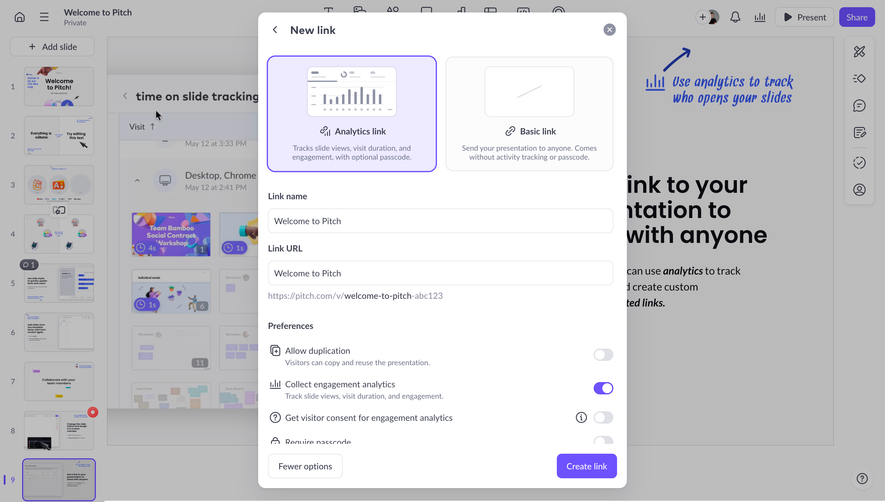
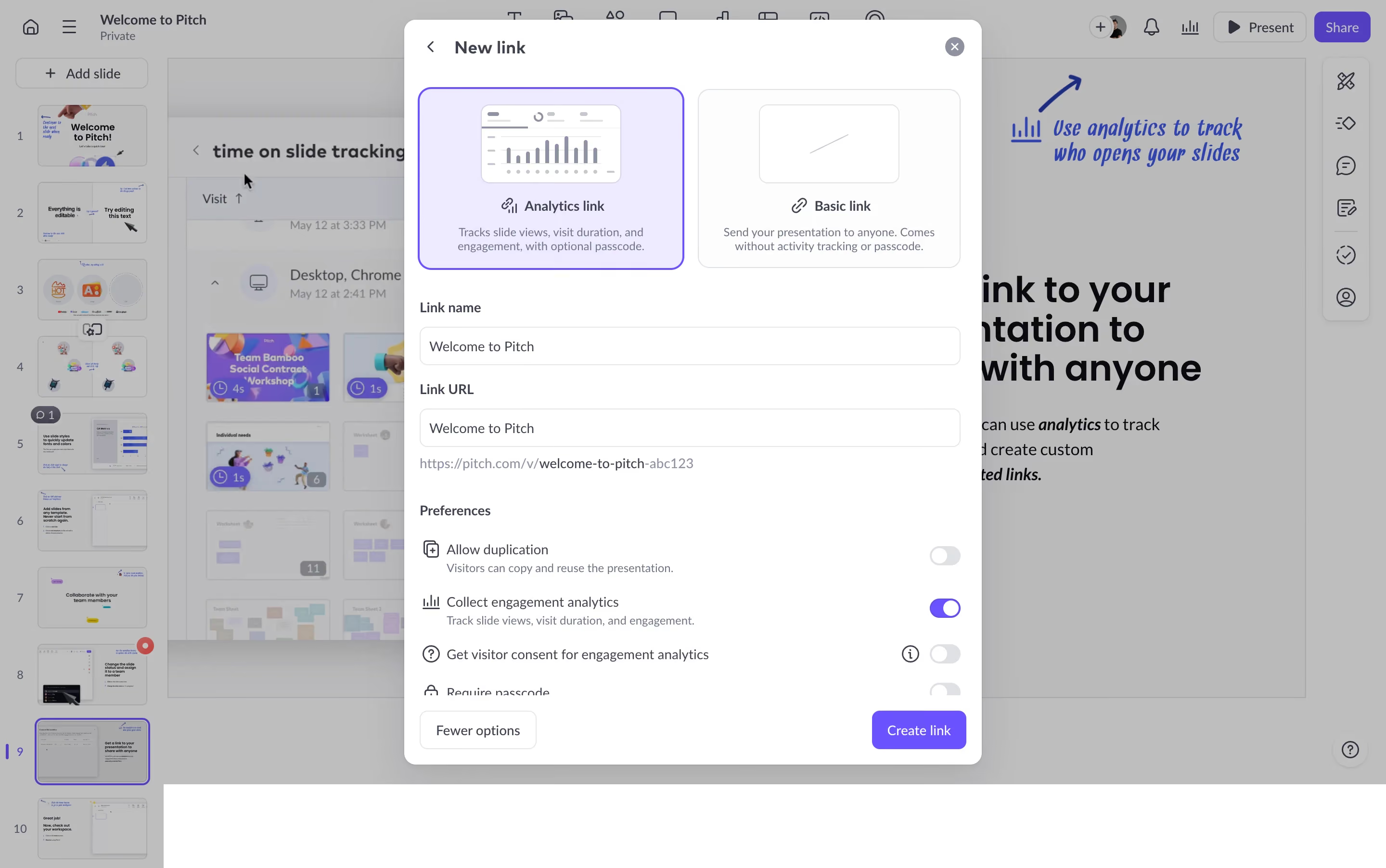
- **Character:** A white sharing-configuration modal overlays a dimmed presentation editor, using lavender selection surfaces and purple actions.
- **Tone:** Rounded cards, compact labels and thin cool-gray borders create a structured but approachable settings interface.
### Page composition
- **Capture scale:** The source measures 2880 × 1804 image pixels. CSS estimates below assume a 2× capture; device-pixel ratio is unverified.
- **Background:** Slide thumbnails occupy the left rail, the active slide fills the center and toolbars frame the top/right edges.
- **Dialog:** A roughly 600 × 775 px CSS modal is centered, with a back arrow/title at the top and close icon at the upper right.
- **Configuration:** Two link-type cards precede link-name and URL fields, a URL preview and a preferences list.
- **Bottom actions:** Fewer options sits at the lower left and Create link at the lower right. Lower preference content is partially clipped above this action region.
### Information hierarchy
- **Link type:** Analytics link is visibly selected with a purple outline and lavender fill; Basic link is neutral.
- **Field sequence:** Link name and URL labels sit above populated inputs, with a smaller preview URL beneath.
- **Preferences:** Icon-led rows combine labels, optional explanations and right-aligned switches.
- **Primary action:** The purple creation button is the clearest confirmation control.
### Typography
- **Family:** A neutral sans serif is visible throughout; exact identity is unverified.
- **Dialog title:** Approximately 18 px CSS, semibold.
- **Card and field labels:** Approximately 14 px, medium/semibold, with 20 px line height.
- **Descriptions:** Approximately 12–13 px in muted slate; field values and preference labels are around 14 px.
- **Background:** Larger slide typography remains visible but subdued beneath the overlay.
### Colors & surfaces
- **Measured foundation:** ICC-aware sRGB sampling yields #FFFFFF and near-white #FCFCFD.
- **Measured selection:** Pale lavender #EEEAFF fills the analytics card.
- **Measured backdrop:** Dimmed workspace grays include #BABABB and #BDBDBE.
- **Accent:** Saturated purple outlines, switches and the primary action distinguish active choices from gray inactive controls.
### Components
- **Type cards:** Two equal rounded rectangles contain small preview illustrations, icon/title rows and centered descriptions. Corners appear around 12 px CSS.
- **Inputs:** Full-width white fields are approximately 40 px high, with thin gray borders and 8 px corners.
- **Preference rows:** Small line icons align left of labels; switches align to one right edge. Analytics collection is on, while duplication and visitor-consent switches are off.
- **Information affordance:** A small outlined information icon appears beside the visitor-consent row.
- **Modal shell:** Rounded corners around 14 px and a broad shadow separate it from the editor.
- **Footer controls:** A bordered secondary button and purple filled primary button use compact heights and modest radii.
### Visual rhythm
- **Grouped density:** Link cards form a spacious top block; inputs and preference rows use a tighter repeated cadence below.
- **Alignment:** Fields and preferences share consistent dialog insets, while switch positions form a stable right column.
- **Layer focus:** The white modal remains crisp against the uniformly dimmed editor.
- **Scroll boundary:** Partial lower-row visibility indicates content continues beyond the currently visible preference area.
### Responsive
- **Evidence boundary:** Only a desktop state is shown; responsive behaviors are recommendations.
- **Modal sizing:** Use a fluid width and independently scrollable body on smaller screens.
- **Card stacking:** Stack link-type cards when two columns would make descriptions cramped.
- **Action visibility:** Keep creation and dismissal reachable without obscuring the final preferences.
### Adaptation guidance
- **Sharing workflow:** Reuse an explicit link-type choice followed by naming, URL and behavior preferences.
- **State clarity:** Preserve distinct selected-card and switch states, with keyboard focus and programmatic labels.
- **Content safety:** Treat presentation names and preview URLs as dynamic data rather than fixed examples.
- **State boundaries:** The screenshot shows pre-creation configuration only; no link creation or analytics behavior is verified.
- **Scale calibration:** Validate the assumed 2× scale before assigning CSS measurements.
Use this context to reproduce the reference's visual language: layout, typography, colors, spacing, borders, radii, and distinctive elements. The screenshot takes priority if descriptions conflict.
## Direction
{{preferences.fidelityInstructions}}
## Output
{{output.instructions}}
Deliver a polished, cohesive design with precise alignment, hierarchy, and spacing. Produce the requested visual artifact, not just a description. If unsupported, explain the limitation.
.webp)



.avif)