Design with AI
Generate a new design based on this screen using your own content.
# Design from Reference: Pirsch Analytics Billing
Create an original, high-fidelity visual design inspired by the reference. Prioritize composition, typography, colors, spacing, and component styling over technical implementation.
## Reference
- **Product:** Pirsch Analytics
- **Category:** Billing
- **Screenshot:** https://cdn.prod.website-files.com/5e9dc792e1210c5325f7ebbc/6acb69985e515b69c7964ea4_6ac5749513e14044ebbf0eb6_richtext-8e68f99ae08346fb4272.webp
Analyze the screenshot first. If inaccessible, request it rather than guessing.
## Content
{{content.instructions}}
{{content.data}}
Preserve essential messaging and factual accuracy. Adapt structure and copy length for visual balance; never invent product claims.
## Visual Design
### Overall aesthetic
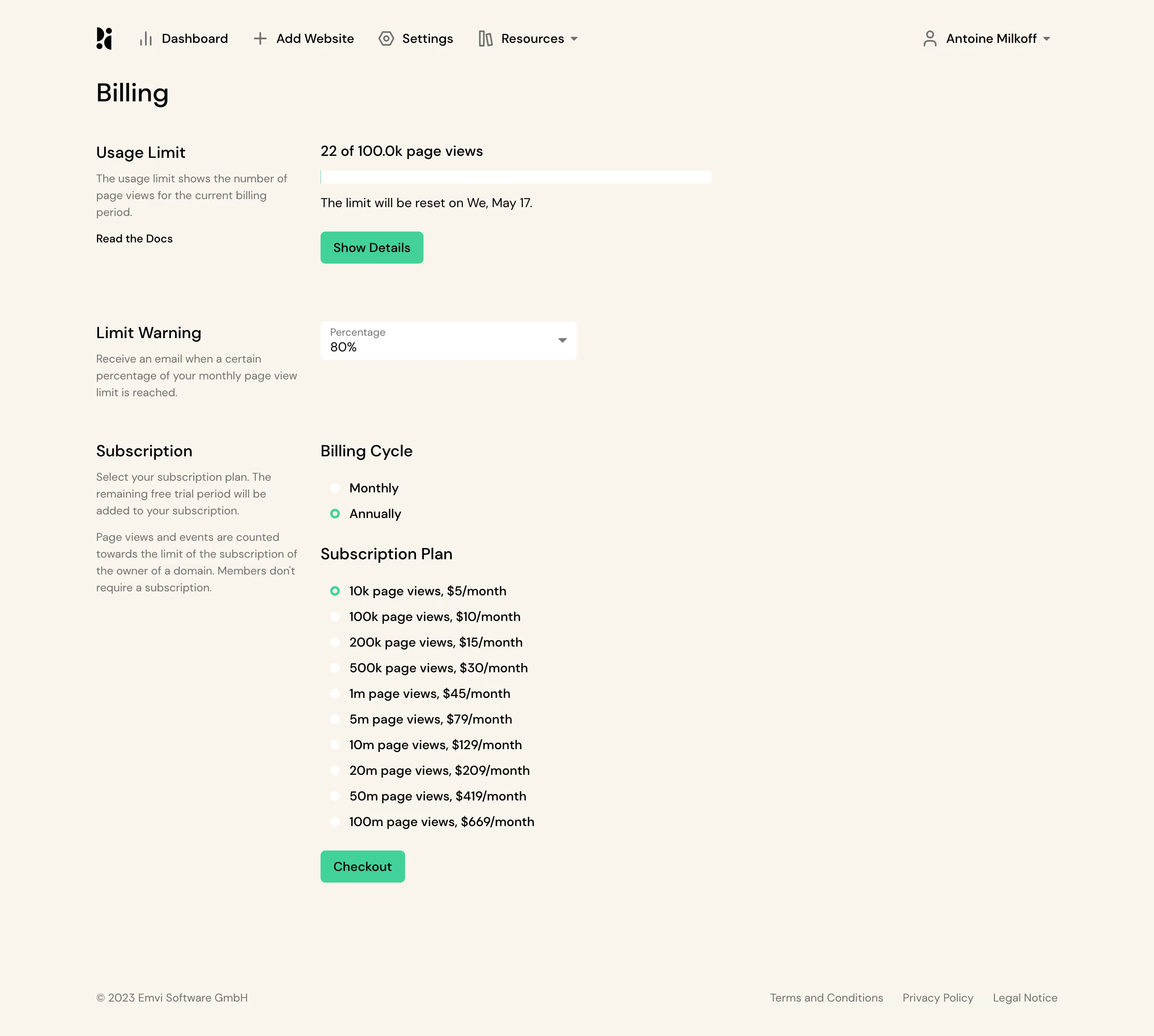
- **Character:** A deliberately plain billing screen uses warm cream, black sans-serif text, green actions and unboxed form groups.
- **Evidence scale:** The screenshot is 2880 × 2586 pixels. CSS sizes below assume an unverified 2× capture density.
### Page composition
- **Header:** An icon-led horizontal navigation row spans the top, with account name/dropdown at right.
- **Billing layout:** A left label/help column about 250 pixels wide pairs with a right settings column beginning around x400 CSS pixels. Most controls occupy only the left half of the broad page.
- **Section sequence:** Usage limit, warning threshold and subscription options follow vertically, ending with Checkout and a widely separated legal footer.
### Information hierarchy
- **Title and groups:** Billing is the largest text, followed by compact section labels and lighter explanatory copy.
- **Usage:** A prominent page-view count sits above a long white progress track, reset-date sentence and green Show Details action.
- **Subscription:** Billing-cycle choices precede a ten-option page-view plan list, with Checkout at the end.
- **Selected states:** Annual billing and the smallest plan have green radio outlines, distinguishing them from the white unselected circles.
### Typography
- **Title:** Approximately 32 pixels, medium weight with 1.2 line-height.
- **Groups:** Section headings are about 20 pixels; settings values and radio labels are approximately 16 pixels.
- **Help/footer:** Muted helper text is around 14 pixels with 21-pixel leading; footer links are similarly small.
- **Family:** A rounded geometric sans-serif is visible; exact identity is unverified. Tracking appears normal, with hierarchy driven by size and tone.
### Colors & surfaces
- **Measured palette:** ICC-to-sRGB sampling identifies #F9F5EC as the dominant cream canvas, #F7F5EC as a nearby variation, #000000 for foreground and #FFFFFF for controls.
- **Measured accent:** #41D199 is the green action/selection color; #707070 supports helper text.
- **Surface approach:** Controls sit directly on the page without card containers or prominent shadows.
- **Progress:** The usage track is white with only a very small green segment visible at its start.
### Components
- **Usage meter:** Approximately 490 pixels wide and 16 pixels tall, with gentle rounding; count and reset-date text sit above and below.
- **Threshold select:** A white rounded field about 320 × 48 pixels includes a small Percentage label, 80% value and right chevron.
- **Radio groups:** Small circular inputs sit beside monthly/annual choices and ten plan tiers, with approximately 32-pixel row cadence.
- **Actions:** Show Details and Checkout are compact green filled buttons, roughly 40 pixels tall with 5-pixel radii.
- **Footer:** Copyright aligns left and three legal links right, close to the bottom of the page.
### Visual rhythm
- **Two-column consistency:** Each group label/help block aligns with the same settings start line.
- **Vertical spacing:** Large gaps distinguish usage, warning and subscription, while radio rows remain tightly regular.
- **Open canvas:** Substantial unused space on the right and beneath the form gives a lightweight administrative feel.
### Responsive
- **Observed scope:** Only one desktop form state is supplied; expanded select options and checkout details are not visible.
- **Recommended layout:** Stack labels/help above controls and make the meter/select fluid on small screens.
- **Recommended interaction:** Preserve clear radio grouping, sufficient tap area and a visible focus state for all controls.
### Adaptation guidance
- **Transferable pattern:** Use a simple label/help column beside focused controls for a short billing task.
- **State clarity:** Keep current consumption, warning threshold and future subscription choice distinct; do not imply the selected option has already been purchased.
- **Implementation:** Verify fonts and density, provide semantic radio legends and refresh pricing from live data before reusing the screenshot-era tiers.
Use this context to reproduce the reference's visual language: layout, typography, colors, spacing, borders, radii, and distinctive elements. The screenshot takes priority if descriptions conflict.
## Direction
{{preferences.fidelityInstructions}}
## Output
{{output.instructions}}
Deliver a polished, cohesive design with precise alignment, hierarchy, and spacing. Produce the requested visual artifact, not just a description. If unsupported, explain the limitation.
.webp)



.avif)