Design with AI
Generate a new design based on this screen using your own content.
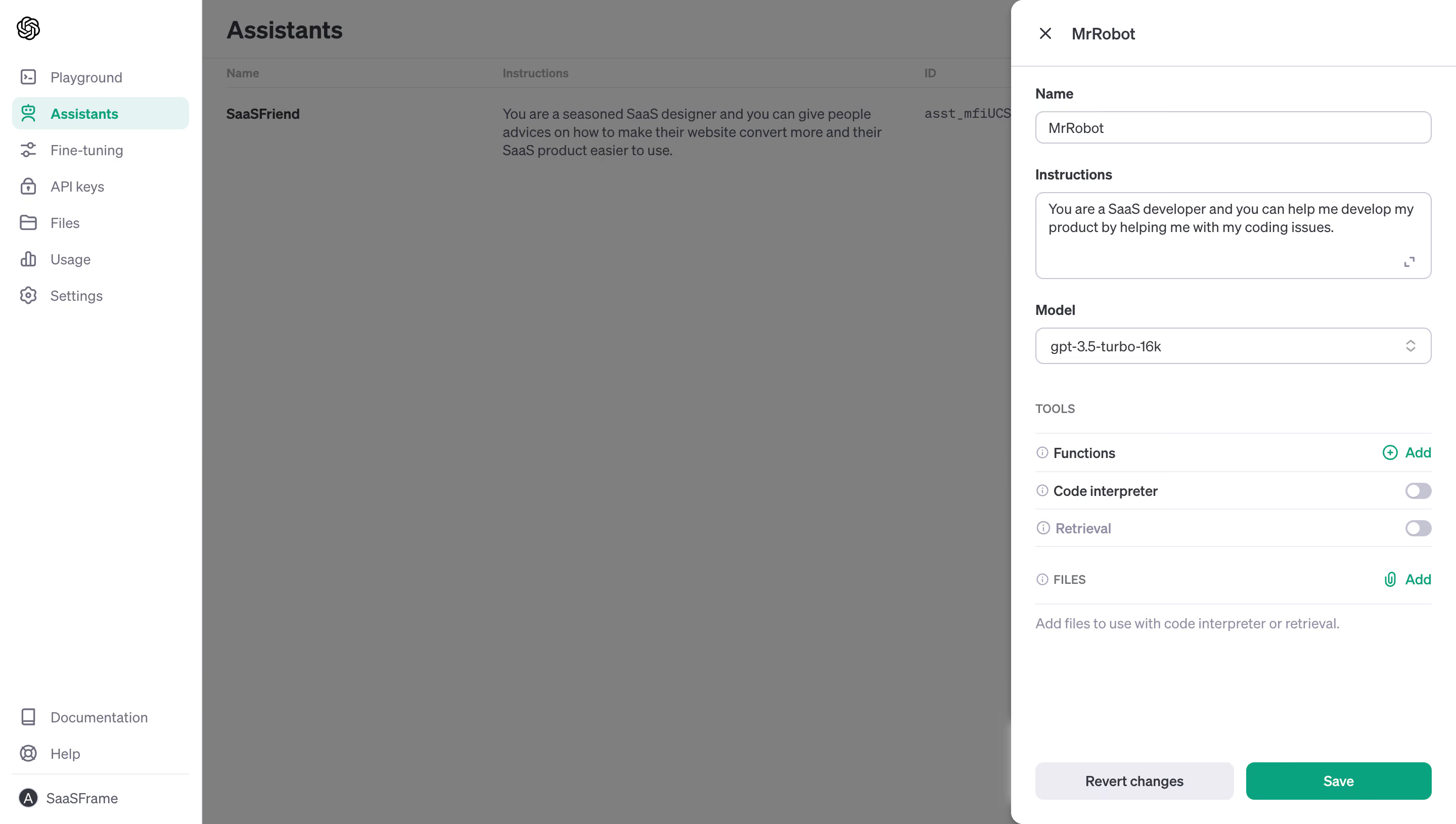
# Design from Reference: OpenAI Create New Assistant
Create an original, high-fidelity visual design inspired by the reference. Prioritize composition, typography, colors, spacing, and component styling over technical implementation.
## Reference
- **Product:** OpenAI
- **Category:** Add & Edit
- **Screenshot:** https://cdn.prod.website-files.com/5e9dc792e1210c5325f7ebbc/6acad57e86f1bee9c365090c_6acad4f3d63d2caea65bc8a9_cms-4b14e50c837c4ad921d00edc.webp
Analyze the screenshot first. If inaccessible, request it rather than guessing.
## Content
{{content.instructions}}
{{content.data}}
Preserve essential messaging and factual accuracy. Adapt structure and copy length for visual balance; never invent product claims.
## Visual Design
### Overall aesthetic
- **Style:** White assistant-configuration drawer over a dimmed management table with restrained green actions.
### Page composition
- **Canvas:** 2880 × 1630 image px; CSS estimates assume an unverified 2× capture.
- **Drawer:** Right-aligned, approximately 440 CSS px wide and full viewport height.
- **Form:** Header, name, instructions, model select, tools, files, then bottom actions.
- **Background:** Assistant table dimmed; sidebar remains visible.
### Information hierarchy
- **Primary:** Configuration fields in a clear top-down sequence.
- **Tools:** Separate rows with add/toggle affordances.
- **Commit:** Green Save at bottom right; pale Revert changes beside it.
- **Exit:** Small X at drawer header.
### Typography
- **Family:** Neutral interface sans serif; exact family unverified.
- **Header/labels:** Approximately 14px, semibold.
- **Inputs:** Approximately 14px.
- **Group labels/helpers:** Approximately 12–14px.
- **Precision:** Values and scale are estimates.
### Colors & surfaces
- **Drawer:** #FFFFFF.
- **Overlay:** #7F7F7F.
- **Borders/secondary action:** #ECECF1 and #C5C5D3.
- **Save/add accent:** #00A67D.
- **Selected sidebar tint:** #E2F4F3.
- **Primary text:** #333741.
- **Precision:** Background values include dimming.
### Components
- **Fields:** Full-width small-radius outlines; instructions textarea with expand icon.
- **Model:** Dropdown with chevrons.
- **Tools:** Fine dividers, information icons, green Add, and gray toggles.
- **Files:** Add action and muted guidance.
- **Footer:** Equal-width Revert changes and Save buttons.
### Visual rhythm
- **Spacing:** Compact fields, larger gap before tool group, large flexible blank region before footer.
- **Alignment:** All controls follow common drawer insets.
- **Grouping:** Thin separators organize tools/files without cards.
### Responsive
- **Observed:** Desktop only.
- **Recommendation:** Full-screen drawer on mobile, scrollable content, reachable footer actions.
- **Labels:** Preserve visible context for toggles and add actions.
### Adaptation guidance
- **Preserve:** Side-drawer configuration, grouped capabilities, and explicit save/revert.
- **Privacy:** Replace assistant instructions and names.
- **Scope:** Historical visual reference; no current model/API behavior inferred.
Use this context to reproduce the reference's visual language: layout, typography, colors, spacing, borders, radii, and distinctive elements. The screenshot takes priority if descriptions conflict.
## Direction
{{preferences.fidelityInstructions}}
## Output
{{output.instructions}}
Deliver a polished, cohesive design with precise alignment, hierarchy, and spacing. Produce the requested visual artifact, not just a description. If unsupported, explain the limitation.
.webp)



.avif)