.webp)
Thank you! Your submission has been received!
Oops! Something went wrong while submitting the form.
Get SaaSFrame Pro
Monthly
$18
Quarterly
$48
Yearly
$180
Upgrade to access this feature
Browse all screens & flows
Filter and search screens & flows
Access Figma files
Access mobile versions
Bookmark screens & flows
Join now
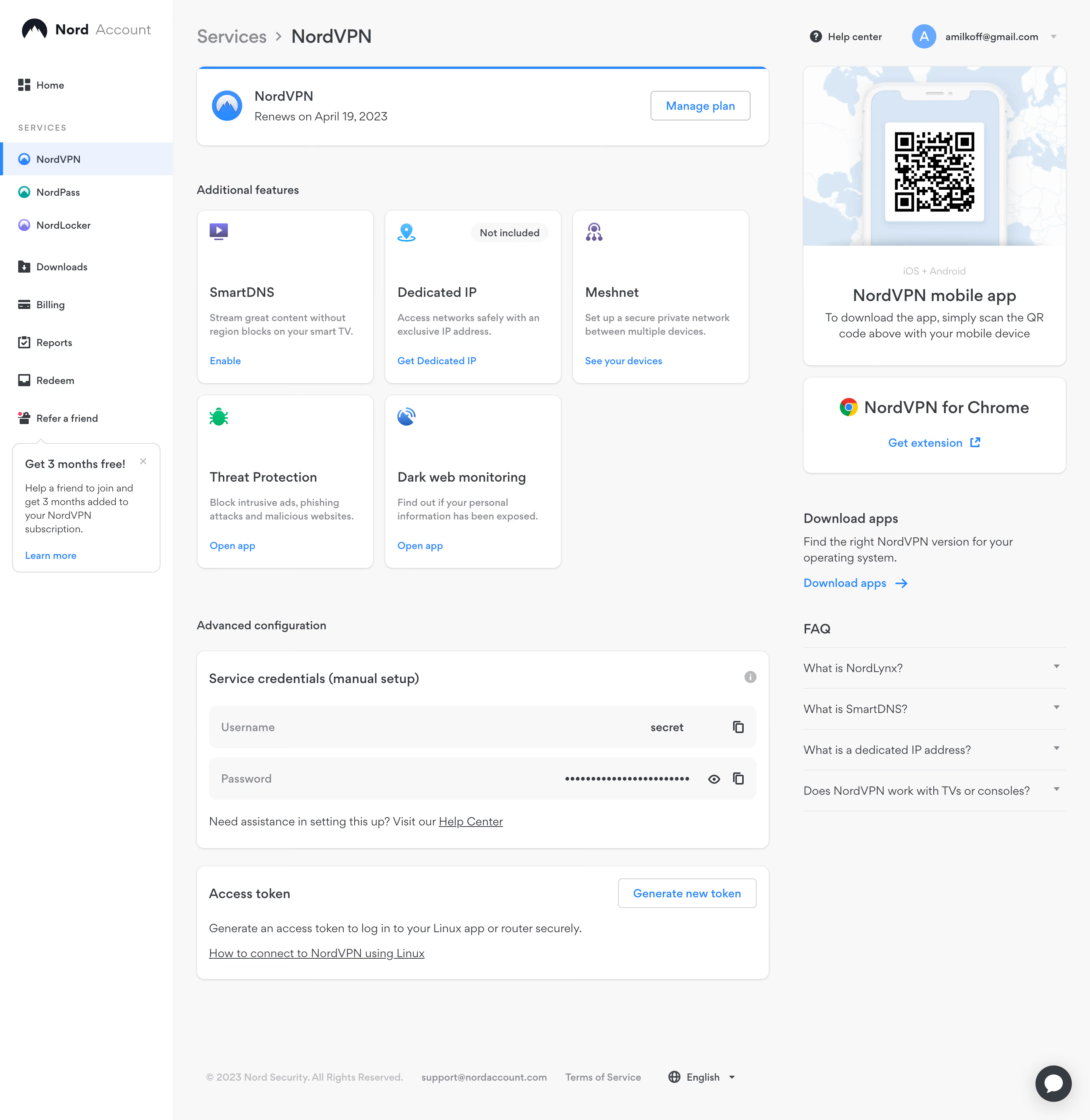
Nord VPN Dashboard

Nord VPN
Online VPN service for speed and security
Designed by
No items found.

Bookmark
Bookmark

Design with AI
Thank you! Your submission has been received!
Oops! Something went wrong while submitting the form.
# Design from Reference: Nord VPN Dashboard
Create an original, high-fidelity visual design inspired by the reference. Prioritize composition, typography, colors, spacing, and component styling over technical implementation.
## Reference
- **Product:** Nord VPN
- **Category:** Dashboard
- **Screenshot:** https://cdn.prod.website-files.com/5e9dc792e1210c5325f7ebbc/6acb6aeebf2e69a0c03b6c75_6acb6a1f55968e6fef886292_cms-6df07d4fc1c65e6267cfcc86.webp
Analyze the screenshot first. If inaccessible, request it rather than guessing.
## Content
{{content.instructions}}
{{content.data}}
Preserve essential messaging and factual accuracy. Adapt structure and copy length for visual balance; never invent product claims.
## Visual Design
### Overall aesthetic
- **Style:** Clean account-management dashboard with a white navigation rail, pale-gray workspace and softly outlined white service cards.
- **Character:** Blue links and service accents provide a familiar utility interface; colorful small feature icons aid scanning without dominating the layout.
- **Capture:** Observed image dimensions are 2880 × 2958 pixels. CSS estimates assume a 2× screenshot, equivalent to 1440 × 1479 CSS pixels; actual capture scale and font identity are unverified.
### Page composition
- **Sidebar:** An approximately 228-CSS-pixel white rail spans the height, with Nord Account branding, Home, a Services group, utility navigation and a referral promotion.
- **Top bar:** A service breadcrumb sits above the main content. Help and a profile/avatar dropdown align at the upper right.
- **Main split:** The content has a roughly 756-pixel primary column and a 348-pixel supporting column, separated by about 45 pixels.
- **Subscription card:** The primary column opens with a horizontal plan summary containing the service icon, renewal information and a right-aligned management button.
- **Feature grid:** Five feature cards form a three-column grid followed by two cards on a second row.
- **Advanced area:** Two full-width primary-column panels contain manual setup credentials and access-token generation.
- **Supporting rail:** A mobile-app QR promotion, browser-extension card, download guidance and four collapsed FAQ rows stack on the right.
- **Footer:** Copyright, support, legal and language controls sit near the bottom; a circular chat launcher overlays the lower-right corner.
### Information hierarchy
- **Service context:** The breadcrumb and selected sidebar item identify NordVPN as the current service.
- **Subscription priority:** A blue top rule differentiates the plan card from other white modules; renewal text and Manage plan are immediately visible.
- **Feature hierarchy:** Each card uses an icon, medium-weight title, short muted explanation and blue action link. Dedicated IP additionally carries a Not included pill.
- **Advanced controls:** Section labeling separates manual credentials and token generation from everyday feature actions.
- **Support hierarchy:** Large QR imagery leads the supporting rail, followed by extension installation, downloads and FAQ assistance.
- **State visibility:** The selected sidebar row uses both a blue left indicator and pale-blue fill; the password is masked and FAQ answers are collapsed.
### Typography
- **Family:** A rounded, clean sans-serif is visible; its precise identity is unverified.
- **Breadcrumb:** Approximately 26-pixel CSS text, with the parent in gray and current service darker.
- **Card titles:** Feature and advanced-panel headings are approximately 18 pixels and medium-to-semibold weight.
- **Body copy:** Approximately 14–16 pixels with 20–22-pixel line height, depending on module.
- **Utility labels:** Sidebar labels and action links are approximately 14 pixels; section labels around 16 pixels.
- **Mobile promotion:** The centered app title is approximately 24 pixels, followed by 16-pixel explanatory text.
- **Small metadata:** The sidebar group label uses uppercase text with increased tracking; footer text is approximately 13 pixels and muted.
### Colors & surfaces
- **Measured canvas:** The workspace samples #F8F8F8 and card/sidebar surfaces #FFFFFF.
- **Measured text:** Dark gray #373C43 is a prominent sampled text color.
- **Measured pale blues:** Sampled image colors include #ECF3FF, #D8E6F6 and #DAE8F5, visible in the selection and mobile-promotion artwork.
- **Accent roles:** Bright blue marks service identity, links, plan emphasis and buttons. Teal, violet and green distinguish other products and feature icons.
- **Control surfaces:** Credential rows use a light-gray fill; the exclusion badge is a slightly darker neutral pill.
- **Depth:** Cards use fine gray borders, approximately 12-pixel corners and subtle low-offset shadows rather than strong elevation.
### Components
- **Sidebar selection:** The current service row is about 44 CSS pixels high with a blue vertical edge and a small round service icon.
- **Referral panel:** A bordered white speech-bubble-style card includes a short heading, body copy, dismiss icon and blue informational link.
- **Plan card:** Approximately 756 × 104 CSS pixels, with a thin blue top border and an outlined Manage plan button roughly 132 × 40 pixels.
- **Feature cards:** Approximately 234 × 230 CSS pixels with 16-pixel padding. Icons sit high in the cards; titles, descriptions and actions cluster lower down.
- **Exclusion badge:** A compact light-gray rounded pill appears at the upper right of the Dedicated IP card.
- **Mobile-app promotion:** A tall white card combines a map-and-phone illustration containing a QR code with centered platform, title and download instructions below.
- **Extension promotion:** A smaller card centers a browser logo, heading and blue external-link action.
- **Credentials:** Two wide gray rows pair labels with values and copy icons; the password row adds a visibility icon. No credential values need to be reproduced for adaptation.
- **Token panel:** A title and outlined generation button share the top line, above explanation and an underlined help link. No generated token state is visible.
- **FAQ and chat:** Four thin-rule-separated question rows end in down chevrons; the dark circular chat control contains a white speech bubble.
### Visual rhythm
- **Main inset:** Content starts approximately 32 CSS pixels beyond the sidebar and retains a similar outer right margin.
- **Feature grid:** Narrow 14–16-pixel gaps establish a compact repeated grid within the primary column.
- **Section spacing:** Roughly 48–64-pixel breaks distinguish plan, features and advanced configuration.
- **Card spacing:** Advanced panels use approximately 24-pixel separation and 16-pixel internal insets.
- **Rail pacing:** Right-side modules alternate bordered cards with unboxed text, reducing a continuous stack-of-cards effect.
- **Bottom space:** Substantial neutral whitespace below the configuration panels separates account controls from the footer.
### Responsive
- **Recommendation — shell:** Collapse the navigation rail into a menu while preserving clear current-service indication.
- **Recommendation — columns:** Move the supporting rail below the main account controls on narrower screens.
- **Recommendation — feature grid:** Reduce three columns to two and then one, retaining full descriptions and action labels.
- **Recommendation — credentials:** Allow values and actions to fit without horizontal overflow; keep copy and visibility controls separately focusable.
- **Recommendation — support:** Keep the QR code large enough to scan and provide a direct mobile download route. No mobile layout is evidenced.
### Adaptation guidance
- **Keep task groups distinct:** Separate subscription management, optional features, advanced configuration and help.
- **Reuse a card system:** Share white surfaces, fine borders, 12-pixel corners and restrained shadows across related modules.
- **Preserve explicit states:** Pair selected service and availability styling with text or icons, including the Not included badge.
- **Protect credential interactions:** Maintain masking, copy affordances and clear generation controls; implement reveal and confirmation behavior separately.
- **Balance the rail:** Use the supporting column for installation and help while keeping subscription and service controls in the wider column.
- **Define unshown states:** Provide accessible focus, FAQ expansion, token generation and feature activation feedback; the static image does not establish those outcomes.
Use this context to reproduce the reference's visual language: layout, typography, colors, spacing, borders, radii, and distinctive elements. The screenshot takes priority if descriptions conflict.
## Direction
{{preferences.fidelityInstructions}}
## Output
{{output.instructions}}
Deliver a polished, cohesive design with precise alignment, hierarchy, and spacing. Produce the requested visual artifact, not just a description. If unsupported, explain the limitation.

.avif)
Category
Patterns
No items found.
Tech Stack

Added on
April 6, 2023
Similar screens




Upgrade to SaaSFrame Pro now to see similar examples.
Monthly
$18 /month
Billed $18 monthly
Browse all screens & flows
Filter and search screens & flows
Search text in screenshots
Access Figma files
Access mobile versions
Join now
Quarterly
$16 /month
Billed $48 quarterly
Browse all screens & flows
Filter and search screens & flows
Search text in screenshots
Access Figma files
Access mobile versions
Join now
Yearly
$15 /month
Billed $180 yearly
Browse all screens & flows
Filter and search screens & flows
Search text in screenshots
Access Figma files
Access mobile versions
Join now