Design with AI
Generate a new design based on this screen using your own content.
# Design from Reference: Moss Billing and spend limits
Create an original, high-fidelity visual design inspired by the reference. Prioritize composition, typography, colors, spacing, and component styling over technical implementation.
## Reference
- **Product:** Moss
- **Category:** Billing
- **Screenshot:** https://cdn.prod.website-files.com/5e9dc792e1210c5325f7ebbc/6acf5258dec0a3f836c1db0a_36TgA8pWD4rUfIpFOhjYb2oQHEKUK2R9mnTKOFruq1w.png
Analyze the screenshot first. If inaccessible, request it rather than guessing.
## Content
{{content.instructions}}
{{content.data}}
Preserve essential messaging and factual accuracy. Adapt structure and copy length for visual balance; never invent product claims.
## Visual Design
### Overall aesthetic
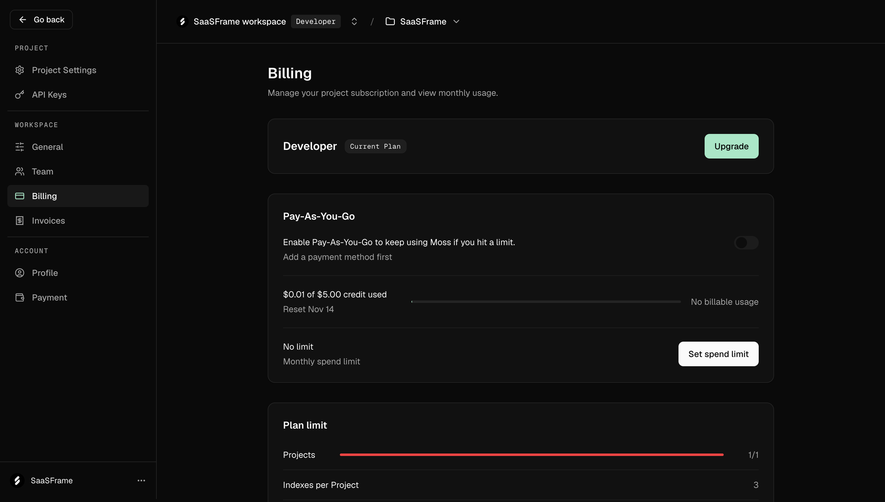
- **Character:** A dense dark billing interface uses near-black layers, fine charcoal borders, white text and a restrained mint upgrade accent.
- **Evidence:** The image is 2880 × 2978 pixels. CSS sizes are estimates assuming an unverified 2× capture density; both readable portions were inspected.
### Page composition
- **Navigation:** A roughly 254-pixel left rail groups project, workspace and account links. A 70-pixel top bar contains workspace and project selectors with small badges and chevrons.
- **Content column:** A roughly 824-pixel-wide billing stack begins well inside the main panel, with title and subtitle above five rounded cards.
- **Card sequence:** Current plan, pay-as-you-go usage/spend settings, plan limits, payment methods and invoice-email recipients form the complete vertical sequence.
### Information hierarchy
- **Primary status:** The Developer plan name and Current Plan badge lead, paired with a mint Upgrade action.
- **Usage detail:** The next card distinguishes activation state, credit usage, reset date and monthly spend limit using internal rules and aligned actions.
- **Limits and payment:** A red full project-limit bar precedes simple numeric limit rows. Payment methods shows an explicit empty state; recipient settings concludes with an input and Save action.
### Typography
- **Heading:** Billing is approximately 24 pixels semibold; its subtitle is around 14 pixels in muted gray.
- **Card roles:** Section labels are about 16–18 pixels semibold; body copy, row labels and buttons are roughly 14 pixels with 20-pixel leading.
- **Badges:** Compact plan badges use small monospaced-looking text around 11–12 pixels. The main sans-serif identity is unverified.
### Colors & surfaces
- **Measured layers:** ICC-to-sRGB sampling identifies #0A0A0A as the canvas, #111111 as card surfaces, #242424 as outlines and #FAFAFA as bright text/action areas.
- **Supporting darks:** #1F1F1F and #181818 appear in darker control/selection layers.
- **Semantic accents:** Mint highlights Upgrade and the active billing icon; red marks the exhausted project allowance. Gray supports helper copy and inactive controls.
- **Elevation:** Fine borders and slight tonal separation establish depth, without conspicuous card shadows.
### Components
- **Cards:** The plan card is about 90 pixels tall; larger settings cards use 24-pixel padding, roughly 12-pixel radii and thin charcoal outlines.
- **Usage controls:** A small off toggle sits right, a narrow progress track accompanies credit usage and a light Set spend limit button aligns with its row.
- **Limits table:** Three rows use fine separators, right-aligned values and one long red horizontal bar.
- **Payment empty state:** A header/action row sits above a centered two-line message with subdued helper text.
- **Recipient editor:** A full-width dark outlined email field is followed by an outlined Add more control; a separated bottom row places Save at right.
### Visual rhythm
- **Vertical cadence:** Cards have consistent approximately 32-pixel gaps and repeated internal padding.
- **Alignment:** Titles, paragraphs, table labels and input edges share the same left inset; actions and values align to the opposite edge.
- **Density control:** Internal dividers group related settings while broad dark gutters separate the stack from navigation.
### Responsive
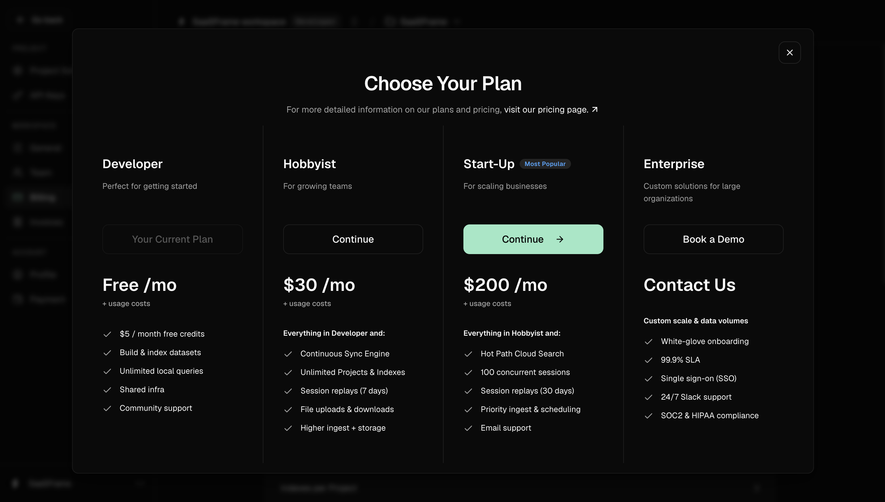
- **Observed scope:** Only the desktop resting state is visible; upgrade, toggle, spend-limit and payment dialogs are not documented.
- **Recommended layout:** Collapse the sidebar and let the billing column fill available width with mobile padding.
- **Recommended controls:** Stack explanatory copy and actions on small screens, preserve readable progress labels and keep inputs/actions comfortably tappable.
### Adaptation guidance
- **Billing pattern:** Separate subscription status, consumption, entitlements, payment setup and invoice delivery into distinct cards.
- **Semantic state:** Keep warning-limit color distinct from promotional mint, and explain disabled activation prerequisites beside the control.
- **Implementation:** Verify font and capture density, specify focus/error/loading states and retain clear empty-payment messaging.
Use this context to reproduce the reference's visual language: layout, typography, colors, spacing, borders, radii, and distinctive elements. The screenshot takes priority if descriptions conflict.
## Direction
{{preferences.fidelityInstructions}}
## Output
{{output.instructions}}
Deliver a polished, cohesive design with precise alignment, hierarchy, and spacing. Produce the requested visual artifact, not just a description. If unsupported, explain the limitation.
.webp)




.avif)