.webp)
Thank you! Your submission has been received!
Oops! Something went wrong while submitting the form.
Get SaaSFrame Pro
Monthly
$18
Quarterly
$48
Yearly
$180
Upgrade to access this feature
Browse all screens & flows
Filter and search screens & flows
Access Figma files
Access mobile versions
Bookmark screens & flows
Join now
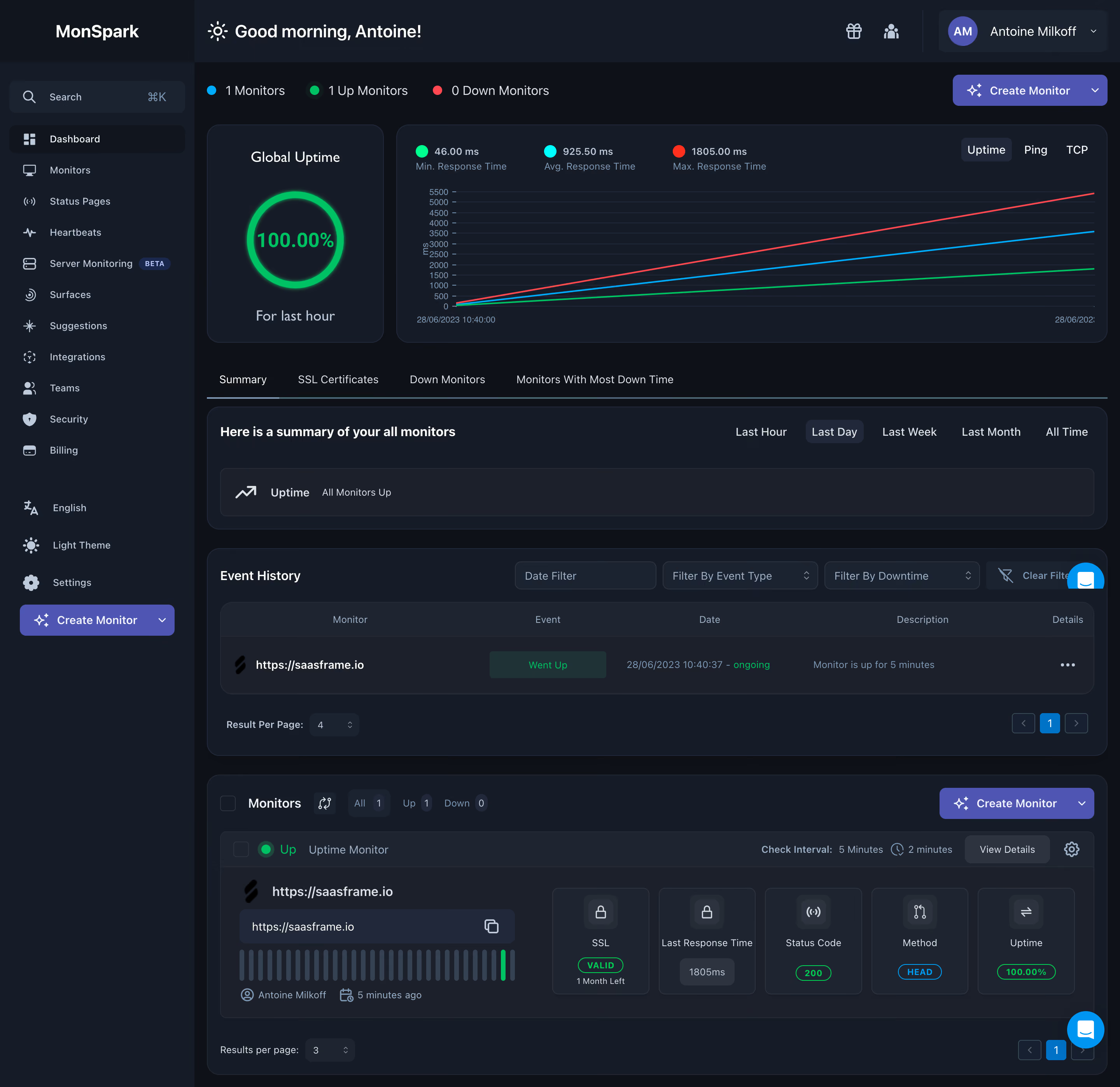
MonSpark Dashboard

MonSpark
All In One Website Monitoring
Designed by
No items found.

Bookmark
Bookmark

Design with AI
Thank you! Your submission has been received!
Oops! Something went wrong while submitting the form.
# Design from Reference: MonSpark Dashboard
Create an original, high-fidelity visual design inspired by the reference. Prioritize composition, typography, colors, spacing, and component styling over technical implementation.
## Reference
- **Product:** MonSpark
- **Category:** Dashboard
- **Screenshot:** https://cdn.prod.website-files.com/5e9dc792e1210c5325f7ebbc/6acb65c7b206c0d3f8f0f70b_6acb650badcf005a3c5d34f9_cms-7e220c903ca1c9b56bde7001.webp
Analyze the screenshot first. If inaccessible, request it rather than guessing.
## Content
{{content.instructions}}
{{content.data}}
Preserve essential messaging and factual accuracy. Adapt structure and copy length for visual balance; never invent product claims.
## Visual Design
### Overall aesthetic
- **Character:** Dense dark monitoring dashboard with slate cards, fine borders, compact controls and bright status colors.
- **Visual language:** A glowing green uptime ring, colored chart lines, status pills and tiny history bars emphasize operational health.
- **Scale:** The image measures 2880 × 2794 px. Dimensions below estimate a 1440 × 1397 CSS layout at 2× scale; browser zoom and device ratio are unverified.
### Page composition
- **Shell:** A roughly 250 CSS px sidebar contains search, monitoring destinations and utilities. A wide top bar has a greeting, small utility icons and account dropdown.
- **Top summary:** Monitor counts sit above a two-part row: a narrow Global Uptime card left and a much wider response-time chart right.
- **Summary section:** Four tabs precede a broad card with a time-range selector and a compact uptime-summary row.
- **Event history:** A large panel includes three filters, clear-filter control, one table row, page-size selector and pagination.
- **Monitor detail:** A lower panel combines filter counts and creation action with one expanded monitor. Its URL/history block sits left, with five metric tiles across the right.
- **Floating support:** Cyan chat controls are visible near the right edge at two vertical positions in this full-page capture.
### Information hierarchy
- **Health:** The top counts and 100% uptime ring establish an all-up state. The chart's minimum, average and maximum metrics are grouped above the plot.
- **Navigation:** Summary is active in the tab strip; Last Day is highlighted within its time-range controls, while the uptime card separately references the last hour.
- **History:** The event row uses a green status badge, timestamp and short description, with a trailing details menu.
- **Monitor specifics:** An Up marker precedes the monitor label; SSL, response time, status code, method and uptime receive separate tiles.
- **Action:** Purple Create Monitor buttons appear in the top toolbar, sidebar and lower panel. No creation or configuration is performed.
### Typography
- **Family:** Neutral sans-serif; exact family is unverified.
- **Header:** Greeting is approximately 24 CSS px at medium weight; panel titles around 16–18 px and bold.
- **Metrics:** Uptime numerals are roughly 28 px bold. Chart metric values and detail values are smaller, around 12–14 px.
- **Body/control text:** Approximately 14 px with compact 20 px leading. Muted metadata and table headers are around 12 px.
- **Hierarchy:** Bright/light text identifies main labels, while blue-gray captions and small timestamps recede.
### Colors & surfaces
- **Measured base:** ICC-aware sRGB sampling yields #161C27 for major panels and #0E1118 for the dark page ground.
- **Measured secondary tones:** #1B202B, #1F2530, #1B2331 and #212839 define nested cards, controls and table surfaces.
- **Measured action:** Purple #4E55B3 appears in creation buttons.
- **Measured outlines:** #2E343F and #262C36 occur in subtle separators and panel edges.
- **Status palette:** Bright green signifies up/valid health, cyan marks selected metrics/method and red identifies the maximum-response chart series. Labels accompany these colors.
- **Depth:** Panels rely mainly on fine borders and 14–16 px corners; the uptime ring adds a localized glow.
### Components
- **Uptime card:** A compact rounded card centers title, green circular progress ring, percentage and period caption.
- **Chart:** Three straight rising colored lines sit over fine horizontal grid lines, with time labels below and milliseconds on the vertical axis. Uptime/Ping/TCP choices sit top right.
- **Tabs/ranges:** Underlined section tabs and pill-like selected ranges organize views without large containers around each choice.
- **History table:** A darker header row labels five columns; the single body row has monitor identity, green event badge, date, description and ellipsis.
- **Filters:** Three compact dark outlined dropdown/date controls align horizontally above history, followed by a muted clear action.
- **Monitor tile:** An expanded bordered region includes an editable-looking URL/copy field, a row of narrow uptime bars and a top status/interval/action strip.
- **Metric tiles:** Five matching small rectangles use line icons, labels and compact values or outlined status pills.
- **Pagination:** Small previous/page/next controls and page-size selectors sit along panel bottoms.
### Visual rhythm
- **Main spacing:** Approximately 16–24 CSS px gaps separate cards and panels; internal sections share consistent horizontal insets.
- **Density progression:** The upper dashboard favors large visual summaries, while lower history/detail areas become progressively denser.
- **Alignment:** Panel edges and toolbars align to one broad content column; metric tiles share equal widths and vertical baselines.
- **Color rhythm:** Most content remains dark neutral, with operational color confined to chart marks, health badges and primary actions.
### Responsive
- **Evidence limit:** Only desktop is shown; the following are recommendations.
- **Shell/cards:** Collapse navigation and stack the uptime card above the chart on narrow screens.
- **Tables:** Preserve column meaning through horizontal scrolling or labeled stacked rows; do not reduce small text excessively.
- **Filters/metrics:** Wrap filters and convert five metric tiles to fewer columns.
- **Support:** Keep floating chat controls from obscuring table menus or pagination.
### Adaptation guidance
- **Reusable pattern:** Organize monitoring into health overview, temporal summary, event history and expanded resource metrics.
- **State clarity:** Keep period labels explicit and distinguish uptime from response-time values; the screenshot contains different periods in different sections.
- **Data integrity:** Treat plotted values and status as captured examples, not current operational facts.
- **Accessibility:** Pair colors with labels, expose chart summaries and provide keyboard access to filters, tabs, menus and pagination.
Use this context to reproduce the reference's visual language: layout, typography, colors, spacing, borders, radii, and distinctive elements. The screenshot takes priority if descriptions conflict.
## Direction
{{preferences.fidelityInstructions}}
## Output
{{output.instructions}}
Deliver a polished, cohesive design with precise alignment, hierarchy, and spacing. Produce the requested visual artifact, not just a description. If unsupported, explain the limitation.

.avif)
Category
Tech Stack


Added on
June 28, 2023
Similar screens



Upgrade to SaaSFrame Pro now to see similar examples.
Monthly
$18 /month
Billed $18 monthly
Browse all screens & flows
Filter and search screens & flows
Search text in screenshots
Access Figma files
Access mobile versions
Join now
Quarterly
$16 /month
Billed $48 quarterly
Browse all screens & flows
Filter and search screens & flows
Search text in screenshots
Access Figma files
Access mobile versions
Join now
Yearly
$15 /month
Billed $180 yearly
Browse all screens & flows
Filter and search screens & flows
Search text in screenshots
Access Figma files
Access mobile versions
Join now