Design with AI
Generate a new design based on this screen using your own content.
# Design from Reference: MonSpark Create Status Page
Create an original, high-fidelity visual design inspired by the reference. Prioritize composition, typography, colors, spacing, and component styling over technical implementation.
## Reference
- **Product:** MonSpark
- **Category:** Add & Edit
- **Screenshot:** https://cdn.prod.website-files.com/5e9dc792e1210c5325f7ebbc/6acb65c2b206c0d3f8f0f622_6acb6506994832179b5548de_cms-3d4d057f70933e77d0124adc.webp
Analyze the screenshot first. If inaccessible, request it rather than guessing.
## Content
{{content.instructions}}
{{content.data}}
Preserve essential messaging and factual accuracy. Adapt structure and copy length for visual balance; never invent product claims.
## Visual Design
### Overall aesthetic
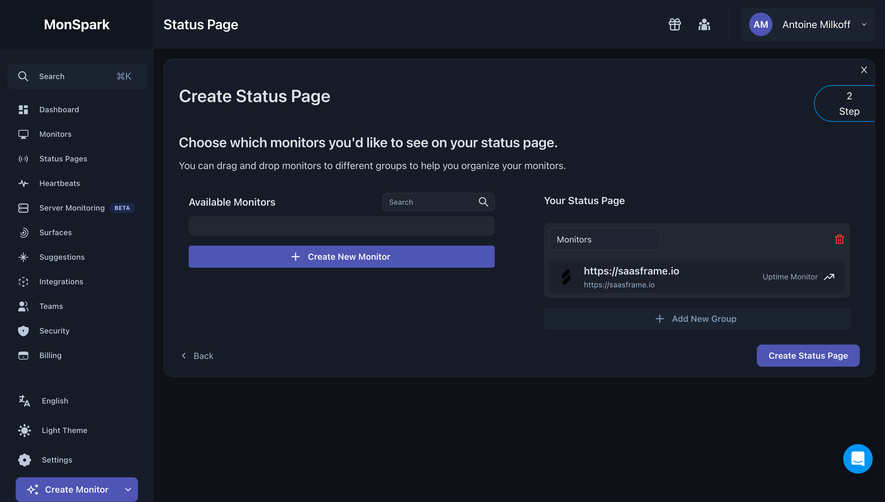
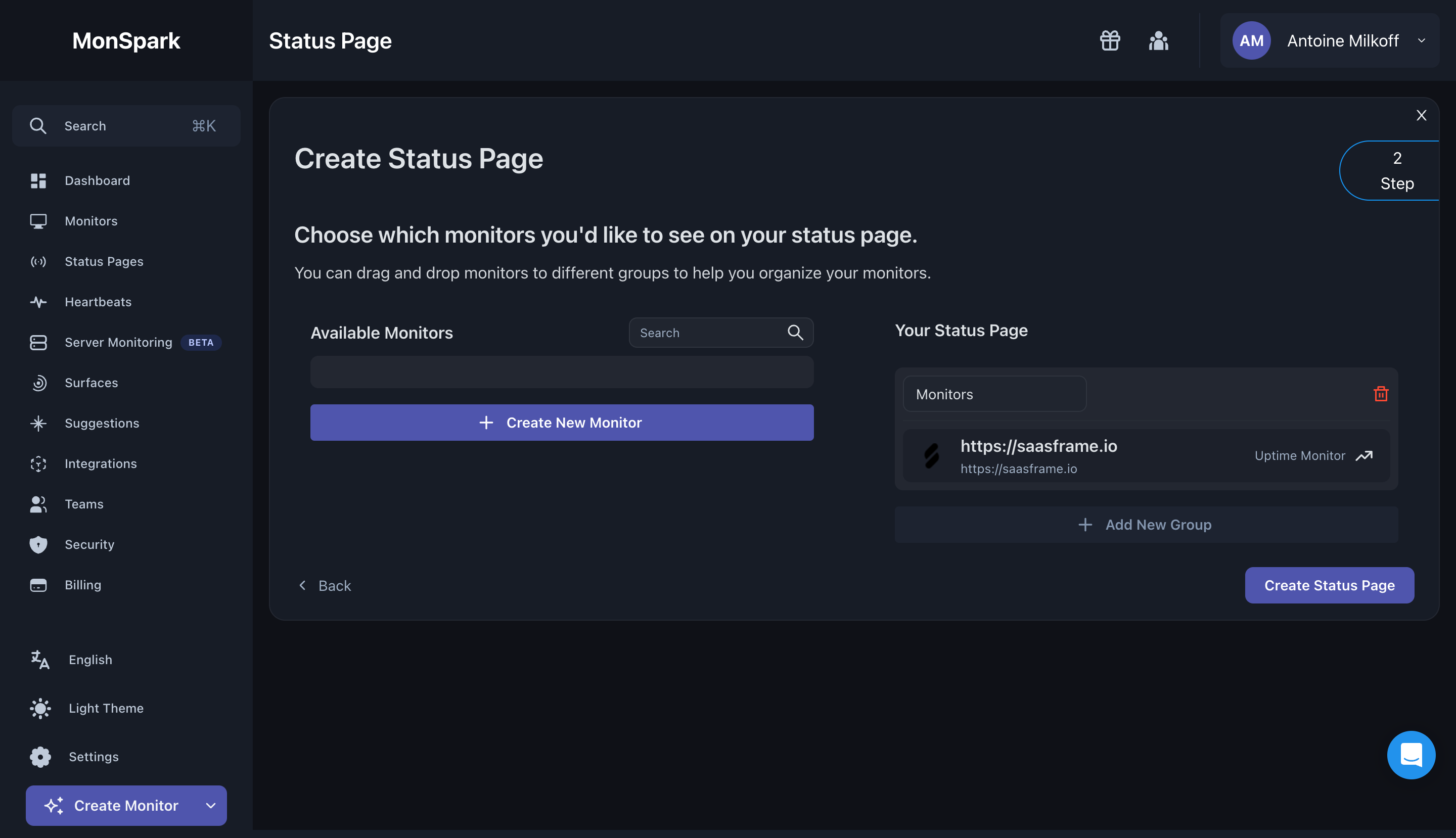
- **Style:** Dark monitoring dashboard with navy-charcoal layers, compact icon navigation and muted indigo actions.
- **Capture scale:** Source screenshot is 2880 × 1658px. Sizes below estimate a 1440px-wide CSS viewport at 2× capture scale.
### Page composition
- **Shell:** A roughly 250px left sidebar contains MonSpark branding, search, monitoring/navigation links and lower language/theme/settings controls. A top bar carries Status Page and account utilities.
- **Creation panel:** A large rounded panel begins near x266/y96 and spans almost the remaining width, approximately 1158 × 516px.
- **Working columns:** Available Monitors occupies the left half; Your Status Page occupies the right, with an existing monitor group.
- **Lower space:** A broad empty dark area sits below the creation panel, with a blue circular chat control at the lower right.
### Information hierarchy
- **Task:** Create Status Page is followed by a bold monitor-selection instruction and a smaller drag-and-drop explanation.
- **Available items:** The left column has a heading, compact search field, blank dark list strip and a full-width Create New Monitor action.
- **Destination:** The right column contains a named Monitors group, one monitor row and an Add New Group control.
- **Progression:** A small outlined Step 2 marker is partially clipped at the upper right. Back sits lower left; Create Status Page lower right.
### Typography
- **Family:** Neutral sans-serif; exact font identity is unverified.
- **Roles:** Estimated main title 28px semibold, instruction 22px medium, supporting copy 16px/22px, column headings 16px medium and compact navigation around 13px.
- **Data:** The monitor URL is approximately 16px semibold, with a smaller muted secondary URL and monitor-type label.
### Colors & surfaces
- **Sampled palette:** ICC-aware sRGB samples include navy #161C27, canvas #0E1118, raised #222732, blue-gray #1B2331, indigo #4E55B3 and secondary dark #1B202B.
- **Accents:** Indigo fills creation actions and account avatar. Bright blue outlines the step marker and fills chat; red identifies the group delete icon.
- **Contrast:** Off-white headings contrast with muted blue-gray navigation and helper text. Fine dark borders separate layered panels.
### Components
- **Main panel:** Approximately 16px corners, thin outline and around 24px internal padding; a small close icon sits at the upper right.
- **Search:** Compact rounded field around 180 × 30px, aligned beside Available Monitors, with a magnifying-glass icon.
- **Monitor group:** Raised dark container around 498px wide, with an editable-looking group-name field, red delete icon and darker nested monitor row.
- **Monitor row:** Provider/site mark left, bold URL plus secondary address, and Uptime Monitor text with a trend icon right.
- **Actions:** Create New Monitor spans the left column at about 36px high. Add New Group is a subdued full-width bar. Final creation action is a compact indigo rectangle with small rounded corners.
- **Sidebar:** Small pale outline icons precede labels; Server Monitoring carries a tiny Beta pill. The lower Create Monitor action includes a dropdown chevron.
### Visual rhythm
- **Alignment:** Both working columns share heading and control baselines. The destination group is slightly lower than the left search/header row.
- **Spacing:** Wide central gutter separates source and destination, while generous bottom space isolates Back and the final action.
- **Density:** Compact navigation and monitor rows contrast with the large blank canvas below the panel.
### Responsive
- **Recommended adaptation:** Only desktop is observed. Collapse the sidebar and stack available monitors above destination groups on narrow screens.
- **Interaction:** Provide an accessible alternative to drag-and-drop, keep group deletion distinct and allow URLs to wrap without hiding controls.
### Adaptation guidance
- **Preserve:** Keep the source/destination grouping model, explicit organization guidance and a clear final creation action.
- **Adapt:** Use real monitors and group names. Do not populate the blank available list with invented items or infer additional steps from the partially visible progress marker.
Use this context to reproduce the reference's visual language: layout, typography, colors, spacing, borders, radii, and distinctive elements. The screenshot takes priority if descriptions conflict.
## Direction
{{preferences.fidelityInstructions}}
## Output
{{output.instructions}}
Deliver a polished, cohesive design with precise alignment, hierarchy, and spacing. Produce the requested visual artifact, not just a description. If unsupported, explain the limitation.
.webp)


.avif)