.webp)
Thank you! Your submission has been received!
Oops! Something went wrong while submitting the form.
Get SaaSFrame Pro
Monthly
$18
Quarterly
$48
Yearly
$180
Upgrade to access this feature
Browse all screens & flows
Filter and search screens & flows
Access Figma files
Access mobile versions
Bookmark screens & flows
Join now
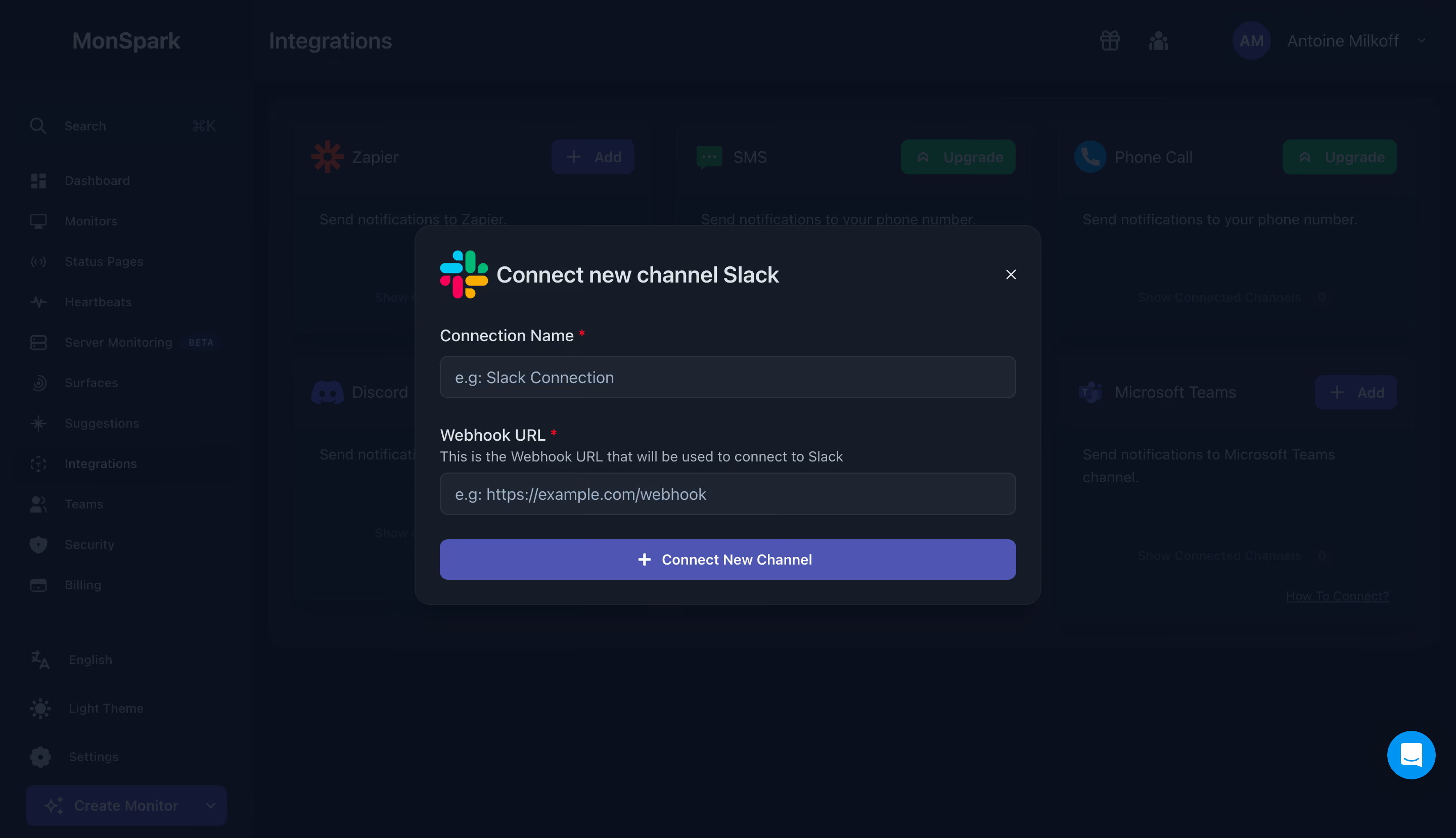
MonSpark Connect Slack Integration

MonSpark
All In One Website Monitoring
Designed by
No items found.

Bookmark
Bookmark

Design with AI
Thank you! Your submission has been received!
Oops! Something went wrong while submitting the form.
# Design from Reference: MonSpark Connect Slack Integration
Create an original, high-fidelity visual design inspired by the reference. Prioritize composition, typography, colors, spacing, and component styling over technical implementation.
## Reference
- **Product:** MonSpark
- **Category:** Integrations
- **Screenshot:** https://cdn.prod.website-files.com/5e9dc792e1210c5325f7ebbc/6acb65c5b206c0d3f8f0f667_6ac57454c67f47f0799af2c0_richtext-2240fddcd8b3c5bb3bab.webp
Analyze the screenshot first. If inaccessible, request it rather than guessing.
## Content
{{content.instructions}}
{{content.data}}
Preserve essential messaging and factual accuracy. Adapt structure and copy length for visual balance; never invent product claims.
## Visual Design
### Overall aesthetic
- **Style:** Dark monitoring dashboard with a centered integration dialog and a strongly dimmed background.
- **Character:** Cool slate surfaces, violet primary action and a full-color Slack mark create a functional technical interface.
- **Capture:** The screenshot measures 2880 × 1658 pixels. CSS estimates assume a 2× capture, equivalent to approximately 1440 × 829 CSS pixels; actual scale and font identity are unverified.
### Page composition
- **Underlying shell:** A roughly 250-pixel left sidebar contains search, monitoring navigation, account utilities and a bottom creation action.
- **Background page:** The Integrations heading sits above a multi-column grid of connection cards. Account controls occupy the upper right.
- **Modal placement:** A dialog approximately 620 × 376 CSS pixels is centered around x410, y223.
- **Dialog structure:** Slack branding and title share the top row with a close icon. Two labeled inputs stack vertically above a full-width connection button.
- **Persistent support:** A bright-blue circular chat launcher remains visible at the lower-right corner.
### Information hierarchy
- **Primary focus:** The modal is the only undimmed content region, clearly taking priority over the integrations grid.
- **Identity:** The Slack logo precedes a large connection title, identifying the channel being configured.
- **Field hierarchy:** Connection name comes first, then webhook URL with a smaller explanatory sentence.
- **Required state:** Small red asterisks mark both labels as required.
- **Submission:** The wide violet button is the dominant action; the small close icon provides dismissal.
- **Background scope:** Other integration cards and sidebar items are visible only as context under the scrim; their detailed states should not be inferred.
### Typography
- **Family:** A compact sans-serif is visible; exact font identity is unverified.
- **Dialog title:** Approximately 24-pixel CSS size, semibold, with about 30-pixel line height.
- **Field labels:** Approximately 16 pixels, medium weight.
- **Helper text:** Approximately 14 pixels with 20-pixel line height, muted gray-blue.
- **Placeholders:** Approximately 16 pixels, regular weight, in a lighter cool blue-gray.
- **Primary action:** Approximately 14–15 pixels, semibold, with white text and a plus icon.
### Colors & surfaces
- **Measured dark palette:** Prominent samples include #0B111E, #090F1C and #0A121F across the dimmed workspace.
- **Measured modal surface:** #161C27 supports the dialog; #1F2530 appears among the input-surface pixels.
- **Measured primary action:** Violet #4E55B3 fills the wide submission button.
- **Text hierarchy:** Bright cool-gray labels contrast with more muted helper and placeholder text.
- **Accent roles:** Red required markers and Slack's multicolor symbol provide local cues; the lower-right support launcher is bright blue.
- **Layering:** A dark scrim suppresses the entire workspace. The dialog uses a subtle outline and rounded corners rather than a bright elevated card.
### Components
- **Dialog:** Approximately 620 pixels wide with 16-pixel corners and 24-pixel padding.
- **Header:** A roughly 48-pixel Slack logo sits beside the title; an X close control aligns at the upper right.
- **Inputs:** Approximately 570 × 42 CSS pixels, with 8-pixel corners, dark-gray fill and thin lighter outlines.
- **Name field:** A short example placeholder communicates the desired connection label.
- **Webhook field:** A descriptive helper line sits between the label and input; the placeholder indicates a URL-shaped value.
- **Submission button:** Approximately 570 × 40 pixels, around 8-pixel corners, centered plus icon and Connect New Channel label.
- **Integration grid:** Dimmed cards show recognizable service icons and Add or Upgrade controls; these remain background context.
- **State scope:** Both fields are empty, with no validation error, loading indicator or successful connection feedback.
### Visual rhythm
- **Insets:** The title, labels, inputs and primary action share a consistent left/right alignment.
- **Field spacing:** Roughly 24–30 CSS pixels separate the first input from the second label group.
- **Helper grouping:** The URL helper sits closely beneath its label, keeping explanation and input together.
- **Action spacing:** Approximately 24 pixels separate the second input from submission.
- **Modal focus:** The centered medium-width panel and wide dark margins eliminate competition from the dense underlying application.
### Responsive
- **Recommendation — width:** Make the modal fluid with 16–24-pixel viewport gutters and preserve its internal alignment.
- **Recommendation — scrolling:** Allow dialog-body scrolling on short screens while keeping dismissal and submission reachable.
- **Recommendation — fields:** Keep webhook values horizontally manageable and use a URL-appropriate input mode.
- **Recommendation — focus:** Trap focus within the modal, provide a labeled close control and restore focus on dismissal.
- **Recommendation — support overlay:** Ensure the chat launcher does not obscure dialog actions. No mobile modal state is shown.
### Adaptation guidance
- **Preserve the small task:** Keep channel identity, connection name, webhook guidance and submission together in one focused dialog.
- **Reuse dark tokens:** Apply the sampled slate surfaces and violet action consistently across related integration forms.
- **Keep labels explicit:** Retain required markers and explain webhook purpose adjacent to the field.
- **Distinguish modal from workspace:** Use a consistent scrim and rounded dialog treatment while preserving recognizable background context.
- **Define feedback states:** Add field validation, connection progress and success/failure feedback separately; none is evidenced here.
- **Maintain safe interaction:** Make dismissal and keyboard operation clear without requiring interaction with the dimmed page.
Use this context to reproduce the reference's visual language: layout, typography, colors, spacing, borders, radii, and distinctive elements. The screenshot takes priority if descriptions conflict.
## Direction
{{preferences.fidelityInstructions}}
## Output
{{output.instructions}}
Deliver a polished, cohesive design with precise alignment, hierarchy, and spacing. Produce the requested visual artifact, not just a description. If unsupported, explain the limitation.

.avif)
Category
Tech Stack


Added on
June 28, 2023
Similar screens




Upgrade to SaaSFrame Pro now to see similar examples.
Monthly
$18 /month
Billed $18 monthly
Browse all screens & flows
Filter and search screens & flows
Search text in screenshots
Access Figma files
Access mobile versions
Join now
Quarterly
$16 /month
Billed $48 quarterly
Browse all screens & flows
Filter and search screens & flows
Search text in screenshots
Access Figma files
Access mobile versions
Join now
Yearly
$15 /month
Billed $180 yearly
Browse all screens & flows
Filter and search screens & flows
Search text in screenshots
Access Figma files
Access mobile versions
Join now