Design with AI
Generate a new design based on this screen using your own content.
# Design from Reference: Monday Video Tour
Create an original, high-fidelity visual design inspired by the reference. Prioritize composition, typography, colors, spacing, and component styling over technical implementation.
## Reference
- **Product:** Monday
- **Category:** Product Video
- **Screenshot:** https://cdn.prod.website-files.com/5e9dc792e1210c5325f7ebbc/6acbd3c9b735ec7976bf4454_6acbd1c78fba92542f0338bc_cms-3e872e78b01e5a2a797696bd.webp
Analyze the screenshot first. If inaccessible, request it rather than guessing.
## Content
{{content.instructions}}
{{content.data}}
Preserve essential messaging and factual accuracy. Adapt structure and copy length for visual balance; never invent product claims.
## Visual Design
### Overall aesthetic
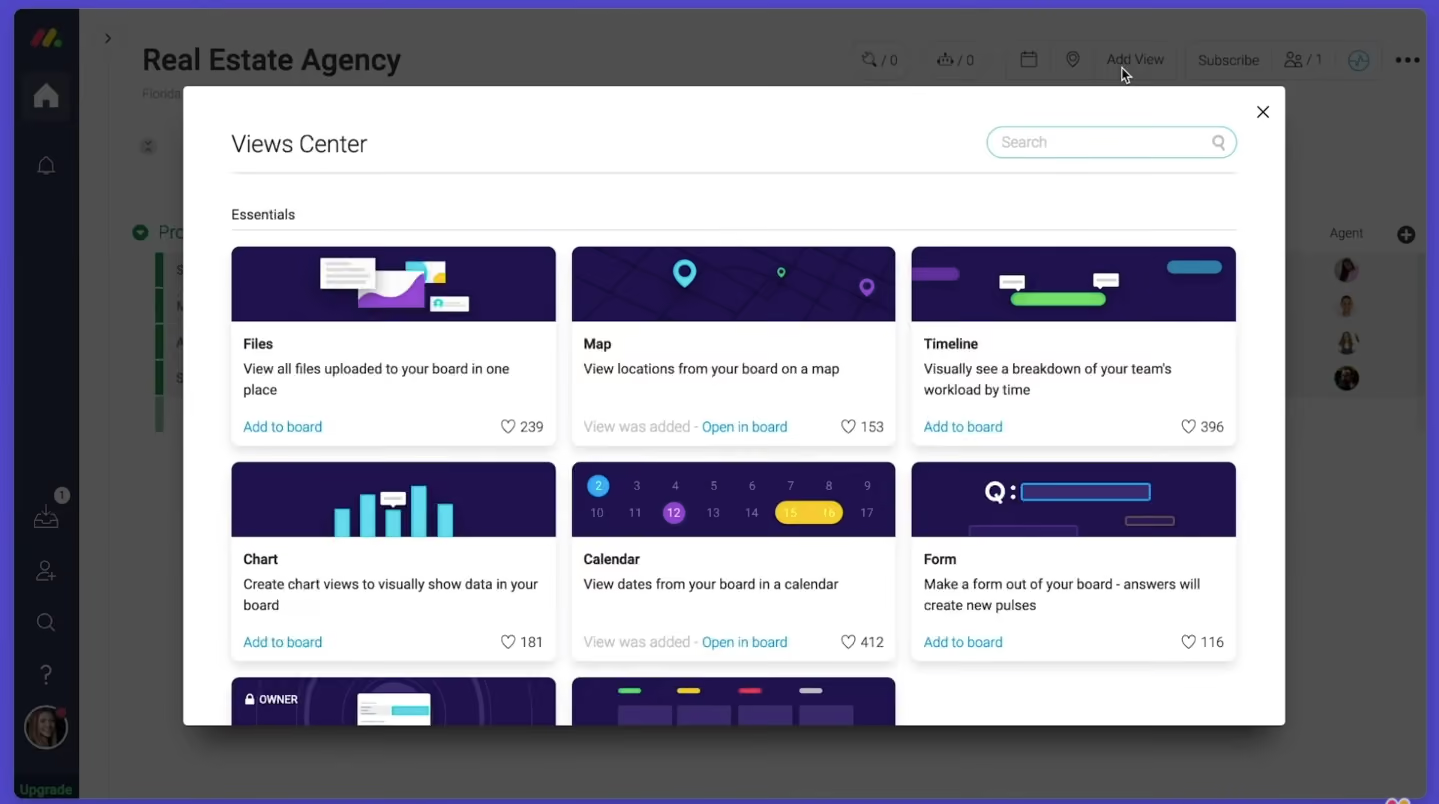
- **Style:** White marketplace-style modal displaying available board views over a dimmed work-management interface.
- **Character:** Three-column card grid, dark-purple thumbnails, compact labels, and teal links.
### Page composition
- **Canvas:** 1439 × 804 screenshot px.
- **Modal:** Approximately 1100 × 640px, centered, with a white surface and strong lower shadow.
- **Header:** Views Center title at left, pill-shaped search at right, close X in upper-right corner.
- **Body:** Essentials label above three columns of cards; two full rows and part of another are visible.
- **Background:** Board title, left dark navigation rail, table, and utility actions remain dimly visible.
### Information hierarchy
- **Primary:** Modal title and view-card artwork.
- **Cards:** View name precedes short description and add/open link.
- **State:** Muted View was added label separates installed views from available choices.
- **Social signal:** Heart icon and count at the lower-right of each card.
### Typography
- **Family:** Interface sans serif; exact family unverified.
- **Modal title:** Approximately 24 screenshot px, regular weight.
- **Card titles and descriptions:** Approximately 14px, titles bold.
- **Section label:** Approximately 14px.
- **Search text:** Approximately 14px.
- **Precision:** Font metrics are screenshot estimates.
### Colors & surfaces
- **Modal:** #FFFFFF.
- **Dimmed background:** Approximately #4F4F4F.
- **Thumbnail purple:** #20124E, with nearby #20124D shade.
- **Dark underlying navigation:** Approximately #0E1019.
- **Links:** Muted teal; exact token unverified.
- **Borders:** Light gray card edges and subtle separators.
- **Shadow:** Soft, broad dark shadow beneath the dialog.
- **Precision:** Background samples include overlay; WebP compression affects shades.
### Components
- **Cards:** Approximately 325 × 200px, rounded corners and soft elevation.
- **Artwork:** Wide purple banner with stylized Files, Map, Timeline, Chart, Calendar, and Form illustrations.
- **Body:** White area with padded title/description and footer link.
- **Search:** Narrow rounded outlined field with search icon at right.
- **Close:** Small unboxed X.
- **Overflow:** Lower row is clipped by dialog viewport, indicating scrollable content visually.
### Visual rhythm
- **Grid:** Approximately 16px gutters and consistent card heights.
- **Header separation:** Fine divider beneath title/search.
- **Card rhythm:** Illustration, title, two-line description, then footer status/actions.
- **Whitespace:** Compact catalog density contrasts with broad modal margins.
### Responsive
- **Observed:** Desktop catalog modal only.
- **Recommendation:** Reduce grid to two then one column, preserve search access, and allow dialog-body scrolling.
- **Controls:** Keep close and add/open actions accessible.
- **Artwork:** Preserve consistent banner aspect ratios.
### Adaptation guidance
- **Preserve:** Searchable catalog, consistent preview cards, concise descriptions, and installed/available distinction.
- **Content:** Use actual supported view types and meaningful previews.
- **State fidelity:** Record title says Video Tour, but the visible frame is a Views Center catalog; describe the visible frame.
- **Behavior:** Search, install, and scrolling are not demonstrated interactively.
Use this context to reproduce the reference's visual language: layout, typography, colors, spacing, borders, radii, and distinctive elements. The screenshot takes priority if descriptions conflict.
## Direction
{{preferences.fidelityInstructions}}
## Output
{{output.instructions}}
Deliver a polished, cohesive design with precise alignment, hierarchy, and spacing. Produce the requested visual artifact, not just a description. If unsupported, explain the limitation.
.webp)



.avif)