Design with AI
Generate a new design based on this screen using your own content.
# Design from Reference: Monday User Onboarding
Create an original, high-fidelity visual design inspired by the reference. Prioritize composition, typography, colors, spacing, and component styling over technical implementation.
## Reference
- **Product:** Monday
- **Category:** User Onboarding
- **Screenshot:** https://cdn.prod.website-files.com/5e9dc792e1210c5325f7ebbc/6acbc691edc235600abc9303_6acbc100405d8e0fbc3aa4f6_cms-0d00cc90d880f8957de9b77d.webp
Analyze the screenshot first. If inaccessible, request it rather than guessing.
## Content
{{content.instructions}}
{{content.data}}
Preserve essential messaging and factual accuracy. Adapt structure and copy length for visual balance; never invent product claims.
## Visual Design
### Overall aesthetic
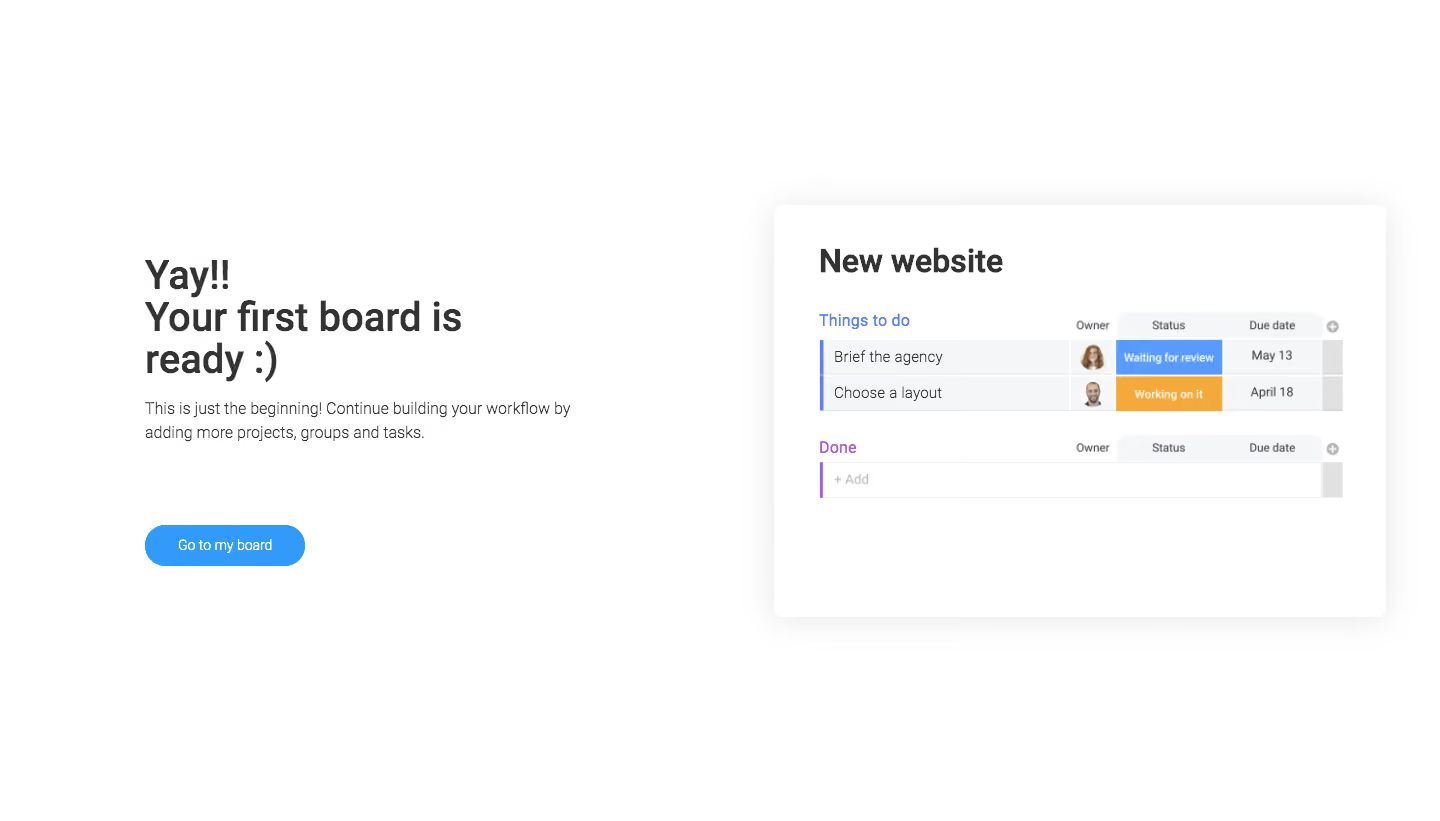
- **Character:** A sparse onboarding completion screen, combining a celebratory text block with a realistic miniature project board on white.
- **Evidence scale:** Original 1440 × 821 pixels. Dimensions below are approximate image pixels; a 1× CSS relationship is plausible but unverified.
### Page composition
- **Left region:** A roughly 430 px copy column begins around x145, y255; its heading wraps across three lines.
- **Right region:** An approximately 612 × 412 px white board-preview card begins around x774, y205.
- **Action:** A small blue pill button sits below the left copy, with a much larger gap than the heading-to-paragraph spacing.
- **Canvas:** Large unused margins surround both regions; no global navigation or footer is visible.
### Information hierarchy
- **Completion message:** The bold three-line heading leads; a two-line paragraph explains that the workflow can continue.
- **Board preview:** A large project title sits above two task groups, demonstrating the board structure rather than adding another action.
- **Primary action:** Go to my board is the only prominent button and uses the screen's strongest blue fill.
- **Task state:** Colored status cells and circular owner portraits make the miniature board understandable at a glance.
### Typography
- **Heading:** Unverified sans-serif, approximately 40 px bold, 42 px line height and slightly tight tracking.
- **Supporting copy:** Approximately 16 px regular, 24 px line height, in medium gray.
- **Preview title:** Around 32 px bold; group headings around 16 px regular.
- **Table roles:** Task labels around 14 px, column headings and status labels approximately 11–12 px; button label around 14 px medium.
### Colors & surfaces
- **Base:** Measured #FFFFFF dominates the canvas and preview.
- **Text:** Dark #333333 headings with softer gray paragraph and task text.
- **Structure:** Pale #F5F6F8 table rows and light rules define the miniature grid.
- **Accents:** Sampled #319AFB appears in the blue action family; the preview also uses periwinkle group markers, a purple completed-group marker, blue review status and orange working status.
### Components
- **Preview shell:** Approximately 8 px radius with a broad, very soft gray shadow; roughly 44 px internal side padding.
- **Task table:** Two populated rows align task names, owner portraits, status and due date columns, followed by a second group with an empty add row.
- **Status cells:** Solid blue and orange rectangular fills with small centered white labels.
- **Group markers:** Thin vertical colored bars sit at the left edge of each group; compact plus icons appear at the far right of the headers.
- **Main button:** Approximately 160 × 40 px with a fully rounded silhouette, centered white text and no visible icon.
### Visual rhythm
- **Copy spacing:** Approximately 20 px separates heading and explanatory copy, while the action sits roughly 80 px below the paragraph.
- **Preview spacing:** The project title has generous space before the first group; a roughly 24 px gap separates the two groups.
- **Alignment:** Copy and button share one left edge; the card's task columns stay tightly aligned to contrast with the airy outer layout.
### Responsive
- **Observed limit:** Only a wide-screen composition is visible.
- **Recommendation:** Stack the text and preview at narrow widths, keeping the completion message and button before the illustrative board.
- **Preview handling:** Preserve readable column labels through a simplified mobile illustration or a scrollable preview instead of shrinking the entire table excessively.
### Adaptation guidance
- **Retain:** Pair a short success message with a concrete preview of the user's next destination.
- **Implement:** Use one blue action, generous white space and a subtly elevated preview card.
- **Verify:** Confirm fonts and real navigation behavior independently; the screenshot establishes completion appearance, not a tested transition.
Use this context to reproduce the reference's visual language: layout, typography, colors, spacing, borders, radii, and distinctive elements. The screenshot takes priority if descriptions conflict.
## Direction
{{preferences.fidelityInstructions}}
## Output
{{output.instructions}}
Deliver a polished, cohesive design with precise alignment, hierarchy, and spacing. Produce the requested visual artifact, not just a description. If unsupported, explain the limitation.
.webp)



.avif)