Design with AI
Generate a new design based on this screen using your own content.
# Design from Reference: Mixpanel Sign Up Flow
Create an original, high-fidelity visual design inspired by the reference. Prioritize composition, typography, colors, spacing, and component styling over technical implementation.
## Reference
- **Product:** Mixpanel
- **Category:** Signup
- **Screenshot:** https://cdn.prod.website-files.com/5e9dc792e1210c5325f7ebbc/6acbc93a1790037d3e058ffe_6acbc64df145f33405de1b65_cms-756d000612062ca66ea29afc.webp
Analyze the screenshot first. If inaccessible, request it rather than guessing.
## Content
{{content.instructions}}
{{content.data}}
Preserve essential messaging and factual accuracy. Adapt structure and copy length for visual balance; never invent product claims.
## Visual Design
### Overall aesthetic
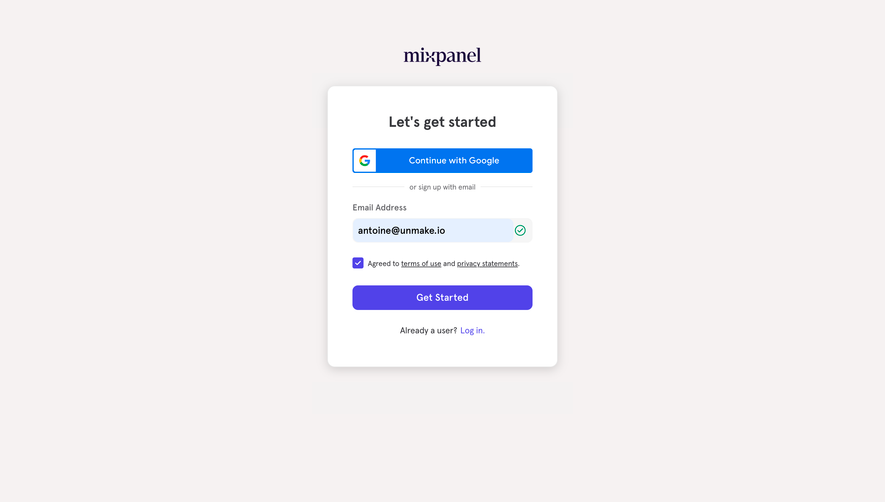
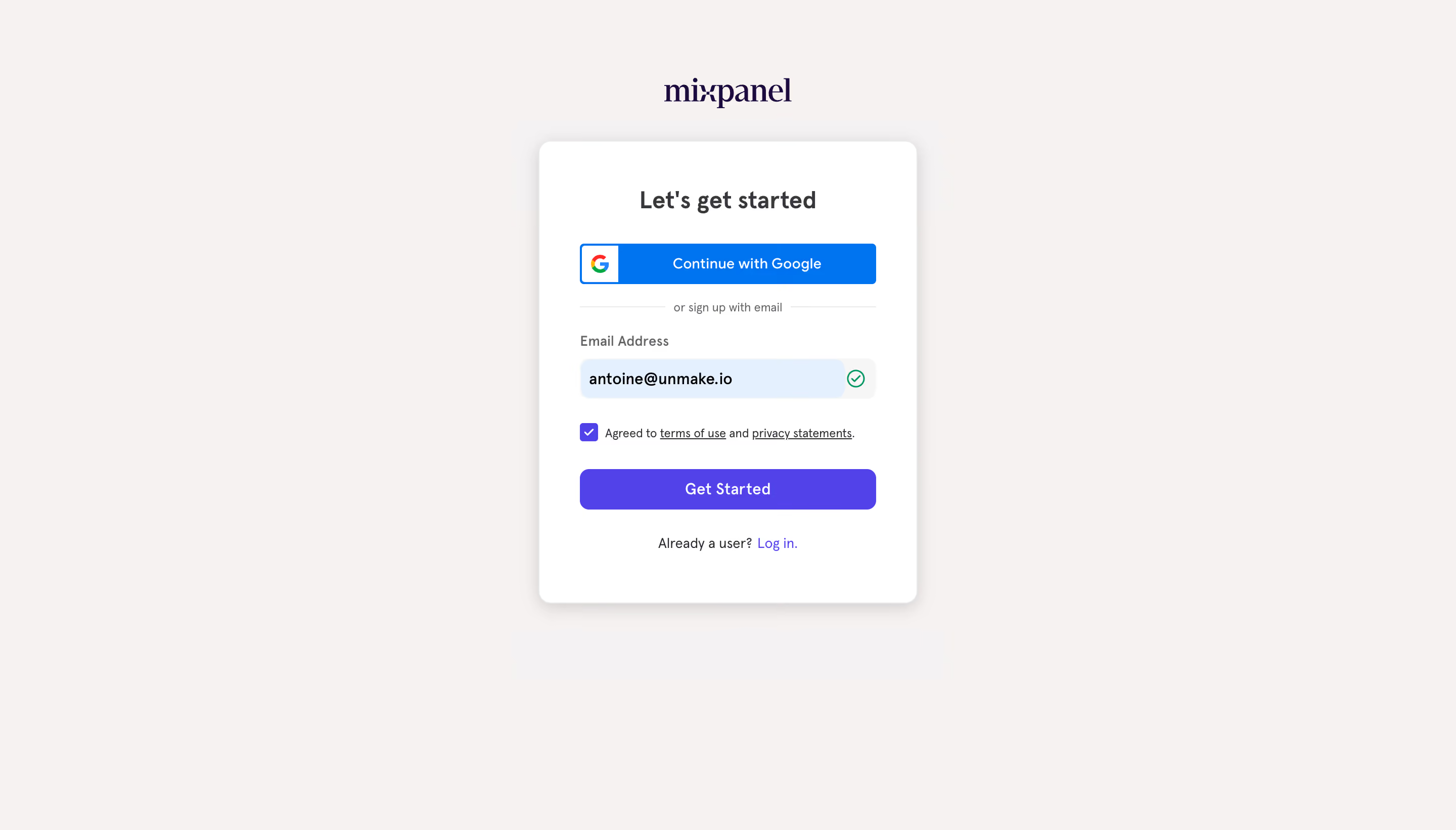
- **Character:** A compact signup card floats on a warm near-white canvas, using blue provider authentication and a purple primary action.
- **Tone:** A serif-style wordmark contrasts with simple sans-serif form content; soft shadow and rounded corners keep the layout approachable.
### Page composition
- **Capture scale:** The source measures 2880 × 1642 image pixels. CSS estimates below assume a 2× capture; device-pixel ratio is unverified.
- **Centered frame:** A wordmark sits above a roughly 375 × 455 px CSS white card, centered horizontally and positioned above the viewport midpoint.
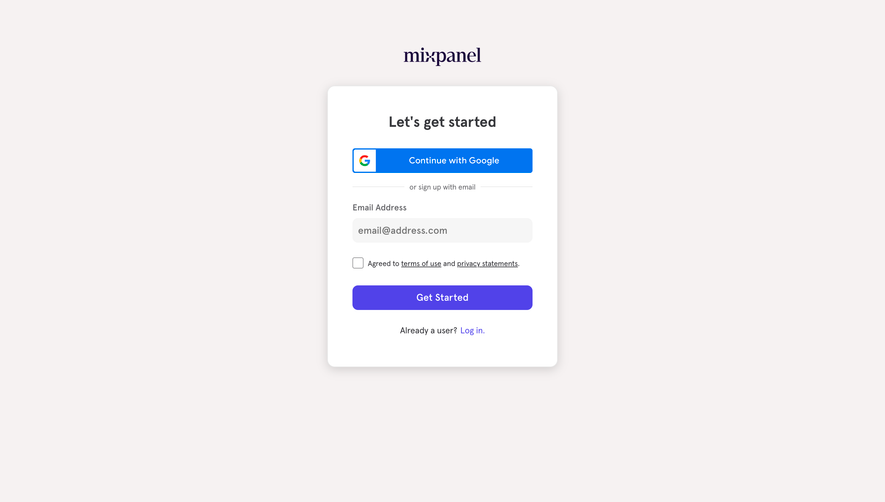
- **Form sequence:** Heading, Google action, divider, email field, checked agreement, primary signup button and login route form one vertical column.
- **Whitespace:** Broad empty margins surround the card; no additional navigation or footer is visible.
### Information hierarchy
- **Heading:** A short bold introduction leads the card.
- **Authentication routes:** Google appears first in blue, followed by a small email-alternative divider.
- **Validated entry:** The populated email field has a pale-blue area and green outlined check at the right.
- **Consent and continuation:** A checked purple box precedes small policy copy; the purple Get Started button spans the content width.
- **Existing users:** A centered login sentence sits at the card's bottom.
### Typography
- **Families:** The wordmark uses a serif treatment; the form uses sans serif. Exact font identities are unverified.
- **Heading:** Approximately 24 px CSS, bold, with 30 px leading.
- **Controls:** Button and input text are approximately 14–16 px; the email value is darker and heavier than its label.
- **Supporting text:** Divider and agreement copy are around 11–12 px, while the login line is around 13 px.
### Colors & surfaces
- **Measured foundation:** ICC-aware sRGB sampling yields warm #F6F2F2 and white #FFFFFF.
- **Measured actions:** Purple #5142E9 fills the main action; blue #0074F0 fills the Google control.
- **Measured input highlight:** Pale #E5F0FF supports the populated email state.
- **Status:** A green check communicates validation, while purple marks the checked agreement.
- **Depth:** A broad soft gray shadow lifts the card from the background.
### Components
- **Card:** Approximately 12 px CSS corners and around 40 px internal padding enclose the form.
- **Google button:** A full-width blue rectangle has a white provider-icon square at the left and centered white label.
- **Divider:** Thin pale lines flank a small email-alternative label.
- **Email input:** A roughly 295 × 40 px rounded field combines the entered value with a right-side status area.
- **Agreement:** A small filled square checkbox aligns beside inline underlined policy links.
- **Primary action:** A full-width purple button approximately 40 px high uses around 9 px corners.
### Visual rhythm
- **Vertical cadence:** Compact gaps connect labels and fields, while larger pauses distinguish authentication, consent and signup.
- **Alignment:** Provider action, field and primary button share equal widths and left edges.
- **Centered anchors:** Wordmark, card heading and final login line reinforce the symmetrical composition.
### Responsive
- **Evidence boundary:** Only a desktop state is shown; responsive behaviors are recommendations.
- **Fluid card:** Reduce outer gutters and allow the card to fit mobile width.
- **Policy wrapping:** Let agreement copy wrap without separating it from the checkbox.
- **Keyboard handling:** Keep the active field and continuation action accessible when a virtual keyboard opens.
### Adaptation guidance
- **Signup pattern:** Reuse provider-first authentication with a clear email alternative and existing-user route.
- **Validation:** Pair the green status icon with accessible validation text and define invalid/loading states separately.
- **Dynamic data:** Replace the captured email value with application data; do not embed personal identifiers.
- **Accessible controls:** Label fields and checkbox explicitly and preserve visible focus states.
- **Scale calibration:** Validate the assumed 2× capture scale before implementing dimensions.
Use this context to reproduce the reference's visual language: layout, typography, colors, spacing, borders, radii, and distinctive elements. The screenshot takes priority if descriptions conflict.
## Direction
{{preferences.fidelityInstructions}}
## Output
{{output.instructions}}
Deliver a polished, cohesive design with precise alignment, hierarchy, and spacing. Produce the requested visual artifact, not just a description. If unsupported, explain the limitation.
.webp)



.avif)