.webp)
Thank you! Your submission has been received!
Oops! Something went wrong while submitting the form.
Get SaaSFrame Pro
Monthly
$18
Quarterly
$48
Yearly
$180
Upgrade to access this feature
Browse all screens & flows
Filter and search screens & flows
Access Figma files
Access mobile versions
Bookmark screens & flows
Join now
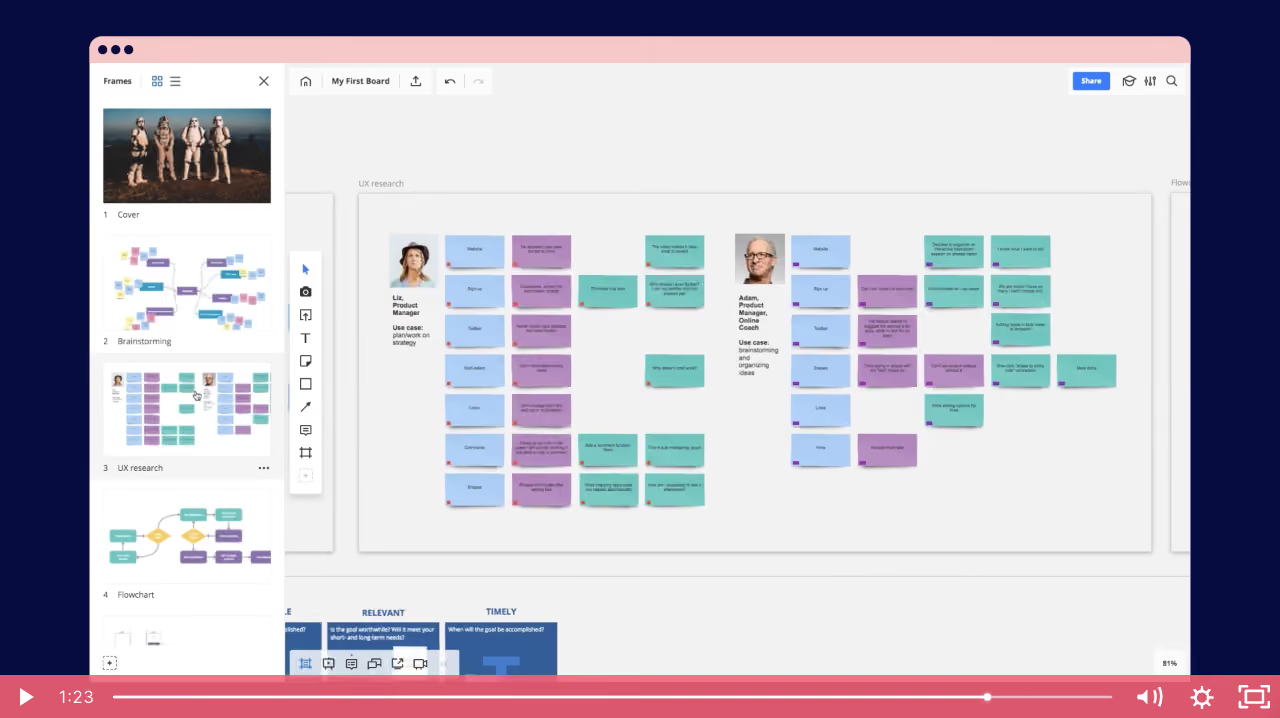
Miro Product Video

Miro
Visual Collaboration Software
Designed by
No items found.

Bookmark
Bookmark

Design with AI
Thank you! Your submission has been received!
Oops! Something went wrong while submitting the form.
# Design from Reference: Miro Product Video
Create an original, high-fidelity visual design inspired by the reference. Prioritize composition, typography, colors, spacing, and component styling over technical implementation.
## Reference
- **Product:** Miro
- **Category:** Product Video
- **Screenshot:** https://cdn.prod.website-files.com/5e9dc792e1210c5325f7ebbc/6acbd5f0ea7aaba35a8298f1_6acbd335151c40fa4079cdba_cms-4d1a616f18ed2b38de4c020e.webp
Analyze the screenshot first. If inaccessible, request it rather than guessing.
## Content
{{content.instructions}}
{{content.data}}
Preserve essential messaging and factual accuracy. Adapt structure and copy length for visual balance; never invent product claims.
## Visual Design
### Overall aesthetic
- **Style:** Product-demo video frame showing a collaborative whiteboard inside a stylized browser window.
- **Character:** Deep navy outer stage, pale-gray board, white application chrome and pastel sticky notes. Pink browser/player bands provide a distinctive presentation layer.
- **Evidence scope:** This is one captured video frame. Motion, narration, transitions and other video states are not established.
### Page composition
- **Capture dimensions:** 1280 × 718 image px. Geometry below follows screenshot pixels; CSS/video-display scale is unverified.
- **Outer stage:** Deep navy fills the background around a large inset browser-like application window.
- **Browser frame:** Rounded upper corners and a pale-pink top strip with three dark dots.
- **Frame navigator:** White left sidebar contains a Frames heading, small view controls and vertically stacked board thumbnails with numbered labels.
- **Application toolbar:** A shallow top row contains board identity, navigation/history controls and a blue Share action at right.
- **Canvas:** Pale-gray area centers a large UX-research frame with two persona groups, portraits, small text and many blue, purple and teal sticky notes.
- **Drawing tools:** A narrow floating vertical toolbar sits between the frame navigator and main canvas.
- **Player controls:** A full-width coral-pink strip overlays the bottom, containing play, time, progress, volume, settings and fullscreen controls.
### Information hierarchy
- **Primary demonstration:** The whiteboard content is the central focus, especially the two structured persona/sticky-note clusters.
- **Navigation hierarchy:** Thumbnail frames provide an overview while the main canvas shows the selected research area.
- **Tool hierarchy:** Small tool icons and the top toolbar remain secondary to board content.
- **Player hierarchy:** The bright lower strip clearly belongs to video playback rather than the whiteboard application.
- **Captured state:** A play triangle and timeline position are visible; do not infer playback activity or interaction beyond the static controls.
### Typography
- **Application family:** Compact neutral sans serif; exact identity is unverified.
- **Toolbar/sidebar:** Small text around 9–12 image px, with medium weight for board identity and frame labels.
- **Canvas content:** Very small persona labels and sticky-note copy, much of it unsuitable for precise transcription at this display scale.
- **Player time:** Approximately 16–18 image px, white.
- **Reconstruction guidance:** Preserve relative hierarchy and zoom behavior rather than treating tiny embedded canvas text as normal page body typography.
### Colors & surfaces
- **Outer background:** Sampled sRGB #060C3F supplies the deep navy stage.
- **Canvas:** Sampled #F2F2F2 supplies the pale-gray whiteboard.
- **Chrome:** Sampled #FFFFFF fills navigation and tool surfaces.
- **Player accent:** Sampled #DB576D supplies the coral-pink playback bar reference.
- **Browser strip:** Sampled #F6C8C7 supplies the pale-pink top band.
- **Sticky notes:** Light blue, lavender-purple and muted teal distinguish note groups. Exact note colors are not established by the dominant-color sample.
- **Shadows:** Subtle gray shadows lift sticky notes, frame boundaries and floating tools from the canvas.
### Components
- **Frame thumbnails:** White rectangular previews with small numeric captions; one research frame corresponds to the main visible content.
- **Research frame:** Large light rectangle with fine boundary/shadow, containing two portrait-led columns and repeated note grids.
- **Sticky notes:** Small colored rectangles with tiny text, occasional corner color markers and slight lower shadows.
- **Tool palette:** Narrow white floating strip with stacked drawing/content icons and soft shadow.
- **Share action:** Small blue rectangle with white text in the upper-right application chrome.
- **Timeline:** Thin white track across most of the lower bar, with a circular handle near the right side.
- **Playback controls:** White icon set, with larger volume/settings/fullscreen controls at the far right.
### Visual rhythm
- **Nested structure:** Navy stage, browser frame, application panes and board frames create layered context.
- **Grid repetition:** Repeated note sizes and two persona groupings organize dense content.
- **Color grouping:** Pastel note colors create visual categories without requiring large headings.
- **Presentation contrast:** Pink video controls and browser strip frame the quieter application content.
### Responsive
- **Evidence limit:** Only this video display is visible; recommendations below are not observed behavior.
- **Video recommendation:** Preserve the source aspect ratio and scale within the available container.
- **Readability recommendation:** Provide fullscreen/zoom or supplementary close-ups when small canvas text matters.
- **Controls recommendation:** Keep playback targets accessible and avoid covering important demonstration content.
- **Accessibility recommendation:** Supply captions, transcript and keyboard-accessible player controls where applicable; these features are not verified by the screenshot.
### Adaptation guidance
- **Separate layers:** Distinguish product UI from the surrounding video-player presentation.
- **Use real demonstration content:** Replace persona/sticky-note material with authorized target-product examples.
- **Preserve useful context:** Show navigation/tools only to the extent needed to explain the demonstrated workflow.
- **Avoid invented motion:** Do not describe unseen transitions or interactions from a single frame.
- **Maintain hierarchy:** Keep product content central and playback controls visually distinct.
Use this context to reproduce the reference's visual language: layout, typography, colors, spacing, borders, radii, and distinctive elements. The screenshot takes priority if descriptions conflict.
## Direction
{{preferences.fidelityInstructions}}
## Output
{{output.instructions}}
Deliver a polished, cohesive design with precise alignment, hierarchy, and spacing. Produce the requested visual artifact, not just a description. If unsupported, explain the limitation.

.avif)
Category
Patterns
No items found.
Tech Stack


Added on
May 5, 2020
Similar screens



Upgrade to SaaSFrame Pro now to see similar examples.
Monthly
$18 /month
Billed $18 monthly
Browse all screens & flows
Filter and search screens & flows
Search text in screenshots
Access Figma files
Access mobile versions
Join now
Quarterly
$16 /month
Billed $48 quarterly
Browse all screens & flows
Filter and search screens & flows
Search text in screenshots
Access Figma files
Access mobile versions
Join now
Yearly
$15 /month
Billed $180 yearly
Browse all screens & flows
Filter and search screens & flows
Search text in screenshots
Access Figma files
Access mobile versions
Join now