.webp)
Thank you! Your submission has been received!
Oops! Something went wrong while submitting the form.
Get SaaSFrame Pro
Monthly
$18
Quarterly
$48
Yearly
$180
Upgrade to access this feature
Browse all screens & flows
Filter and search screens & flows
Access Figma files
Access mobile versions
Bookmark screens & flows
Join now
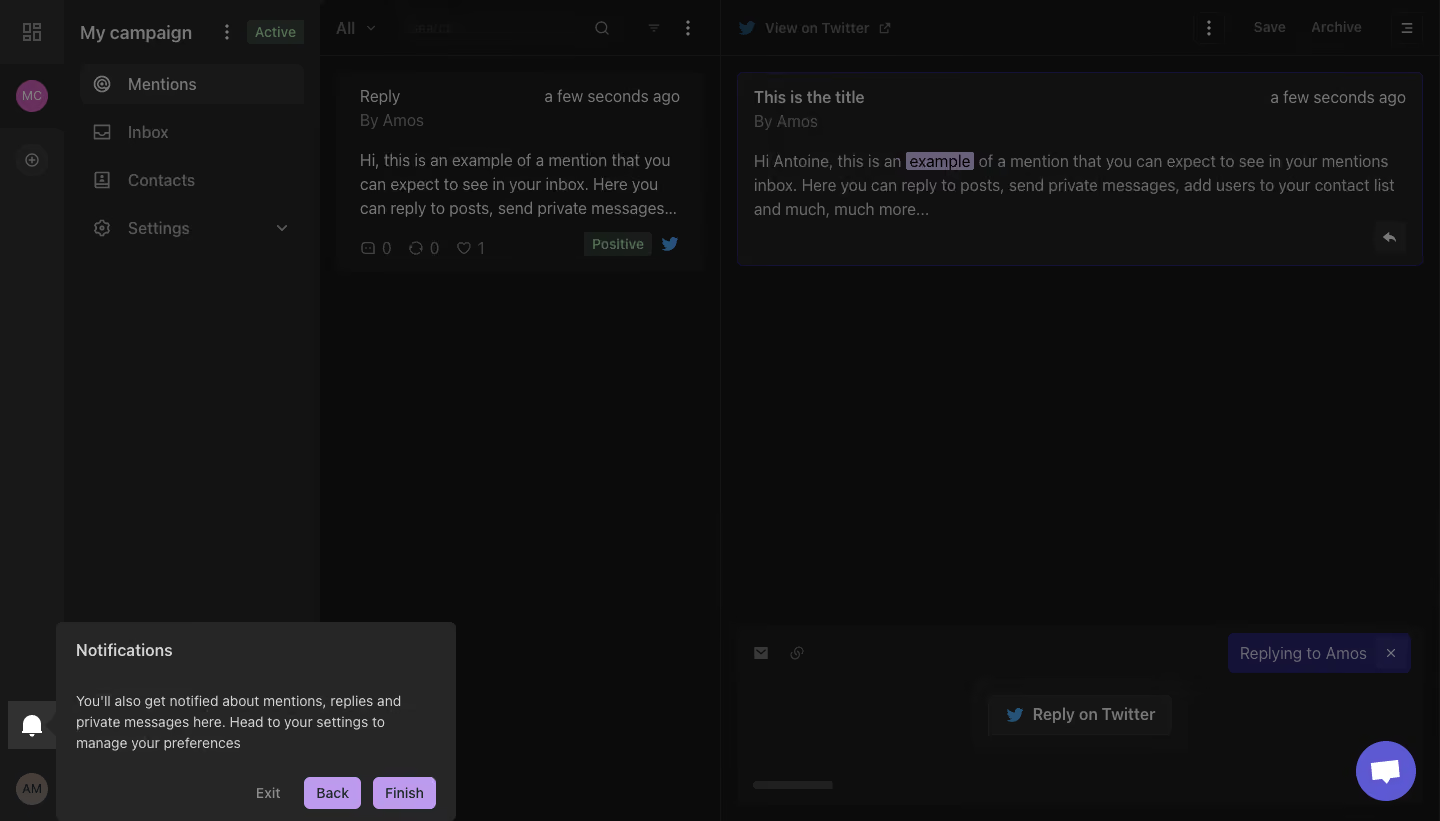
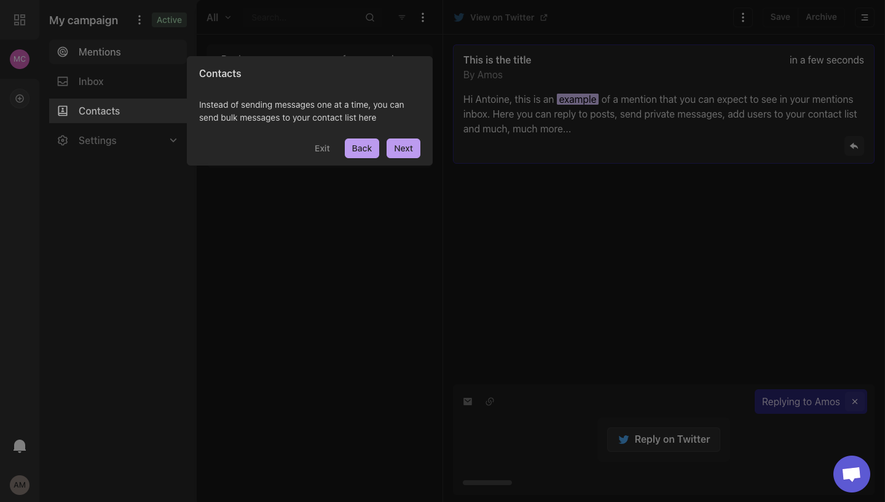
MentionFunnel Product Tour

MentionFunnel
Easily find new leads and activate them
Designed by
No items found.

Bookmark
Bookmark

Design with AI
Thank you! Your submission has been received!
Oops! Something went wrong while submitting the form.
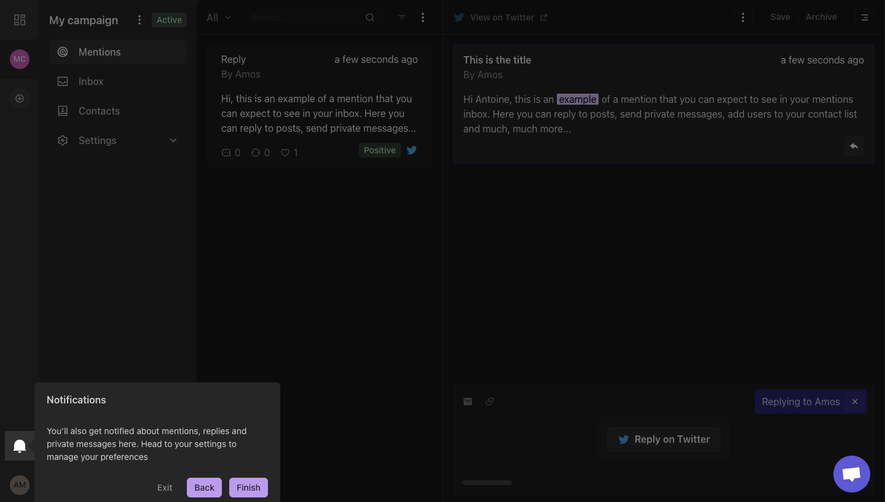
# Design from Reference: MentionFunnel Product Tour
Create an original, high-fidelity visual design inspired by the reference. Prioritize composition, typography, colors, spacing, and component styling over technical implementation.
## Reference
- **Product:** MentionFunnel
- **Category:** Product Tour
- **Screenshot:** https://cdn.prod.website-files.com/5e9dc792e1210c5325f7ebbc/6acbbbe8f023ce865170e0e5_6acbbb2bd37e66e942004b02_cms-11ec88b93783af11572bd44d.webp
Analyze the screenshot first. If inaccessible, request it rather than guessing.
## Content
{{content.instructions}}
{{content.data}}
Preserve essential messaging and factual accuracy. Adapt structure and copy length for visual balance; never invent product claims.
## Visual Design
### Overall aesthetic
- **Style:** Dense, dark desktop messaging workspace shown during a guided onboarding tour. A dimming scrim suppresses most of the application while a notification explanation remains prominent at the bottom left.
- **Character:** Compact navigation, thin panel dividers, muted message cards and a narrow lavender accent palette create a utilitarian social-monitoring interface.
- **Captured state:** This is an overlay state, not reliable evidence of the undimmed application's original colors. Preserve the distinction between sampled composited pixels and underlying theme values.
### Page composition
- **Capture dimensions:** 1440 × 821 image px. Dimensions below describe image-space geometry; approximate CSS reconstruction assumes an unverified 1× capture.
- **Global rail:** A roughly 64 px-wide strip spans the full left edge. An application-grid icon appears at the top, a circular campaign avatar below, an add control farther down, and notification/account controls near the bottom.
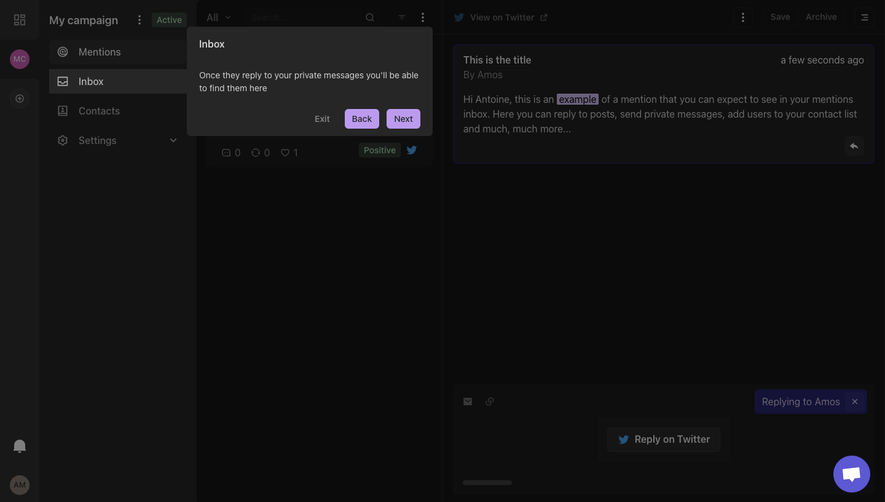
- **Campaign navigation:** A second sidebar extends from approximately x=64 to x=320. Its header contains the campaign name, overflow menu and an Active badge. Four stacked navigation options appear below, with Mentions selected.
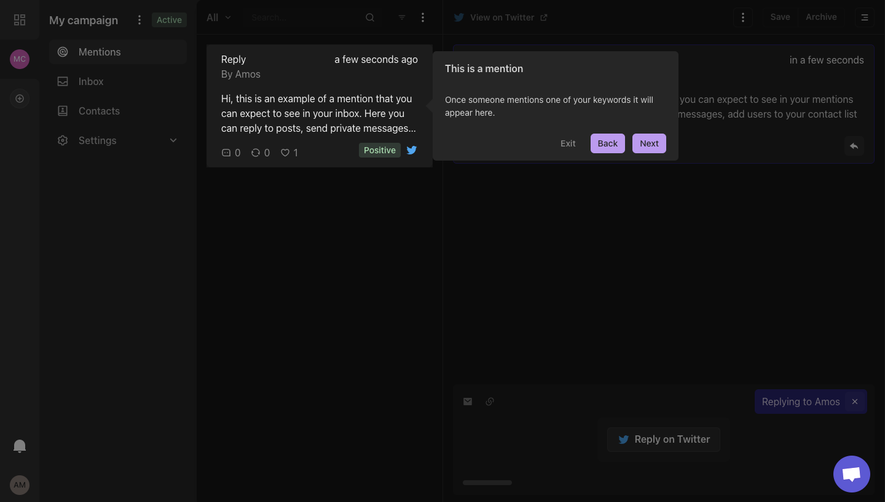
- **Message list:** The middle column runs from approximately x=320 to x=720, or about 400 px wide. A shallow toolbar contains the All selector, search field and compact utility icons; one message preview sits beneath it.
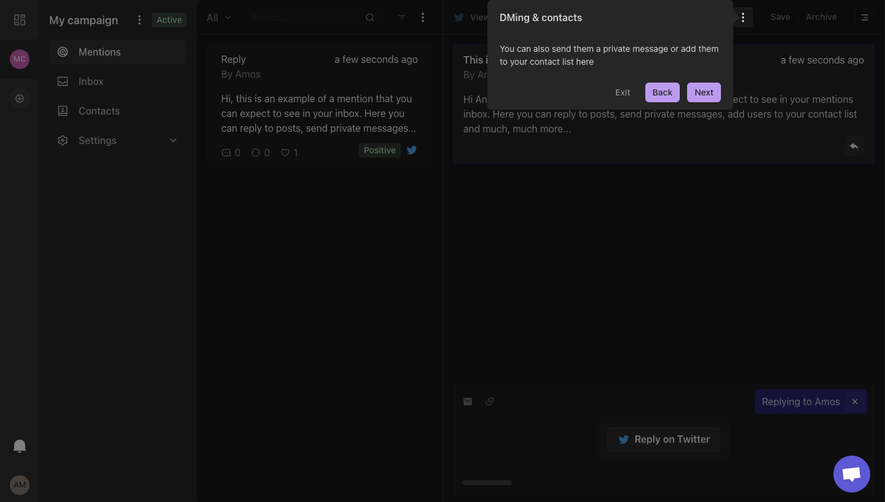
- **Conversation pane:** The remaining approximately 720 px-wide area contains a top action bar, a selected message card, a large empty central region and a bottom reply composer.
- **Tour positioning:** A rectangular tooltip begins around x=56, y=622 and measures approximately 400 × 199 px. Its left-facing pointer aligns with the highlighted bell control on the global rail.
- **Floating assistance:** A circular purple chat launcher sits near the bottom-right corner, separated from the reply composer controls.
### Information hierarchy
- **Tour priority:** The notification tooltip is the intended reading focus. Its brighter surface and text stand out against the darkened workspace; Back and Finish are the clearest colored actions.
- **Navigation hierarchy:** The global icon rail establishes account-level navigation, the campaign sidebar provides section navigation, and the message-list column presents individual items.
- **Message hierarchy:** The detail card starts with a bold short title, a quieter author line and a right-aligned relative timestamp. Paragraph content follows underneath.
- **State cues:** The campaign Active badge and the message Positive badge provide secondary status information. The selected navigation row and outlined conversation card provide location cues.
- **Action ordering:** Exit is visually subdued, Back is secondary within the tooltip and Finish occupies the final rightmost position. No behavior beyond these visible controls is established.
### Typography
- **Family:** Neutral application sans serif; exact family is unverified. Text shapes are compact and conventional, with no decorative display typography.
- **Sidebar and toolbar:** Approximately 16–18 image px, regular to medium weight, with compact line heights around 22–24 px.
- **Message content:** Approximately 16 px with about 24 px leading. Titles are slightly heavier; authors, timestamps and status labels use reduced contrast rather than a large size change.
- **Tooltip title:** Approximately 16–18 px, medium or semibold, positioned about 20 px from the left and 20–24 px from the top.
- **Tooltip paragraph:** Approximately 14 px with 20–22 px leading, wrapping across roughly three lines within a text width of about 350 px.
- **Tour actions:** Approximately 14 px, medium weight; short labels remain centered in compact buttons. All size and weight values are visual reconstruction estimates, not extracted font styles.
### Colors & surfaces
- **Dimmed canvas:** After ICC-aware conversion to sRGB where a profile is present, dominant sampled pixels include #0B0B0B, #0E0E0E, #111111 and #131313. These belong to the captured overlay composition and must not be presented as confirmed base-theme tokens.
- **Tour surface:** Sampled #262626 corresponds to the brighter charcoal notification tooltip. It remains distinctly lighter than the dimmed panels behind it.
- **Tour accent:** Sampled lavender #BC9BEF appears in the prominent tour-button region. Use this pale purple as the onboarding action accent, with dark text.
- **Underlying accents:** A dark violet sampled tone #141237 occurs in the dimmed interface. The message selection border, reply-state chip and highlighted inline word use related purple treatments, but their undimmed values are unknown.
- **Text contrast:** Tooltip text is light gray against charcoal; background workspace text is visibly dimmed. Choose accessible light text in the reconstructed tooltip rather than copying the scrim-darkened body text into a normal application state.
- **Support control:** The bottom-right chat launcher has a much brighter violet circular fill and a white speech symbol, visually distinct from the pale tour buttons.
### Components
- **Tooltip container:** Approximately 400 px wide with a subtle 5–7 px radius, charcoal fill and a small triangular pointer on its left edge. The screenshot shows no conspicuous border.
- **Tooltip action row:** Right-aligned near the bottom, with a quiet Exit text action followed by filled Back and Finish buttons. Buttons are approximately 56–64 px wide, 30–34 px high and separated by roughly 12 px.
- **Highlighted notification control:** A roughly 48 px square sits near the lower left rail. Its bright bell icon and stronger background identify the tour target beneath the pointer.
- **Selected navigation item:** A rounded horizontal row spans most of the campaign sidebar, with a mention icon and left-aligned label. Other rows use the same alignment with quieter surfaces.
- **Message preview:** A dark rounded card includes a reply label, author, timestamp, truncated paragraph, tiny engagement indicators and a sentiment badge. It uses compact internal spacing instead of large gutters.
- **Detail card:** A broad low-radius rectangle carries a thin violet outline and a small reply icon at its lower right. A highlighted word appears within its paragraph.
- **Composer:** A large bottom panel includes small communication icons, a purple replying-state chip with a close symbol, a centered Reply on Twitter button and a short muted horizontal line near the bottom.
- **Chat launcher:** Approximately 60 px in diameter at the original capture scale, inset about 24 px from the right and bottom edges.
### Visual rhythm
- **Column rhythm:** Strong vertical panel boundaries create an orderly four-part structure: rail, navigation, message list and detail view.
- **Density variation:** Compact toolbars and message cards occupy the top, while substantial empty space separates the selected message from the bottom composer.
- **Tour contrast:** The tooltip introduces the brightest text grouping near the lower left, shifting attention away from the otherwise dominant right-hand conversation pane.
- **Spacing:** Application controls use close 12–20 px intervals; the tooltip uses more generous approximately 20 px padding and a distinct gap before its action row.
### Responsive
- **Evidence limit:** Only a desktop capture is visible. The following are recommendations rather than observed behavior.
- **Pane recommendation:** On narrow screens, show one principal content pane at a time and provide explicit back navigation between the message list and conversation detail.
- **Tour recommendation:** Clamp tooltip width to the viewport with at least 16 px margins, reposition its pointer to the actual target and keep all actions visible above safe-area insets.
- **Control recommendation:** Increase compact tour-button and icon hit areas toward 44 px without making the desktop visual treatment unnecessarily large.
- **Collision recommendation:** Move or temporarily hide the chat launcher if it obstructs the composer or guided-tour actions.
### Adaptation guidance
- **Preserve the interaction pattern:** Anchor a concise explanation to one clearly highlighted control, dim unrelated interface regions and provide visible progress/navigation actions.
- **Adapt the copy:** Replace the notification explanation with accurate instructions for the target product; retain the short title, compact paragraph and clear final action.
- **Separate theme layers:** Implement the normal application palette and the overlay scrim independently. Do not use dimmed screenshot samples as the base text palette.
- **Keep structural clarity:** Retain the hierarchy between account rail, section navigation, item list and item detail only when the new workflow needs those levels.
- **Accessibility recommendation:** Provide keyboard focus handling, readable contrast, an explicit exit path and tooltip placement that remains usable at increased text sizes. These are implementation recommendations, not features verified from the screenshot.
Use this context to reproduce the reference's visual language: layout, typography, colors, spacing, borders, radii, and distinctive elements. The screenshot takes priority if descriptions conflict.
## Direction
{{preferences.fidelityInstructions}}
## Output
{{output.instructions}}
Deliver a polished, cohesive design with precise alignment, hierarchy, and spacing. Produce the requested visual artifact, not just a description. If unsupported, explain the limitation.

.avif)
Category
Patterns
Tech Stack
No items found.
Added on
February 24, 2023


Similar screens




Upgrade to SaaSFrame Pro now to see similar examples.
Monthly
$18 /month
Billed $18 monthly
Browse all screens & flows
Filter and search screens & flows
Search text in screenshots
Access Figma files
Access mobile versions
Join now
Quarterly
$16 /month
Billed $48 quarterly
Browse all screens & flows
Filter and search screens & flows
Search text in screenshots
Access Figma files
Access mobile versions
Join now
Yearly
$15 /month
Billed $180 yearly
Browse all screens & flows
Filter and search screens & flows
Search text in screenshots
Access Figma files
Access mobile versions
Join now