Design with AI
Generate a new design based on this screen using your own content.
# Design from Reference: MentionFunnel Account Setup
Create an original, high-fidelity visual design inspired by the reference. Prioritize composition, typography, colors, spacing, and component styling over technical implementation.
## Reference
- **Product:** MentionFunnel
- **Category:** Account Setup
- **Screenshot:** https://cdn.prod.website-files.com/5e9dc792e1210c5325f7ebbc/6acbbbe5f023ce865170e0a1_6acbbb28e0a3ea561ff66522_cms-8699f47c2af492141cb6bb1e.webp
Analyze the screenshot first. If inaccessible, request it rather than guessing.
## Content
{{content.instructions}}
{{content.data}}
Preserve essential messaging and factual accuracy. Adapt structure and copy length for visual balance; never invent product claims.
## Visual Design
### Overall aesthetic
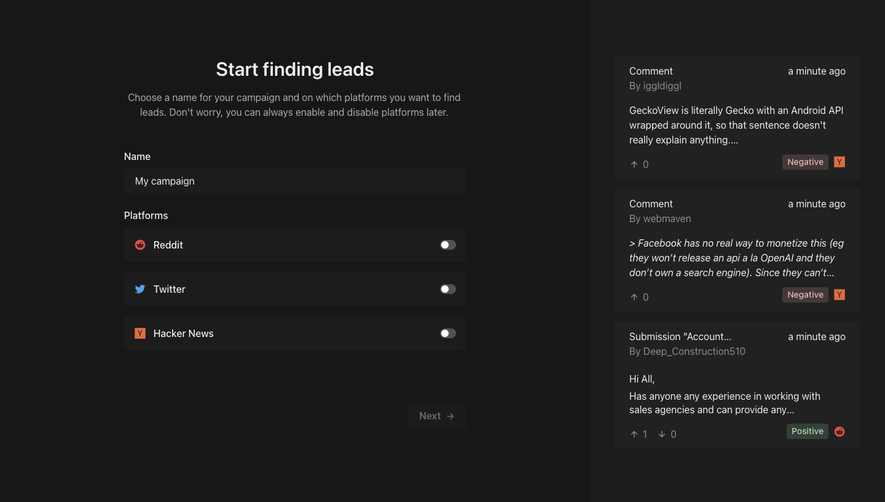
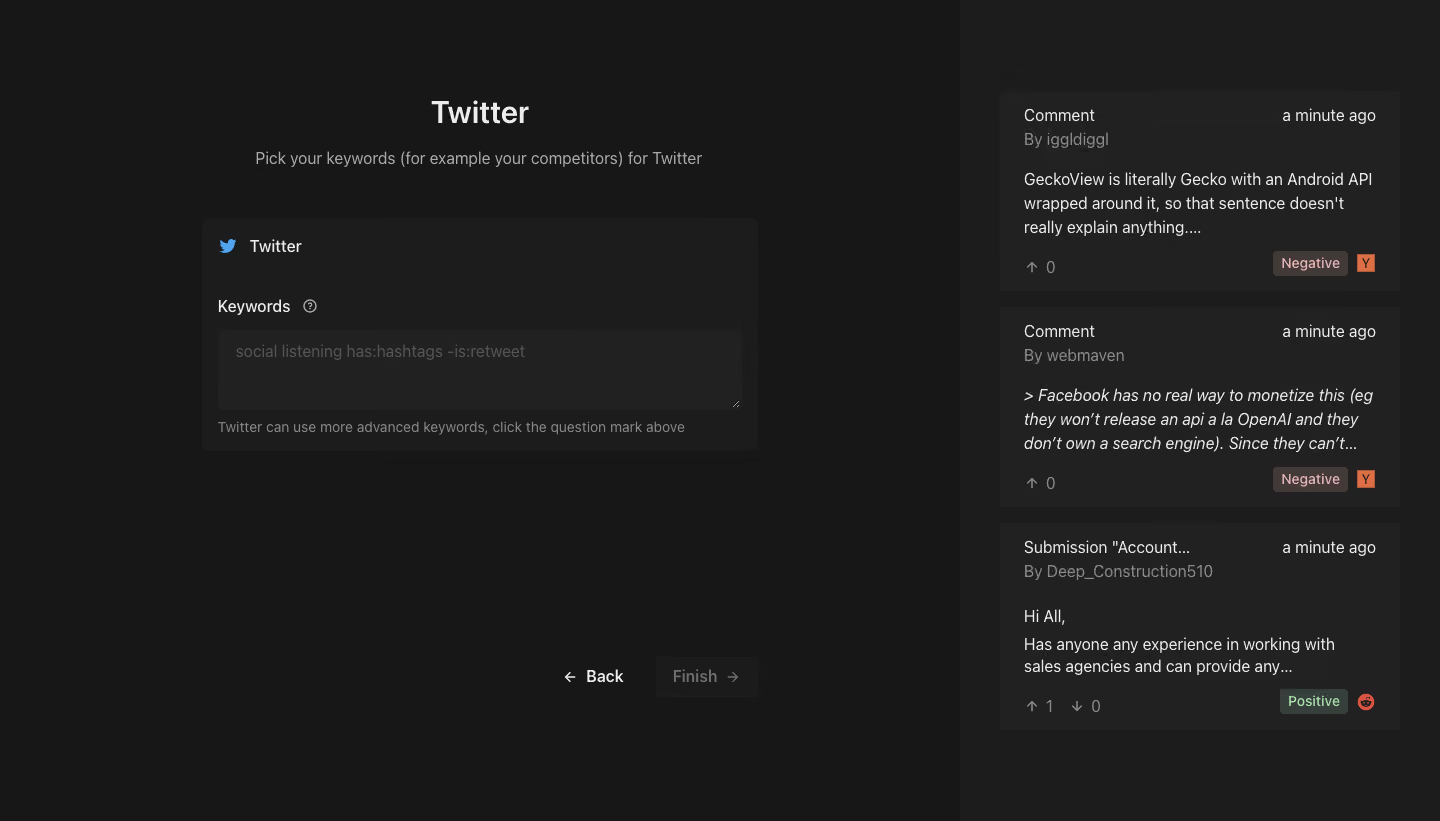
- **Character:** A dark keyword-setup screen with a focused form at left and example social-listening results at right.
- **Restraint:** Subtle charcoal differences establish regions, while small social icons and sentiment badges supply limited color.
### Page composition
- **Capture:** The source measures 1440 × 821 image pixels. A 1× CSS scale is plausible but unverified.
- **Split layout:** Roughly two-thirds of the page contains the setup task; a darker/lighter right rail around 480 pixels wide contains three stacked result examples.
- **Form group:** A centered Twitter heading and subtitle sit above a roughly 556-pixel-wide rounded configuration panel.
- **Actions:** Back and a muted Finish button align near the lower-right edge of the form region, well below the input.
### Information hierarchy
- **Task:** Twitter is the largest heading, followed by a sentence asking for keywords.
- **Configuration:** A blue bird icon/channel label precedes Keywords, a small help icon, a multiline field and advanced-keyword guidance.
- **Completion:** Back remains readable while Finish looks inactive in the empty-field state.
- **Examples:** Three result cards show content type, author/time metadata, excerpt, engagement and sentiment/platform markers.
### Typography
- **Family:** A neutral sans serif is visible; exact identity is unverified.
- **Heading:** Approximately 32 image pixels, semibold; subtitle is around 16 pixels.
- **Form:** Labels and field text are around 16 pixels; helper copy is around 14 pixels with 20-pixel line height.
- **Results:** Body excerpts are approximately 16 pixels with 24-pixel line height, while metadata is muted.
### Colors & surfaces
- **Measured palette:** ICC-aware sRGB sampling yields #171717 for the main canvas, #212121 for result/field surfaces and #1C1C1C for quiet panel regions.
- **Text and badges:** Light foreground #EEEEEE contrasts with muted gray metadata. Sampled badge-family tones include #423A38 and #363F39.
- **Accents:** Blue identifies Twitter, orange/red marks other social sources, and green/red sentiment text appears on tinted badges.
- **Edges:** Surfaces use soft corners around 6–8 pixels and little visible border or shadow.
### Components
- **Keyword panel:** A channel header, label/help row and wide textarea form one compact card.
- **Textarea:** Approximately 524 × 80 image pixels, with a dark fill and muted example query placeholder.
- **Result cards:** Three rectangular panels repeat header, excerpt and bottom metadata, with varying content lengths.
- **Navigation:** Back is a text/arrow action; Finish is a dark rounded rectangle with a right arrow.
### Visual rhythm
- **Whitespace:** Large empty areas below the form separate configuration from completion controls.
- **Example cadence:** The right rail uses small consistent gaps between dense content cards.
- **Alignment:** The heading, subtitle and form share a central axis, while labels and field content align left.
### Responsive
- **Recommendation:** Move example results beneath the form or hide them behind an optional preview on phones.
- **Recommendation:** Keep the textarea full width and place Back/Finish directly after it on short screens. No mobile state is shown.
### Adaptation guidance
- **Preserve:** Retain the focused channel setup, contextual examples and nearby syntax-help affordance.
- **Implement:** Provide accessible textarea labeling, keyboard help and explicit validation/disabled states.
- **Content:** Use generic example results without copying captured author identities or unrelated post text.
Use this context to reproduce the reference's visual language: layout, typography, colors, spacing, borders, radii, and distinctive elements. The screenshot takes priority if descriptions conflict.
## Direction
{{preferences.fidelityInstructions}}
## Output
{{output.instructions}}
Deliver a polished, cohesive design with precise alignment, hierarchy, and spacing. Produce the requested visual artifact, not just a description. If unsupported, explain the limitation.
.webp)



.avif)