Design with AI
Generate a new design based on this screen using your own content.
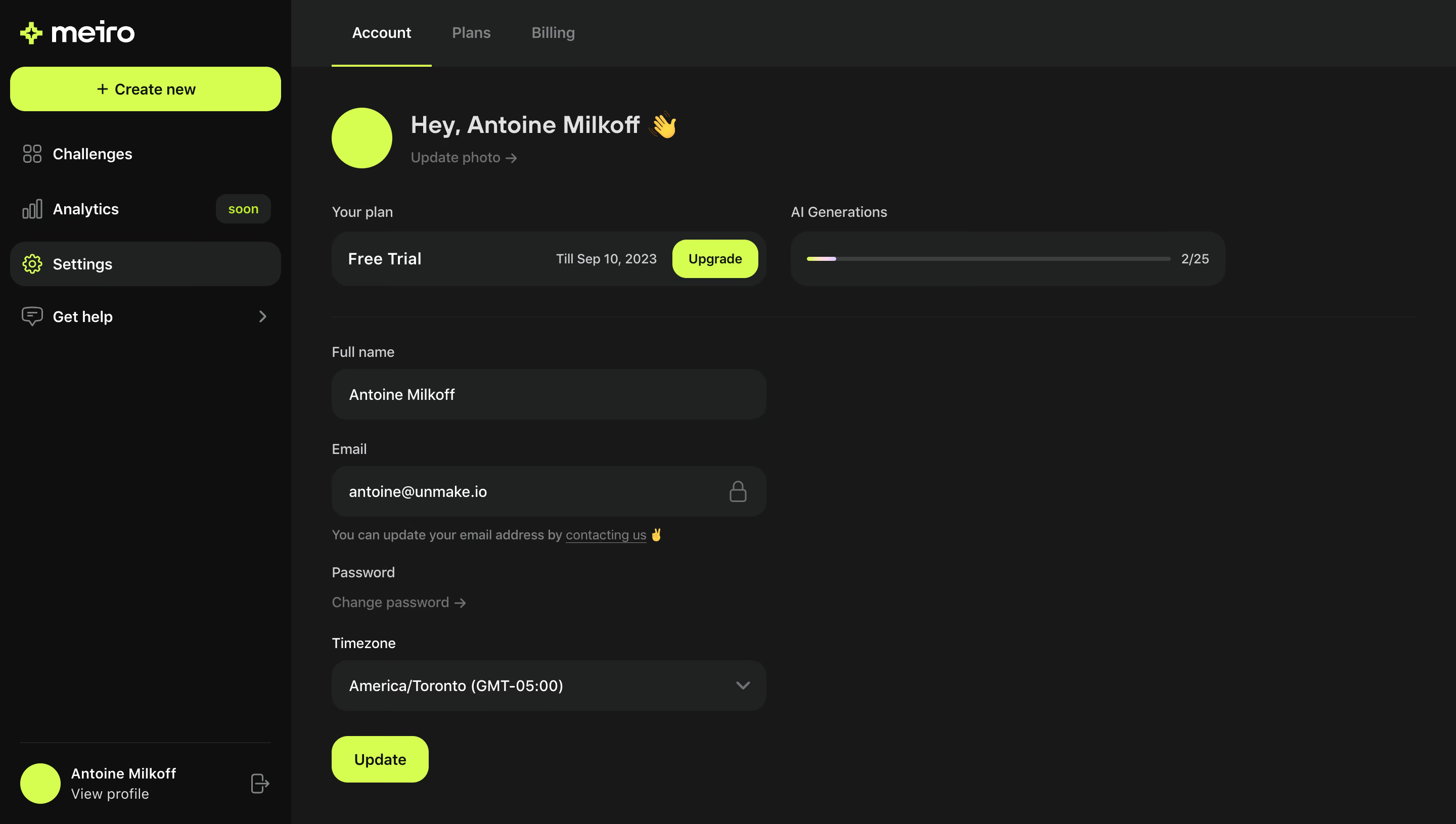
# Design from Reference: Meiro Account Settings
Create an original, high-fidelity visual design inspired by the reference. Prioritize composition, typography, colors, spacing, and component styling over technical implementation.
## Reference
- **Product:** Meiro
- **Category:** Settings
- **Screenshot:** https://cdn.prod.website-files.com/5e9dc792e1210c5325f7ebbc/6acadbe5d05a3f53c0a862af_6acadb2f819c11087507eeb6_cms-be0e4abee8d659d880c82a15.webp
Analyze the screenshot first. If inaccessible, request it rather than guessing.
## Content
{{content.instructions}}
{{content.data}}
Preserve essential messaging and factual accuracy. Adapt structure and copy length for visual balance; never invent product claims.
## Visual Design
### Overall aesthetic
- **Character:** A dark account-settings dashboard with vivid acid-lime primary actions and rounded charcoal controls.
- **Brand tone:** White branding, lime geometric accents and occasional emoji make the otherwise restrained interface feel playful.
### Page composition
- **Capture scale:** The source measures 2880 × 1630 pixels. A roughly 1440 × 815 CSS-pixel viewport at 2× scale is plausible but unverified.
- **Sidebar:** A roughly 288-pixel estimated CSS rail contains brand, a wide Create new action, navigation and a bottom profile block.
- **Main header:** Account, Plans and Billing form a horizontal tab row; Account is underlined in lime.
- **Account area:** A lime circular avatar and greeting precede side-by-side plan and AI-generation summaries. A narrow form below contains name, locked email, password link, timezone and Update.
### Information hierarchy
- **Identity:** The greeting and avatar lead, with a quieter Update photo link below.
- **Plan context:** Free-trial information and a lime Upgrade button sit beside a usage meter.
- **Form:** Field labels precede filled dark controls; email has a lock icon and helper link, while password uses a change link rather than a visible field.
- **Actions:** Update and Upgrade use lime; Settings is the selected sidebar destination.
### Typography
- **Family:** A rounded sans serif is visible; exact identity is unverified.
- **Greeting:** Approximately 24 estimated CSS pixels, semibold.
- **Form and navigation:** Around 14–16 pixels with 20–24-pixel line height; labels are lighter/smaller than the greeting.
- **Utility:** Usage and helper copy use muted gray at around 13–14 pixels.
### Colors & surfaces
- **Measured palette:** ICC-aware sRGB sampling yields canvas #171818, sidebar #0E0F0F, raised controls #202222 and primary lime #CAFF00.
- **Text:** White #FFFFFF, light gray #E1E1E1 and muted #7F8484 establish hierarchy; #3A3E3E appears in quiet dividers/tracks.
- **Geometry:** Inputs and summary strips use rounded corners around 16–20 estimated CSS pixels, with flat surfaces and minimal shadow.
### Components
- **Sidebar action:** A nearly full-width lime Create new button uses black text and a plus sign.
- **Plan strip:** A rounded dark bar combines plan label, end-date text and compact lime Upgrade action.
- **Usage strip:** A thin progress track with a small colored fill sits beside a numeric fraction.
- **Form controls:** Name, email and timezone controls are roughly 430 pixels wide and 50 pixels high; timezone includes a right chevron.
- **Update:** A compact lime button around 96 × 46 pixels sits below the form.
- **Profile:** A lime circular avatar, two-line identity text and logout icon anchor the sidebar bottom.
### Visual rhythm
- **Spacing:** Form groups use roughly 24-pixel vertical intervals; plan summaries sit above a long subtle divider.
- **Alignment:** Greeting, summaries and form share a main left inset around 40 pixels beyond the sidebar.
- **Contrast rhythm:** Sparse lime actions punctuate large charcoal regions without overwhelming the form.
### Responsive
- **Recommendation:** Collapse the sidebar and stack plan/usage summaries at narrow widths.
- **Recommendation:** Make form controls fluid and allow helper text to wrap without crowding the locked-email icon. No mobile rendering is visible.
### Adaptation guidance
- **Preserve:** Retain the acid-lime action system, rounded dark fields and clear account/plan hierarchy.
- **Implement:** Use explicit read-only semantics for email, accessible timezone labeling and clear saved/error feedback.
- **Privacy:** Replace personal name/email values with generic examples; treat the trial date and usage as captured historical content.
Use this context to reproduce the reference's visual language: layout, typography, colors, spacing, borders, radii, and distinctive elements. The screenshot takes priority if descriptions conflict.
## Direction
{{preferences.fidelityInstructions}}
## Output
{{output.instructions}}
Deliver a polished, cohesive design with precise alignment, hierarchy, and spacing. Produce the requested visual artifact, not just a description. If unsupported, explain the limitation.
.webp)



.avif)