Design with AI
Generate a new design based on this screen using your own content.
# Design from Reference: Logbook Complete Step
Create an original, high-fidelity visual design inspired by the reference. Prioritize composition, typography, colors, spacing, and component styling over technical implementation.
## Reference
- **Product:** Logbook
- **Category:** Add & Edit
- **Screenshot:** https://cdn.prod.website-files.com/5e9dc792e1210c5325f7ebbc/6acb6eb12837b9f3168fb7cb_6acb6cd5ddc9482c92790955_cms-43153a55aa5430a9bf4feb77.webp
Analyze the screenshot first. If inaccessible, request it rather than guessing.
## Content
{{content.instructions}}
{{content.data}}
Preserve essential messaging and factual accuracy. Adapt structure and copy length for visual balance; never invent product claims.
## Visual Design
### Overall aesthetic
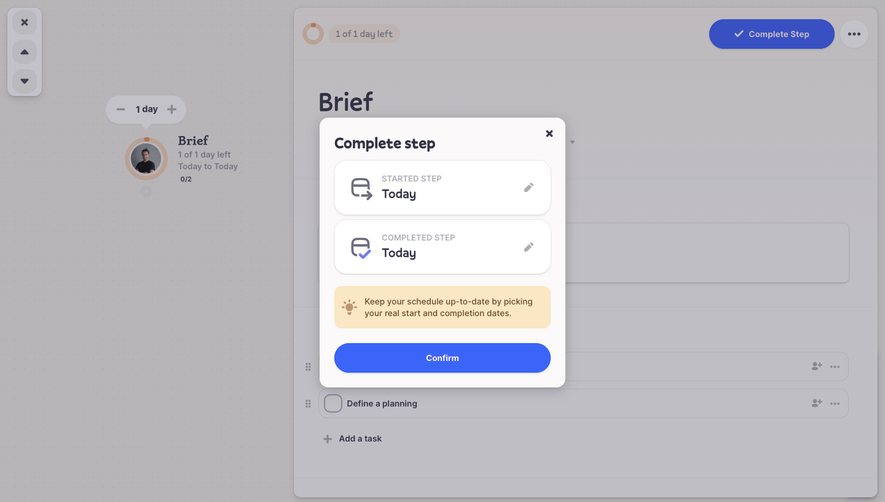
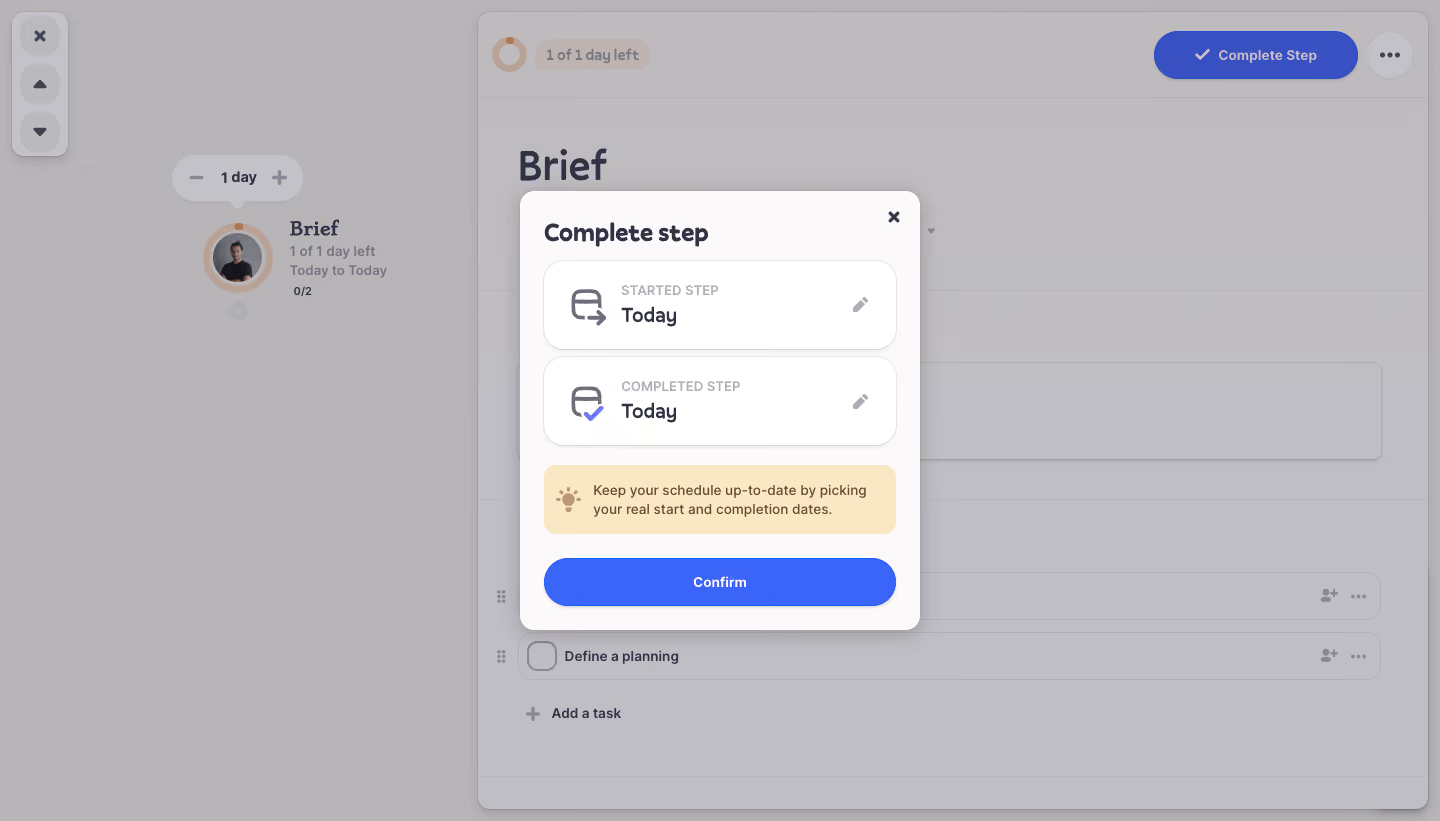
- **Character:** A compact completion dialog overlays a dimmed planning workspace, using rounded white cards, blue confirmation and a warm helper notice.
- **Capture evidence:** The screenshot measures 1440 × 821 pixels. Dimensions below are image-pixel estimates; near-1× CSS scale is unverified.
- **Tone:** A small date-confirmation task is isolated from the larger project interface.
### Page composition
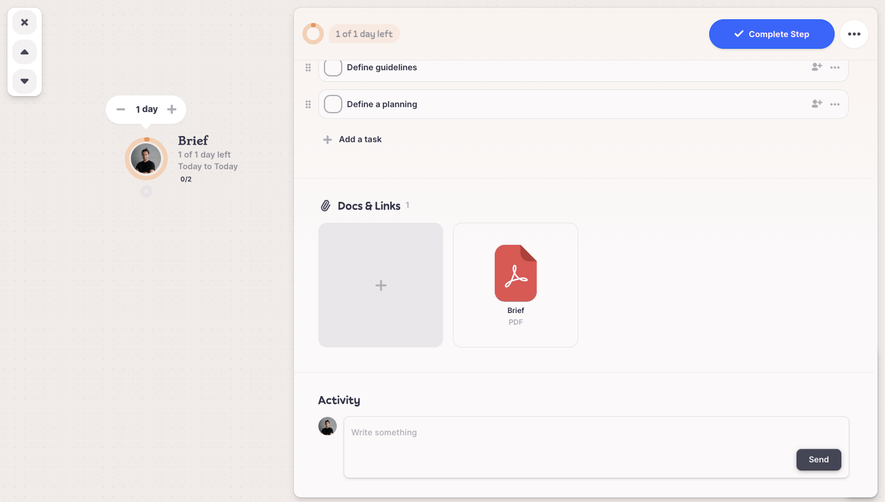
- **Background:** A dotted planning canvas and broad Brief detail panel remain visible under a gray veil.
- **Modal:** A centered roughly 400 × 440px white rectangle contains the completion task.
- **Date cards:** Two rounded rows show started and completed dates, each with an icon and edit pencil.
- **Helper:** A pale amber notice advises using real start/completion dates.
- **Action:** A full-width blue Confirm pill sits at the bottom; a close X is upper right.
### Information hierarchy
- **Task title:** Complete step is bold and prominent.
- **Date roles:** Small uppercase labels distinguish Started step and Completed step.
- **Values:** Today appears larger and darker in both cards.
- **Guidance:** The warm notice explains the scheduling purpose.
- **Primary action:** Confirm is the only filled action inside the dialog.
### Typography
- **Family:** A rounded sans-serif is visible; exact identity is unverified.
- **Modal heading:** Approximately 24px bold.
- **Date labels:** Approximately 13px uppercase semibold.
- **Date values:** Approximately 20px semibold.
- **Helper:** Approximately 14px with 20px line-height.
- **Action:** Approximately 14px semibold white text.
### Colors & surfaces
- **Modal/cards:** Sampled #FFFFFF and #FBF9F9 supply warm-white surfaces.
- **Overlay appearance:** Sampled #B8B5B9 and #BFBEC4 supply the dimmed background.
- **Primary blue:** Sampled #3B65F9 supplies the Confirm action.
- **Background blue:** Sampled #3850C2 contributes to dimmed completion controls behind the dialog.
- **Helper:** Pale amber fill and brown text/icon create a warm informational treatment.
- **Ink:** Dark purple-gray headings and muted gray labels match the surrounding app.
### Components
- **Dialog shell:** White rounded rectangle with around 16px radii and a soft shadow.
- **Date cards:** Two roughly 352 × 90px rows use thin outlines, around 20px radii and subtle elevation.
- **Icons:** Calendar/arrow and calendar/check symbols distinguish start and completion.
- **Edit actions:** Small pencil icons align at the right of each date card.
- **Helper notice:** A roughly 352 × 68px amber rectangle uses 12px radii and a lightbulb icon.
- **Confirm:** A matching-width blue pill around 48px high uses white text and slight shadow.
- **Close:** A compact unboxed X sits beside the title area.
### Visual rhythm
- **Padding:** Approximately 24px surrounds dialog content.
- **Card gaps:** Around 8px separates the two date cards.
- **Group spacing:** Larger 18–24px gaps separate dates, helper and confirmation.
- **Alignment:** Card text and helper content follow consistent internal left edges.
- **Backdrop:** Uniform dimming makes the modal the clearest region.
### Responsive
- **Evidence limit:** Only desktop is observed; date editing and confirmation behavior are unverified.
- **Dialog recommendation:** Use fluid width with 16–24px margins and internal scrolling if needed.
- **Date recommendation:** Keep edit targets large enough for touch without crowding labels.
- **Focus recommendation:** Trap focus while open and restore it on close.
- **Feedback recommendation:** Announce completion or validation results accessibly.
### Adaptation guidance
- **Task semantics:** Keep actual start/completion dates distinct from planned dates.
- **Reusable pattern:** Use date-summary cards with explicit edit controls and one confirmation action.
- **Accessibility:** Label pencils and close control, associate helper guidance and provide focus states.
- **State handling:** Define invalid date ordering and saving feedback separately.
- **Scope:** The screenshot shows a pending completion dialog; no project step was completed.
Use this context to reproduce the reference's visual language: layout, typography, colors, spacing, borders, radii, and distinctive elements. The screenshot takes priority if descriptions conflict.
## Direction
{{preferences.fidelityInstructions}}
## Output
{{output.instructions}}
Deliver a polished, cohesive design with precise alignment, hierarchy, and spacing. Produce the requested visual artifact, not just a description. If unsupported, explain the limitation.
.webp)



.avif)