.webp)
Thank you! Your submission has been received!
Oops! Something went wrong while submitting the form.
Get SaaSFrame Pro
Monthly
$18
Quarterly
$48
Yearly
$180
Upgrade to access this feature
Browse all screens & flows
Filter and search screens & flows
Access Figma files
Access mobile versions
Bookmark screens & flows
Join now
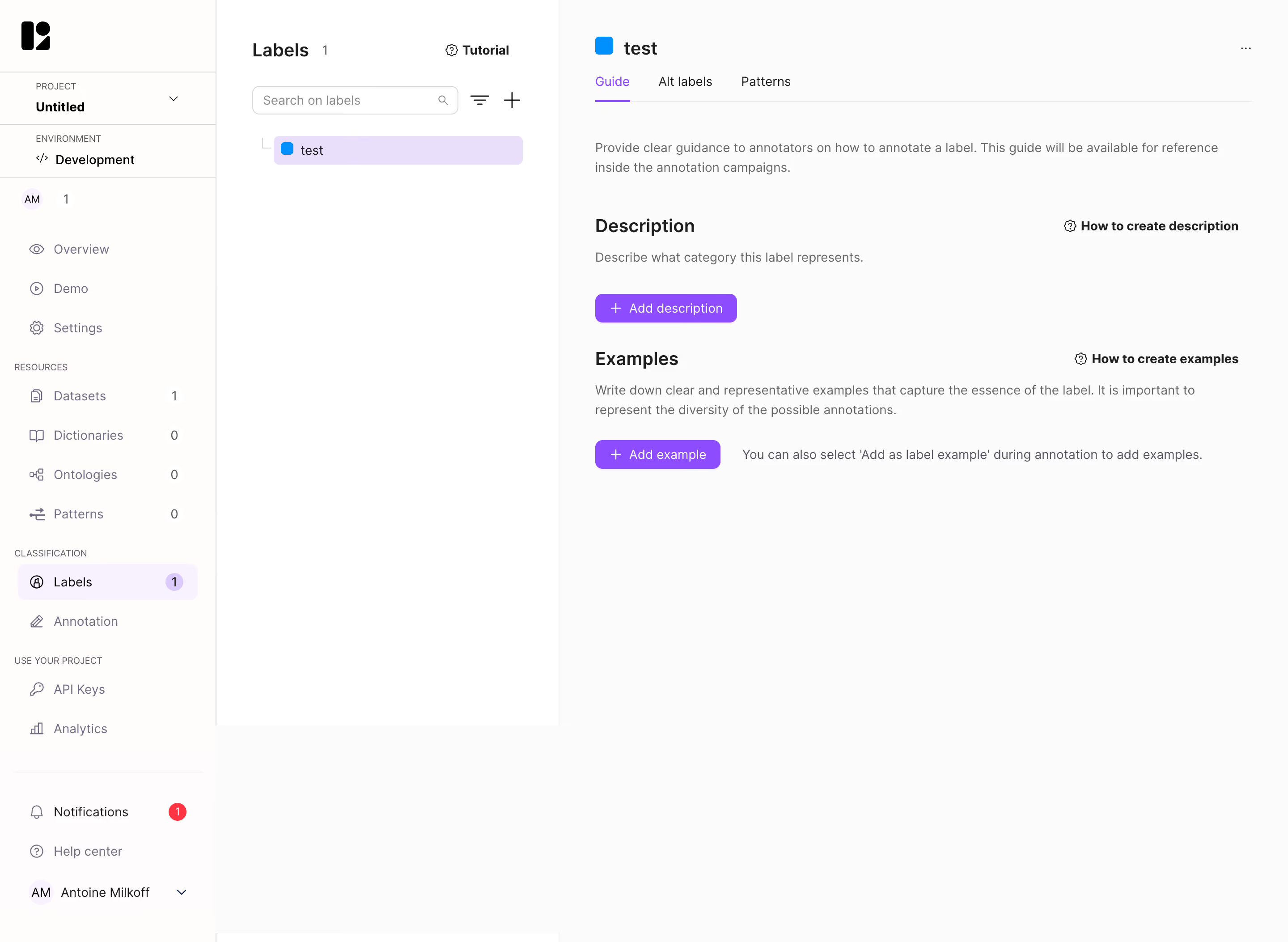
Lettria Create A Label

Lettria
The no-code AI platform for text
Designed by
No items found.

Bookmark
Bookmark

Design with AI
Thank you! Your submission has been received!
Oops! Something went wrong while submitting the form.
# Design from Reference: Lettria Create A Label
Create an original, high-fidelity visual design inspired by the reference. Prioritize composition, typography, colors, spacing, and component styling over technical implementation.
## Reference
- **Product:** Lettria
- **Category:** Add & Edit
- **Screenshot:** https://cdn.prod.website-files.com/5e9dc792e1210c5325f7ebbc/6acb6e962837b9f3168fb383_6acb6cb80186079ae1c09d0e_cms-9771d782daa7f8e2e8e98d36.webp
Analyze the screenshot first. If inaccessible, request it rather than guessing.
## Content
{{content.instructions}}
{{content.data}}
Preserve essential messaging and factual accuracy. Adapt structure and copy length for visual balance; never invent product claims.
## Visual Design
### Overall aesthetic
- **Style:** Sparse annotation-management workspace with three vertical regions, pale surfaces and violet creation actions.
- **Character:** Small line icons, count badges and a blue label-color swatch support a technical but approachable interface.
- **Capture:** The image measures 2880 × 2106 pixels. CSS estimates assume a 2× capture, equivalent to approximately 1440 × 1053 CSS pixels; actual scale and font identity are unverified.
### Page composition
- **Project rail:** An approximately 242-CSS-pixel left sidebar contains project/environment context, grouped navigation and lower help/account controls.
- **Label browser:** A roughly 383-pixel middle pane contains a title/count, tutorial link, search, filter/add icons and one selected label.
- **Detail region:** The right pane begins around x625 and shows label identity, tabs and empty guidance sections.
- **Guide content:** An introductory sentence leads into Description and Examples modules, each with explanation, help link and add action.
- **Whitespace:** Most of the lower detail region remains empty because no guide content has been added.
### Information hierarchy
- **Location:** Labels is selected in the project rail and repeated as the middle-pane heading.
- **Selection:** One label is highlighted in lavender and repeated with a blue swatch in the detail header.
- **Tab state:** Guide is selected with violet text and underline; alternate-label and pattern tabs are inactive.
- **Content tasks:** Description and Examples are the two main setup actions.
- **Help:** Tutorial and section-specific guidance links support creation without dominating the form.
- **State scope:** A label already exists, but its description and examples are empty; no creation dialog is open.
### Typography
- **Family:** A neutral UI sans-serif is visible; exact identity is unverified.
- **Pane headings:** Approximately 20-pixel CSS size, semibold.
- **Detail title:** Approximately 22 pixels, semibold.
- **Section headings:** Approximately 20–22 pixels, bold.
- **Descriptions:** Approximately 14 pixels with 22-pixel line height, muted gray.
- **Navigation and tabs:** Approximately 14 pixels.
- **Group labels/counts:** Around 10–12 pixels, with uppercase sidebar labels.
### Colors & surfaces
- **Measured base:** Near-white #FBFBFB and white #FFFFFF dominate the workspace.
- **Measured warm/pink whites:** #FEFDFB and #FEFCFD occur in supporting surfaces.
- **Measured selection:** Lavender #E9DFFB highlights the selected label; pale #F8F1FF supports selected navigation.
- **Measured action:** Violet #8E4CFF fills add controls.
- **Measured text:** #1F1F1F supports headings and #676767 supports descriptions.
- **Measured boundaries:** #D9D9D9 appears among fine dividers.
- **Accent roles:** A bright-blue square identifies the selected label; a red badge marks notifications.
### Components
- **Project selector:** A compact project/environment stack is separated by horizontal rules.
- **Navigation counts:** Resource and label items have small right-aligned numbers or badges.
- **Label search:** A rounded outlined field includes a magnifier, with filter and plus controls beside it.
- **Selected label row:** A lavender rounded rectangle contains a blue square and short label name.
- **Tabs:** Three labels share a thin bottom rule; Guide has a narrow violet underline.
- **Add controls:** Violet rounded buttons with plus icons provide description and example creation.
- **Help links:** Small outlined question-style icons precede bold how-to text at the right of each section.
- **Example hint:** A muted inline sentence explains an alternative way to add examples during annotation.
- **State scope:** No description editor, example entry or alternate tab content is visible.
### Visual rhythm
- **Column separation:** Fine vertical rules distinguish project navigation, label browser and detail workspace.
- **Detail inset:** Approximately 40 pixels frame the right-pane content.
- **Section spacing:** Larger 40–48-pixel breaks separate introduction, description and examples.
- **Label cadence:** Compact browser controls contrast with the broad empty detail area.
- **Alignment:** Section headings, explanations and add actions share a stable left edge.
### Responsive
- **Recommendation — panes:** Collapse project navigation and label browser into selectable drawers on narrow screens.
- **Recommendation — detail:** Preserve readable guide content and primary add controls.
- **Recommendation — help:** Move section help links beneath headings when horizontal space is limited.
- **Recommendation — tabs:** Allow explicit wrapping or scrolling without clipping labels.
- **Recommendation — counts:** Keep count badges associated with their navigation labels. No mobile state is evidenced.
### Adaptation guidance
- **Preserve browse/detail separation:** Keep label selection distinct from guide authoring.
- **Make empty content actionable:** Retain concise explanations and explicit add-description/example routes.
- **Reuse violet selection tokens:** Maintain consistent selected-row, tab and primary-action emphasis.
- **Keep guidance adjacent:** Place how-to resources beside the relevant content task.
- **Define editors separately:** Description/example creation and validation states are outside the capture.
- **Avoid inferring label content:** Only the empty guide and selected label are visible.
Use this context to reproduce the reference's visual language: layout, typography, colors, spacing, borders, radii, and distinctive elements. The screenshot takes priority if descriptions conflict.
## Direction
{{preferences.fidelityInstructions}}
## Output
{{output.instructions}}
Deliver a polished, cohesive design with precise alignment, hierarchy, and spacing. Produce the requested visual artifact, not just a description. If unsupported, explain the limitation.

.avif)
Category
Patterns
No items found.
Tech Stack


Added on
April 28, 2023


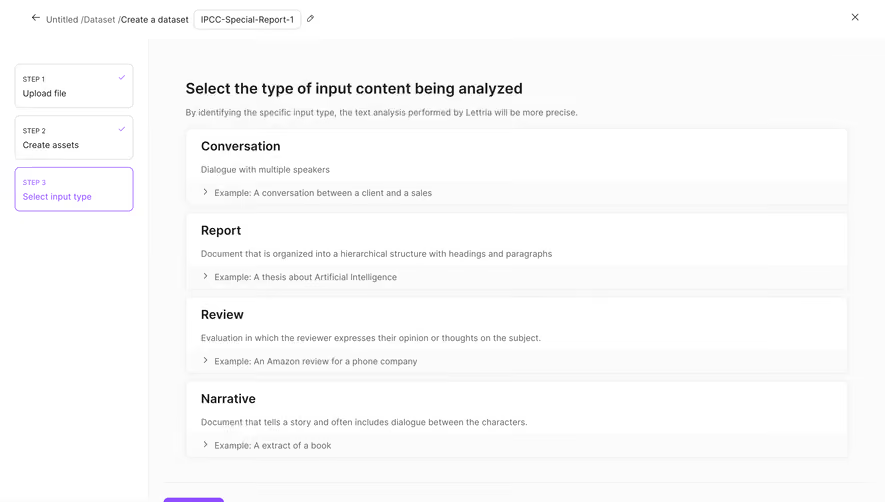


Similar screens





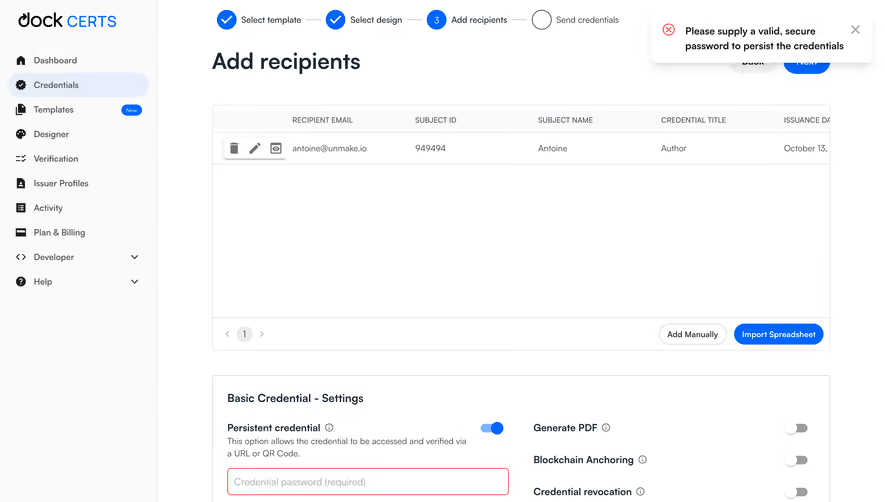

Upgrade to SaaSFrame Pro now to see similar examples.
Monthly
$18 /month
Billed $18 monthly
Browse all screens & flows
Filter and search screens & flows
Search text in screenshots
Access Figma files
Access mobile versions
Join now
Quarterly
$16 /month
Billed $48 quarterly
Browse all screens & flows
Filter and search screens & flows
Search text in screenshots
Access Figma files
Access mobile versions
Join now
Yearly
$15 /month
Billed $180 yearly
Browse all screens & flows
Filter and search screens & flows
Search text in screenshots
Access Figma files
Access mobile versions
Join now