Design with AI
Generate a new design based on this screen using your own content.
# Design from Reference: Hyperline General Settings
Create an original, high-fidelity visual design inspired by the reference. Prioritize composition, typography, colors, spacing, and component styling over technical implementation.
## Reference
- **Product:** Hyperline
- **Category:** Settings
- **Screenshot:** https://cdn.prod.website-files.com/5e9dc792e1210c5325f7ebbc/6acad7ed1025e911ae520fd5_6acad776a2ad6b7cce1686eb_cms-55c2ea786ac483b17fa50a80.webp
Analyze the screenshot first. If inaccessible, request it rather than guessing.
## Content
{{content.instructions}}
{{content.data}}
Preserve essential messaging and factual accuracy. Adapt structure and copy length for visual balance; never invent product claims.
## Visual Design
### Overall aesthetic
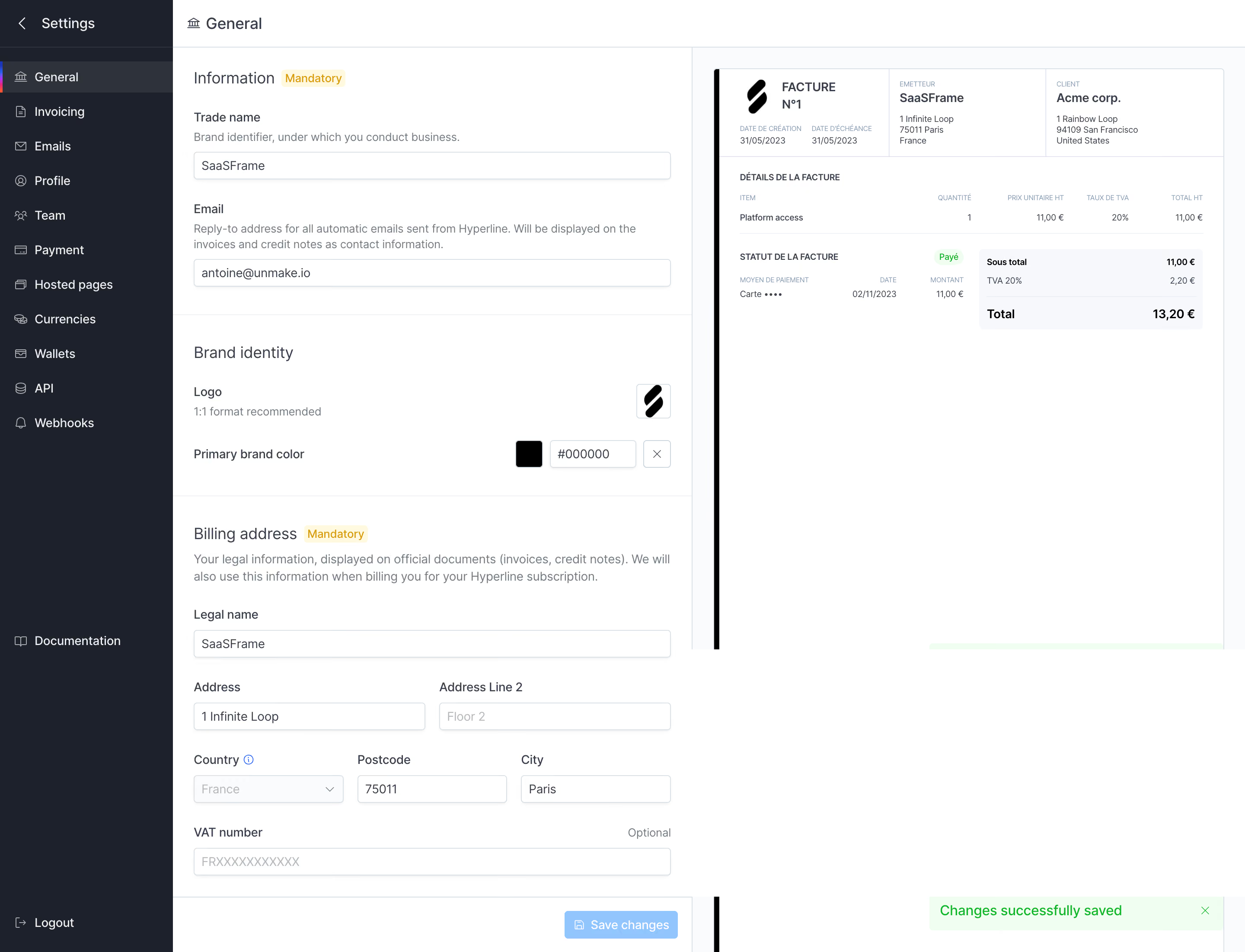
- **Character:** Practical billing-settings interface pairing a narrow form with a large invoice preview.
### Page composition
- **Capture:** 2880 × 2202 screenshot pixels; estimated 2× CSS scale.
- **Structure:** Dark left navigation, General header, stacked Information/Brand identity/Billing address form and right invoice preview; save controls and success toast sit at bottom.
### Information hierarchy
- **Priority:** Mandatory information and billing fields are labeled; brand controls modify the adjacent invoice example.
### Typography
- **Family:** Sans serif; exact family unverified.
- **Estimated CSS sizes:** Section titles 18px, labels/body 14px, helper 13px and invoice details 10–12px.
### Colors & surfaces
- **Measured palette:** White #FFFFFF, sidebar #1C212C, preview background #FAFBFC, invoice summary #F7F8FC, success #EBFFF0 and borders #DBE1E8.
### Components
- **Elements:** Mandatory badges, trade name/email inputs, logo upload, color swatch/hex field, address grid, country select, VAT field and Save changes.
- **Estimated geometry:** Sidebar 200px, form 600px, controls 32px high, 4px radii and 24px section padding.
### Visual rhythm
- **Spacing:** Thin section rules group dense fields; the large preview provides visual balance and immediate output context.
### Responsive
- **Suggested adaptation:** Stack preview beneath the form, wrap address fields and keep save feedback visible. Mobile behavior is unverified.
### Adaptation guidance
- **Transfer:** Preserve mandatory/optional distinctions and form-to-document preview relationship. Use fictitious data in examples.
Use this context to reproduce the reference's visual language: layout, typography, colors, spacing, borders, radii, and distinctive elements. The screenshot takes priority if descriptions conflict.
## Direction
{{preferences.fidelityInstructions}}
## Output
{{output.instructions}}
Deliver a polished, cohesive design with precise alignment, hierarchy, and spacing. Produce the requested visual artifact, not just a description. If unsupported, explain the limitation.
.webp)


.avif)