Generate a new design based on this screen using your own content.
Thank you! Your submission has been received!
Oops! Something went wrong while submitting the form.
# Design from Reference: Huly Planner
Create an original, high-fidelity visual design inspired by the reference. Prioritize composition, typography, colors, spacing, and component styling over technical implementation.
## Reference
- **Product:** Huly
- **Category:** Calendar
- **Screenshot:** https://cdn.prod.website-files.com/5e9dc792e1210c5325f7ebbc/6acad3ffc910b3adf9e48ab2_6acad17b5a5fdf4c302fab88_cms-9be549fbbbbd48b6dfbfc34e.webp
Analyze the screenshot first. If inaccessible, request it rather than guessing.
## Content
{{content.instructions}}
{{content.data}}
Preserve essential messaging and factual accuracy. Adapt structure and copy length for visual balance; never invent product claims.
## Visual Design
Use this context to reproduce the reference's visual language: layout, typography, colors, spacing, borders, radii, and distinctive elements. The screenshot takes priority if descriptions conflict.
## Direction
{{preferences.fidelityInstructions}}
## Output
{{output.instructions}}
Deliver a polished, cohesive design with precise alignment, hierarchy, and spacing. Produce the requested visual artifact, not just a description. If unsupported, explain the limitation.
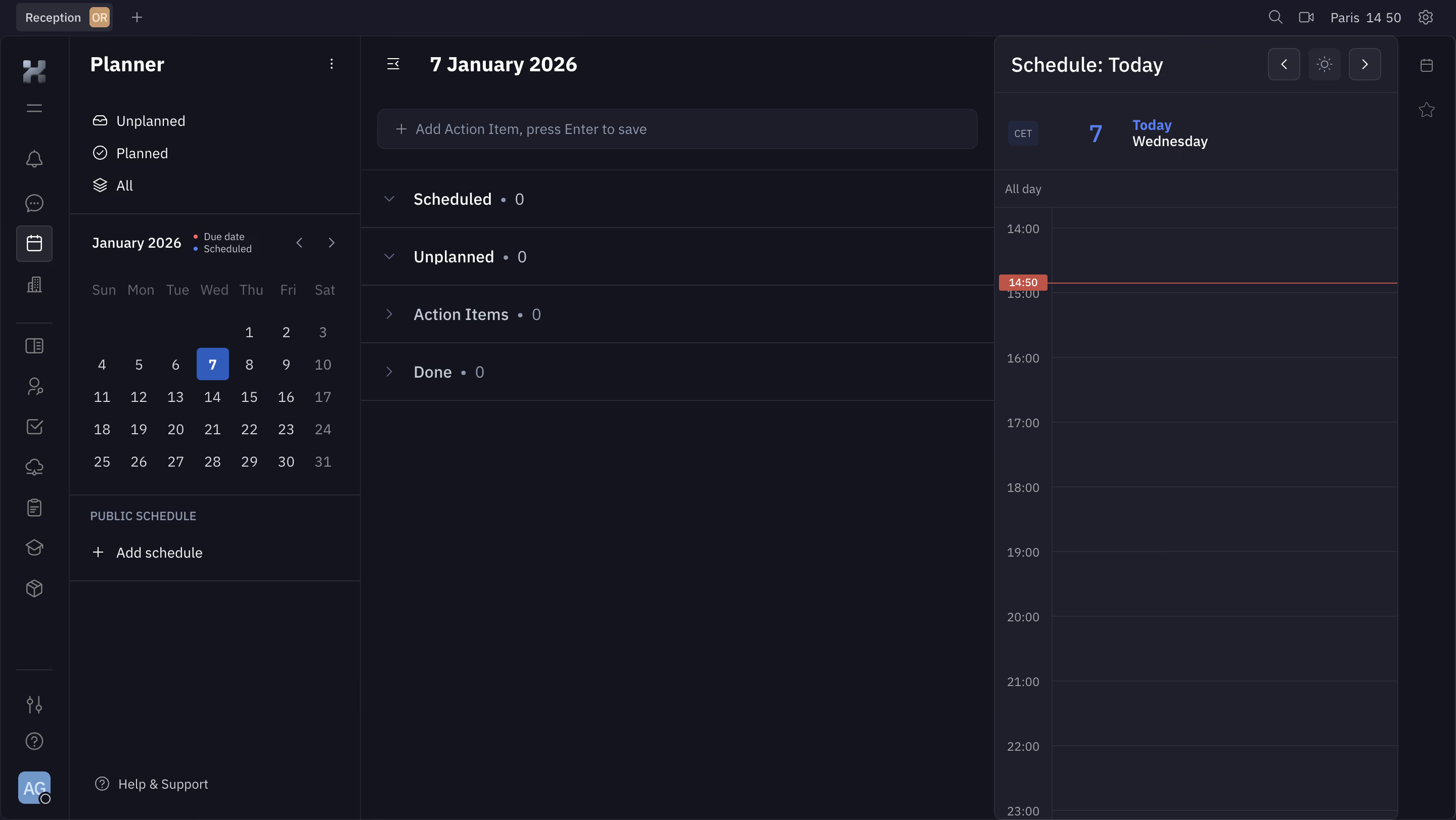
The deep navy background sets the mood instantly. This is a planner view from what looks like a project management tool, and the dark theme feels intentional, not just inverted. The left sidebar uses subtle icon work and clear hierarchy. "Unplanned," "Planned," "All" as filter options. Simple. The mini calendar sits right where you'd expect it, with today's date (January 7) highlighted in a punchy blue circle that pops against the muted grid.
Three-Panel Layout That Actually Works
Left panel handles navigation and calendar. Center panel shows task categories: Scheduled, Unplanned, Action Items, Done. All at zero. It's an empty state but still feels structured. The right panel is a daily schedule timeline running from 14:00 to 23:00, with a red "14:50" marker showing current time. That red accent is the only warm color on screen and it grabs your eye immediately.
What Makes It Stand Out
Typography is clean and readable. The weight contrast between section headers and body text creates natural scanning paths. The "Add Action Item" input field at the top keeps task creation always one click away. No clutter, no filler. Just structure waiting to be filled.
.webp)



.avif)