Design with AI
Generate a new design based on this screen using your own content.
# Design from Reference: Hugo User Onboarding
Create an original, high-fidelity visual design inspired by the reference. Prioritize composition, typography, colors, spacing, and component styling over technical implementation.
## Reference
- **Product:** Hugo
- **Category:** User Onboarding
- **Screenshot:** https://cdn.prod.website-files.com/5e9dc792e1210c5325f7ebbc/6acbbf7a4d71070f5fd414fe_6acbbea23a787595fbdd6efc_cms-98d3d0921215ef1f55351d62.webp
Analyze the screenshot first. If inaccessible, request it rather than guessing.
## Content
{{content.instructions}}
{{content.data}}
Preserve essential messaging and factual accuracy. Adapt structure and copy length for visual balance; never invent product claims.
## Visual Design
### Overall aesthetic
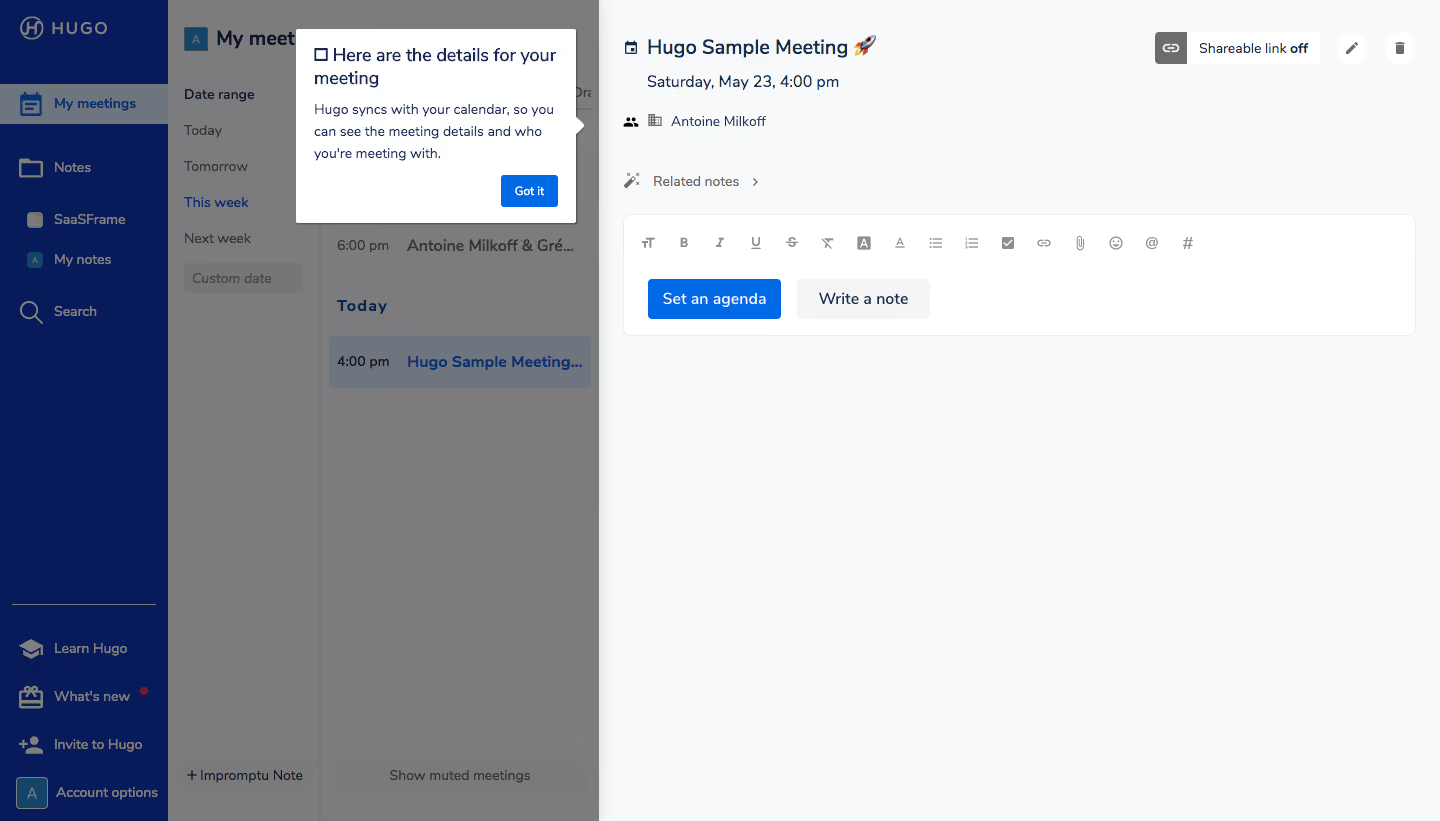
- **Character:** Functional meeting workspace with a contextual onboarding spotlight.
### Page composition
- **Canvas:** 1440 × 821 screenshot px. Navy navigation, date filters, meeting list, and large meeting-detail pane form four vertical zones. A white tooltip points toward the undimmed detail area.
### Information hierarchy
- **Priority:** Tutorial heading and explanation precede Got it. Meeting title, time, attendees, sharing controls, and note editor remain the target context.
### Typography
- **Scale:** Approximately 20 screenshot px meeting title, 16 px tooltip title, 14 px body, and 12 px secondary controls. Sans serif family and CSS scale unverified.
### Colors & surfaces
- **Palette:** Sampled sRGB #F8F9FA, #FFFFFF, navy #071B5A, and overlay grays #7C7C7D/#6F757E. Bright blue supplies primary actions.
### Components
- **Details:** Tooltip about 280 screenshot px wide with small pointer and shadow; editor has thin border, 8 px corners, formatting icons, and paired agenda/note buttons.
### Visual rhythm
- **Spacing:** Dense left columns contrast with an expansive right workspace. Tooltip padding about 18 px and comfortable 22 px text leading support instruction.
### Responsive
- **Adaptation:** Mobile is not shown. Present meeting list and detail as separate views and anchor tutorial to the visible target.
### Adaptation guidance
- **Transfer:** Preserve contextual spotlight and a single acknowledgment. Adapt meeting metadata and tutorial instructions to actual functionality.
Use this context to reproduce the reference's visual language: layout, typography, colors, spacing, borders, radii, and distinctive elements. The screenshot takes priority if descriptions conflict.
## Direction
{{preferences.fidelityInstructions}}
## Output
{{output.instructions}}
Deliver a polished, cohesive design with precise alignment, hierarchy, and spacing. Produce the requested visual artifact, not just a description. If unsupported, explain the limitation.
.webp)



.avif)