Design with AI
Generate a new design based on this screen using your own content.
# Design from Reference: Help Scout Onboarding Emails
Create an original, high-fidelity visual design inspired by the reference. Prioritize composition, typography, colors, spacing, and component styling over technical implementation.
## Reference
- **Product:** Help Scout
- **Category:** Onboarding Email
- **Screenshot:** https://cdn.prod.website-files.com/5e9dc792e1210c5325f7ebbc/6acbc996f9eac5af75463c1b_6acbc7363b6b24eada55fae5_cms-5eae8199a195a9b02dbaec6b.webp
Analyze the screenshot first. If inaccessible, request it rather than guessing.
## Content
{{content.instructions}}
{{content.data}}
Preserve essential messaging and factual accuracy. Adapt structure and copy length for visual balance; never invent product claims.
## Visual Design
### Overall aesthetic
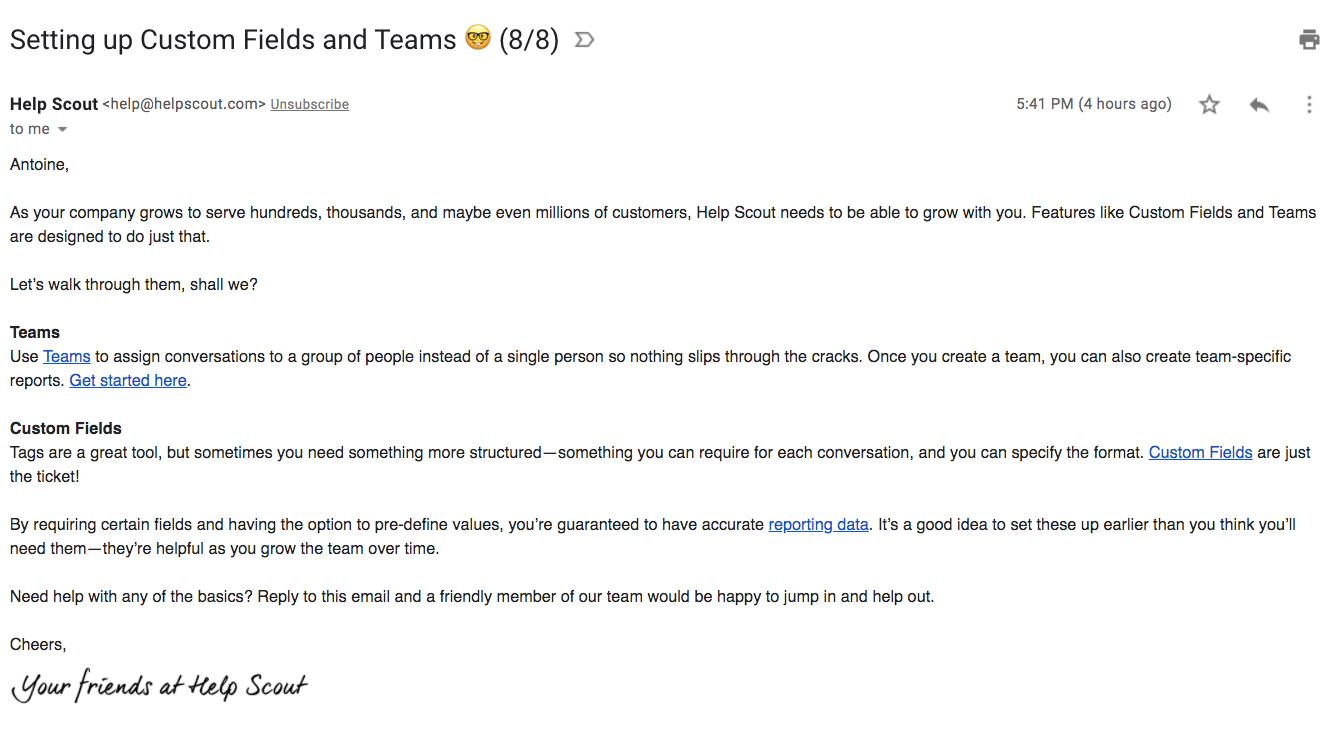
- **Character:** Plain-text-style onboarding email inside mail-client chrome, with black prose, blue underlined links and a handwritten signature graphic.
- **Visual restraint:** No branded card, hero image or filled action button is visible.
- **Capture:** The image measures 1341 × 749 px. Dimensions below are image estimates; email-client/CSS scale is unverified.
### Page composition
- **Mail header:** Subject, sender metadata and utility icons occupy the top.
- **Message:** Left-aligned greeting/introduction spans nearly the viewport width.
- **Sections:** Bold Teams and Custom Fields labels introduce short explanatory paragraphs and inline destinations.
- **Closing:** A support/reply invitation, sign-off and handwritten brand-team signature end the message.
### Information hierarchy
- **Topic:** The subject identifies the final visible installment in an onboarding sequence.
- **Body structure:** Two bold labels distinguish team assignment from structured conversation fields.
- **Actions:** Blue underlined inline links provide setup/reporting destinations, without a single dominant button.
- **Support:** A reply invitation closes the educational message.
- **State:** No product configuration or email reply is performed.
### Typography
- **Family:** Conventional Arial-like sans-serif; exact identity is unverified.
- **Subject:** Approximately 28 px in mail chrome.
- **Body:** Around 16 px with 24 px leading.
- **Section labels:** Body-sized bold text.
- **Signature:** A black handwritten graphic contrasts with the standard email type.
### Colors & surfaces
- **Measured base:** ICC-aware sRGB sampling yields #FFFFFF.
- **Measured foreground:** #222222 and #202124 appear in text/chrome.
- **Links:** Default-style vivid blue underlined destinations provide the main accent.
- **Graphic colors:** Small signature-related pixels include warm/dark tones, but the visible signature reads predominantly black.
- **Depth:** Flat white rendering with no enclosing message card.
### Components
- **Mail utilities:** Print/star/reply/menu icons belong to the client, separate from message content.
- **Section labels:** Bold inline headings precede plain paragraphs.
- **Links:** Underlined blue phrases appear within explanatory prose.
- **Signature graphic:** A short handwritten team sign-off sits below a plain closing.
### Visual rhythm
- **Paragraph cadence:** Moderate blank lines separate introduction, sections and closing.
- **Width:** Long text lines span much of the capture rather than a narrow newsletter column.
- **Emphasis:** Bold section labels and blue links provide the main scanning anchors.
- **Whitespace:** A modest blank region follows the signature.
### Responsive
- **Evidence limit:** Only one mail rendering is shown; recommendations follow.
- **Message:** Let prose wrap naturally in narrower clients.
- **Links:** Preserve underlines and adequate tap spacing.
- **Signature:** Scale the graphic proportionally with useful alternative text.
### Adaptation guidance
- **Reusable pattern:** Teach two related features through short labeled prose and direct inline setup links.
- **Content discipline:** Keep support invitation and educational destinations clear without adding unrelated CTAs.
- **Accessibility:** Use semantic section headings and descriptive links.
- **Client boundary:** Do not reproduce mail-client subject/sender controls as part of the email template.
Use this context to reproduce the reference's visual language: layout, typography, colors, spacing, borders, radii, and distinctive elements. The screenshot takes priority if descriptions conflict.
## Direction
{{preferences.fidelityInstructions}}
## Output
{{output.instructions}}
Deliver a polished, cohesive design with precise alignment, hierarchy, and spacing. Produce the requested visual artifact, not just a description. If unsupported, explain the limitation.