.webp)
Thank you! Your submission has been received!
Oops! Something went wrong while submitting the form.
Get SaaSFrame Pro
Monthly
$18
Quarterly
$48
Yearly
$180
Upgrade to access this feature
Browse all screens & flows
Filter and search screens & flows
Access Figma files
Access mobile versions
Bookmark screens & flows
Join now
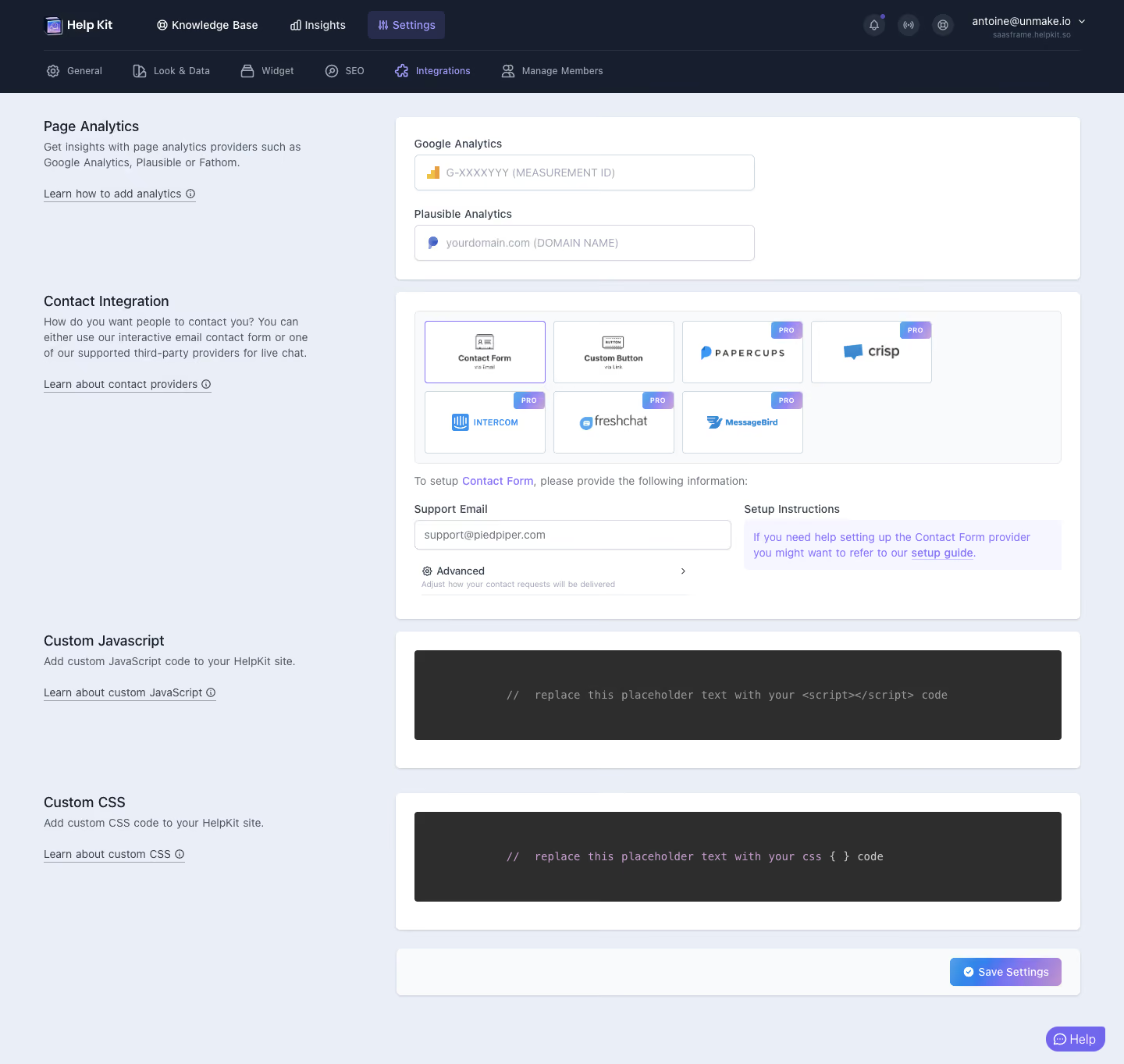
Help Kit Integrations Settings

Help Kit
Turn Notion into a Help or Doc site
Designed by
No items found.

Bookmark
Bookmark

Design with AI
Thank you! Your submission has been received!
Oops! Something went wrong while submitting the form.
# Design from Reference: Help Kit Integrations Settings
Create an original, high-fidelity visual design inspired by the reference. Prioritize composition, typography, colors, spacing, and component styling over technical implementation.
## Reference
- **Product:** Help Kit
- **Category:** Integrations
- **Screenshot:** https://cdn.prod.website-files.com/5e9dc792e1210c5325f7ebbc/6acbbb54151c40fa40745e21_6acb71bc023feca97f523ce5_cms-05a75a246d1383ce802862f1.webp
Analyze the screenshot first. If inaccessible, request it rather than guessing.
## Content
{{content.instructions}}
{{content.data}}
Preserve essential messaging and factual accuracy. Adapt structure and copy length for visual balance; never invent product claims.
## Visual Design
### Overall aesthetic
- **Style:** Structured SaaS settings page with dark navy navigation, a pale blue-gray workspace, white form cards and violet/blue accents.
- **Capture scale:** Source image is 1440 × 1363px. Measurements below refer to screenshot pixels; CSS/device scale is unverified.
### Page composition
- **Navigation:** Two dark horizontal rows span the top: primary product navigation above icon-supported settings categories. Settings and Integrations are selected.
- **Settings grid:** A left explanatory column begins near x56, while an approximately 878px-wide form column begins near x507. Each explanatory block aligns with its corresponding white card.
- **Sections:** Page Analytics, Contact Integration, Custom Javascript and Custom CSS run vertically, followed by a separate save-action bar.
- **Peripheral control:** A compact purple Help button floats at the bottom right.
### Information hierarchy
- **Analytics:** The first card contains Google Analytics and Plausible Analytics fields with provider icons and muted format hints.
- **Contact provider:** A seven-option provider grid leads into the currently selected Contact Form configuration, with support email, collapsed Advanced controls and setup guidance.
- **Code customization:** Separate dark editors distinguish JavaScript and CSS configuration.
- **Completion:** A gradient Save Settings button aligns to the right in the final white bar; no success or validation state is shown.
### Typography
- **Family:** Compact sans-serif UI text, with monospace in the code editors; exact font identities are unverified.
- **Roles:** Estimated section headings 18px medium, descriptions and field labels 14px/20px, navigation around 13px and provider tile labels about 11–12px.
- **Secondary text:** Small helper copy beneath Advanced is around 11px and uses a lighter gray. Editor placeholders are approximately 14px monospaced.
### Colors & surfaces
- **Sampled palette:** ICC-aware sRGB samples include workspace #EAEEF6, white #FFFFFF, code-editor charcoal #2D2D2D, navigation navy #171F2E, pale #F8FAFC and #F9FAFB, and lavender guidance #F5F6FF.
- **Accent roles:** Violet marks active settings, selected contact provider, inline links and Help. Blue-to-lavender gradients appear in PRO badges and Save Settings.
- **Depth:** Cards use fine pale borders, small corners and restrained lower shadows rather than strong elevation.
### Components
- **Cards:** White containers with roughly 6px corners and 24px internal padding. The analytics card is about 208px high; the contact configuration is considerably taller.
- **Inputs:** Analytics controls are approximately 436 × 46px, with 5px corners, provider icons and thin blue-gray borders. Support Email uses a similar field within a two-column configuration row.
- **Provider grid:** Four tiles in the first row and three in the second, each approximately 155 × 80px. Contact Form has a violet selection outline; five paid providers carry small gradient PRO badges at the upper right.
- **Setup guidance:** A pale lavender box with violet copy and an underlined setup guide link sits beside the email field.
- **Code editors:** Broad charcoal rectangles around 115px high show centered muted placeholder code; each sits inside its own white card.
- **Save action:** Compact rounded gradient button with a white check icon, approximately 144 × 36px. Advanced remains collapsed with a right chevron.
### Visual rhythm
- **Alignment:** Left-side headings/descriptions and right-side cards form repeated horizontal section pairs. Form controls share consistent insets.
- **Spacing:** About 16px separates the first two cards; later code sections use around 30px gaps. The save bar is separated clearly from the editors.
- **Density:** The provider selection is the densest region; quieter explanatory text and large code surfaces balance it.
### Responsive
- **Recommended adaptation:** Only desktop is observed. Stack explanatory blocks above their cards, collapse navigation and reduce provider tiles to two columns on narrow screens.
- **Form handling:** Stack email and setup instructions, keep editors horizontally scrollable and retain an accessible save action without covering fields.
### Adaptation guidance
- **Preserve:** Keep aligned section explanations, provider selection before configuration, explicit paid-feature badges and separate code customization areas.
- **Adapt:** Use supported providers, actual plan restrictions and real setup instructions. Do not infer expanded Advanced settings or configured analytics values from placeholder text.
Use this context to reproduce the reference's visual language: layout, typography, colors, spacing, borders, radii, and distinctive elements. The screenshot takes priority if descriptions conflict.
## Direction
{{preferences.fidelityInstructions}}
## Output
{{output.instructions}}
Deliver a polished, cohesive design with precise alignment, hierarchy, and spacing. Produce the requested visual artifact, not just a description. If unsupported, explain the limitation.

.avif)
Category



Added on
February 27, 2023
Similar screens






Upgrade to SaaSFrame Pro now to see similar examples.
Monthly
$18 /month
Billed $18 monthly
Browse all screens & flows
Filter and search screens & flows
Search text in screenshots
Access Figma files
Access mobile versions
Join now
Quarterly
$16 /month
Billed $48 quarterly
Browse all screens & flows
Filter and search screens & flows
Search text in screenshots
Access Figma files
Access mobile versions
Join now
Yearly
$15 /month
Billed $180 yearly
Browse all screens & flows
Filter and search screens & flows
Search text in screenshots
Access Figma files
Access mobile versions
Join now