Design with AI
Generate a new design based on this screen using your own content.
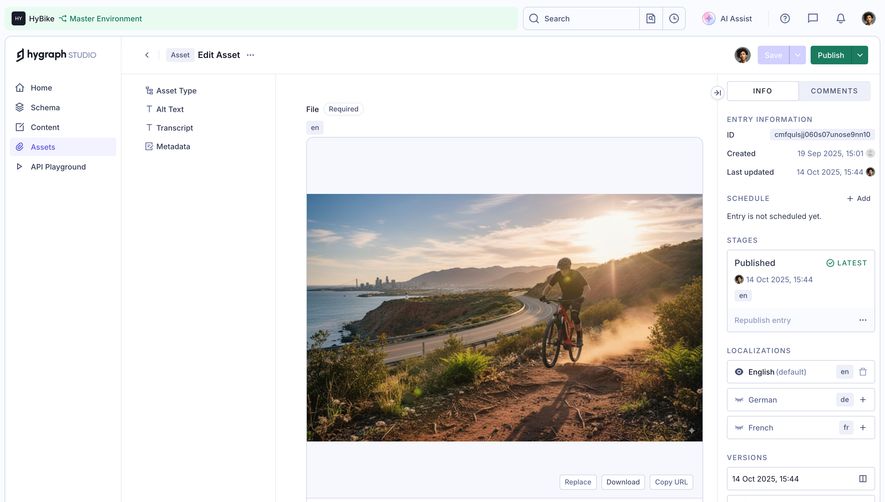
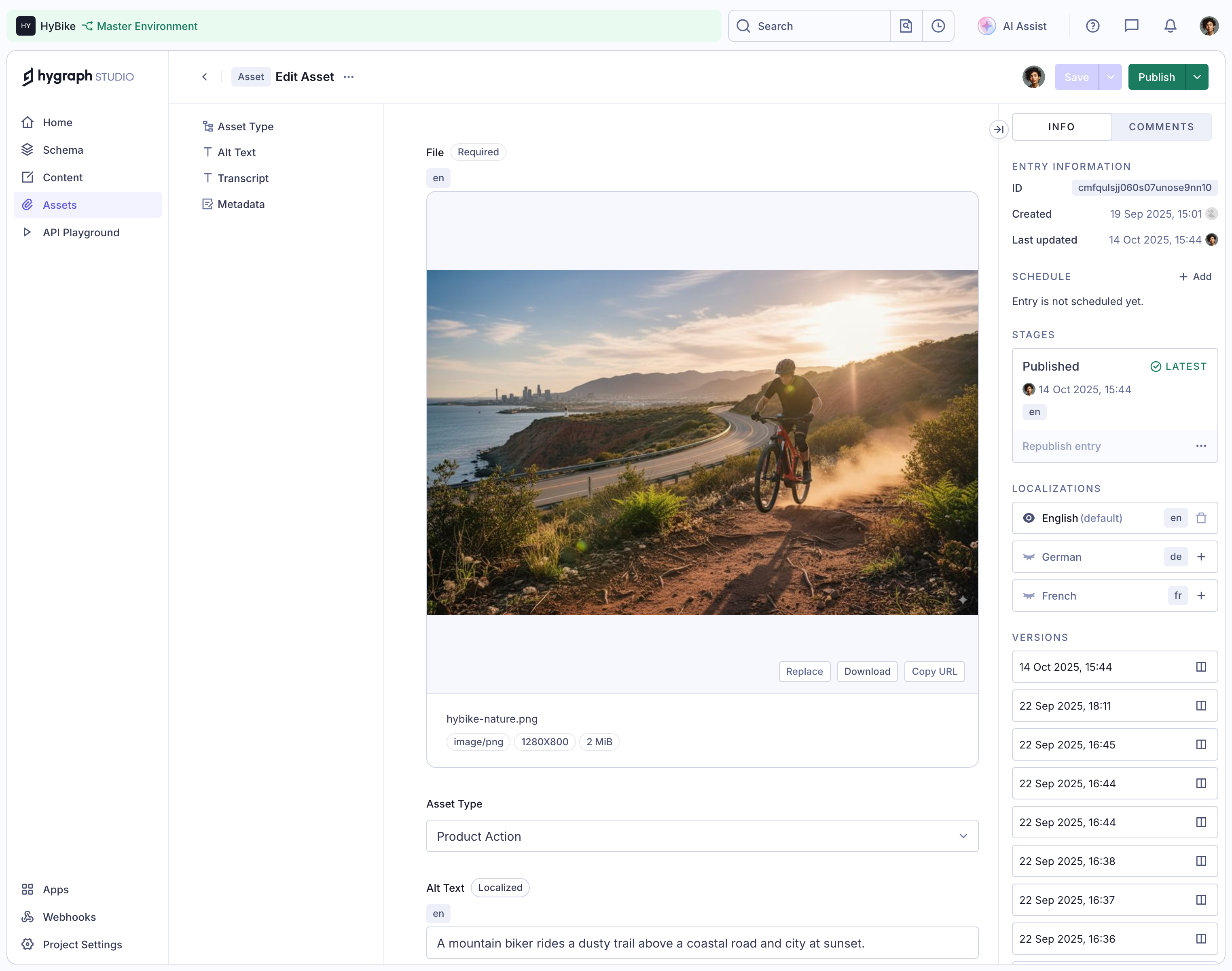
# Design from Reference: GraphCMS Asset details and preview
Create an original, high-fidelity visual design inspired by the reference. Prioritize composition, typography, colors, spacing, and component styling over technical implementation.
## Reference
- **Product:** GraphCMS
- **Category:** Details
- **Screenshot:** https://cdn.prod.website-files.com/5e9dc792e1210c5325f7ebbc/6acad333d5603a17eba5b557_6acad033c13ea92655a8ae08_cms-bcdcb53705beb90a4faa7d68.webp
Analyze the screenshot first. If inaccessible, request it rather than guessing.
## Content
{{content.instructions}}
{{content.data}}
Preserve essential messaging and factual accuracy. Adapt structure and copy length for visual balance; never invent product claims.
## Visual Design
### Overall aesthetic
- **Character:** Detailed light CMS asset editor with white panels, pale lavender borders, green publication status and a large photographic preview.
- **Visual hierarchy:** Multiple narrow navigation/metadata rails surround the central asset form.
- **Scale:** The source measures 3046 × 2400 image px. Exact CSS scale is unverified; a roughly 2× interpretation is plausible, so measurements below are approximate CSS-scale estimates.
### Page composition
- **Global bar:** Workspace/environment strip, search and utility icons span the top.
- **Primary rail:** A narrow left navigation column contains home, schema, content, assets and playground destinations, with utilities at the bottom.
- **Field rail:** A second column lists asset type, alt text, transcript and metadata.
- **Editor:** The central form opens with a required localized file field and a large landscape photo preview, followed by asset type and alt-text controls.
- **Metadata rail:** A right column has Info/Comments tabs, entry information, scheduling, publication stage, localizations and a long version list.
- **Top actions:** Save and Publish controls sit at the upper right. Their presence does not imply any action is performed.
### Information hierarchy
- **Current area:** Assets is selected in the main rail; Edit Asset identifies the resource.
- **File:** The preview is visually dominant, showing a mountain biker on a dusty coastal trail at sunset, with road, water and distant city.
- **File metadata:** Filename and compact type/dimension/size chips sit beneath the image.
- **Editing:** Replace, Download and Copy URL actions appear below the preview; asset type and localized alt text follow.
- **Publication:** The right rail displays an existing Published stage with Latest marker, locale choices and historical versions.
- **Privacy:** Specific entry identifiers and account details are not reproduced.
### Typography
- **Family:** Neutral compact sans-serif; exact identity is unverified.
- **Editor labels:** Approximately 13–14 CSS-scale px, medium-to-bold.
- **Body/values:** Around 13–14 px; metadata labels and timestamps are smaller.
- **Rail headings:** Uppercase tracked captions organize entry information, stage, locales and versions.
- **Chips:** Tiny rounded labels use approximately 10–12 px text.
### Colors & surfaces
- **Measured base:** ICC-aware sRGB sampling yields #FFFFFF, #F6F8FE and #F9FBFF across panels and preview grounds.
- **Measured rules:** #D0D4E5 and #E6E9F3 define cool borders.
- **Measured accents:** #E9FBF1 and green #1A7B5E occur in environment/publication treatment.
- **Measured text:** #343A55 is a dark slate foreground.
- **Photo:** Warm sunset gold, earthy trail browns and blue coastal tones remain confined to the asset preview.
### Components
- **Navigation selection:** Assets has a pale-purple rounded highlight and purple icon/text.
- **Field rail:** Small icons precede plain field names in a compact vertical list.
- **File preview:** A large pale framed rectangle contains the landscape image with blank padding above/below; a lower action row holds three small outlined buttons.
- **Metadata chips:** File type, source dimensions and file size appear as small outlined pills.
- **Asset controls:** A full-width select shows the asset category; a localized badge and locale chip precede the alt-text input.
- **Stage card:** A bordered Published block includes green latest-state marker and a subordinate republish row.
- **Locales/versions:** Compact outlined rows show locale names/codes and version timestamps, with small trailing controls.
### Visual rhythm
- **Column density:** Compact rails contrast with the large visual center.
- **Alignment:** File frame, asset-type select and alt-text field share a central left/right boundary.
- **Rules:** Fine vertical/horizontal dividers separate regions without heavy shadows.
- **Spacing:** Form groups have generous gaps, while version rows repeat tightly in the right rail.
### Responsive
- **Evidence limit:** Only desktop is shown; recommendations follow.
- **Rails:** Collapse navigation and field index, moving metadata into a drawer/tab.
- **Preview:** Preserve image aspect ratio and accessible action controls.
- **Form:** Keep labels and localized state visible while allowing full-width fields.
- **Versions:** Use a scrollable history region rather than shrinking timestamps.
### Adaptation guidance
- **Reusable pattern:** Center asset preview/editing while separating field navigation from publication/history metadata.
- **State clarity:** Distinguish existing publication state from a new publish action.
- **Accessibility:** Provide meaningful image alternative text, labeled icon actions and semantic tab/locale states.
- **Data discipline:** Avoid exposing identifiers in reusable examples; keep file metadata and image content distinct.
Use this context to reproduce the reference's visual language: layout, typography, colors, spacing, borders, radii, and distinctive elements. The screenshot takes priority if descriptions conflict.
## Direction
{{preferences.fidelityInstructions}}
## Output
{{output.instructions}}
Deliver a polished, cohesive design with precise alignment, hierarchy, and spacing. Produce the requested visual artifact, not just a description. If unsupported, explain the limitation.
.webp)



.avif)