Design with AI
Generate a new design based on this screen using your own content.
# Design from Reference: GoFundMe Setup Banking Transfers
Create an original, high-fidelity visual design inspired by the reference. Prioritize composition, typography, colors, spacing, and component styling over technical implementation.
## Reference
- **Product:** GoFundMe
- **Category:** Account Setup
- **Screenshot:** https://cdn.prod.website-files.com/5e9dc792e1210c5325f7ebbc/6acbcc4ce13ab9df8f053279_6acbcaf85031babccd8c398c_cms-c2b204916f74179e90326f04.webp
Analyze the screenshot first. If inaccessible, request it rather than guessing.
## Content
{{content.instructions}}
{{content.data}}
Preserve essential messaging and factual accuracy. Adapt structure and copy length for visual balance; never invent product claims.
## Visual Design
### Overall aesthetic
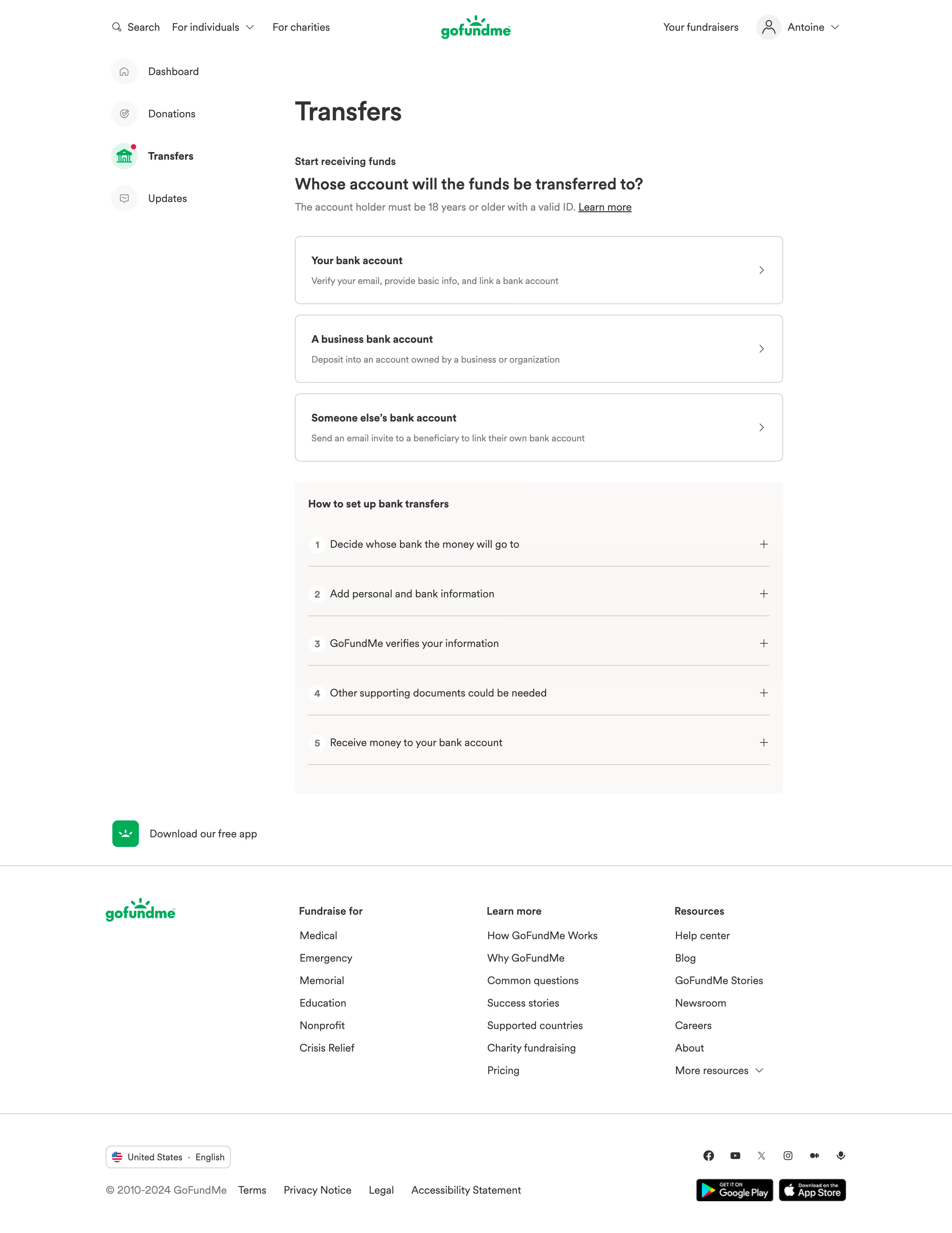
- **Style:** Clear financial setup page with white surfaces, dark gray copy, green branding and lightly outlined choice cards.
- **Scale:** Source 2880 × 3730px. Sizes below estimate a 1440px-wide CSS layout at 2× capture scale.
### Page composition
- **Navigation:** Centered GoFundMe logo sits between search/audience links and fundraiser/account controls. A left rail lists dashboard, donations, transfers and updates.
- **Main column:** A roughly 738px-wide transfer setup area asks whose account receives funds, followed by three choices.
- **Guidance:** A pale warm-gray panel contains five numbered collapsed setup steps.
- **Footer:** App download link precedes a large navigation footer, then locale/legal/social and app-store controls.
### Information hierarchy
- **Task:** Transfers heading and Start receiving funds introduce the beneficiary question and account-holder eligibility note.
- **Choices:** Your bank account, a business bank account and someone else's bank account each have a concise explanation and chevron.
- **Help:** The numbered guide explains recipient choice, information entry, verification, documents and receiving funds.
- **State:** Transfers is selected with a green icon; no recipient choice or banking form is open.
### Typography
- **Family:** Rounded sans-serif; exact font identity is unverified.
- **Roles:** Estimated page heading 40px bold, question 24px semibold, card titles 16px bold and descriptions/body 14–16px/22px.
- **Footer:** Compact bold group headings and regular links maintain a scannable hierarchy.
### Colors & surfaces
- **Sampled palette:** ICC-aware sRGB samples include white #FFFFFF, warm pale #FCF8F6/#FAF8F6, text #333333 and border #C8C8C8.
- **Accent:** Green identifies branding, active transfer navigation and app icon. Other controls remain neutral.
- **Depth:** Flat outlined cards with small corners and no strong shadows.
### Components
- **Recipient cards:** Approximately 738 × 102px, 8px corners, thin gray outline and 24px padding; chevrons align right.
- **Guide:** Warm pale rectangle with five roughly 75px rows, white numbered circles, fine separators and plus controls.
- **Sidebar:** Circular pale icon backplates; Transfers uses a green-tinted circle and small red notification dot.
- **Footer controls:** Outlined locale selector, social icons and app-store badges below three resource columns.
### Visual rhythm
- **Spacing:** Short gaps separate recipient cards; a larger gap introduces the guide. Broad white margins isolate the main decision.
- **Alignment:** Question, cards and guide share the same reading width; footer expands across the wider page.
### Responsive
- **Recommended adaptation:** Only desktop is observed. Collapse left navigation, make cards fluid and stack footer columns.
- **Choices:** Allow explanations to wrap without crowding chevrons; retain readable eligibility guidance.
### Adaptation guidance
- **Preserve:** Keep beneficiary choice before bank details and provide a clear explanation of verification steps.
- **Adapt:** Use actual eligibility, verification and transfer rules. Do not invent bank fields or imply a selected recipient.
Use this context to reproduce the reference's visual language: layout, typography, colors, spacing, borders, radii, and distinctive elements. The screenshot takes priority if descriptions conflict.
## Direction
{{preferences.fidelityInstructions}}
## Output
{{output.instructions}}
Deliver a polished, cohesive design with precise alignment, hierarchy, and spacing. Produce the requested visual artifact, not just a description. If unsupported, explain the limitation.
.webp)


.avif)