.webp)
Thank you! Your submission has been received!
Oops! Something went wrong while submitting the form.
Get SaaSFrame Pro
Monthly
$18
Quarterly
$48
Yearly
$180
Upgrade to access this feature
Browse all screens & flows
Filter and search screens & flows
Access Figma files
Access mobile versions
Bookmark screens & flows
Join now
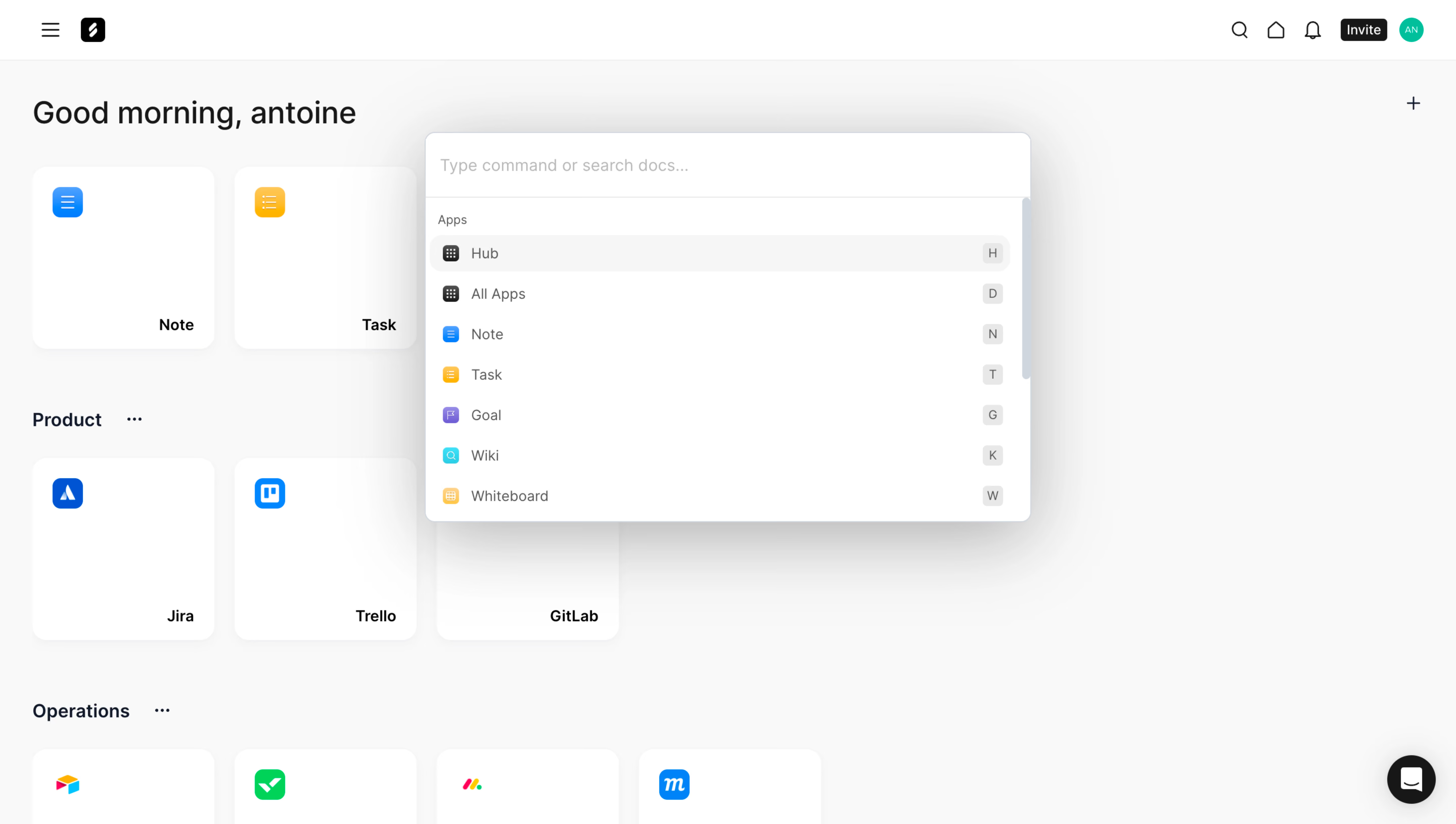
Frame Search Modal

Frame
Unified suite of collaboration apps for teams
Designed by
No items found.

Bookmark
Bookmark

Design with AI
Thank you! Your submission has been received!
Oops! Something went wrong while submitting the form.
# Design from Reference: Frame Search Modal
Create an original, high-fidelity visual design inspired by the reference. Prioritize composition, typography, colors, spacing, and component styling over technical implementation.
## Reference
- **Product:** Frame
- **Category:** Search Modal
- **Screenshot:** https://cdn.prod.website-files.com/5e9dc792e1210c5325f7ebbc/6acbcc50e13ab9df8f053334_6acbcafcab26dfac79c117d0_cms-8e33e34c98a0c9354b9575b7.webp
Analyze the screenshot first. If inaccessible, request it rather than guessing.
## Content
{{content.instructions}}
{{content.data}}
Preserve essential messaging and factual accuracy. Adapt structure and copy length for visual balance; never invent product claims.
## Visual Design
### Overall aesthetic
- **Character:** A white command-search overlay floats above a pale application hub, using a strong diffuse shadow, compact icon rows, and keyboard shortcut badges.
- **Evidence:** The source is 5760 × 3260 px, inspected at 1400 px width. Measurements below use inspection pixels; a roughly 1440 CSS px layout at 4× capture is plausible but unverified.
- **Surface language:** White cards, soft gray backgrounds, and colorful app icons create a light productivity-tool interface.
### Page composition
- **Background:** A slim top bar contains menu/brand controls left and search, home, notifications, invite, and avatar right.
- **Hub:** A greeting precedes large app tiles grouped under headings such as Product and Operations.
- **Search panel:** A centered overlay approximately 582 × 375 inspection px contains a large input row, divider, Apps caption, and scrollable results.
- **Results:** Seven visible app destinations use leading icons, labels, and trailing letter shortcuts.
- **Support:** A black circular chat launcher sits at lower right.
### Information hierarchy
- **Search:** A muted command/document-search placeholder is the panel's entry point.
- **Results:** A small category caption precedes equal-height rows; the first Hub row is highlighted pale gray.
- **Shortcuts:** Small gray letter badges communicate keyboard access without competing with result labels.
- **Background:** Large app tiles and greeting remain visible but are partly covered by the search surface.
### Typography
- **Family:** A neutral sans serif is used; exact identity is unverified.
- **Greeting:** Approximately 30 px medium weight.
- **Input:** Around 16 px with muted placeholder color.
- **Rows:** Approximately 14 px regular, with small 12 px category caption.
- **Shortcuts:** Compact 12–13 px characters centered in small gray badges.
### Colors & surfaces
- **Measured palette:** Source samples include pale gray #F9F9F9, white #FFFFFF, #F8F8F8, #F5F5F5, #F7F7F7, and #F6F6F6.
- **Semantic use:** White grounds the overlay; gray distinguishes selected row, shortcut badges, and page canvas.
- **Icons:** Blue, yellow, purple, and cyan identify app types; primary text is dark gray/black.
- **Depth:** A broad soft shadow beneath the overlay is stronger than the subtle shadows under background app tiles.
### Components
- **Overlay shell:** Approximately 582 px wide with 8–10 px radii, thin cool outline, and substantial shadow.
- **Input row:** About 62 px high with 14 px side padding and a lower divider.
- **Result rows:** Roughly 39 px high, with small icons, text, and right-aligned shortcut badges. The selected first row has rounded pale-gray fill.
- **Scroll indicator:** A narrow gray scrollbar appears at the panel's right edge.
- **Background tiles:** Large rounded white app cards include an upper-left icon and lower-right name.
- **Header actions:** Small outline icons and compact black Invite button align in a horizontal row.
### Visual rhythm
- **Panel alignment:** Search input, caption, icons, and labels form consistent left insets.
- **Row cadence:** Equal vertical spacing and shortcut alignment create a predictable command list.
- **Hub grid:** Large square tiles provide a slower background rhythm than the compact overlay.
- **Whitespace:** Broad pale canvas around the popup emphasizes its search role.
### Responsive
- **Observed limit:** Only desktop is visible; actual search results and mobile behavior are unverified.
- **Recommended overlay:** Constrain to viewport width and height, with internal result scrolling and safe gutters.
- **Recommended interaction:** Support keyboard navigation, visible active result, Escape dismissal, and focus restoration.
- **Recommended content:** Let long labels truncate accessibly without colliding with shortcut badges.
### Adaptation guidance
- **Preserve:** Keep the simple input/category/result hierarchy, small colorful icons, selected row, and shortcut cues.
- **Implement:** Use an accessible command-dialog/listbox pattern with explicit focus and active-result semantics.
- **Layout:** Keep popup position independent of the background tile grid.
- **Validate:** Confirm fonts, true CSS sizes, scrolling, empty/no-result states, and keyboard behavior. The screenshot shows only the initial untyped app list.
Use this context to reproduce the reference's visual language: layout, typography, colors, spacing, borders, radii, and distinctive elements. The screenshot takes priority if descriptions conflict.
## Direction
{{preferences.fidelityInstructions}}
## Output
{{output.instructions}}
Deliver a polished, cohesive design with precise alignment, hierarchy, and spacing. Produce the requested visual artifact, not just a description. If unsupported, explain the limitation.

.avif)
Category
Tech Stack

Added on
October 2, 2023
Similar screens







Upgrade to SaaSFrame Pro now to see similar examples.
Monthly
$18 /month
Billed $18 monthly
Browse all screens & flows
Filter and search screens & flows
Search text in screenshots
Access Figma files
Access mobile versions
Join now
Quarterly
$16 /month
Billed $48 quarterly
Browse all screens & flows
Filter and search screens & flows
Search text in screenshots
Access Figma files
Access mobile versions
Join now
Yearly
$15 /month
Billed $180 yearly
Browse all screens & flows
Filter and search screens & flows
Search text in screenshots
Access Figma files
Access mobile versions
Join now