Design with AI
Generate a new design based on this screen using your own content.
# Design from Reference: Fiberplane User Onboarding
Create an original, high-fidelity visual design inspired by the reference. Prioritize composition, typography, colors, spacing, and component styling over technical implementation.
## Reference
- **Product:** Fiberplane
- **Category:** User Onboarding
- **Screenshot:** https://cdn.prod.website-files.com/5e9dc792e1210c5325f7ebbc/6acbca328313d4c6c0cc400f_6acbc8296b0a1061299b93d5_cms-988f9d0d1e39f98d9a8f3630.webp
Analyze the screenshot first. If inaccessible, request it rather than guessing.
## Content
{{content.instructions}}
{{content.data}}
Preserve essential messaging and factual accuracy. Adapt structure and copy length for visual balance; never invent product claims.
## Visual Design
### Overall aesthetic
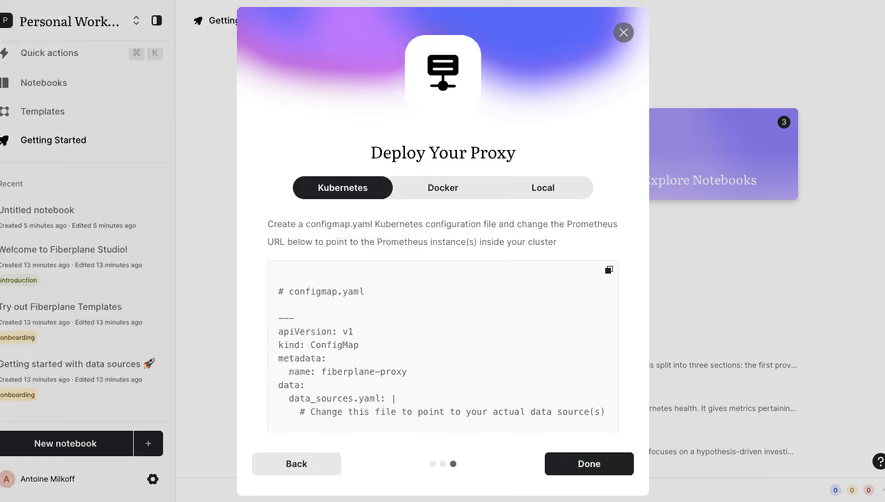
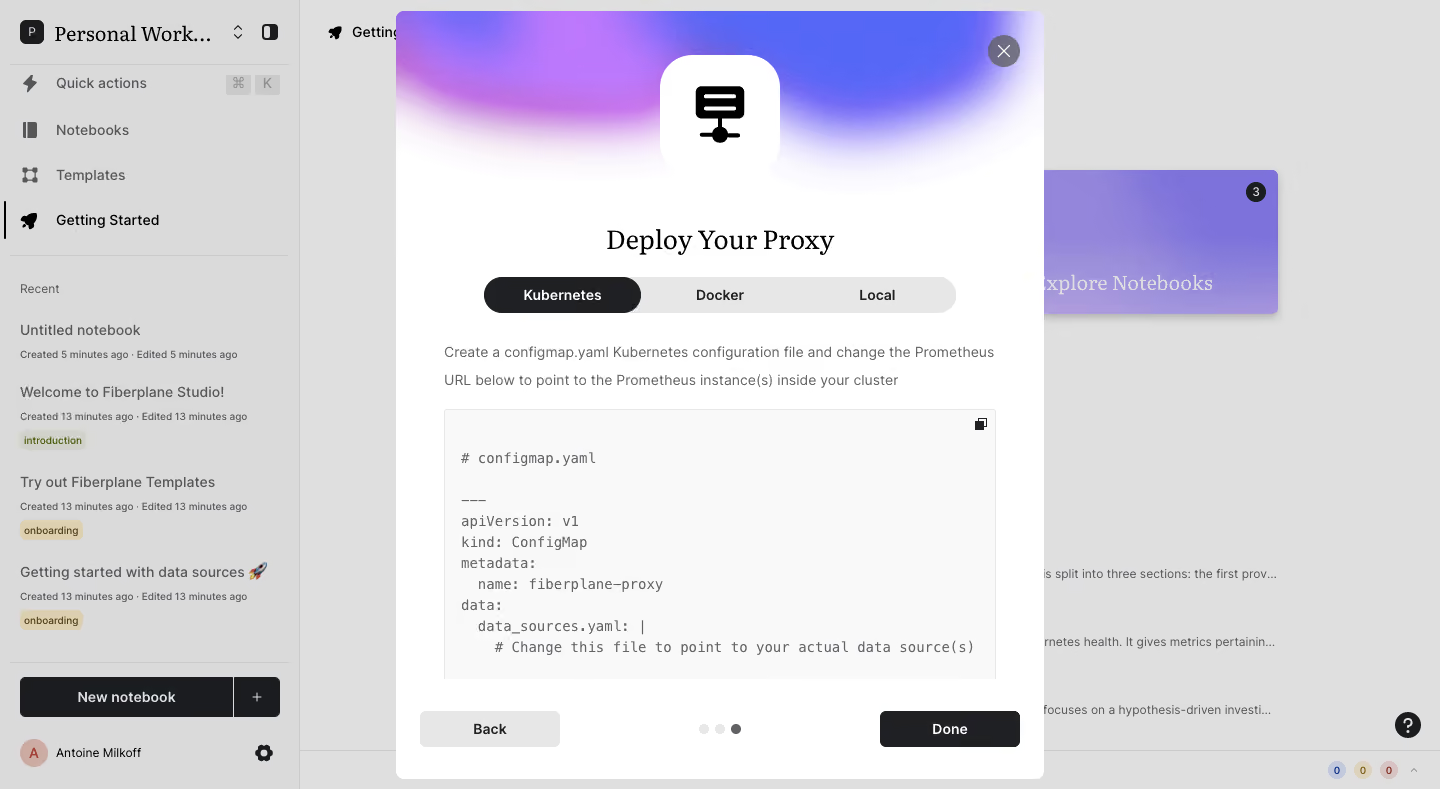
- **Character:** A technical onboarding modal pairs a soft purple-blue gradient header with a white deployment guide and monospaced code block.
- **Capture evidence:** The screenshot measures 1440 × 789 pixels. Approximate dimensions are image pixels; near-1× CSS scale is plausible but unverified.
- **Tone:** A large instructional panel over a dimmed notebook app emphasizes deployment setup.
### Page composition
- **Background:** A notebook sidebar and getting-started workspace remain visible under gray dimming.
- **Modal:** A centered roughly 650 × 768px white rectangle nearly fills the viewport height.
- **Header artwork:** A purple/pink/blue gradient fades into white behind a centered rounded-square server icon.
- **Guide title:** Deploy Your Proxy sits above a three-way Kubernetes/Docker/Local selector.
- **Instructions:** Two lines of explanation precede a large light code panel.
- **Footer:** Back and Done align at opposite sides, with three progress dots centered.
### Information hierarchy
- **Task:** The serif deployment heading establishes the current onboarding lesson.
- **Environment:** Kubernetes is selected in a dark pill; Docker and Local are inactive.
- **Technical guidance:** Explanatory prose leads directly into the configuration example.
- **Code:** Monospaced content includes a configuration-file label and structured YAML-like lines; only the visible portion is established.
- **Progress:** The third dot is dark while the first two are pale.
- **Completion action:** Done is dark filled; Back is pale gray.
### Typography
- **Family pairing:** A serif serves the main guide title; sans-serif serves controls/prose; monospace serves code. Exact identities are unverified.
- **Title:** Approximately 28px regular serif.
- **Instructions:** Approximately 14px with 28px line-height, muted gray.
- **Segment labels:** Approximately 14px semibold.
- **Code:** Approximately 14px monospace with 22px line-height.
- **Footer actions:** Approximately 14px semibold.
### Colors & surfaces
- **Modal:** Sampled #FFFFFF supplies the main dialog.
- **Backdrop:** Sampled #DFDFDF and #DADADA supply much of the dimmed app appearance.
- **Code surface:** Sampled #F9F9F9 supplies the pale code panel.
- **Controls:** Sampled #E7E7E7 supplies the segmented track and Back button.
- **Dark actions:** Sampled #1B1C1F and #1F2023 supply the selected segment, icon and Done control.
- **Header:** Soft violet, pink and blue create a localized gradient without extending into the code area.
### Components
- **Modal shell:** White rectangle with around 8px radii and a small shadow.
- **Server icon:** A large black symbol sits inside a roughly 120px white rounded square.
- **Segmented control:** A roughly 472 × 36px pale pill contains three equal options, with the first dark filled.
- **Code panel:** A roughly 552px-wide light rectangle has a thin border and small copy icon at upper right.
- **Close control:** A dark translucent circular X sits over the gradient near the modal corner.
- **Footer buttons:** Back and Done are around 140 × 36px with small radii.
- **Progress dots:** Three small circles identify the visible final step.
### Visual rhythm
- **Main padding:** Approximately 48px horizontal inset aligns prose and code.
- **Header spacing:** The icon, title and selector form a centered vertical stack.
- **Technical density:** The large code block occupies most of the lower middle, contrasting with the spacious decorative header.
- **Footer spacing:** A clear white band separates navigation from the code content.
- **Viewport fit:** The modal nearly touches top and bottom margins, making height management significant.
### Responsive
- **Evidence limit:** Only a desktop deployment state is visible; environment switching, copy and deployment behavior are unverified.
- **Dialog recommendation:** Use internal scrolling on short screens and preserve access to close/navigation controls.
- **Code recommendation:** Allow horizontal scrolling without shrinking monospaced text.
- **Selector recommendation:** Keep the three environment choices clearly labeled and keyboard operable.
- **Header recommendation:** Reduce decorative height on narrow or short viewports.
### Adaptation guidance
- **Technical guide:** Keep environment selection, instructions and code synchronized.
- **Code handling:** Use real text with accessible copy feedback rather than embedding configuration as an image.
- **Safety of scope:** Treat the configuration as displayed documentation; do not infer execution or successful deployment.
- **Accessibility:** Provide a labeled dialog, selected-tab semantics and visible focus.
- **Progress:** Expose the current step textually in addition to dots.
Use this context to reproduce the reference's visual language: layout, typography, colors, spacing, borders, radii, and distinctive elements. The screenshot takes priority if descriptions conflict.
## Direction
{{preferences.fidelityInstructions}}
## Output
{{output.instructions}}
Deliver a polished, cohesive design with precise alignment, hierarchy, and spacing. Produce the requested visual artifact, not just a description. If unsupported, explain the limitation.
.webp)



.avif)