Design with AI
Generate a new design based on this screen using your own content.
# Design from Reference: Cloudflare Domain Registration
Create an original, high-fidelity visual design inspired by the reference. Prioritize composition, typography, colors, spacing, and component styling over technical implementation.
## Reference
- **Product:** Cloudflare
- **Category:** Empty State
- **Screenshot:** https://cdn.prod.website-files.com/5e9dc792e1210c5325f7ebbc/6acad127b2165b6c7fffac72_6acad0b4610f0f51f4ed537e_cms-c7dfb8a4c774fc96cd13e5fa.webp
Analyze the screenshot first. If inaccessible, request it rather than guessing.
## Content
{{content.instructions}}
{{content.data}}
Preserve essential messaging and factual accuracy. Adapt structure and copy length for visual balance; never invent product claims.
## Visual Design
### Overall aesthetic
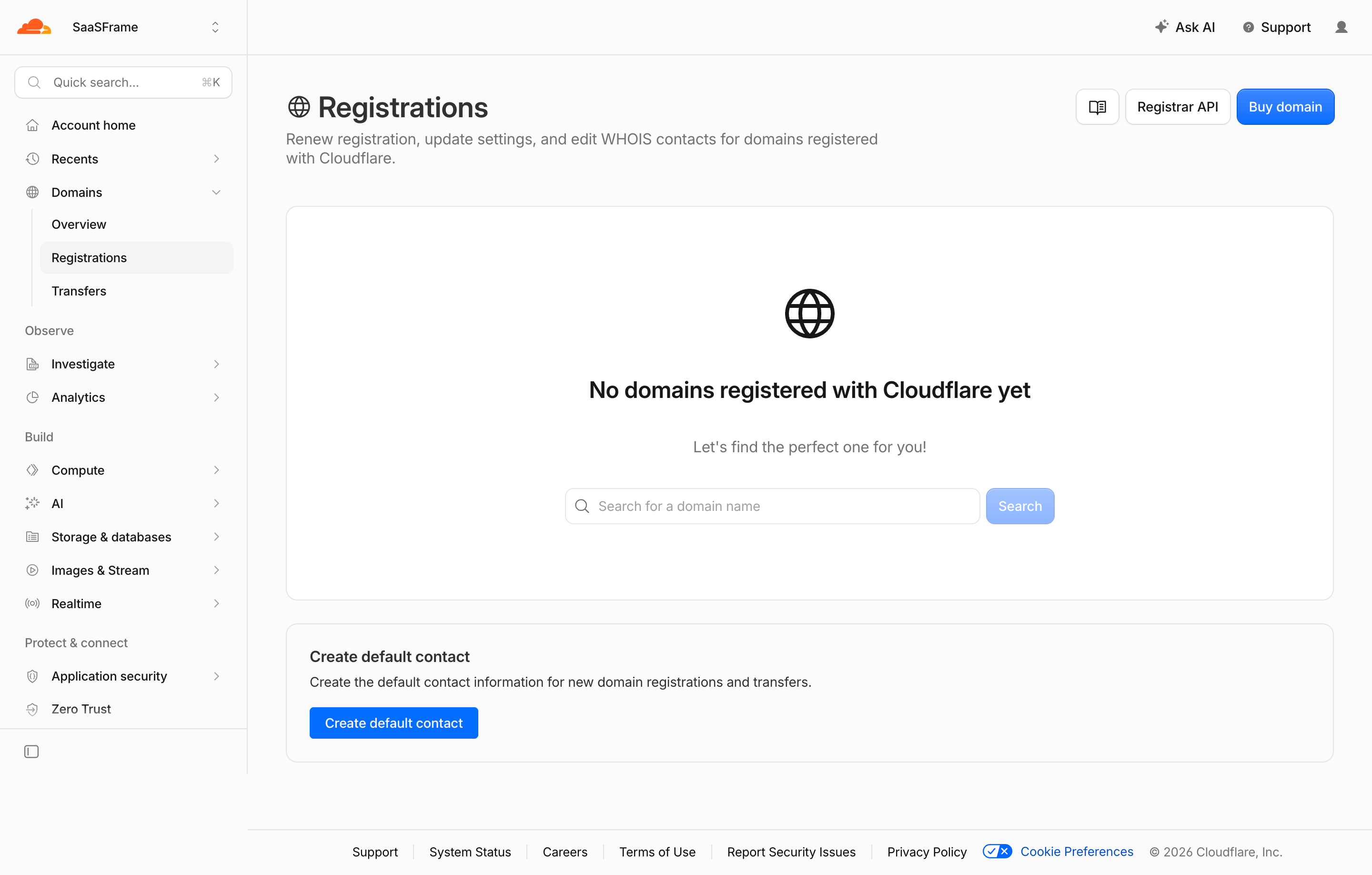
- **Character:** Light domain-management dashboard with a quiet gray navigation rail, large empty-state panel and blue acquisition actions.
- **Evidence and scale:** Screenshot is 2880 × 1836 image pixels. Sizes estimate a 1440px CSS canvas at 2× capture scale; DPR and exact font identity are unverified.
### Page composition
- **Shell:** Approximately 260px left rail contains quick search, grouped product destinations and expanded Domains submenu.
- **Top/header:** Workspace context sits above the rail; support/account utilities align right. Main title/description pair with documentation, registrar API and Buy domain controls.
- **Empty state:** Large white rounded panel contains globe icon, no-domains heading, short prompt and search/action row.
- **Contact setup:** A smaller bordered panel below offers default-contact creation.
- **Footer:** Compact support/legal/status links sit below a thin divider.
### Information hierarchy
- **Current view:** Registrations is highlighted within the expanded Domains submenu.
- **State:** Bold no-domains message is the main focal point; the search field suggests a next step.
- **Actions:** Buy domain and Create default contact use saturated blue; search action appears paler in the empty-field state.
- **Secondary utilities:** Registrar API/docs remain outlined and visually quieter.
### Typography
- **Page title:** Approximately 30px CSS semibold with globe icon.
- **Empty heading:** Around 24px semibold; supporting prompt around 16px gray.
- **Controls/body:** Around 14–16px; rail links and footer around 13–14px.
- **Family:** Neutral sans-serif; exact family, weights and tracking remain unverified.
### Colors & surfaces
- **Measured foundation:** Near-white #FBFBFB and white #FFFFFF dominate.
- **Measured lines:** #E5E5E5/#E3E3E3 and pale #F3F4F3 support borders/selection.
- **Measured foreground:** Near-black #171717 supports strong text.
- **Measured accents:** Blue #036EFF fills primary controls; orange #FF5E1F appears in the small brand mark, with darker #045EDE action pixels.
### Components
- **Rail:** Icon-led rows, section labels and nested vertical guide; selected registration row uses a pale rounded fill.
- **Empty shell:** Approximately 1100 × 414px CSS, thin border, radius near 12px and generous centered padding.
- **Domain search:** Wide outlined input around 435 × 38px with magnifier, followed by compact pale-blue Search button.
- **Header actions:** Small outlined icon/docs control, outlined Registrar API and blue Buy domain, around 38px high.
- **Contact panel:** Short title/body stack and compact blue action within roughly 24px padding.
- **Footer:** Small inline links with separators and blue cookie-preference control.
### Visual rhythm
- **Main inset:** Approximately 40px from rail boundary; header, panels and footer share aligned edges.
- **Panel spacing:** Around 24px separates large empty state and contact setup.
- **Empty-state stack:** Globe, heading, prompt and search have generous 28–40px intervals.
- **Navigation density:** Compact grouped rail contrasts with broad open main surfaces.
### Responsive
- **Observed limit:** Desktop empty state only; domain search, purchase, contact creation and mobile behavior are unobserved.
- **Recommended layout:** Collapse navigation, wrap header actions and let search/action stack on narrow screens.
- **Recommended state:** Retain clear no-domain explanation and next-step choices.
- **Recommended controls:** Preserve readable labels and comfortable tap targets.
### Adaptation guidance
- **Preserve clarity:** Separate domain discovery from default-contact setup and make empty-state context explicit.
- **Keep utilities quiet:** Neutral outlined technical routes should remain secondary to the main task.
- **Implementation:** Provide accessible search/navigation labels, focus and validation. The screenshot does not authorize domain purchase or contact changes.
Use this context to reproduce the reference's visual language: layout, typography, colors, spacing, borders, radii, and distinctive elements. The screenshot takes priority if descriptions conflict.
## Direction
{{preferences.fidelityInstructions}}
## Output
{{output.instructions}}
Deliver a polished, cohesive design with precise alignment, hierarchy, and spacing. Produce the requested visual artifact, not just a description. If unsupported, explain the limitation.
.webp)



.avif)