Design with AI
Generate a new design based on this screen using your own content.
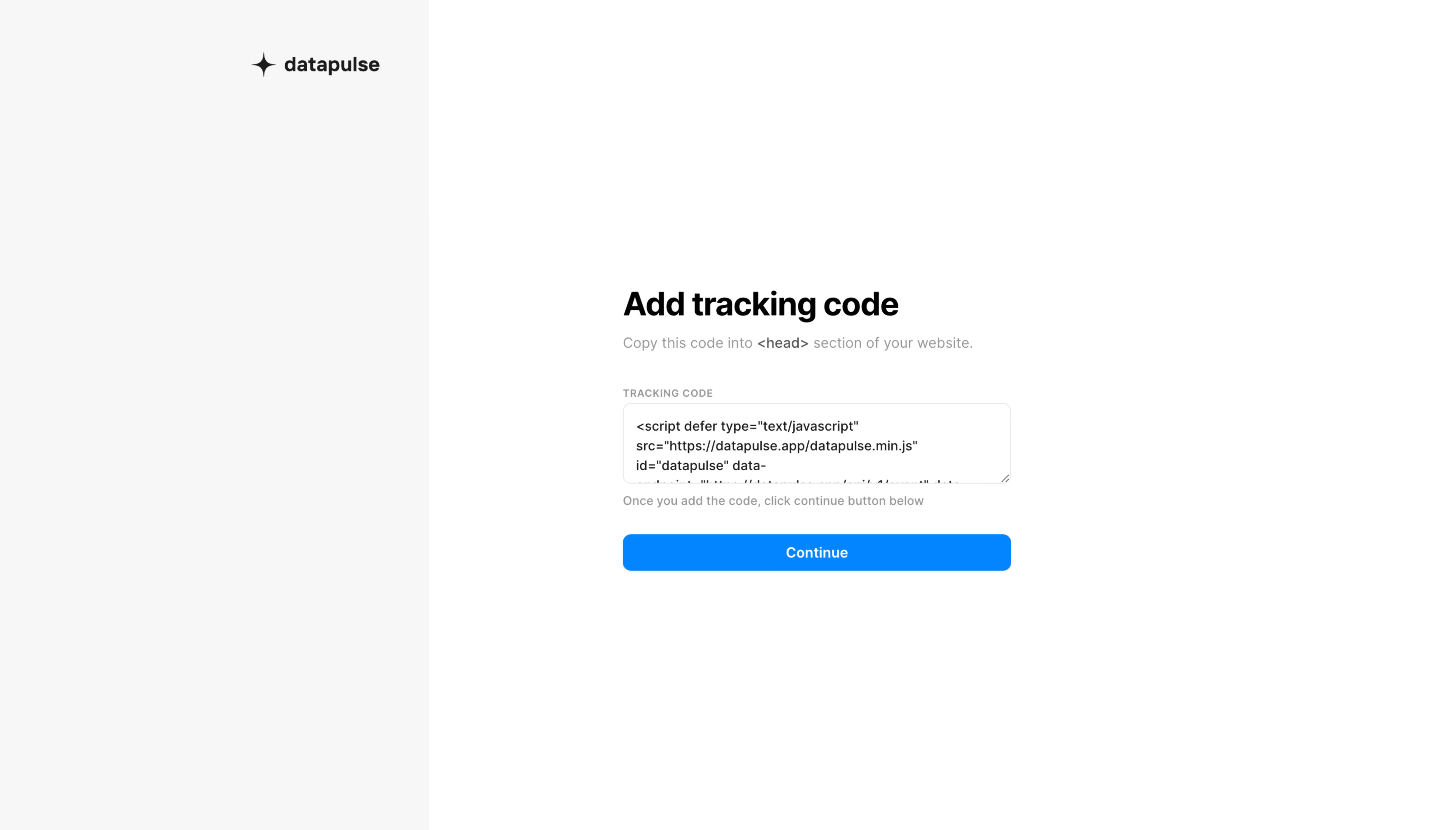
# Design from Reference: DataPulse Account Setup
Create an original, high-fidelity visual design inspired by the reference. Prioritize composition, typography, colors, spacing, and component styling over technical implementation.
## Reference
- **Product:** DataPulse
- **Category:** Account Setup
- **Screenshot:** https://cdn.prod.website-files.com/5e9dc792e1210c5325f7ebbc/6acadd226cd44b3ad4d9d46e_6acadc31819c110875083a9c_cms-600d9e179c53703943f08eca.webp
Analyze the screenshot first. If inaccessible, request it rather than guessing.
## Content
{{content.instructions}}
{{content.data}}
Preserve essential messaging and factual accuracy. Adapt structure and copy length for visual balance; never invent product claims.
## Visual Design
### Overall aesthetic
- **Style:** A minimal analytics onboarding step with a pale brand rail, a narrow installation form, and one saturated blue continuation action.
- **Character:** Functional and uncluttered, with no illustration, progress artwork, or promotional panel competing with the tracking-code task.
### Page composition
- **Capture and scale:** The screenshot measures 5760 × 3284 pixels, consistent with an estimated 4× capture of a 1440 × 821 CSS viewport. Following dimensions are estimated CSS pixels under that assumption.
- **Brand rail:** A pale-gray vertical region occupies roughly 425 CSS px, or 29% of the width. A black sparkle mark and datapulse wordmark sit near its upper right.
- **Main form:** A roughly 385 px-wide text/form stack sits in the white right region, slightly above the vertical midpoint. It contains a title, short instruction, uppercase field label, multiline code box, helper sentence, and full-width Continue button.
### Information hierarchy
- **Task:** The bold heading introduces installation. The instruction identifies the website head section as the code destination.
- **Action order:** The tracking code is presented before a small completion reminder and the only primary button.
- **Restraint:** The brand remains secondary to the installation task; no unrelated navigation is shown.
### Typography
- **Family:** A neutral sans serif is visible; the exact family is unverified. The code box also appears to use compact sans serif text rather than clearly distinguishable monospace.
- **Heading:** Approximately 32 px CSS, weight 700, with about 38 px line-height and slightly tight tracking.
- **Body and metadata:** Instructions are around 15–16 px with 22 px line-height. The uppercase Tracking Code label is about 10–11 px with positive tracking; helper text is around 13 px.
- **Controls:** Code text is approximately 13 px; the button label around 14 px semibold, centered.
### Colors & surfaces
- **Foundation:** Sampled sRGB #FFFFFF defines the main area and #F7F7F7 the brand rail.
- **Action:** Sampled blue #0088FF fills the continuation button, with white text.
- **Ink and boundaries:** Sampled #000000 and #1C1C1C support dark headings/brand, while #E8E8E8 provides a fine field-border reference. Instruction and helper copy use muted gray.
### Components
- **Code field:** A roughly 385 × 80 px CSS white multiline field has a thin light-gray border, about 7–8 px corner radius, modest internal padding, and a visible bottom-right resize grip. Script content extends beyond the visible field.
- **Primary action:** The blue button is approximately 36–38 px high, spans the form width, and uses a roughly 7 px radius. No icon accompanies its centered label.
- **Brand lockup:** The small black sparkle and wordmark form a simple horizontal unit without a surrounding card.
### Visual rhythm
- **Vertical spacing:** Keep the title and instruction close, then allow approximately 32 px before the code label. Helper copy follows the field tightly; roughly 24 px separates it from the button.
- **Alignment:** All form elements share one left/right edge, with extensive white space around the compact stack.
### Responsive
- **Observed state:** Only the wide desktop setup step is evidenced.
- **Recommended reflow:** Collapse the pale rail into a short brand header and place the form in a fluid single column with 20–24 px side padding.
- **Code handling:** Keep code selectable and preserve its exact content; allow appropriate internal scrolling or wrapping without forcing horizontal page overflow.
### Adaptation guidance
- **Preserve:** Retain the compact task-first form, explicit code label/instruction, muted helper copy, and single full-width blue action.
- **Adapt:** Use the actual integration snippet and verified installation destination for the new product. Keep technical instructions concise and accurate.
- **Avoid:** Do not invent a copy button, installation success state, or validation feedback that is absent from the screenshot. Add such behavior only when required by the new workflow.
Use this context to reproduce the reference's visual language: layout, typography, colors, spacing, borders, radii, and distinctive elements. The screenshot takes priority if descriptions conflict.
## Direction
{{preferences.fidelityInstructions}}
## Output
{{output.instructions}}
Deliver a polished, cohesive design with precise alignment, hierarchy, and spacing. Produce the requested visual artifact, not just a description. If unsupported, explain the limitation.
.webp)



.avif)






.avif)

