Design with AI
Generate a new design based on this screen using your own content.
# Design from Reference: Cycle Search Modal
Create an original, high-fidelity visual design inspired by the reference. Prioritize composition, typography, colors, spacing, and component styling over technical implementation.
## Reference
- **Product:** Cycle
- **Category:** Search Modal
- **Screenshot:** https://cdn.prod.website-files.com/5e9dc792e1210c5325f7ebbc/6acbb9bed1be8ecd2912de59_6acb7075b206c0d3f8f4d507_cms-dc536fe0806a5df27f379eca.webp
Analyze the screenshot first. If inaccessible, request it rather than guessing.
## Content
{{content.instructions}}
{{content.data}}
Preserve essential messaging and factual accuracy. Adapt structure and copy length for visual balance; never invent product claims.
## Visual Design
### Overall aesthetic
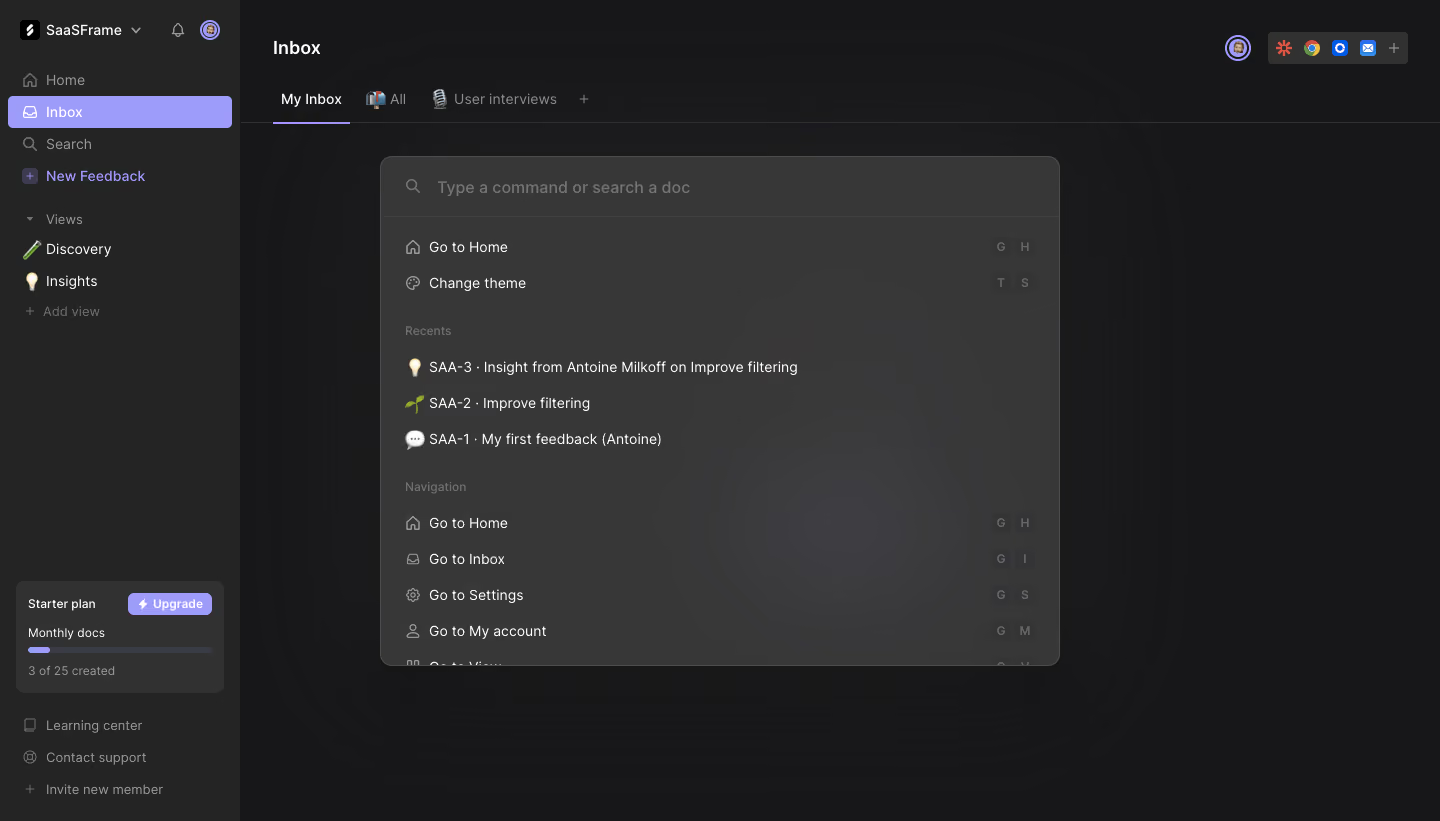
- **Character:** A dark command palette floats above a subdued feedback workspace.
- **Emphasis:** Gray surfaces, soft shadow and lavender selection accents create a quiet keyboard-oriented interface.
### Page composition
- **Capture:** The original is 1440 × 821 pixels. Measurements approximate image pixels; CSS scale is unverified.
- **Shell:** A roughly 240-pixel sidebar contains workspace identity, navigation, views and a bottom plan-usage card.
- **Workspace:** Inbox heading and tabs remain visible behind the overlay.
- **Palette:** A centered approximately 680 × 510-pixel rounded panel contains search input, immediate commands, recent items and navigation commands.
- **Crop:** Lower palette entries are cut off within the panel, indicating more content beyond the visible list.
### Information hierarchy
- **Search first:** A magnifier and large placeholder establish the command/search entry point.
- **Suggestions:** Two immediate commands appear before the Recents group.
- **Groups:** Muted small headings distinguish recent documents from navigation.
- **Shortcuts:** Small keycaps align right of navigation commands.
### Typography
- **Family:** A rounded sans serif is visible; exact identity is unverified.
- **Search:** Approximately 16 pixels, medium weight and muted.
- **Rows:** Commands and recent-item names use around 14 pixels.
- **Group labels:** Approximately 12 pixels, subdued gray.
- **Shell:** Inbox heading is around 20 pixels and bold; sidebar links around 14 pixels.
### Colors & surfaces
- **Measured canvas:** Near-black #171618 and nearby #181719/#19181A dominate the workspace.
- **Measured palette:** Gray #383738 and nearby #383838 form the raised modal.
- **Measured sidebar:** #242424 provides a distinct navigation surface.
- **Accent relationship:** Lavender highlights the selected Inbox row, upgrade action and some active details.
### Components
- **Palette shell:** Approximately 12-pixel radius, fine gray outline and broad soft shadow.
- **Search row:** A roughly 60-pixel-high top area is divided from results by a thin rule.
- **Command rows:** Leading line icons or emoji identify each item; rows share consistent left padding.
- **Keycaps:** Small dark rounded squares show two-key shortcuts at the right.
- **Plan widget:** A compact dark card includes upgrade button, thin usage bar and small count text.
- **Sidebar selection:** A lavender rounded rectangle spans almost the full sidebar width.
### Visual rhythm
- **Row cadence:** Results use approximately 36-pixel intervals.
- **Group spacing:** Larger gaps before Recents and Navigation create readable subdivisions.
- **Layering:** The palette occupies the central visual field, while shell contrast is reduced.
### Responsive
- **Observed state:** Only desktop is supplied; mobile command behavior is unverified.
- **Recommended palette:** Use viewport-bounded width/height and internal result scrolling.
- **Recommended labels:** Truncate long document names accessibly and hide nonessential shortcut badges when narrow.
### Adaptation guidance
- **Preserve hierarchy:** Keep search, suggestions, recents and navigation distinct.
- **State fidelity:** Reproduce the open palette without inventing search results or hidden entries.
- **Keyboard support:** Provide clear focus and arrow-key navigation if implementing the interaction.
- **Accessibility:** Use appropriate dialog/combobox semantics and announce result selection.
Use this context to reproduce the reference's visual language: layout, typography, colors, spacing, borders, radii, and distinctive elements. The screenshot takes priority if descriptions conflict.
## Direction
{{preferences.fidelityInstructions}}
## Output
{{output.instructions}}
Deliver a polished, cohesive design with precise alignment, hierarchy, and spacing. Produce the requested visual artifact, not just a description. If unsupported, explain the limitation.
.webp)



.avif)