Generate a new design based on this screen using your own content.
Thank you! Your submission has been received!
Oops! Something went wrong while submitting the form.
# Design from Reference: Customer.io Connect Airtable
Create an original, high-fidelity visual design inspired by the reference. Prioritize composition, typography, colors, spacing, and component styling over technical implementation.
## Reference
- **Product:** Customer.io
- **Category:** Integrations
- **Screenshot:** https://cdn.prod.website-files.com/5e9dc792e1210c5325f7ebbc/6acad4ba1025e911ae518349_6acad37f610f0f51f4ee554d_cms-c022ca00ae702c0769df0db4.webp
Analyze the screenshot first. If inaccessible, request it rather than guessing.
## Content
{{content.instructions}}
{{content.data}}
Preserve essential messaging and factual accuracy. Adapt structure and copy length for visual balance; never invent product claims.
## Visual Design
Use this context to reproduce the reference's visual language: layout, typography, colors, spacing, borders, radii, and distinctive elements. The screenshot takes priority if descriptions conflict.
## Direction
{{preferences.fidelityInstructions}}
## Output
{{output.instructions}}
Deliver a polished, cohesive design with precise alignment, hierarchy, and spacing. Produce the requested visual artifact, not just a description. If unsupported, explain the limitation.
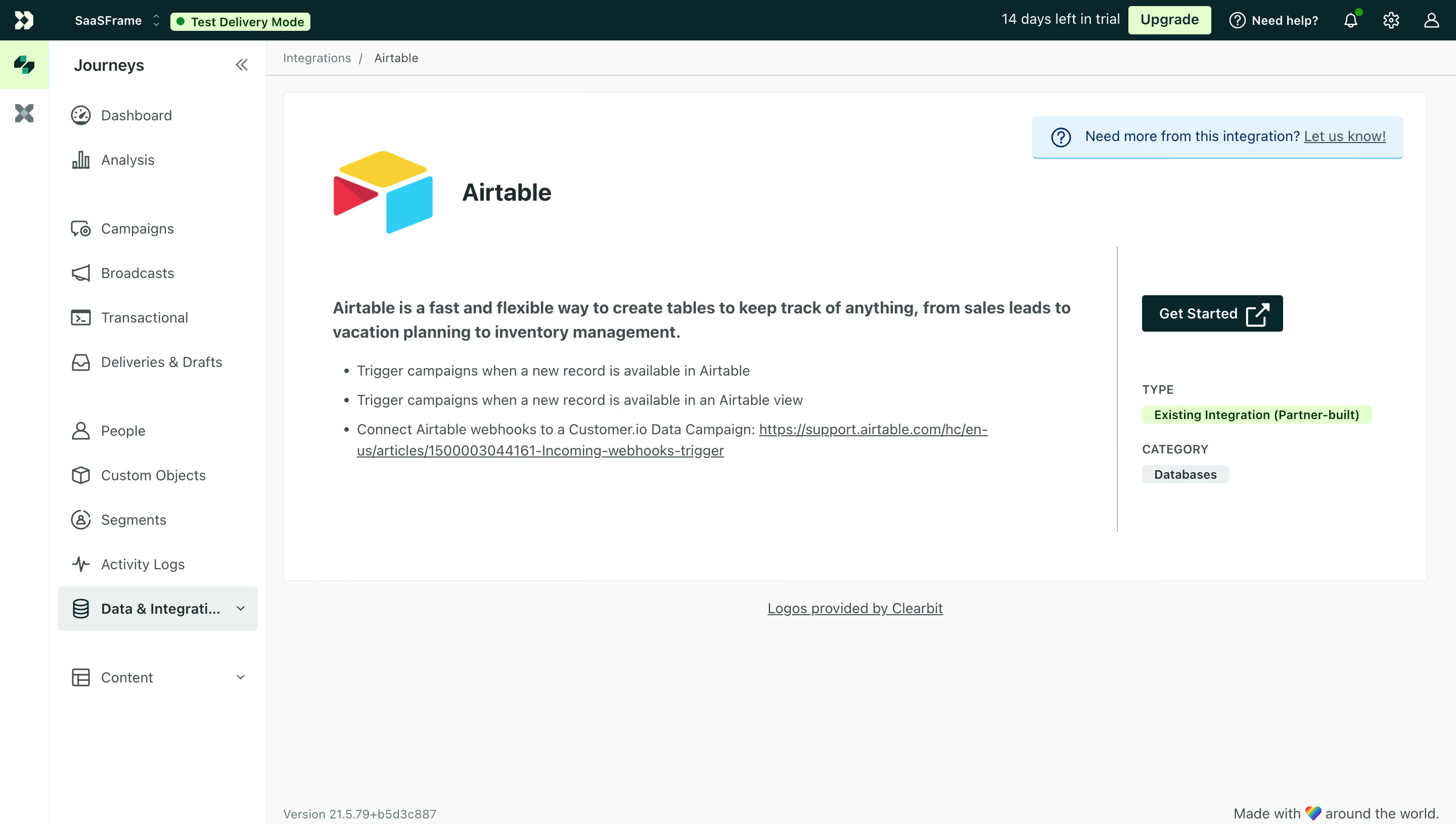
This is Customer.io's Airtable integration page and it's a good example of how to present third-party tool info without overcomplicating things. The left sidebar is dense but well-organized, grouping navigation into logical clusters with subtle icon work. That green "Test Delivery Mode" badge up top immediately signals environment context. Smart.
Layout That Just Works
Two-column content area does the heavy lifting here. Left side gives you the description and bullet points. Right side pins the CTA and metadata. The "Get Started" button with that external link arrow is compact but unmissable against all the white space. The green accent on the integration type tag ("Existing Integration (Partner-built)") adds a tiny pop of color without being loud. Typography is restrained, mostly one font family at different weights.
What Stands Out
The Airtable logo gets room to breathe. That matters. The bullet points are scannable in seconds. One thing I appreciate is the "Need more from this integration?" banner at the top. It's a soft feedback loop that feels genuinely useful rather than decorative. Whole page reads fast and gets out of your way.
.webp)




.avif)