Design with AI
Generate a new design based on this screen using your own content.
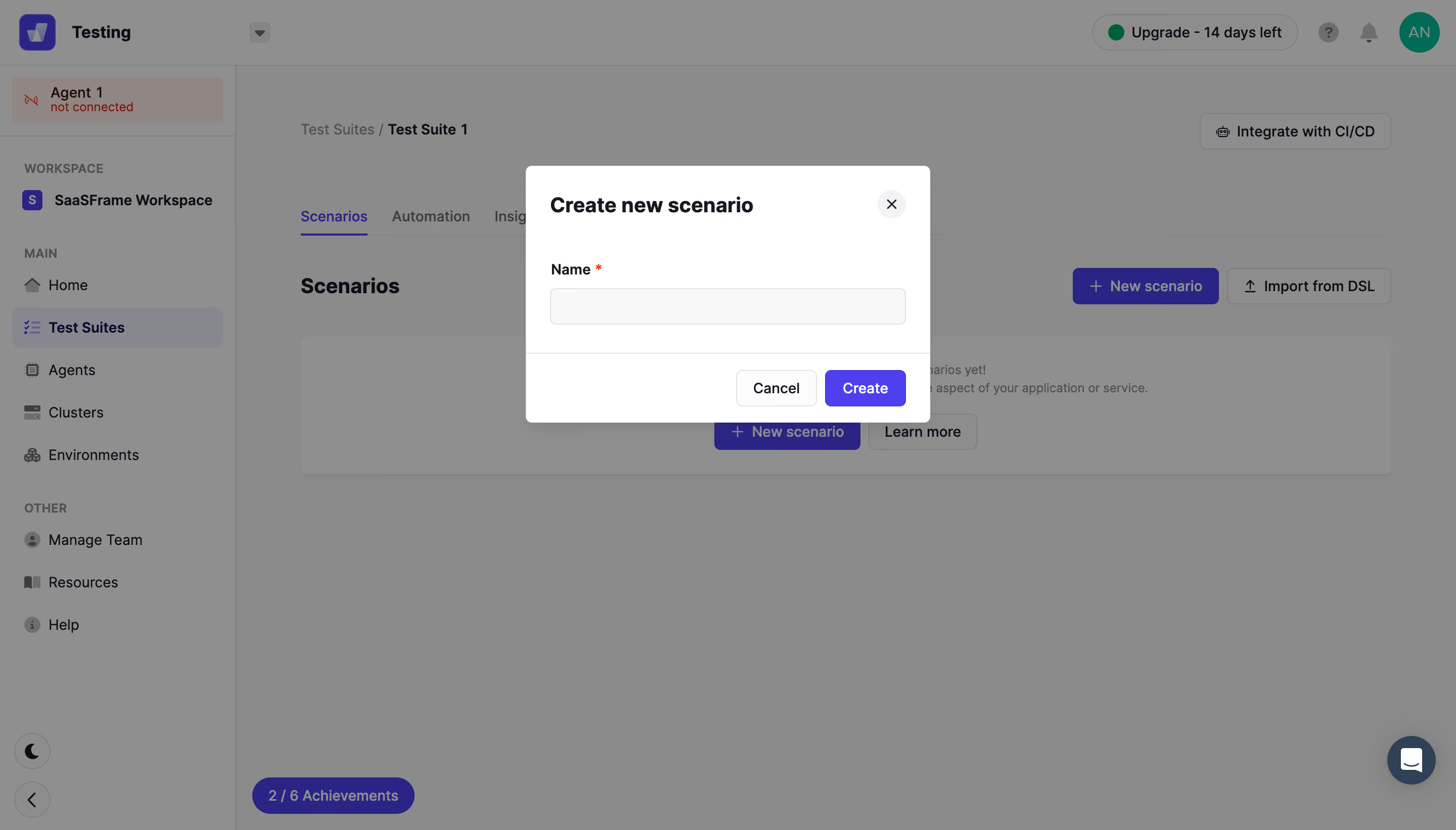
# Design from Reference: Conduktor Create Element
Create an original, high-fidelity visual design inspired by the reference. Prioritize composition, typography, colors, spacing, and component styling over technical implementation.
## Reference
- **Product:** Conduktor
- **Category:** Add & Edit
- **Screenshot:** https://cdn.prod.website-files.com/5e9dc792e1210c5325f7ebbc/6acb6765994832179b56067d_6acb657ec08cd859ff861191_cms-e3fb947864d0614240b82d1f.webp
Analyze the screenshot first. If inaccessible, request it rather than guessing.
## Content
{{content.instructions}}
{{content.data}}
Preserve essential messaging and factual accuracy. Adapt structure and copy length for visual balance; never invent product claims.
## Visual Design
### Overall aesthetic
- **Character:** Compact creation modal above a dimmed testing workspace.
### Page composition
- **Canvas:** 2880 × 1642 screenshot px. Centered white Create new scenario dialog overlays navigation, test-suite tabs, and an empty-state panel.
### Information hierarchy
- **Priority:** Dialog title, required Name label, single input, and right-aligned Cancel/Create footer define the interaction.
### Typography
- **Scale:** Estimated CSS at assumed 2× capture: title 20 px bold, label/body 14 px, actions 14 px. Sans serif family unverified.
### Colors & surfaces
- **Palette:** Sampled sRGB modal #FFFFFF, input #F9F8F9, dimmed overlay #8C8B8C/#8F8F8F, and underlying purple #2B2487. Primary modal action is vivid violet.
### Components
- **Details:** Approximately 400 CSS px dialog width, 6 px corners, shadow, circular close control, thin input border, horizontal footer divider, outlined Cancel and filled Create.
### Visual rhythm
- **Spacing:** About 24 CSS px dialog padding, 32 px field height, and 16 px footer padding. Centering separates creation from dense workspace context.
### Responsive
- **Adaptation:** Mobile is not shown. Use a fluid modal with 20 px outer margins and keep required input and actions visible.
### Adaptation guidance
- **Transfer:** Retain the one-field creation flow and explicit dismissal. Replace scenario terminology and required-field rules with target requirements.
Use this context to reproduce the reference's visual language: layout, typography, colors, spacing, borders, radii, and distinctive elements. The screenshot takes priority if descriptions conflict.
## Direction
{{preferences.fidelityInstructions}}
## Output
{{output.instructions}}
Deliver a polished, cohesive design with precise alignment, hierarchy, and spacing. Produce the requested visual artifact, not just a description. If unsupported, explain the limitation.
.webp)



.avif)