Design with AI
Generate a new design based on this screen using your own content.
# Design from Reference: Shortcut lubhouse User Onboarding
Create an original, high-fidelity visual design inspired by the reference. Prioritize composition, typography, colors, spacing, and component styling over technical implementation.
## Reference
- **Product:** Shortcut
- **Category:** User Onboarding
- **Screenshot:** https://cdn.prod.website-files.com/5e9dc792e1210c5325f7ebbc/6acbcea075891049b183fe49_6acbcd1f7baf79c89e85b39b_cms-adde2cdd4049361c34c01a4d.webp
Analyze the screenshot first. If inaccessible, request it rather than guessing.
## Content
{{content.instructions}}
{{content.data}}
Preserve essential messaging and factual accuracy. Adapt structure and copy length for visual balance; never invent product claims.
## Visual Design
### Overall aesthetic
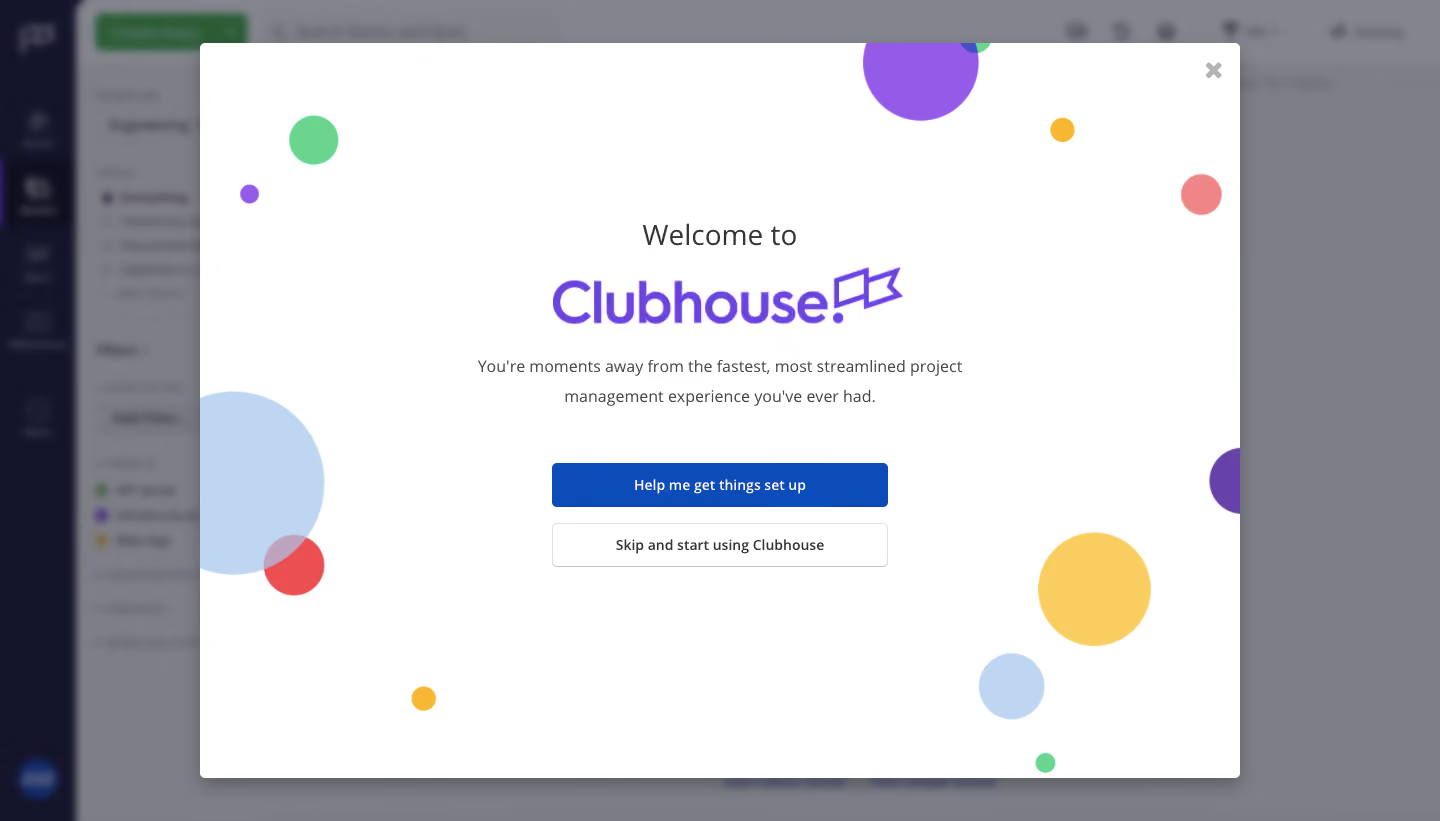
- **Character:** Celebratory welcome modal with a bright white surface, multicolor floating circles and a large purple Clubhouse wordmark.
- **Contrast:** The application behind it is blurred and darkened, making the centered onboarding choice the dominant focus.
- **Capture:** The screenshot is 1440 × 821 image px. Dimensions are observed image estimates; CSS scale is unverified. The visible branding says Clubhouse.
### Page composition
- **Modal:** A large approximately 1040 × 735 px white panel is centered with narrow top/bottom margins and small rounded corners.
- **Central stack:** Welcome line, purple wordmark, two-line supporting sentence and two equal-width buttons align centrally.
- **Decoration:** Colored circles of varying size appear around the perimeter, with several clipped by the panel edges.
- **Shell:** A dark left rail and project-management content remain blurred behind the modal; details cannot be reliably established.
### Information hierarchy
- **Brand:** The purple wordmark is the strongest central graphic beneath a smaller welcome line.
- **Explanation:** A short centered sentence describes the product experience without adding a dense checklist.
- **Choice:** A filled blue setup action leads; an outlined skip action follows directly beneath.
- **Dismissal:** A gray X in the upper-right corner offers a third, visually subordinate control. No action outcome is shown.
### Typography
- **Family:** Neutral sans-serif body text and custom brand lettering; exact font identity is unverified.
- **Welcome:** Approximately 28–30 image px, regular weight.
- **Supporting copy:** Around 17–18 px with roughly 30 px leading, centered in a moderate-width block.
- **Buttons:** Approximately 15–16 px, medium-to-bold, with centered labels.
- **Wordmark:** Large purple custom lettering and flag-like symbol are graphic identity rather than a verified font.
### Colors & surfaces
- **Measured base:** ICC-aware sRGB sampling yields #FFFFFF for the modal and #7E7E87 in the composite dimmed background.
- **Measured dark:** #14142A occurs in the background rail; these background values include overlay effects.
- **Measured action/accent:** Blue #0C4CB9 appears in the primary action, purple #935BE7 and pale blue #BED6F1 in decorative areas.
- **Measured warm tone:** #F9CD5F is a yellow circle color; additional coral and mint circles add variety.
- **Depth:** A broad soft shadow separates the modal from the blurred shell.
### Components
- **Primary button:** Approximately 336 × 44 image px, blue fill, white caption and about 5 px corners.
- **Secondary button:** Matching dimensions with white fill, thin gray outline and dark text, spaced about 16 px below.
- **Close:** Small gray X with generous surrounding white space in the panel corner.
- **Circle system:** Flat colored disks range from tiny dots to large cropped circles; overlapping disks create transparent-looking intersections.
- **State:** This is an initial welcome choice, with neither setup nor skip visibly selected.
### Visual rhythm
- **Centering:** All functional content shares a central vertical axis.
- **Spacing:** Large gaps separate wordmark, explanation and actions, while the two buttons form a tight group.
- **Perimeter balance:** Decorative circles stay mostly outside the text area, maintaining a quiet reading center.
- **Whitespace:** Broad blank regions keep the large modal from feeling crowded.
### Responsive
- **Evidence limit:** Only desktop is shown; recommendations follow.
- **Modal:** Use viewport-constrained width and scrollable content on short screens.
- **Content:** Scale the wordmark and wrap supporting copy within comfortable side padding.
- **Actions:** Keep both choices full width on small screens and preserve keyboard-accessible dismissal.
### Adaptation guidance
- **Reusable pattern:** Use a brief welcome, one explanatory sentence and clear guided-setup/skip choices.
- **Identity:** Place celebratory decoration at the perimeter so it does not obscure controls.
- **Accessibility:** Trap and restore focus, label the close control and keep decorative circles hidden from assistive technology.
- **State truth:** Do not imply onboarding completion from the presence of the welcome modal.
Use this context to reproduce the reference's visual language: layout, typography, colors, spacing, borders, radii, and distinctive elements. The screenshot takes priority if descriptions conflict.
## Direction
{{preferences.fidelityInstructions}}
## Output
{{output.instructions}}
Deliver a polished, cohesive design with precise alignment, hierarchy, and spacing. Produce the requested visual artifact, not just a description. If unsupported, explain the limitation.
.webp)



.avif)