Design with AI
Generate a new design based on this screen using your own content.
# Design from Reference: Claude Usage Settings
Create an original, high-fidelity visual design inspired by the reference. Prioritize composition, typography, colors, spacing, and component styling over technical implementation.
## Reference
- **Product:** Claude
- **Category:** Usage
- **Screenshot:** https://cdn.prod.website-files.com/5e9dc792e1210c5325f7ebbc/69971c21d635624415ef65ef_xL8K_G2INpbrBzQ3-caslrB3OzxhGziGV5MEoi9PlOA.avif
Analyze the screenshot first. If inaccessible, request it rather than guessing.
## Content
{{content.instructions}}
{{content.data}}
Preserve essential messaging and factual accuracy. Adapt structure and copy length for visual balance; never invent product claims.
## Visual Design
### Overall aesthetic
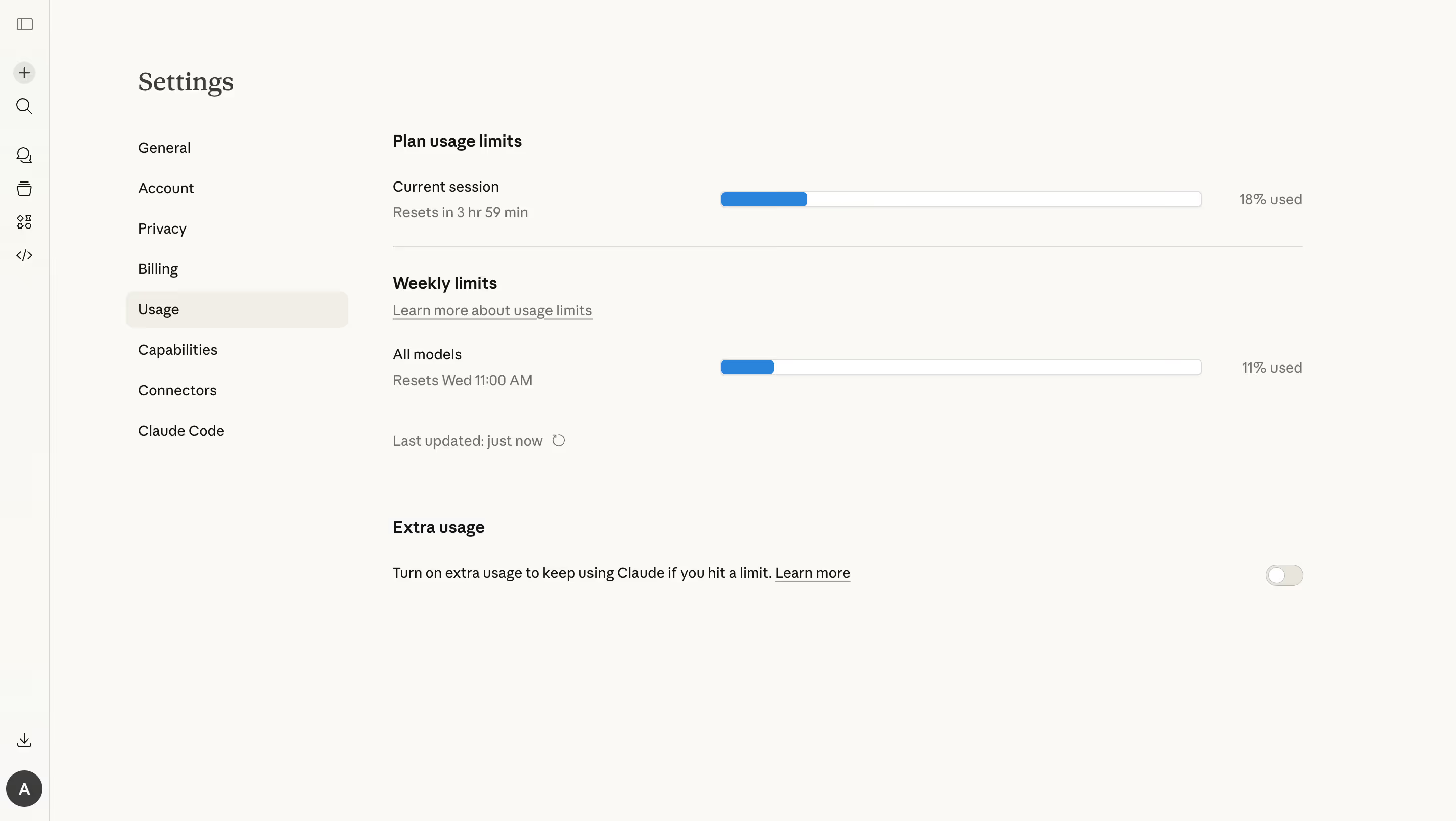
- **Character:** A warm off-white settings page uses sparse typography, fine rules and blue usage bars.
- **Tone:** A serif page title contrasts with practical sans-serif controls, creating a calm, low-chrome administrative surface.
### Page composition
- **Capture scale:** The source measures 2880 × 1624 image pixels. CSS estimates below assume a 2× capture; device-pixel ratio is unverified.
- **Navigation layers:** A roughly 48 px icon rail sits at the far left, followed by a wider settings menu beginning around x=135 px CSS.
- **Main content:** A roughly 900 px wide usage region starts around x=390 px CSS, with plan limits, weekly limits and extra usage separated vertically.
- **Usage rows:** Labels/reset information occupy the left, long horizontal bars the middle and percentages the right.
- **Lower region:** Extra-usage explanatory text and a far-right off switch sit below a full-width divider.
### Information hierarchy
- **Page identity:** Settings appears as a prominent serif title above the menu.
- **Active navigation:** Usage is selected with a pale warm rounded background.
- **Section headings:** Bold plan/weekly/extra-usage labels define the main groups.
- **Status:** Each bar has a visible percentage and reset line; a smaller update timestamp/refresh icon sits below the weekly row.
- **Optional setting:** Extra usage uses a single explanatory sentence, inline Learn more link and off switch.
### Typography
- **Families:** The page title uses serif; menus, labels and controls use sans serif. Exact identities are unverified.
- **Title:** Approximately 28 px CSS, regular/medium.
- **Section headings:** Approximately 16 px, semibold.
- **Body:** Approximately 14 px with 20–24 px leading; reset/update details use muted gray.
- **Links:** Underlined supporting links retain the body size rather than becoming button-like controls.
### Colors & surfaces
- **Measured foundation:** ICC-aware sRGB sampling yields warm #FAF9F5, with related near-white shades.
- **Measured selection:** #F0EEE6 supports the active menu row.
- **Measured text:** Near-black #141413 anchors labels; gray supports reset and update details.
- **Measured borders:** Light #DDDDDD outlines progress tracks and subtle separators.
- **Accent:** Medium blue fills the used portions of both bars; white tracks and pale off-switch surfaces remain quiet.
### Components
- **Icon rail:** Small monochrome line icons stack vertically, with a circular account avatar at the bottom.
- **Settings menu:** Eight text items use consistent row heights; the active item sits in a broad rounded highlight.
- **Progress bars:** Two approximately 475 × 14 px CSS tracks have thin gray outlines, slight shadow and small corners. Their blue fills occupy about 18% and 11% in the captured state.
- **Refresh affordance:** A small circular-arrow icon follows the update timestamp.
- **Extra-usage switch:** A compact pale pill with its white thumb at the left indicates the visible off state.
### Visual rhythm
- **Row alignment:** Labels, bars and percentages form stable horizontal columns.
- **Section breathing room:** Large gaps distinguish usage groups; fine rules provide boundaries without cards.
- **Whitespace:** The lower half remains largely empty, keeping attention on the few controls.
- **Menu cadence:** Even text-row spacing gives the left navigation a regular rhythm.
### Responsive
- **Evidence boundary:** Only a desktop state is shown; responsive behaviors are recommendations.
- **Navigation collapse:** Move settings navigation into a compact accessible selector or drawer.
- **Usage stacking:** Place bars below their labels and keep percentages adjacent to the corresponding track.
- **Optional control:** Allow extra-usage copy to wrap while keeping its switch clearly associated.
### Adaptation guidance
- **Usage display:** Pair visual progress with explicit percentages and reset information so meaning does not depend on bar length alone.
- **Live data:** Populate usage, reset times and update status dynamically; captured values are not current account facts.
- **Accessible controls:** Label progress values and the switch programmatically, with clear keyboard focus.
- **State boundaries:** No toggle change, limit-reached or refreshed result is verified.
- **Scale calibration:** Validate the assumed 2× capture scale before implementing dimensions.
Use this context to reproduce the reference's visual language: layout, typography, colors, spacing, borders, radii, and distinctive elements. The screenshot takes priority if descriptions conflict.
## Direction
{{preferences.fidelityInstructions}}
## Output
{{output.instructions}}
Deliver a polished, cohesive design with precise alignment, hierarchy, and spacing. Produce the requested visual artifact, not just a description. If unsupported, explain the limitation.
.webp)



.avif)