Generate a new design based on this screen using your own content.
Thank you! Your submission has been received!
Oops! Something went wrong while submitting the form.
# Design from Reference: Claude Connectors Settings
Create an original, high-fidelity visual design inspired by the reference. Prioritize composition, typography, colors, spacing, and component styling over technical implementation.
## Reference
- **Product:** Claude
- **Category:** Integrations
- **Screenshot:** https://cdn.prod.website-files.com/5e9dc792e1210c5325f7ebbc/69971c2f5ab21a831eb19df2_rZLzmZoM18t_rQ9sqKcg5tLBjr2070UwP9Or7pZyZjw.avif
Analyze the screenshot first. If inaccessible, request it rather than guessing.
## Content
{{content.instructions}}
{{content.data}}
Preserve essential messaging and factual accuracy. Adapt structure and copy length for visual balance; never invent product claims.
## Visual Design
Use this context to reproduce the reference's visual language: layout, typography, colors, spacing, borders, radii, and distinctive elements. The screenshot takes priority if descriptions conflict.
## Direction
{{preferences.fidelityInstructions}}
## Output
{{output.instructions}}
Deliver a polished, cohesive design with precise alignment, hierarchy, and spacing. Produce the requested visual artifact, not just a description. If unsupported, explain the limitation.
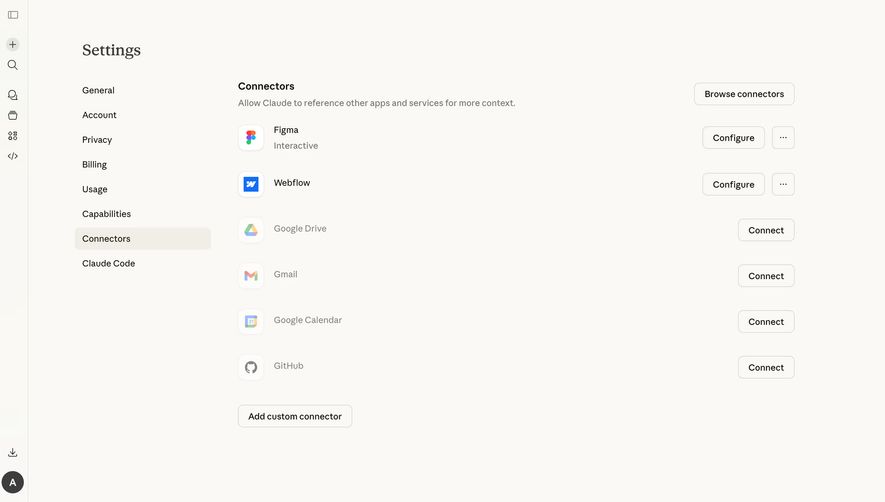
First thing you notice is how calm this page feels. The warm off-white background with minimal color keeps everything readable without any visual noise. Figma and Webflow sitting at the top with "Configure" buttons instantly tells you these are already connected. The rest show "Connect" in a lighter treatment. That distinction is subtle but effective.
Layout That Just Works
Left sidebar navigation is dead simple. No icons, no badges, just text links stacked vertically. "Connectors" gets a soft highlight to show where you are. The main content area breathes. Each integration row has generous spacing, a recognizable product icon, the service name, and action buttons pushed to the far right. Your eye flows naturally down the list.
Typography and Details Worth Stealing
The type is restrained. Looks like a serif for the "Settings" header paired with a clean sans-serif everywhere else. That combo gives it personality without trying too hard. The "Add custom connector" button at the bottom sits alone, clearly secondary but findable. Small thing that stands out: Figma's "Interactive" label underneath. It hints at deeper configuration options without cluttering the view.
.webp)




.avif)