.webp)
Thank you! Your submission has been received!
Oops! Something went wrong while submitting the form.
Get SaaSFrame Pro
Monthly
$18
Quarterly
$48
Yearly
$180
Upgrade to access this feature
Browse all screens & flows
Filter and search screens & flows
Access Figma files
Access mobile versions
Bookmark screens & flows
Join now
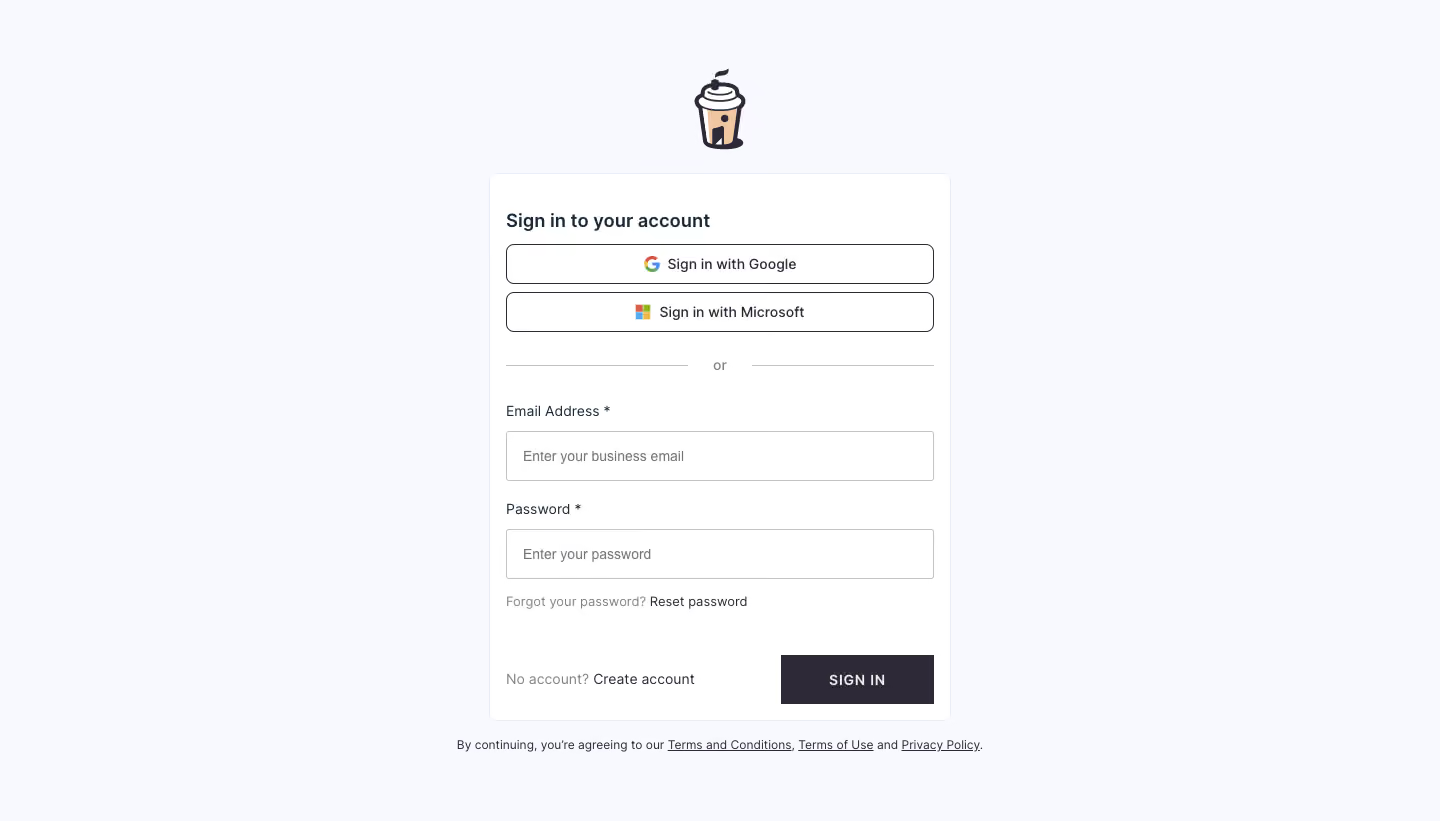

Café Login

Café
The Social Hub for Hybrid Teams
Designed by
No items found.

Bookmark
Bookmark

Design with AI
Thank you! Your submission has been received!
Oops! Something went wrong while submitting the form.
# Design from Reference: Café Login
Create an original, high-fidelity visual design inspired by the reference. Prioritize composition, typography, colors, spacing, and component styling over technical implementation.
## Reference
- **Product:** Café
- **Category:** Login
- **Screenshot:** https://cdn.prod.website-files.com/5e9dc792e1210c5325f7ebbc/6acb72b4018523cfee2da0f5_6acb7034f56587432a47a9db_cms-71ca5ba7c1753060fb79256f.webp
Analyze the screenshot first. If inaccessible, request it rather than guessing.
## Content
{{content.instructions}}
{{content.data}}
Preserve essential messaging and factual accuracy. Adapt structure and copy length for visual balance; never invent product claims.
## Visual Design
### Overall aesthetic
- **Character:** Simple centered login screen with a pale cool background, small coffee-cup brand illustration and a compact white form card.
- **Evidence and scale:** Screenshot is 1440 × 821 image pixels. Sizes describe captured pixels with plausible 1× CSS scale; actual DPR and font identity are unverified.
### Page composition
- **Brand:** Small illustrated takeaway cup is centered above the form, separated by a short gap.
- **Card:** Approximately 460 × 548px white panel centered horizontally, beginning around y173px.
- **Form order:** Sign-in heading, Google/Microsoft buttons, horizontal or divider, email field, password field, reset link and final create-account/sign-in row.
- **Legal:** A single small sentence with three underlined policy links sits below the card.
### Information hierarchy
- **Authentication choices:** Two outlined provider buttons appear before the email/password alternative.
- **Field sequence:** Clear required labels precede empty inputs; password reset sits directly beneath the password field.
- **Primary action:** Dark SIGN IN button anchors the lower-right; Create account remains a text link at lower-left.
- **Brand restraint:** The coffee illustration adds personality without a large promotional region.
### Typography
- **Heading:** Approximately 20px captured size, medium-to-semibold neutral sans-serif.
- **Form/provider text:** Approximately 14px, regular-to-medium; field labels are similar scale.
- **Utility/legal:** Reset/create-account copy around 13px; legal sentence around 12px. Sign-in label is uppercase with moderate letter spacing.
- **Family:** Exact font identity and computed values remain unverified.
### Colors & surfaces
- **Measured ground:** Very pale #F8F9FE fills most of the page; white #FFFFFF forms the card and controls.
- **Measured emphasis:** Dark violet-charcoal #2D2936 supports the sign-in action and strong text.
- **Measured lines:** Gray #C4C4C4 and pale #E8ECF5 support input/divider/card boundaries.
- **Local color:** Multicolor provider logos and warm beige #F0C79E in the coffee art add small accents without a large colored UI surface.
### Components
- **Card shell:** Fine pale border, small radius around 6px and approximately 16px inner side padding; no strong shadow.
- **Provider buttons:** Approximately 428 × 40px, thin dark outline, 8px radius and centered icon/label groups.
- **Alternative divider:** Two gray rules flank the small centered or label with generous vertical breathing room.
- **Inputs:** Approximately 428 × 50px, fine gray borders, nearly square corners and around 16px horizontal inset.
- **Submit:** Approximately 153 × 49px, dark fill, white uppercase label and square corners.
- **Utility links:** Reset password and Create account use dark text; policy links below use underlining rather than button chrome.
### Visual rhythm
- **Centered stack:** Cup, card and legal sentence share one vertical axis, with broad empty space on either side.
- **Control spacing:** Provider buttons use a short gap; larger breaks around the divider distinguish login methods.
- **Field rhythm:** Labels sit roughly 10px above inputs; approximately 22px separates field groups.
- **Bottom balance:** Create-account copy and submit control share a row with ample space above them.
### Responsive
- **Observed limit:** Only desktop blank login is shown; errors, authentication transitions and mobile layouts are unobserved.
- **Recommended layout:** Use a fluid card with 20–24px viewport margins and cap its desktop width.
- **Recommended controls:** Keep provider buttons full-width, allow the final row/legal sentence to wrap and preserve comfortable touch targets.
- **Recommended accessibility:** Maintain explicit labels, meaningful provider names and clear focus without relying solely on border color.
### Adaptation guidance
- **Preserve clarity:** Separate provider login from credential login and keep recovery/account-creation routes easy to find.
- **Keep personality small:** A compact friendly illustration can brand a utilitarian form without adding clutter.
- **Implementation:** Use correct input types/autocomplete, accessible validation and keyboard focus. Provider availability and policy details shown in the capture require separate verification.
Use this context to reproduce the reference's visual language: layout, typography, colors, spacing, borders, radii, and distinctive elements. The screenshot takes priority if descriptions conflict.
## Direction
{{preferences.fidelityInstructions}}
## Output
{{output.instructions}}
Deliver a polished, cohesive design with precise alignment, hierarchy, and spacing. Produce the requested visual artifact, not just a description. If unsupported, explain the limitation.

.avif)
Category
Patterns
Tech Stack


Added on
March 9, 2023
Similar screens






Upgrade to SaaSFrame Pro now to see similar examples.
Monthly
$18 /month
Billed $18 monthly
Browse all screens & flows
Filter and search screens & flows
Search text in screenshots
Access Figma files
Access mobile versions
Join now
Quarterly
$16 /month
Billed $48 quarterly
Browse all screens & flows
Filter and search screens & flows
Search text in screenshots
Access Figma files
Access mobile versions
Join now
Yearly
$15 /month
Billed $180 yearly
Browse all screens & flows
Filter and search screens & flows
Search text in screenshots
Access Figma files
Access mobile versions
Join now