Design with AI
Generate a new design based on this screen using your own content.
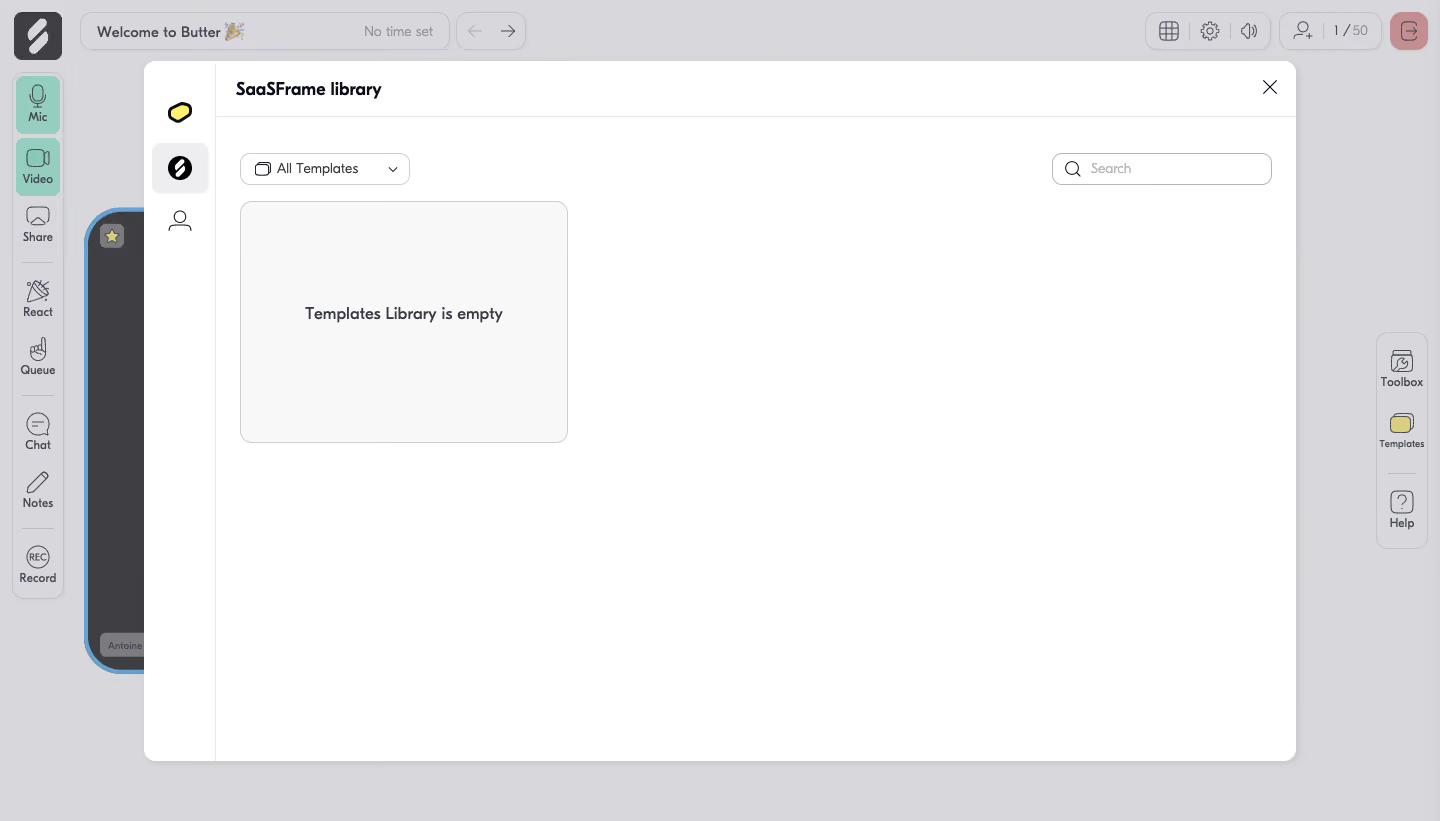
# Design from Reference: Butter Empty Template Library
Create an original, high-fidelity visual design inspired by the reference. Prioritize composition, typography, colors, spacing, and component styling over technical implementation.
## Reference
- **Product:** Butter
- **Category:** Dashboard
- **Screenshot:** https://cdn.prod.website-files.com/5e9dc792e1210c5325f7ebbc/6acbbd0a3b6b24eada548889_6acbbc37d6be908889c4644d_cms-46c30e9d99b89e4d3542f4dd.webp
Analyze the screenshot first. If inaccessible, request it rather than guessing.
## Content
{{content.instructions}}
{{content.data}}
Preserve essential messaging and factual accuracy. Adapt structure and copy length for visual balance; never invent product claims.
## Visual Design
### Overall aesthetic
- **Character:** A white template-library modal overlays a muted collaborative session interface, keeping attention on a deliberately sparse empty state.
- **Style:** Thin gray outlines, compact rounded controls and playful line icons give the product a friendly utility character.
### Page composition
- **Capture:** The source is 1440 × 821 pixels. Measurements are approximate image pixels; a 1:1 CSS scale is plausible but unverified.
- **Backdrop:** A dimmed session workspace remains visible, with a top session bar, a left communication toolbar and a right toolbox/templates/help rail.
- **Modal:** A large centered white dialog spans approximately x144–1296 and y61–761, about 1152 × 700 pixels.
- **Internal regions:** A roughly 72-pixel icon rail sits left of the main content. The main header contains the library title and close icon; filter and search controls occupy the next row.
- **Empty state:** A single pale bordered rectangle sits below the filter on the left, leaving most of the dialog blank.
### Information hierarchy
- **Context:** The library title establishes location, while the selected icon in the internal rail indicates the current library category.
- **Controls:** All Templates and Search appear before the content area, making the available discovery controls visible even when empty.
- **Message:** A centered bold empty-library message is the only content inside the pale placeholder panel; no template cards or creation CTA are visible.
### Typography
- **Family:** A rounded sans serif appears in the library and session shell; exact font identity is unverified.
- **Title:** The library name is approximately 18 pixels and bold.
- **Controls:** Filter and search text use roughly 14 pixels; the empty-state message is around 16 pixels and semibold.
- **Backdrop utilities:** Small captions beneath line icons are approximately 11–12 pixels, subordinated by the overlay.
### Colors & surfaces
- **Measured dialog:** #FFFFFF is the principal modal surface; pale #F8F8F8 supports the empty-state rectangle.
- **Measured backdrop:** #D8D8DB and nearby #D7D7DA/#D6D6D9 dominate the dimmed surrounding interface.
- **Measured ink:** Dark gray #3F3F42 contributes the strongest text/icon contrast.
- **Accent relationships:** Mint microphone/video controls, a yellow templates icon and a muted red exit button remain visible beneath the dimming layer.
### Components
- **Dialog shell:** Approximately 12-pixel rounded corners and a soft shadow separate the modal from the gray backdrop.
- **Internal navigation:** Three icon-only items stack vertically; the selected middle item sits in a pale rounded square.
- **Filter:** An approximately 170 × 32-pixel outlined rounded control combines a small folder icon, label and chevron.
- **Search:** An approximately 220 × 32-pixel outlined input aligns to the right, with a leading magnifier and pale placeholder text.
- **Empty panel:** Approximately 328 × 242 pixels, with a thin gray border and about 12-pixel radius; its message is centered both horizontally and vertically.
- **Dismissal:** A simple X icon sits at the upper-right of the header; thin rules divide header and navigation regions.
### Visual rhythm
- **Insets:** About 24 pixels of content padding aligns filter and empty panel; search shares the same control-row baseline.
- **Density:** Compact header controls contrast with the large unused white content region.
- **Backdrop rhythm:** Repeated outlined utility groups frame the session without competing with the modal.
### Responsive
- **Observed state:** Only the desktop dialog is shown; smaller-screen behavior is unverified.
- **Recommended dialog:** Fit within viewport padding and permit internal scrolling; retain an always-accessible close action.
- **Recommended controls:** Stack search and filter when space is limited, reduce the internal rail width and make the empty panel fluid.
### Adaptation guidance
- **Preserve sparsity:** Keep the empty state honest and uncluttered rather than inventing templates or additional calls to action.
- **Maintain structure:** Reuse the narrow icon rail, title header, control row and left-aligned empty panel.
- **State clarity:** Preserve the selected library icon and active-looking mint session controls as observed visual states, without inferring their behavior.
- **Accessibility:** Give icon-only controls accessible names, maintain modal focus handling and ensure backdrop dimming does not reduce dialog contrast.
Use this context to reproduce the reference's visual language: layout, typography, colors, spacing, borders, radii, and distinctive elements. The screenshot takes priority if descriptions conflict.
## Direction
{{preferences.fidelityInstructions}}
## Output
{{output.instructions}}
Deliver a polished, cohesive design with precise alignment, hierarchy, and spacing. Produce the requested visual artifact, not just a description. If unsupported, explain the limitation.
.webp)



.avif)