Design with AI
Generate a new design based on this screen using your own content.
# Design from Reference: Assembly Account Setup
Create an original, high-fidelity visual design inspired by the reference. Prioritize composition, typography, colors, spacing, and component styling over technical implementation.
## Reference
- **Product:** Assembly
- **Category:** Account Setup
- **Screenshot:** https://cdn.prod.website-files.com/5e9dc792e1210c5325f7ebbc/6acb6759994832179b560549_6acb65695391d62536b5008b_cms-48bbab2ed1d41261f1378953.webp
Analyze the screenshot first. If inaccessible, request it rather than guessing.
## Content
{{content.instructions}}
{{content.data}}
Preserve essential messaging and factual accuracy. Adapt structure and copy length for visual balance; never invent product claims.
## Visual Design
### Overall aesthetic
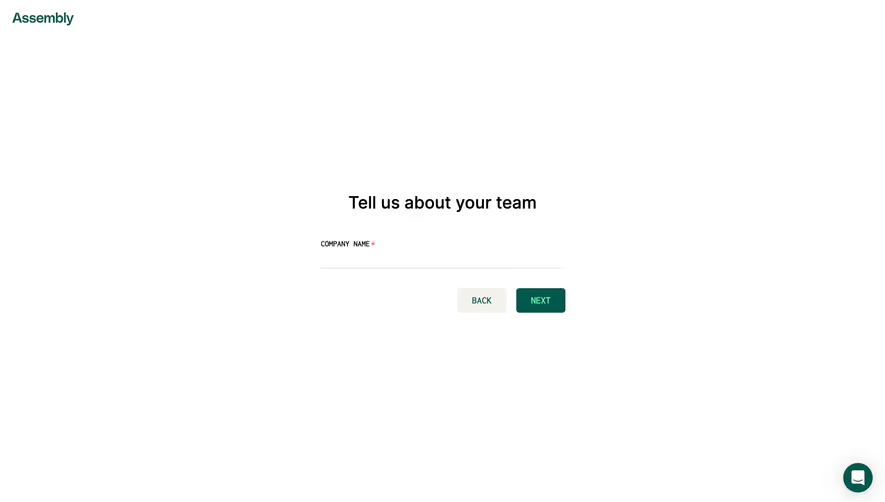
- **Character:** A highly minimal onboarding step uses a white canvas, dark-green brand and action accents, and one required text field.
- **Evidence:** The source is 2880 × 1642 px, inspected at 1400 px width. Dimensions below are approximate CSS-scale estimates assuming a 1440 px layout captured at 2×; the ratio is unverified.
### Page composition
- **Brand:** A small green Assembly wordmark sits at the upper-left corner with roughly 20 px padding.
- **Form:** A compact centered module occupies about 400 CSS px of width near the middle of the viewport.
- **Content order:** A bold team-introduction heading sits above a required company-name label and a single underline input.
- **Actions:** Back and Next sit side by side beneath the field, aligned to the module's right edge.
- **Support:** A dark-green circular chat launcher sits near the lower-right corner.
### Information hierarchy
- **Primary:** The heading is the main content landmark; the required company name is the only data request.
- **Requirement:** A small red asterisk follows the uppercase field label.
- **Progression:** Next is filled dark green, while Back uses a pale neutral surface.
- **Current state:** The field is empty, with no placeholder, error message, progress indicator, or additional fields visible.
### Typography
- **Family:** A plain sans serif carries heading and brand lettering; controls and label have a compact utility appearance. Exact identities are unverified.
- **Heading:** Approximately 28–30 CSS px, semibold, with roughly 36 px line-height.
- **Label:** Approximately 11–12 px uppercase, compact and regular weight.
- **Buttons:** Approximately 13–14 px uppercase, medium weight, centered within their rectangles.
### Colors & surfaces
- **Measured palette:** Source samples include white #FFFFFF, deep green #01584C, warm pale neutral #F4F2EC, black #000000, and near-whites #FEFEFE and #FDFDFD.
- **Semantic use:** Green marks brand, Next, and support launcher. The pale warm surface marks Back.
- **Field:** A fine light-gray underline defines the input without a surrounding box.
- **Contrast:** Main heading is black; the required asterisk adds a small red accent. The white page has no outer panel or border.
### Components
- **Input:** A single approximately 400 px-wide line-style field beneath an external label. No entered text or focus state is shown.
- **Buttons:** Each is roughly 80 × 40 px with small 4–5 px corner radii and about 16 px between them.
- **Chat launcher:** Approximately 48 px in diameter, green with a white message icon and a soft surrounding shadow.
- **Form module:** No enclosing card, illustration, or decorative progress graphic is visible.
### Visual rhythm
- **Whitespace:** The form occupies a small fraction of the page, with especially broad empty side regions.
- **Vertical grouping:** A roughly 40 px gap separates heading and label; the field underline sits below a generous entry area.
- **Action spacing:** Buttons sit approximately 32 px below the underline, creating a distinct navigation row.
- **Alignment:** The heading is centered over the module, while label and underline align left and actions align right.
### Responsive
- **Observed limit:** Only a desktop starting state is visible; actual breakpoints and validation are unverified.
- **Recommended form:** Use a fluid maximum-width module with 20–24 CSS px side gutters and sensible vertical positioning on short screens.
- **Recommended actions:** Preserve the primary/secondary distinction and comfortable touch targets.
- **Recommended support:** Keep the chat launcher clear of form navigation and mobile keyboards.
### Adaptation guidance
- **Preserve:** Keep one focused question, a required external label, simple underline field, and a clear Back/Next pair.
- **Implement:** Associate the label and required state programmatically; add visible focus and validation without relying solely on the asterisk.
- **Layout:** Center with flexible layout instead of absolute screenshot coordinates.
- **Validate:** Confirm fonts, true CSS dimensions, keyboard order, error behavior, and progression states. These are not established by the static image.
Use this context to reproduce the reference's visual language: layout, typography, colors, spacing, borders, radii, and distinctive elements. The screenshot takes priority if descriptions conflict.
## Direction
{{preferences.fidelityInstructions}}
## Output
{{output.instructions}}
Deliver a polished, cohesive design with precise alignment, hierarchy, and spacing. Produce the requested visual artifact, not just a description. If unsupported, explain the limitation.
.webp)



.avif)