.webp)
Thank you! Your submission has been received!
Oops! Something went wrong while submitting the form.
Get SaaSFrame Pro
Monthly
$18
Quarterly
$48
Yearly
$180
Upgrade to access this feature
Browse all screens & flows
Filter and search screens & flows
Access Figma files
Access mobile versions
Bookmark screens & flows
Join now
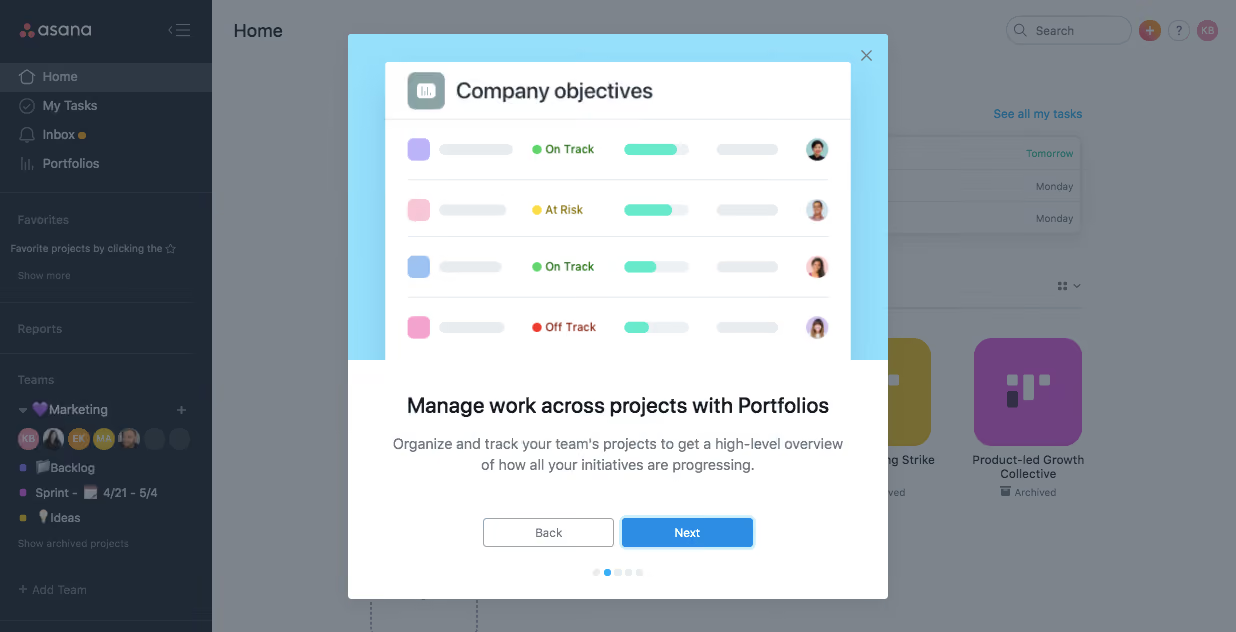
Asana User Onboarding

Asana
Organize team projects
Designed by
No items found.

Bookmark
Bookmark

Design with AI
Thank you! Your submission has been received!
Oops! Something went wrong while submitting the form.
# Design from Reference: Asana User Onboarding
Create an original, high-fidelity visual design inspired by the reference. Prioritize composition, typography, colors, spacing, and component styling over technical implementation.
## Reference
- **Product:** Asana
- **Category:** User Onboarding
- **Screenshot:** https://cdn.prod.website-files.com/5e9dc792e1210c5325f7ebbc/6acbc132b7ca13cf700959d8_6acbc02580dd38e7e754fae1_cms-1e62bdcdbe315be43f0a0452.webp
Analyze the screenshot first. If inaccessible, request it rather than guessing.
## Content
{{content.instructions}}
{{content.data}}
Preserve essential messaging and factual accuracy. Adapt structure and copy length for visual balance; never invent product claims.
## Visual Design
### Overall aesthetic
- **Character:** A product-tour modal overlays a dimmed task dashboard, pairing a bright cyan illustration area with a white explanatory panel.
- **Capture evidence:** The screenshot measures 1236 × 632 image pixels. Measurements below are approximate image pixels; CSS scale is unverified.
- **Tone:** A concise feature explanation and clear step controls make the tour instructional and focused.
### Page composition
- **Underlying app:** A dark left sidebar and white Home workspace remain visible behind a gray dimming layer.
- **Modal:** A centered approximately 540 × 565px rectangle contains a large illustration above text and navigation.
- **Illustration:** A cyan region frames a simplified Company objectives table with colored status indicators, progress bars and small avatars.
- **Explanation:** A bold heading and centered two-line description explain the portfolio feature.
- **Tour navigation:** Back and Next sit side by side, with five small progress dots beneath and a close icon in the upper-right corner.
### Information hierarchy
- **Feature demonstration:** The large objectives illustration establishes the feature before the text.
- **Headline:** A bold single-line heading names managing work across projects with Portfolios.
- **Description:** Smaller muted text explains the high-level overview.
- **Primary action:** Next is filled blue, while Back is outlined.
- **Progress state:** The second of five dots is blue; the other dots are pale.
- **Background context:** Sidebar navigation and project tiles are intentionally subdued by the overlay.
### Typography
- **Family:** A neutral interface sans-serif is visible; exact identity is unverified.
- **Modal heading:** Approximately 22px image size, semibold, with 28px line-height.
- **Description:** Approximately 14px with 22px line-height, centered and muted gray.
- **Buttons:** Approximately 12px medium.
- **Illustration heading:** Approximately 22px within the mock table; status labels are smaller bold text.
- **Background:** App labels retain ordinary interface typography but are visually reduced by dimming.
### Colors & surfaces
- **Modal:** Sampled #FFFFFF supplies the content panel and illustrated table.
- **Overlay appearance:** Sampled #7D848C supplies much of the dimmed workspace.
- **Underlying sidebar:** Sampled #1F2936 supplies dark navy navigation.
- **Illustration backdrop:** Sampled #96E0FB supplies bright pale cyan.
- **Background tile:** Sampled #704181 appears among dimmed project colors.
- **State accents:** Bright blue marks Next and the active dot; green, yellow and red indicate illustrated objective statuses.
### Components
- **Modal shell:** A white rectangle with small 3–4px corner rounding casts a soft shadow over the dimmed app.
- **Objectives illustration:** A white rounded table panel contains four rows, each with a colored square, gray placeholder bars, status text/dot, progress bar and avatar.
- **Actions:** Approximately 132 × 30px Back and Next buttons have small radii; Next has a pale blue outer focus-like ring.
- **Progress dots:** Five small circles form a centered compact row beneath the buttons.
- **Close control:** A small gray X sits in the cyan area's upper-right corner.
- **Backdrop:** A uniform translucent gray veil reduces contrast across the underlying interface.
### Visual rhythm
- **Image/text ratio:** The illustration occupies over half the modal height, with the explanation and controls in the lower white region.
- **Text spacing:** Around 16px separates heading and description; a larger gap precedes the button row.
- **Control spacing:** Buttons have a narrow gap, followed by around 20px before progress dots.
- **Centered alignment:** Heading, description, buttons and dots share a consistent central axis.
### Responsive
- **Evidence limit:** Only one desktop modal state is observed; progression and dismissal behavior are unverified.
- **Modal recommendation:** Constrain width to the viewport with 16–24px margins and allow vertical scrolling on short screens.
- **Illustration recommendation:** Scale the mock table proportionally and keep the live explanatory text readable.
- **Controls recommendation:** Preserve touch-friendly Back, Next and Close targets without overlapping the progress indicators.
- **Focus recommendation:** Keep keyboard focus within the tour while open and restore it appropriately when dismissed.
### Adaptation guidance
- **Tour system:** Use a reusable illustration, heading, description and navigation template with explicit current-step state.
- **State clarity:** Distinguish primary Next, secondary Back and dismiss actions consistently.
- **Accessibility:** Provide a labeled dialog, accessible close control and meaningful step announcement.
- **Illustration semantics:** Treat the objective table as an explanatory asset rather than live editable data.
- **Scope:** The screenshot establishes this portfolio lesson only; subsequent tour content is not visible.
Use this context to reproduce the reference's visual language: layout, typography, colors, spacing, borders, radii, and distinctive elements. The screenshot takes priority if descriptions conflict.
## Direction
{{preferences.fidelityInstructions}}
## Output
{{output.instructions}}
Deliver a polished, cohesive design with precise alignment, hierarchy, and spacing. Produce the requested visual artifact, not just a description. If unsupported, explain the limitation.

.avif)
Category
Patterns
Tech Stack

Added on
February 4, 2023
Found in 1 flow


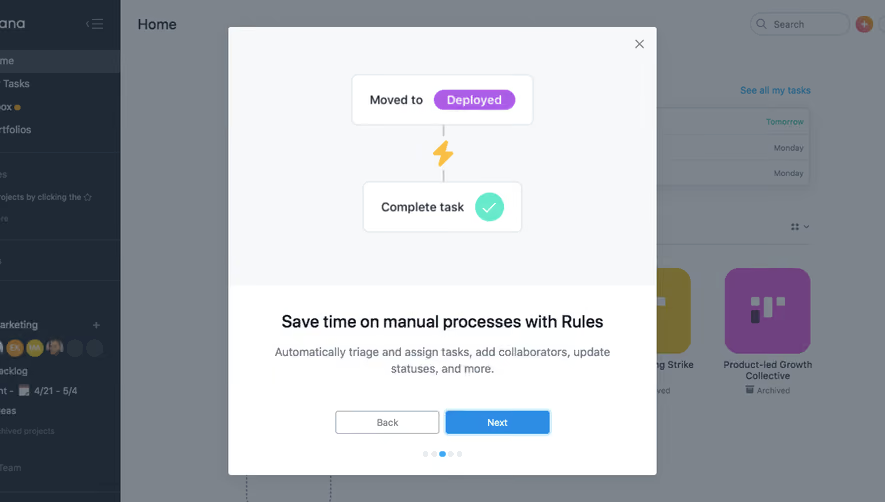


Similar screens






Upgrade to SaaSFrame Pro now to see similar examples.
Monthly
$18 /month
Billed $18 monthly
Browse all screens & flows
Filter and search screens & flows
Search text in screenshots
Access Figma files
Access mobile versions
Join now
Quarterly
$16 /month
Billed $48 quarterly
Browse all screens & flows
Filter and search screens & flows
Search text in screenshots
Access Figma files
Access mobile versions
Join now
Yearly
$15 /month
Billed $180 yearly
Browse all screens & flows
Filter and search screens & flows
Search text in screenshots
Access Figma files
Access mobile versions
Join now