

.avif)


1. Header: The page starts with a header that includes the Aircall logo on the top left, a navigation bar on top with links to other pages, and a CTA (Call-to-Action) button "Get started for free" on the top right. 2. Hero Section: Below the header, there is a hero section that includes an impactful image, headline "The future of call center software is here", and a subheading "The only call center software that prioritizes your team's happiness" that explains the benefits of Aircall. 3. Features Section: The features section is divided into six parts, each highlighting a specific feature of Aircall's call center software. Each section includes a title, a brief explanation, and an image that visually demonstrates the function. 4. Customer stories Section: The page's next section showcases real customer stories and their experiences with Aircall. The section includes a brief heading and a CTA button at the end. 5. Integrations Section: The section highlights Aircall's integration capabilities with other software platforms. It includes six logos of popular integrations and a CTA button. 6. Pricing Section: The pricing section includes two pricing plans and a CTA button for a 7-day free trial. Each plan includes its own set of specific features. 7. FAQ Section: The last section answers common questions about Aircall's call center software. Each question features a brief answer and an image to support the explanation. The section includes a CTA button at the end. 8. Footer: The page's footer includes links to resources like the blog, support page, and social media pages. It also includes a CTA button for starting the free trial, Aircall's address, and a copyright message.
.webp)
Thank you! Your submission has been received!
Oops! Something went wrong while submitting the form.
Get SaaSFrame Pro
Monthly
$18
Quarterly
$48
Yearly
$180
Upgrade to access this feature
Browse all screens & flows
Filter and search screens & flows
Access Figma files
Access mobile versions
Bookmark screens & flows
Join now
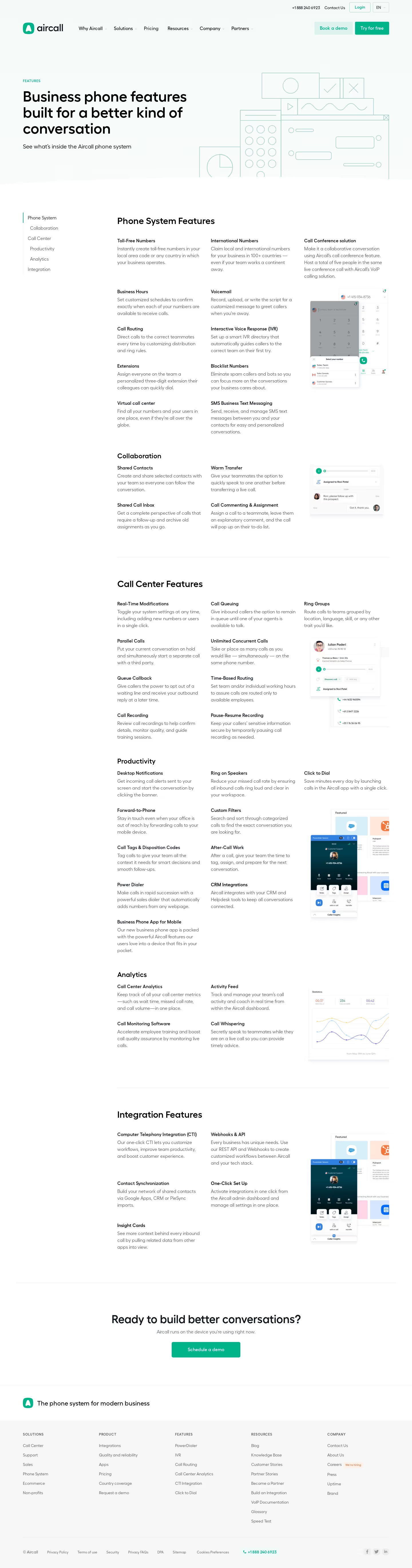
Aircall Features Page

Aircall
Cloud Phone System
Designed by
No items found.

Bookmark
Bookmark
Design with AI
Thank you! Your submission has been received!
Oops! Something went wrong while submitting the form.
# Design from Reference: Aircall Features Page
Create an original, high-fidelity visual design inspired by the reference. Prioritize composition, typography, colors, spacing, and component styling over technical implementation.
## Reference
- **Product:** Aircall
- **Category:** Features Page
- **Screenshot:** https://cdn.prod.website-files.com/5e9dc792e1210c5325f7ebbc/62eca429bf75bb3eaacee535_1659674502195-62ec9c8fc8eb838bec8d637a_screenshot-device-695e3ab6eabaacfcc40d87c4e02b0352-1659606469294.webp
Analyze the screenshot first. If inaccessible, request it rather than guessing.
## Content
{{content.instructions}}
{{content.data}}
Preserve essential messaging and factual accuracy. Adapt structure and copy length for visual balance; never invent product claims.
## Visual Design
### Overall aesthetic
- **Style:** Spacious, restrained business-software feature directory, combining a pale mint introductory area with a long white editorial catalogue.
- **Visual character:** Black headlines, cool gray descriptions, emerald actions and delicate mint line illustrations. Product screenshots supply most of the visual detail; feature entries are not enclosed in cards.
- **Surface treatment:** Flat page sections and extremely subtle separators dominate. Small shadows occur inside the embedded product imagery rather than beneath every text block.
### Page composition
- **Capture scale:** The screenshot measures 1440 × 5481 image px. The following reconstruction dimensions assume approximately 1 image px per CSS px; the actual device-pixel ratio is unverified.
- **Header:** A centered container approximately 1280 px wide has about 80 px outer margins. A small utility row sits at the top right, above a main row containing the Aircall logo, six navigation groups and two adjacent action buttons.
- **Hero:** Approximately 625 px tall including navigation. The left half contains a small uppercase eyebrow, a three-line headline and one supporting sentence. Pale outline drawings of a dial pad, waveform, browser window and chart fill the right half and meet the bottom section boundary.
- **Catalogue shell:** The white content begins with roughly 115 px top padding. A narrow category rail starts near x=80; the main content starts near x=410 and extends to x=1360. This produces a substantial blank gutter between navigation and content.
- **Phone-system region:** A large section heading precedes three columns. Two columns carry stacked feature descriptions; the third starts with a text entry and then an overlapping dialer illustration. Collaboration follows as a smaller subsection with two text columns and a conversation illustration.
- **Call-center region:** A thin horizontal rule separates the next major heading. Feature entries again occupy two main text columns, with a third-column entry and stacked call-interface image. Productivity continues below with a similar structure and a tall dialer/integration illustration.
- **Analytics and integrations:** Analytics uses two pairs of feature descriptions alongside a line-chart screenshot. Another horizontal separator introduces Integration Features, with two columns of descriptions and a repeated integration/dialer illustration on the right.
- **Closing regions:** A full-width separator leads to a centered conversion section with headline, sentence and one green button. A white brand strip follows. The pale gray footer contains five link columns, then a legal row, phone contact and social icons.
### Information hierarchy
- **Primary emphasis:** The large, three-line business-phone headline establishes the subject before the detailed catalogue begins; its black weight is stronger than the body copy or illustration outlines.
- **Catalogue levels:** Major headings such as Phone System Features, Call Center Features and Integration Features establish groups. Collaboration, Productivity and Analytics use slightly smaller headings within the continuous directory.
- **Feature entries:** Each entry has a compact bold title followed immediately by a short gray paragraph. Repetition of this pair supports scanning through many capabilities without additional badges or icons.
- **Navigation cue:** The left category list has a faint vertical guide; Phone System is shown darker with a short green active marker. Other categories are gray. Sticky behavior cannot be established from the screenshot.
- **Conversion hierarchy:** The header contrasts a pale mint Book a demo button with a solid green Try for free button. The closing section reduces the choice to one centered Schedule a demo action.
### Typography
- **Family:** Rounded geometric sans-serif forms appear throughout the marketing page. The exact font family is unverified; use a visually comparable family rather than claiming a specific identity.
- **Hero title:** Approximately 48–50 px, weight 600–700, line-height around 56 px and slightly tight tracking. Its text block is roughly 620 px wide.
- **Supporting hero text:** Approximately 20 px with 28–30 px leading, regular weight and a single-line treatment at the captured desktop width.
- **Section headings:** Major catalogue headings are approximately 30–32 px with 38–40 px leading; smaller subsection headings are approximately 24 px with 30 px leading. Weights are around 600.
- **Feature titles and descriptions:** Titles are approximately 16 px, medium or semibold. Descriptions are approximately 16 px with 24 px leading and regular weight; paragraphs usually occupy two to four lines.
- **Navigation and footer:** Main navigation is approximately 16 px; the utility row and category rail are approximately 14–16 px. Footer links are approximately 13–14 px, while uppercase column labels are smaller with modest letter spacing.
- **Scale qualification:** These are visual CSS-size estimates under the unverified 1× capture assumption, not extracted browser styles.
### Colors & surfaces
- **Primary action:** Sampled emerald #00B489 appears in solid buttons and brand accents. Small adjacent pixel variations are consistent with raster compression and antialiasing.
- **Main surfaces:** Sampled #FFFFFF fills the catalogue and conversion section. The hero contains sampled mint-white tones #F7FCFA and #F6FBF9 rather than a strongly saturated background.
- **Secondary surfaces:** Sampled #F7F7F7 forms the footer background. The pale secondary header button includes sampled #DDF2ED.
- **Text:** Hero headline interiors include sampled #000000; the closing headline includes sampled #10181E. Body text is visibly a lighter cool gray; use a contrast-appropriate gray selected against the reference rather than assigning an unmeasured exact value.
- **Rules and illustration:** Thin mint outlines construct the hero drawing, while very pale gray horizontal rules divide catalogue groups and footer areas. Both remain much quieter than the green actions.
- **Product imagery:** Charts, avatars and integration logos introduce localized blue, purple, yellow and orange accents. Keep those colors inside illustrative content rather than spreading them across the surrounding interface.
### Components
- **Header actions:** Buttons are approximately 120–135 px wide and 44–46 px tall, with modest 3–5 px corner radii. The filled action uses white text; the pale mint action uses green text. Hover states are not visible.
- **Utility controls:** Login and language controls use compact outlined rectangles, visually smaller than the main conversion actions; the language control includes a downward chevron.
- **Category rail:** Six vertically stacked links are spaced about 35–38 px apart. A roughly 2 px green line marks the active entry against a very faint vertical rail.
- **Feature blocks:** Approximately 280–300 px text widths, with roughly 25–35 px column gaps. Titles sit about 6–10 px above body text. Blocks have no surrounding border, fill or rounded container.
- **Embedded interface illustrations:** Small dialer, collaboration, contact and analytics windows occupy the third column. Overlaps and soft internal shadows create depth while preserving the page's flat layout.
- **Closing action:** A centered green button is approximately 240 × 54 px, with a small radius and generous horizontal padding.
- **Footer structure:** Five evenly distributed link columns sit above a long divider. A separate bottom row contains compact legal links, an emerald phone contact and three small social controls.
### Visual rhythm
- **Macro spacing:** The page moves from a broad illustrated hero into a dense but airy directory, then returns to a spacious centered conversion section.
- **Catalogue rhythm:** Repeated title/paragraph pairs align to consistent vertical columns. Larger gaps separate subsections; thin rules and roughly 70–90 px breathing room introduce major groups.
- **Image placement:** Product imagery repeatedly anchors the right edge, breaking up lengthy text without interrupting the main reading columns.
- **Alignment:** The hero and footer share broad outer margins; catalogue headings and separators share the narrower main-column start. Preserve this deliberate difference between full-page and directory alignment.
- **Density:** Long blank areas around the left rail and between feature groups prevent the many descriptions from reading like a compressed comparison table.
### Responsive
- **Evidence limit:** Only the desktop layout is visible; the following are adaptation recommendations, not observed mobile behavior.
- **Navigation recommendation:** Collapse the large navigation into a menu, retain one primary action and simplify the utility row to avoid wrapping.
- **Hero recommendation:** Reduce the title to approximately 32–38 px, use 20–24 px side padding and place the line illustration beneath the text or crop it deliberately.
- **Directory recommendation:** Replace the left rail with a compact category control or horizontal section links. Reduce three columns to two on tablets and one on narrow screens.
- **Image recommendation:** Place each product illustration after its related descriptions, preserve its aspect ratio and ensure embedded small text is not required to understand the feature.
- **Footer recommendation:** Stack or progressively collapse link groups; allow legal links to wrap with comfortable touch spacing.
### Adaptation guidance
- **Preserve the structure:** Use a clear introductory promise, a navigable feature catalogue, recurring illustrative examples and a single closing conversion action.
- **Map real content:** Group the new product's actual capabilities into meaningful categories, using short bold labels and concise explanatory paragraphs. Do not fabricate capabilities to fill the existing column count.
- **Retain the visual language:** Combine abundant white space, restrained green accents, pale introductory surfaces and borderless text blocks. Keep decorative lines thin and low contrast.
- **Scale to content volume:** Keep consistent text widths and group spacing, but shorten the page when fewer features exist. Use illustrations only where they clarify the corresponding group.
- **Keep evidence distinct:** Treat dimensions and font assignments as reconstruction estimates; preserve sampled palette roles while validating final text contrast and readability in the adapted design.
Use this context to reproduce the reference's visual language: layout, typography, colors, spacing, borders, radii, and distinctive elements. The screenshot takes priority if descriptions conflict.
## Direction
{{preferences.fidelityInstructions}}
## Output
{{output.instructions}}
Deliver a polished, cohesive design with precise alignment, hierarchy, and spacing. Produce the requested visual artifact, not just a description. If unsupported, explain the limitation.
Category
Patterns
No items found.
Added on
April 25, 2020
Similar screens





Upgrade to SaaSFrame Pro now to see similar examples.
Monthly
$18 /month
Billed $18 monthly
Browse all screens & flows
Filter and search screens & flows
Search text in screenshots
Access Figma files
Access mobile versions
Join now
Quarterly
$16 /month
Billed $48 quarterly
Browse all screens & flows
Filter and search screens & flows
Search text in screenshots
Access Figma files
Access mobile versions
Join now
Yearly
$15 /month
Billed $180 yearly
Browse all screens & flows
Filter and search screens & flows
Search text in screenshots
Access Figma files
Access mobile versions
Join now