Contact Sales
1
A sales conversion form or call-to-action for requesting a demo, quote, or conversation.
.webp)
A Contact Sales pattern gives visitors a route to discuss a product when the purchase requires more context than a self-service checkout can provide. In SaaS, that context may involve team rollout, deployment requirements, a custom commercial arrangement, or a complex evaluation. The interface should help users understand why a conversation is relevant and what happens after they request one.
The challenge is avoiding a generic gate. A sales button can be highly visible while leaving the visitor unsure whether they will see a demo, receive pricing, or begin a procurement discussion. Design the promise, qualification, and handoff as one journey rather than measuring the button in isolation.
Start with the decision that needs a conversation. A visitor evaluating team-wide deployment has different questions from someone trying the product alone. Make the relevant enterprise or custom requirements visible before asking them to hand over their details.
A sales route should not conceal basic information that the page could reasonably provide. Explain the product, likely use cases, and available purchase paths. People can then choose a conversation because it helps their evaluation rather than because every useful detail is missing.
Separate the commercial conversation from support. An existing customer with a technical problem should not have to enter a prospect qualification funnel. If both routes are available, name them clearly and send users to the team that can address their intent.
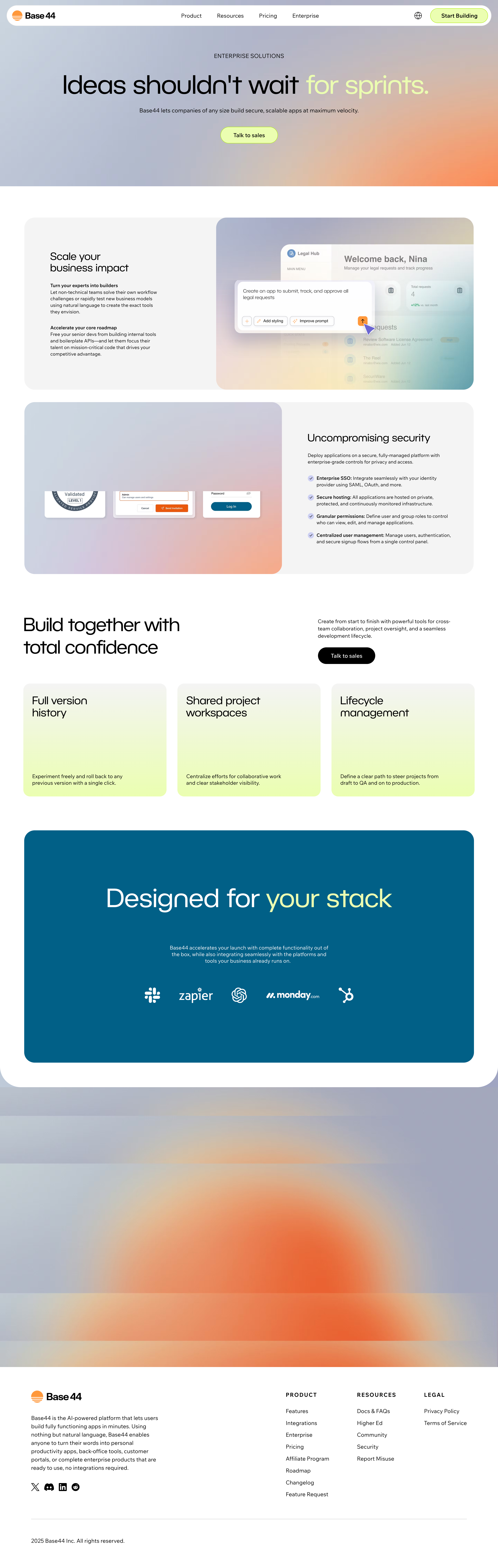
The Base44 enterprise screenshot has a Talk to sales action in its hero. Lower sections discuss business impact, security-related capabilities, and collaborative development. Another Talk to sales action appears near the section about building together.
The repeated action gives visitors a route at more than one point in their evaluation. Someone already convinced by the opening proposition can proceed immediately. Someone who needs to inspect collaboration and rollout context can encounter the same route after reading further.
That repetition is useful when the destination and promise remain coherent. If the hero opens a booking tool but the lower button sends users to a different questionnaire, the identical label can create inconsistent expectations. Specify whether repeated actions share one destination and preserve relevant page context.
The screenshot contains claims about enterprise capabilities, but it does not verify their current availability or the actual sales process. The guide's observation concerns placement and surrounding information. Treat the captured page as an interface example rather than a current procurement specification.

The Dust screenshot shows a subscription area with neighboring Pro and Enterprise cards. Pro has a Subscribe to Pro action. Enterprise has a Contact sales action and a custom commercial presentation. The page also includes billing-cadence controls and account-plan context.
The contrasting actions communicate a useful distinction: one route continues toward a defined subscription, while the other starts a discussion. Users can see the choice in context rather than discovering a sales requirement only after beginning checkout.
The enterprise card lists several reasons a larger team might need a different arrangement. The useful design principle is linking the route to an understandable purchase context. Your own card should explain the relevant distinction accurately, without filling the sales column with vague claims that every business might consider essential.
The captured prices and feature labels describe this screenshot, not current product terms. The image supports analysis of the purchase-path distinction. It does not demonstrate the form, booking flow, or response that follows Contact sales.
Contact Sales, Talk to Sales, Book a Demo, and Request Pricing are not necessarily the same promise. Choose the label that best describes what the user will actually initiate. A pricing request should not unexpectedly become a required demonstration before any information is provided.
If the next step includes qualification before booking, make that sequence understandable. A button labeled Book a Demo creates an expectation of selecting a meeting, while a form that only submits a request may require different supporting text.
Use nearby copy to answer what the conversation can address. Team deployment, technical requirements, or a tailored evaluation are more concrete than “learn more.” The explanation should help users judge whether this route fits their question.
Keep repeated labels consistent across pricing, enterprise, and product pages. If the product offers different sales journeys for different intents, name or explain the distinction rather than hiding it behind one universal phrase.
A form can help the sales team understand the request, but each field adds effort. Choose fields according to their actual role in routing or preparing the conversation. Contact information, organization, and a short description of the need may be sufficient in some products; others have a more complex evaluation process.
Explain unusual questions. A visitor may understand why a company name is useful but not why they must estimate an unfamiliar technical volume. If an answer is needed to provide an appropriate next step, make the unit and purpose clear.
Distinguish required from optional fields and preserve entered information after validation errors. A prospect should not have to repeat a thoughtful request because one field failed. Validation should explain how to correct the value rather than merely announcing that it is invalid.
Consider whether rigid qualification rules exclude legitimate intent. Contractors, small teams, and people evaluating on behalf of another organization can have useful reasons to speak with sales. Apply eligibility rules deliberately and provide a coherent alternative when the sales path is not suitable.
A submitted request and a scheduled meeting are different outcomes. The confirmation should state which one occurred. Users should know whether they need to select a time, wait for a response, or complete another step.
For booking flows, show the relevant time convention and the meeting's purpose. A selected slot should become a clear confirmation, not remain an ambiguous highlighted calendar cell. Preserve the request context so that the meeting does not begin with avoidable repetition.
If the form hands off to an external scheduling service, maintain continuity. Explain the transition and ensure that the user can return or recover if the scheduler fails. The product's promise extends beyond the first form submission.
Do not claim a response time the team cannot reliably support. A clear, accurate expectation is more useful than an impressive but inconsistent promise. If timing varies by region or business hours, communicate the relevant rule where it helps the visitor plan.
A sales-assisted route and a self-service route can coexist, as Dust's captured cards illustrate. A person who wants to test a product may prefer a trial before a conversation. Another may need enterprise context immediately.
Explain which path fits each intent. Avoid steering every visitor into sales simply because the enterprise page is part of the journey. Conversely, do not force a complex team evaluation through an individual checkout that cannot address its requirements.
When a request does not qualify for the sales route, offer a relevant alternative rather than a dead-end rejection. That may be trial access, documentation, a standard subscription, or support, depending on the actual need.
The alternative should preserve intent. A visitor requesting rollout guidance should not be sent to a generic homepage with no explanation. Make the suggested next step useful enough to continue the evaluation.
Enterprise visitors may need information about deployment, administration, integration, and team use. Present evidence that helps them decide what to discuss. A relevant screenshot or case study can make an abstract proposition more concrete.
Keep claims specific and supportable. Customer logos can establish familiarity, but they do not explain the deployment model or suitability for a particular organization. A sales route should sit alongside useful information rather than replacing it.
Make documentation and relevant reference material accessible where appropriate. Users often need to share information internally before booking a call. A page that supports that preparation can make the later conversation more productive.
Be clear about what requires confirmation. Custom arrangements and product-specific requirements may need a sales discussion. Do not imply that every requested capability is guaranteed merely because a visitor submitted the form.
A high submission rate can hide confusion or poor routing. Review whether requests reach the appropriate team, whether meetings are completed, and whether the conversation matches the visitor's stated intent.
Compare behavior across the page's entry points. A hero action and a pricing-card action may attract different questions. Preserve enough attribution and request context to understand that difference without making users repeat the page they came from.
Observe abandonment at meaningful steps: form fields, qualification, booking, and confirmation. The fix depends on the cause. A shorter form will not resolve unclear meeting purpose, and a larger button will not resolve unavailable appointment times.
Use feedback from the team receiving requests. Repeatedly missing context may justify one better field or clearer guidance. Unused collected data may justify removing a field. Qualification should serve the conversation rather than become an end in itself.
Verify the route from page action to confirmation, including the external handoff if present. Test keyboard navigation, clear field labels, errors, and focus after submission. A visually polished landing page can still lead into an unusable embedded form.
On narrow screens, keep required fields, scheduling controls, and completion actions practical to use. Avoid an embedded tool that clips its final button or forces awkward nested scrolling. Test realistic long organization names and request descriptions.
Include duplicate submissions, loading failures, and returning to an unfinished request. The interface should make success recognizable and preserve useful input when recovery is needed.
Only when that route fits the purchase or evaluation model. Explain what the conversation resolves and keep relevant self-service information available where it helps.
Not necessarily. One promises a demonstration, while the other can cover a broader discussion. Use the label that matches the actual next step and clarify any qualification sequence.
There is no useful universal count. Include fields that meaningfully support routing or preparation, and remove those that add effort without improving the handoff.
Browse Contact Sales examples on SaaSFrame to compare enterprise propositions, pricing-path distinctions, and sales-entry placement in real SaaS interfaces.